
1. Wprowadzenie
Thank you for choosing the Greadio Retro Bluetooth Speaker and Vintage FM Radio. This manual provides essential information for the safe and efficient operation of your device. Please read it thoroughly before use and retain it for future reference.
2. Informacje dotyczące bezpieczeństwa
- Nie wystawiaj urządzenia na działanie wody, wilgoci ani ekstremalnych temperatur.
- Unikaj upuszczania i narażania urządzenia na silne uderzenia.
- Nie próbuj samodzielnie demontować ani naprawiać urządzenia. Skontaktuj się z wykwalifikowanym personelem serwisowym.
- Przechowywać w miejscu niedostępnym dla dzieci.
- Używaj wyłącznie dostarczonego kabla ładującego.
3. Zawartość opakowania
Sprawdź, czy w opakowaniu znajdują się wszystkie elementy:
- Greadio Retro Bluetooth Speaker (Model GR919P)
- Kabel ładujący USB
- Kabel AUX
- Instrukcja obsługi

Image: Greadio Retro Bluetooth Speaker (Pink) with its charging cable, AUX cable, and user manual.
4. Koniec produktuview
Familiarize yourself with the main components and controls of your Greadio Retro Bluetooth Speaker.

Image: Front panel of the speaker, showing the speaker, frequency scale, tuning knob, volume knob, and ON/OFF & Function knob.

Image: Rear panel of the speaker, showing the Micro USB port, TF card socket, Play/Pause button, and Previous/Next buttons.
Główne cechy:
- Kompaktowy rozmiar: Measures 4.4 x 2.7 x 2 inches, making it highly portable.
- Głośna głośność: Equipped with a five-watt amplifier for rich and clear audio.
- Bluetooth 5.0: Advanced wireless connectivity for quick pairing.
- Odtwarzanie w wielu trybach: Supports FM Radio, Bluetooth, TF Card, and AUX input.
- Wbudowany akumulator: Provides up to 9 hours of playtime.
5. Konfiguracja
5.1 Pierwsze ładowanie
Before first use, fully charge the speaker. Connect the provided USB charging cable to the Micro USB port on the back of the speaker and plug the other end into a USB power adapter (not included) or a computer's USB port. The charging indicator light will illuminate during charging and turn off when fully charged.
5.2 Włączanie/wyłączanie zasilania
To power on the speaker, rotate the ON/OFF & Function knob clockwise until you hear a click and the display lights up. To power off, rotate the knob counter-clockwise until it clicks off.
6. Tryby pracy
The Greadio Retro Bluetooth Speaker supports multiple playback modes. Rotate the ON/OFF & Function knob to switch between modes.
6.1 Tryb Bluetooth
In Bluetooth mode, the speaker can connect wirelessly to your smartphone, tablet, or other Bluetooth-enabled devices.
- Turn on the speaker and switch to Bluetooth mode. The display will show a blue light, indicating it's ready for pairing.
- On your device, enable Bluetooth and search for "Greadio" or "R919".
- Wybierz głośnik z listy, który chcesz sparować. Dźwięk potwierdzenia poinformuje o pomyślnym sparowaniu.
- Teraz możesz odtwarzać dźwięk ze swojego urządzenia przez głośnik.

Image: The speaker's dial illuminated in blue, signifying Bluetooth mode is active.
Video: Demonstrates how to connect the Greadio Bluetooth Speaker to a smartphone via Bluetooth, showing the pairing process and audio playback.
Tryb radia FM 6.2
Enjoy your favorite FM radio stations with the vintage-style tuner.
- Turn on the speaker and switch to FM Radio mode. The display will show an orange light.
- Rotate the Tuning Knob (large central knob) to scan for available FM stations.
- Adjust the Volume Knob (smaller knob) to your desired listening level.

Image: The speaker's dial illuminated in orange, signifying FM radio mode is active.
6.3 Tryb karty TF
Odtwarzaj muzykę bezpośrednio z karty TF (MicroSD).
- Insert a TF card (up to 32GB, not included) with MP3 audio files into the TF card socket on the back of the speaker.
- The speaker will automatically switch to TF Card mode and begin playback.
- Use the Play/Pause button and Previous/Next buttons on the back to control playback.

Image: The TF card slot located on the rear of the speaker for direct music playback.
6.4 Tryb AUX
Podłącz zewnętrzne urządzenia audio za pomocą kabla AUX.
- Connect one end of the provided AUX cable to the AUX port on the back of the speaker.
- Podłącz drugi koniec do wyjścia audio urządzenia zewnętrznego (np. odtwarzacza MP3, komputera).
- The speaker will automatically switch to AUX mode. Play audio from your external device.

Image: The AUX port on the rear of the speaker for wired audio connections.
7. Ładowanie
The speaker features a built-in 1100mAh rechargeable Lithium Ion battery. When the battery is low, the speaker will indicate this (e.g., voice prompt). Connect the Micro USB charging cable to a 5V/1A USB power source to recharge. A full charge typically takes 3-4 hours and provides up to 9 hours of playback time, depending on volume and mode.
8. Konserwacja
- Czyść głośnik miękką, suchą ściereczką. Nie używaj środków czyszczących o właściwościach ściernych ani rozpuszczalników.
- Przechowuj głośnik w chłodnym, suchym miejscu, z dala od bezpośredniego światła słonecznego i ekstremalnych temperatur.
- Jeżeli akumulator nie będzie używany przez dłuższy czas, należy go ładować co najmniej raz na trzy miesiące, aby wydłużyć jego żywotność.
9. Rozwiązywanie Problemów
| Problem | Możliwa przyczyna | Rozwiązanie |
|---|---|---|
| Głośnik nie włącza się. | Niski poziom naładowania baterii. | Naładuj głośnik całkowicie. |
| Brak dźwięku w trybie Bluetooth. | Not paired or volume too low. | Ensure device is paired and volume is up on both speaker and source device. |
| Słaby odbiór radia FM. | Słaby sygnał lub zakłócenia. | Adjust the speaker's position or rotate for better reception. The charging cable can act as an antenna. |
| Karta TF nie działa. | Card not inserted correctly or unsupported file format. | Włóż ponownie kartę TF. Upewnij się, że files są w formacie MP3. |
10. Specyfikacje
- Numer modelu: GR919P
- Wymiary produktu: 4.4 x 2.7 x 2 cala
- Waga przedmiotu: 7.7 uncji
- Technologia łączności: Bluetooth 5.0
- Technologia tunera: FM
- Źródło zasilania: Zasilanie bateryjne (w zestawie 1 bateria litowo-jonowa)
- Dodatek specjalny: Możliwość ładowania
- Producent: Greadio
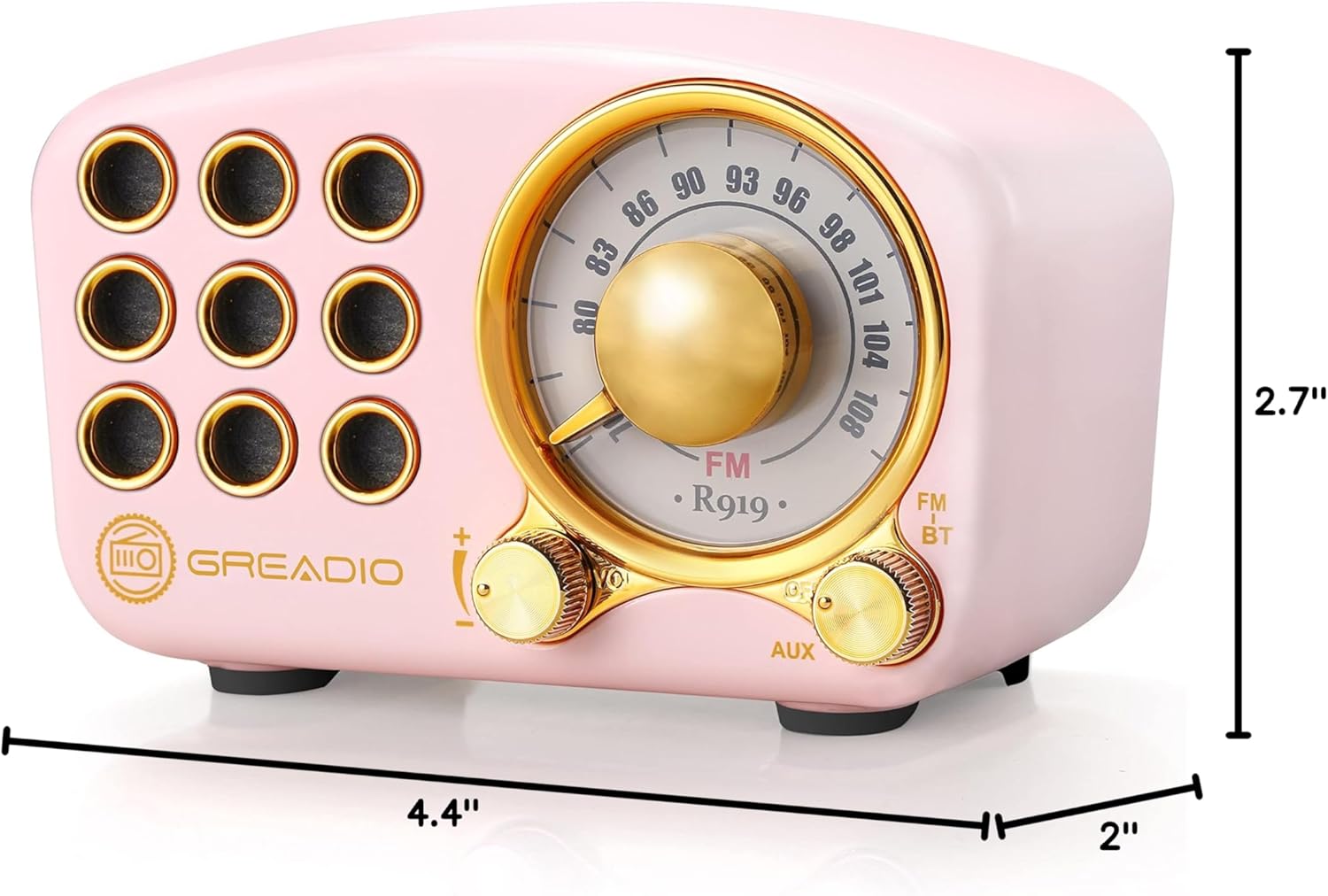
Image: Dimensions of the Greadio Retro Bluetooth Speaker.
11. Gwarancja i wsparcie
Greadio products are designed for reliability and performance. For warranty information or technical support, please refer to the contact details provided on the product packaging or visit the official Greadio webZachowaj paragon jako dowód zakupu.