
Wstęp
This manual provides instructions for the installation, operation, and maintenance of your Swann SRDVR-44580V 4 Channel Digital Video Recorder. This DVR is designed to work with select Swann cameras, offering 1080p Full HD recording capabilities, HDMI and VGA outputs, and remote access via the HomeSafe View App. Please read this manual thoroughly before operating the device.
Zawartość opakowania
Sprawdź, czy w przesyłce znajdują się wszystkie elementy wymienione poniżej:
- Swann SRDVR-44580V 4 Channel Digital Video Recorder
- Zasilacz
- Kabel HDMI
- Kabel Ethernet
- Mysz USB
- Naklejki odstraszające kradzież

Obraz 1: Contents of the Swann SRDVR-44580V package, including the DVR unit, power adapter, HDMI cable, Ethernet cable, USB mouse, and theft deterrent stickers.
Urządzenie ponadview
Panel przedni
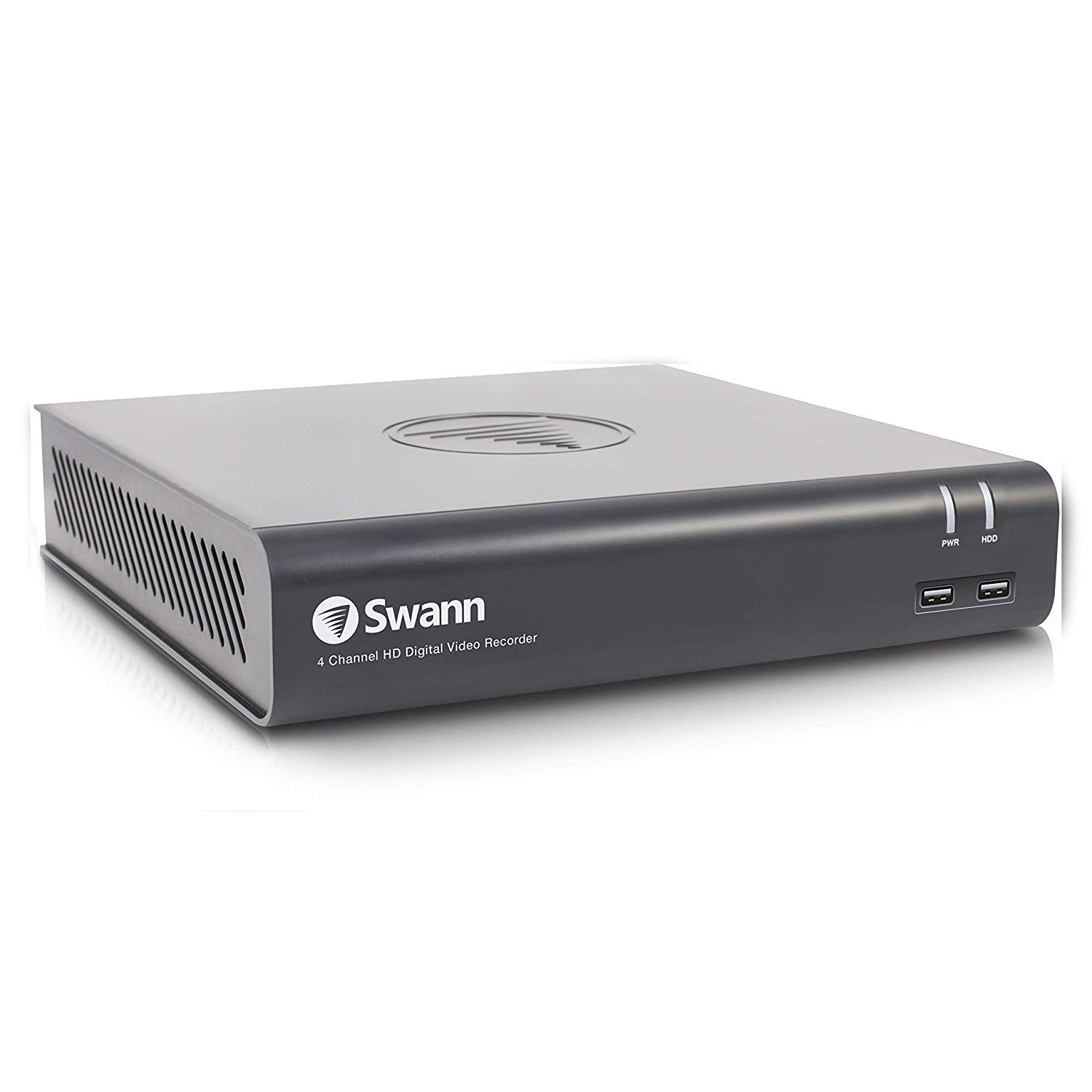
Obraz 2: Przód view of the Swann SRDVR-44580V Digital Video Recorder, showing the Swann logo, '4 Channel HD Digital Video Recorder' text, PWR and HDD indicator lights, and two front USB ports.
The front panel features indicator lights for power (PWR) and hard disk drive activity (HDD). Two USB 2.0 ports are conveniently located on the front for connecting a mouse or USB storage devices.
Panel tylny
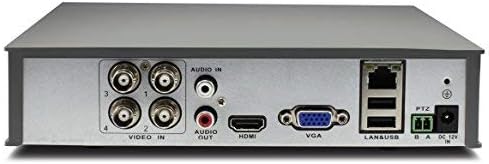
Obraz 3: Tył view of the Swann SRDVR-44580V Digital Video Recorder, displaying various input and output ports including Video In (BNC), Audio In/Out (RCA), HDMI, VGA, LAN, USB, PTZ, and Power Input.
The rear panel provides all necessary connections for your security system:
- Wejście wideo (BNC): Four ports for connecting compatible security cameras.
- Wejście/wyjście audio (RCA): For connecting audio input devices (e.g., microphone) and audio output to a speaker or monitor.
- Wyjście HDMI: Do podłączenia do monitora lub telewizora wysokiej rozdzielczości.
- Wyjście VGA: For connecting to a standard computer monitor.
- Port LAN (RJ45): For network connection to enable remote viewing and internet access.
- Porty USB: Dodatkowe porty USB dla urządzeń peryferyjnych.
- PTZ Port: For connecting Pan-Tilt-Zoom cameras.
- Pobór mocy: For connecting the DC 12V power adapter.
Organizować coś
Follow these steps to set up your Swann SRDVR-44580V:
- Podłącz kamery: Connect your compatible Swann security cameras to the BNC 'Video In' ports on the rear panel. Ensure connections are secure.
- Podłącz monitor: Use an HDMI cable to connect the DVR's HDMI output to your TV or monitor. Alternatively, use a VGA cable for VGA-compatible displays.
- Podłącz mysz USB: Plug the included USB mouse into one of the USB ports on the front or rear of the DVR.
- Połącz się z siecią (opcjonalnie w przypadku dostępu zdalnego): Dla pilota viewing and network features, connect an Ethernet cable from the DVR's LAN port to your router or network switch.
- Podłącz zasilanie: Connect the power adapter to the DVR's 'Power Input' port and then plug it into a power outlet. The DVR will power on automatically.
- Konfiguracja wstępna: Follow the on-screen prompts to complete the initial setup, including setting the date/time, creating a password, and configuring network settings.
Operacyjny
Once set up, you can begin operating your DVR system:
- Na żywo View: The DVR will display live video from connected cameras on your monitor. Use the mouse to navigate the on-screen menu.
- Nagranie: The DVR is pre-configured to record continuously or based on motion detection. You can customize recording schedules and settings via the main menu.
- Odtwarzanie nagranego dźwięku: Aby ponownieview nagrano footage, access the 'Playback' function from the main menu. You can search by date, time, and event type.
- Remote Access (HomeSafe View App):
- Download the 'HomeSafe View' app from your mobile device's app store (iOS or Android).
- Open the app and follow the instructions to add your DVR using its unique ID or QR code.
- Po połączeniu możesz view live camera feeds, play back recordings, and receive alerts from anywhere with an internet connection.
- Utworzyć kopię zapasową: You can back up important video footage to a USB flash drive connected to the DVR's USB port.
Konserwacja
Regularna konserwacja zapewnia optymalną wydajność i długowieczność Twojego systemu DVR:
- Zarządzanie dyskiem twardym: The DVR's hard drive will automatically overwrite the oldest recordings when it becomes full. Regularly back up any critical footage to external storage.
- Czyszczenie: Keep the DVR unit clean and free from dust. Use a soft, dry cloth to wipe the exterior. Do not use liquid cleaners directly on the device. Ensure ventilation openings are not blocked.
- Aktualizacje oprogramowania układowego: Periodically check the official Swann support website for available firmware updates. Updating the firmware can improve performance, add new features, and enhance security.
- Cykl zasilania: If the DVR experiences minor issues, try power cycling the unit by disconnecting the power adapter for a few seconds and then reconnecting it.
Rozwiązywanie problemów
Jeśli napotkasz problemy z rejestratorem DVR, zapoznaj się z poniższymi typowymi procedurami rozwiązywania problemów:
- Brak wyjścia wideo na monitorze:
- Ensure the HDMI or VGA cable is securely connected to both the DVR and the monitor.
- Sprawdź, czy monitor jest włączony i ustawiony na prawidłowe źródło sygnału wejściowego (HDMI/VGA).
- Check if the DVR's power indicator light is on.
- Nie wolno robić nagrań:
- Check the hard drive status in the DVR's menu to ensure it is detected and functioning correctly.
- Verify that recording schedules are properly configured and motion detection is enabled if desired.
- Ensure cameras are connected and displaying live video.
- Zdalny dostęp nie działa:
- Confirm the DVR is connected to your network via an Ethernet cable and has an active internet connection.
- Check your router settings to ensure the DVR is assigned an IP address and there are no firewall restrictions.
- Verify that the HomeSafe View app is correctly configured with the DVR's details.
- Camera Not Displaying Video:
- Check the BNC cable connection between the camera and the DVR.
- Upewnij się, że kamera jest zasilana.
- Confirm the camera is compatible with the Swann SRDVR-44580V.
Specyfikacje
| Numer modelu | SRDVR-44580V |
| Wejście wideo | 4 kanałów (BNC) |
| Wyjścia wideo | 1 x HDMI, 1 x VGA |
| Rozdzielczość nagrywania | Up to 1080p (supports resolutions up to 1920 x 1536 pixels) |
| Wejście audio | 1 x RCA |
| Wyjście audio | 1 x RCA |
| Dysk twardy | 1TB SATA HDD (supports up to 4TB) |
| Interfejs sieciowy | 1 x port Ethernet RJ45 |
| Interfejs USB | 2 x USB 2.0, 1 x USB 3.0 (Total 3 USB ports) |
| Wymiary (szer. x gł. x wys.) | 230 mm x 210 mm x 47 mm (9.05 cala x 8.3 cala x 1.9 cala) |
| Technologia łączności | Przewodowy |
| Kompatybilne urządzenia | Select Swann Cameras |
Informacje o gwarancji
Swann products typically come with a limited warranty that covers defects in materials and workmanship. The specific terms and duration of the warranty may vary by region and product. For detailed warranty information, including coverage, exclusions, and how to make a claim, please refer to the official Swann website or the warranty card included with your purchase documentation.
Wsparcie
For further assistance, technical support, or to download the latest software, firmware, and comprehensive manuals, please visit the official Swann support website. You can also find FAQs and contact customer service for personalized help.
Official Swann Webstrona: www.swann.com