
1. Wprowadzenie
Thank you for choosing the NEXT-SHINE YK02-Charging Food Kitchen Scale. This digital scale is designed for high-precision weighing in various kitchen applications, from baking and cooking to meal preparation. It features a large stainless steel platform, a backlit LCD, and multiple unit options. Please read this manual thoroughly before use to ensure proper operation and maintenance.
2. Informacje dotyczące bezpieczeństwa
- Nie zanurzaj wagi w wodzie ani innych płynach.
- Wyczyść wagę za pomocą adamp ściereczka; nie używaj środków czyszczących o właściwościach ściernych.
- Aby uzyskać dokładne pomiary, należy ustawić wagę na twardej, płaskiej i stabilnej powierzchni.
- Unikaj ekstremalnych temperatur i wilgoci.
- Nie przeciążaj wagi ponad jej maksymalny udźwig 5 kg (11 funta).
- Przechowywać w miejscu niedostępnym dla dzieci.
- If the scale is not used for an extended period, remove the AAA batteries if installed.
3. Zawartość opakowania
Sprawdź, czy w opakowaniu znajdują się wszystkie elementy:
- NEXT-SHINE YK02-Charging Food Kitchen Scale
- 50g ciężarek kalibracyjny
- Taca plastikowa
- Kabel do ładowania USB typu C.
- Instrukcja obsługi (ten dokument)

Image: The complete kit including the scale, calibration weight, plastic tray, and charging cable.
4. Funkcje produktu
- Wysoka precyzja: Measures with 0.1g accuracy for precise results.
- Duża pojemność: Weighs items from 0.4g up to 5kg (11lb).
- Wiele jednostek: Supports 9 units (g, gn, oz, ozt, dwt, ct, lb, tl, ml).
- Ładowarka typu C: Built-in rechargeable battery with Type-C charging port.
- AAA Battery Option: Can also be powered by 2 AAA batteries (not included).
- Large Stainless Steel Platform: Durable and easy to clean weighing surface.
- Podświetlany wyświetlacz LCD: Wyraźny i łatwy do odczytania wyświetlacz w różnych warunkach oświetleniowych.
- Funkcja tary: Allows weighing of ingredients in a container by subtracting the container's weight.
- Funkcja wstrzymania: Locks the weight reading on the display.
- Counting Function (PCS): Counts small, uniform items.
- Automatyczne wyłączenie: Oszczędza baterię.

Image: The scale demonstrating 0.1g precision with a small amount of flour.

Image: The scale's display showing the nine available measurement units.
5. Konfiguracja
5.1 Zasilanie
The scale can be powered by its internal rechargeable battery or by 2 AAA batteries (not included).
- Wewnętrzny akumulator: Connect the provided Type-C USB cable to the scale's charging port and to a USB power source (e.g., computer, wall adapter). The charging indicator will flash while charging and remain solid when fully charged.
- Baterie AAA: Open the battery compartment on the underside of the scale. Insert 2 AAA batteries, ensuring correct polarity. Close the compartment.

Image: Details of the Type-C charging port and the AAA battery compartment.
5.2 Początkowe umiejscowienie
Place the scale on a firm, level, and stable surface. Avoid placing it on soft or uneven surfaces, which can affect accuracy.
6. Działanie
6.1 Włączanie/wyłączanie zasilania
- Naciśnij WŁ./WYŁ. przycisk, aby włączyć wagę.
- Naciśnij i przytrzymaj WŁ./WYŁ. button for 3 seconds to turn the scale off.
- The scale will automatically turn off after a period of inactivity to conserve battery.
6.2 Konwersja jednostek
Po włączeniu wagi naciśnij przycisk JEDNOSTKA button to cycle through the available measurement units: g, gn, oz, ozt, dwt, ct, lb, tl, ml.
6.3 Funkcja tary
Funkcja tarowania umożliwia odjęcie ciężaru pojemnika, dzięki czemu można zmierzyć tylko jego zawartość.
- Umieść pusty pojemnik na platformie ważącej.
- Wait for the display to stabilize, then press the ZERO przycisk. Wyświetlacz zresetuje się do 0.0 g.
- Dodaj do pojemnika przedmioty, które chcesz zważyć. Na wyświetlaczu pojawi się waga netto tych przedmiotów.
6.4 Funkcja wstrzymania
The Hold function locks the current weight reading on the display, which is useful when adding ingredients dynamically or when the display is obscured.
- Place an item on the scale.
- Naciśnij TRZYMAĆ button to lock the weight. The reading will remain on the display even if the item is removed.
- Naciśnij TRZYMAĆ ponownie, aby wyłączyć funkcję.

Image: The Hold function in action, locking the weight of flour in a bowl.
6.5 Funkcja zliczania (PCS)
This function allows you to count a quantity of uniform items.
- Włącz wagę.
- Naciśnij i przytrzymaj PCS przycisk, aż doample quantity (e.g., 25, 50, 75, 100) appears on the display.
- Naciśnij JEDNOSTKA przycisk, aby wybrać żądany sample quantity that matches the number of items you will place on the scale.
- Podaj dokładną liczbę sample items (e.g., 25 pieces) on the platform.
- Naciśnij PCS naciśnij ponownie przycisk, aby potwierdzićample. The display will show "PCS" and the number of items.
- Teraz możesz dodać więcej elementów, a waga policzy je na podstawieampwaga.
Video: Demonstration of the scale's counting function, showing how to set a sample and count multiple items.
7. Kalibracja
The scale comes pre-calibrated, but re-calibration may be necessary over time or if accuracy issues arise. A 50g calibration weight is included.
- Umieść wagę na stabilnej, równej powierzchni.
- Włącz wagę.
- Naciśnij i przytrzymaj CAL button until the display shows "CAL" followed by the required calibration weight (e.g., "50.00g").
- Place the 50g calibration weight precisely in the center of the weighing platform.
- Wait for the display to stabilize and show "PASS" or return to normal weighing mode (0.0g). This indicates successful calibration.
- Remove the calibration weight.
8. Konserwacja i czyszczenie
- Przetrzyj powierzchnię wagi miękką,amp szmatką. W przypadku uporczywych plam można użyć łagodnego detergentu.
- Nie należy używać środków czyszczących o działaniu ściernym ani silnych środków chemicznych. Nie należy również zanurzać wagi w wodzie.
- Store the scale in a clean, dry place when not in use.
- The included plastic tray can be used to protect the weighing platform and for easy cleaning after weighing messy ingredients.
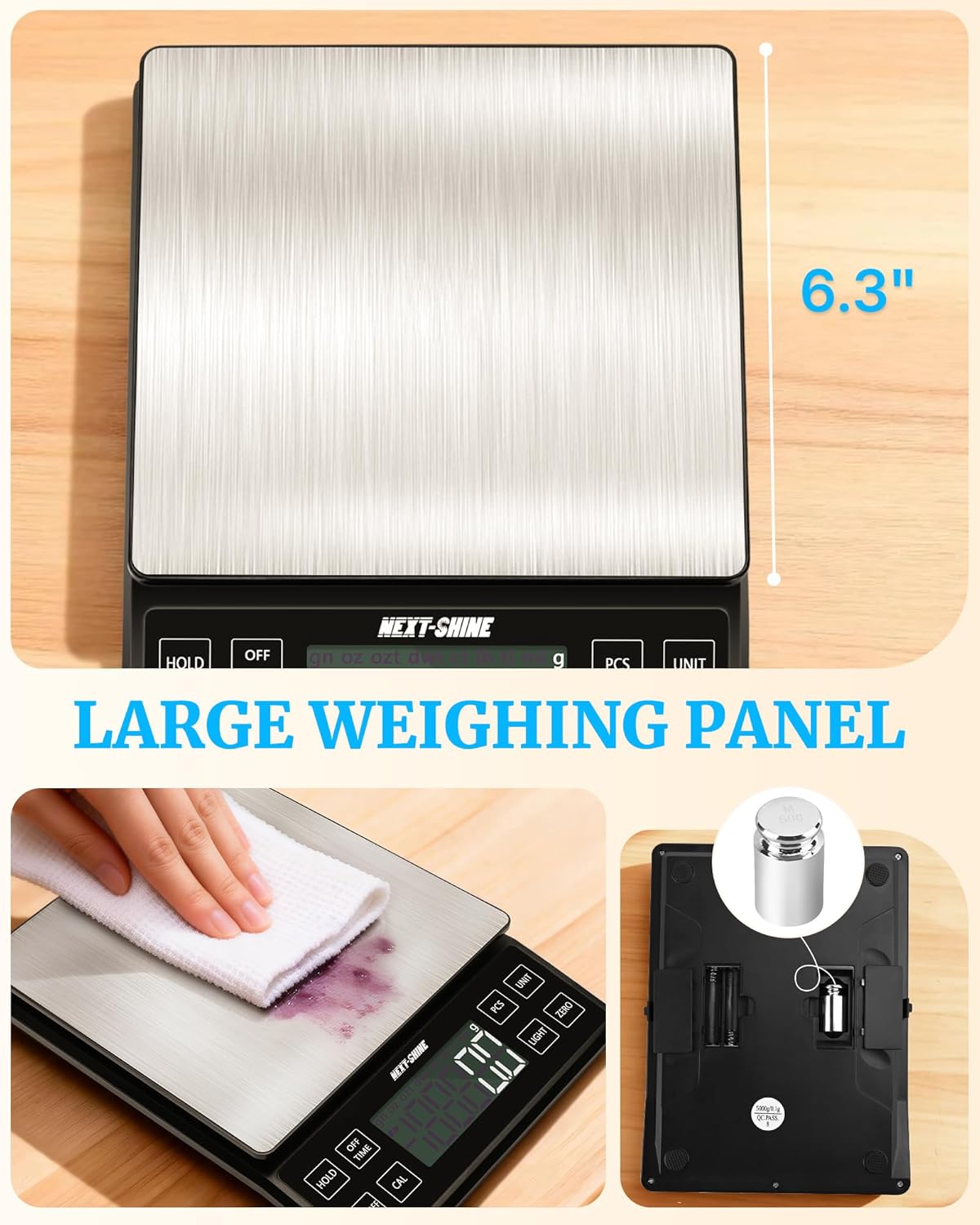
Image: Cleaning the large stainless steel weighing panel of the scale.
9. Rozwiązywanie Problemów
| Problem | Możliwa przyczyna | Rozwiązanie |
|---|---|---|
| Waga się nie włącza | Niski poziom naładowania baterii lub brak zasilania. | Charge the scale using the Type-C cable or replace AAA batteries if installed. |
| Niedokładne odczyty | Uneven surface, overloaded, or needs calibration. | Place on a flat surface, ensure weight is within 5kg limit, or perform calibration. |
| Na wyświetlaczu pojawia się komunikat „EEEE” | Błąd przeciążenia. | Remove items immediately to prevent damage. Ensure total weight is below 5kg. |
| Na wyświetlaczu pojawia się napis „UNST” | Niestabilny odczyt. | Upewnij się, że waga stoi na stabilnej powierzchni i nie jest narażona na drgania ani prądy powietrza. |
10. Specyfikacje
| Funkcja | Szczegół |
|---|---|
| Numer modelu | YK02-Charging |
| Maksymalna nośność | 5 kilogramów (11 funty) |
| Dokładność odczytu | +/- 0.1 g |
| Jednostki miary | g, gn, oz, ozt, dwt, ct, lb, tl, ml |
| Typ wyświetlacza | LCD z podświetleniem |
| Źródło zasilania | Rechargeable Lithium Ion battery (included) or 2x AAA batteries (not included) |
| Port ładowania | USB Typ C |
| Wymiary produktu | Wymiary 19 x 14.22 x 2.49 cm |
| Waga przedmiotu | 662 gram |
| Tworzywo | Akrylonitryl-butadien-styren (ABS) |
| Producent | NASTĘPNY BŁYSK |
| Kraj pochodzenia | Chiny |
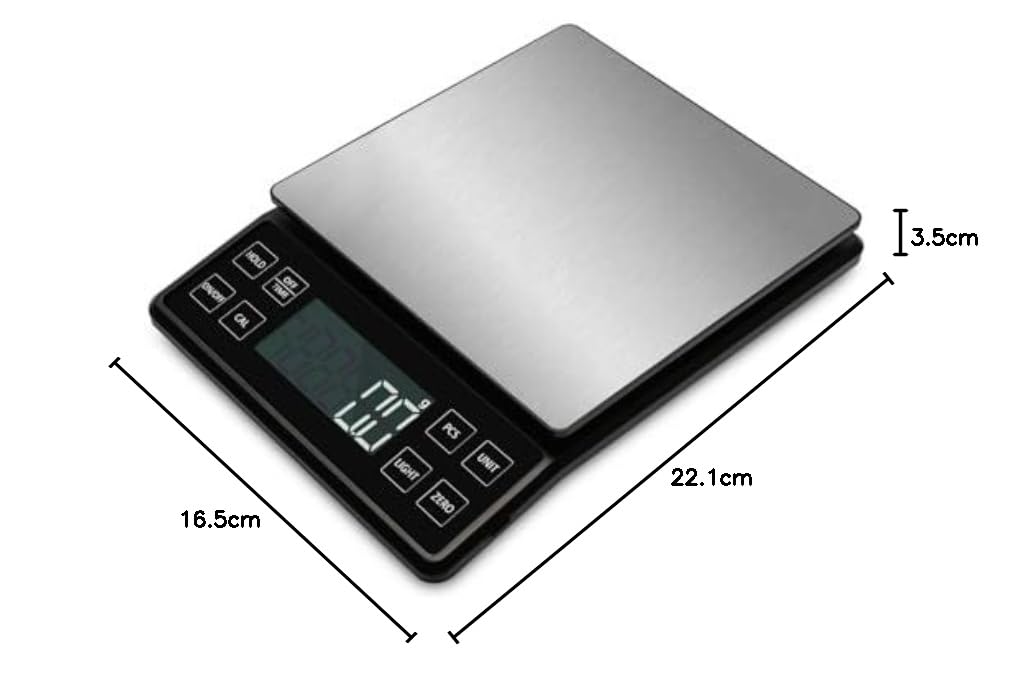
Image: Diagram showing the physical dimensions of the scale.
11. Gwarancja i wsparcie
This NEXT-SHINE YK02-Charging Food Kitchen Scale comes with a Roczna gwarancja producenta od daty zakupu. Niniejsza gwarancja obejmuje wady materiałowe i wykonawcze przy normalnym użytkowaniu.
For warranty claims, technical support, or any questions regarding your product, please contact NEXT-SHINE customer service through the retailer where the product was purchased or refer to the contact information provided on the product packaging.