
1. Wprowadzenie
Dziękujemy za zakupasing the PRGR RED EYES POCKET HS-120 Speed Radar. This compact and portable device is designed to accurately measure various speeds, including golf club head speed, ball speed, and estimated carry distance. It is an invaluable tool for golfers and athletes looking to analyze and improve their performance during practice sessions. This manual provides detailed instructions on how to set up, operate, and maintain your device to ensure optimal performance and longevity.
2. Informacje dotyczące bezpieczeństwa
Przed użyciem urządzenia należy zapoznać się z poniższymi środkami ostrożności:
- Nie wystawiaj urządzenia na działanie ekstremalnych temperatur, bezpośredniego światła słonecznego i wysokiej wilgotności.
- Unikaj upuszczania urządzenia i narażania go na silne uderzenia.
- Keep the device away from water and other liquids. If it gets wet, power it off immediately and allow it to dry completely before attempting to use it again.
- Nie próbuj samodzielnie demontować ani naprawiać urządzenia. Wszelkie czynności serwisowe zlecaj wykwalifikowanemu personelowi.
- Use only the specified battery type (AAA batteries). Ensure correct polarity when inserting batteries.
- Aby zapobiec wyciekowi baterii, wyjmij je, jeśli urządzenie nie będzie używane przez dłuższy czas.
- Przechowywać w miejscu niedostępnym dla dzieci.
3. Zawartość opakowania
Sprawdź, czy w przesyłce znajdują się wszystkie elementy:
- PRGR RED EYES POCKET HS-120 Speed Radar Unit
- Torba transportowa
- AAA Batteries (4 pcs)
- Instrukcja obsługi (ten dokument)
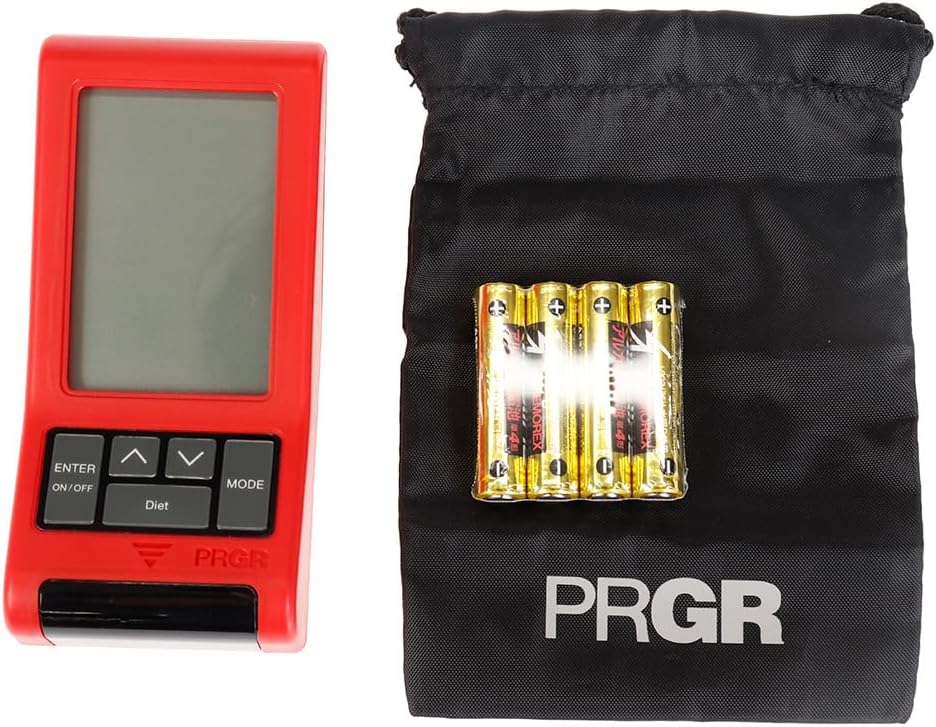
Figure 3.1: PRGR Red Eyes Pocket HS-120 with carrying pouch and batteries.
4. Koniec produktuview
Familiarize yourself with the components of your PRGR RED EYES POCKET HS-120:
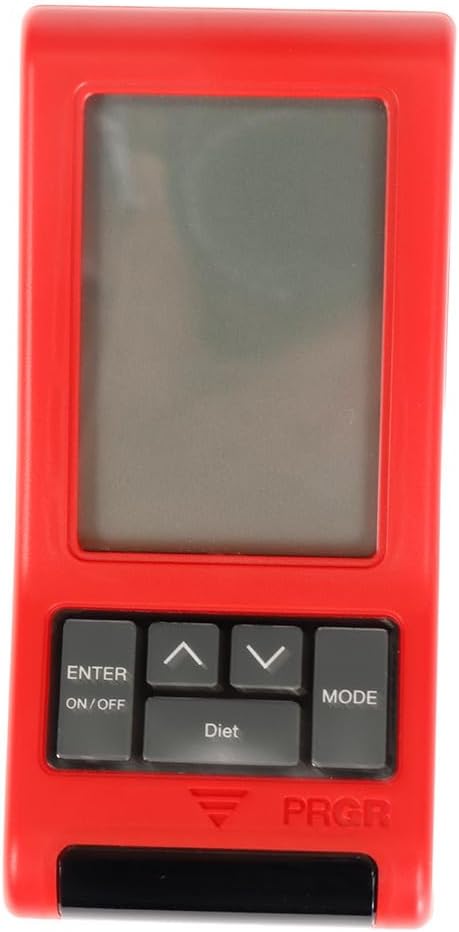
Rycina 4.1: Przód View (Display, Control Buttons)

Rysunek 4.2: Tył View (Battery Compartment, Tripod Mount)

Rysunek 4.3: Strona View

Figure 4.4: Control Buttons (ENTER/ON/OFF, Up/Down, MODE)
Kluczowe komponenty:
- Ekran wyświetlacza: Shows measurement readings, mode, and settings.
- ENTER/ON/OFF Button: Powers the device on/off and confirms selections.
- Przyciski w górę/w dół: Poruszaj się po menu i zmieniaj ustawienia.
- Przycisk TRYB: Switches between different measurement modes (e.g., Golf, Baseball) and settings.
- Sensor Window: The area where the radar detects speed. Keep clear of obstructions.
- Komora baterii: Znajduje się z tyłu i mieści 4 baterie AAA.
- Mocowanie do statywu: Allows for stable positioning on a tripod (tripod not included).
5. Konfiguracja
5.1. Instalacja baterii
- Znajdź pokrywę komory baterii z tyłu urządzenia.
- Otwórz pokrywę.
- Włóż 4 baterie AAA, zwracając uwagę na prawidłową biegunowość (+/-), zgodnie ze wskazaniami wewnątrz komory.
- Dokładnie zamknij pokrywę komory baterii.
5.2. Włączanie/wyłączanie zasilania
- Aby włączyć: Naciśnij i przytrzymaj ENTER/ON/OFF Naciśnij przycisk przez około 1 sekundę.
- Aby wyłączyć: Naciśnij i przytrzymaj ENTER/ON/OFF button for approximately 2 seconds until the display turns off. The device will also automatically power off after a period of inactivity to conserve battery life.
5.3. Ustawienia początkowe
Upon first power-on or after battery replacement, you may need to set the date, time, and preferred measurement units. Use the Up/Down buttons to adjust values and the ENTER button to confirm and move to the next setting.
6. Instrukcja obsługi
6.1. Wybór trybu pomiaru
Naciśnij TRYB button to cycle through available measurement modes. The PRGR RED EYES POCKET HS-120 supports various modes, including:
- Tryb golfa: Measures club head speed, ball speed, and estimated carry distance.
- Baseball Mode: Measures bat swing speed and ball speed.
- Inne tryby: May include general speed measurement or calorie consumption tracking.
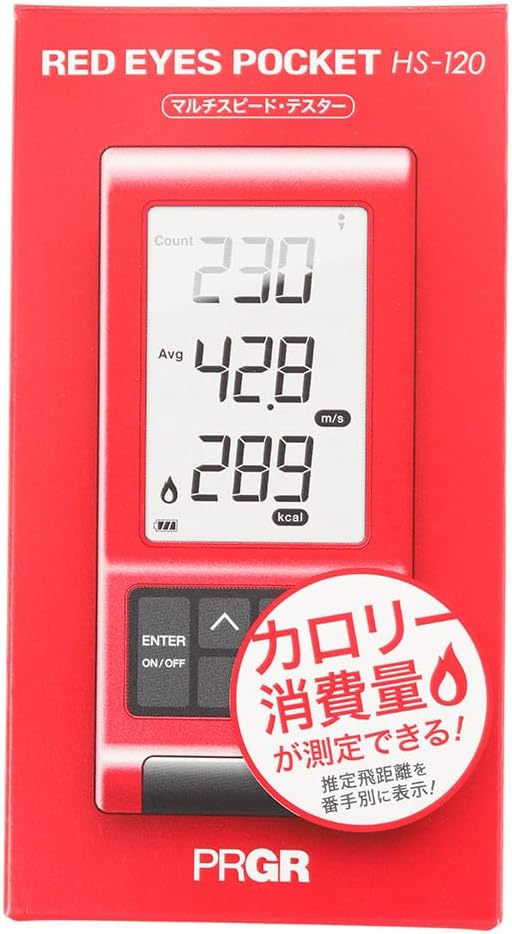
Figure 6.1: Retail packaging indicating multi-speed testing and calorie consumption features.
6.2. Taking a Measurement (Golf Mode Example)
- Place the device on a flat, stable surface approximately 1 meter (3 feet) behind the ball, aligned with your swing path. Ensure there are no obstructions between the device and the ball/club.
- Select 'Golf Mode' using the TRYB przycisk.
- Prepare for your swing.
- Execute your swing. The device will automatically detect the club head speed and ball speed.
- The measured values (Head Speed, Ball Speed, Estimated Carry Distance) will be displayed on the screen.
- The device can also track calorie consumption, which may be displayed or accessible via a dedicated 'Diet' button as seen on the device.
6.3. Zrozumienie odczytów wyświetlacza
Na wyświetlaczu zazwyczaj wyświetlane są następujące informacje:
- HS (Head Speed): Your club head speed in meters per second (m/s) or miles per hour (mph).
- BS (Ball Speed): The speed of the ball immediately after impact.
- Nosić: Estimated carry distance based on your swing and ball speed.
- Spożycie kalorii: An estimate of calories burned during your session (if applicable to the selected mode).
- Count/Avg: Number of swings taken and average speed.
6.4. Adviewing Past Data
The device stores a certain number of past measurements. Use the Up/Down buttons to scroll through previous readings. Consult the on-screen prompts or the device's quick guide for specific instructions on data review.
7. Konserwacja
- Czyszczenie: Wipe the device with a soft, dry cloth. Do not use abrasive cleaners or solvents. Ensure the sensor window is clean and free of dust or smudges for accurate readings.
- Składowanie: Store the device in its carrying pouch in a cool, dry place when not in use. Avoid storing in areas with extreme temperatures or high humidity.
- Pielęgnacja baterii: Replace batteries when the low battery indicator appears. If the device will not be used for an extended period, remove the batteries to prevent potential leakage and damage.
8. Rozwiązywanie Problemów
| Problem | Możliwa przyczyna | Rozwiązanie |
|---|---|---|
| Urządzenie nie włącza się. | Baterie rozładowane lub nieprawidłowo włożone. | Sprawdź biegunowość baterii. Wymień baterie na nowe baterie AAA. |
| Brak odczytu lub odczyt nieprawidłowy. | Incorrect device placement; sensor obstructed; environmental interference. | Ensure device is 1 meter behind the ball and aligned. Clean sensor window. Avoid using near strong electromagnetic fields. Ensure sufficient distance from other objects. |
| Wyświetlacz jest przyciemniony lub migocze. | Niski poziom naładowania baterii. | Wymień baterie. |
| Przyciski nie reagują. | Tymczasowy błąd oprogramowania; niski poziom naładowania baterii. | Remove and reinsert batteries. Replace batteries if low. |
Jeśli po wypróbowaniu tych rozwiązań problem nadal występuje, skontaktuj się z obsługą klienta.
9. Specyfikacje
| Funkcja | Szczegół |
|---|---|
| Numer modelu | HS-120 (GM042) |
| Kolor | Gray, Red |
| Rozmiar | Wolny rozmiar |
| Praworęczność | Oburęczny |
| Tworzywo | Plastikowy |
| Baterie | 4 x AAA (w zestawie) |
| Nazwa serii | RED EYES |
| Wymiary opakowania | Wymiary 14.6 x 8 x 4.6 cm |
| Waga | 162 gramów |
| Pierwsze dostępne na Amazon.co.jp | 18 czerwca 2019 r. |
10. Gwarancja i wsparcie
This product comes with a manufacturer's warranty. Please refer to the warranty card included in your package for specific terms and conditions. For technical support, troubleshooting assistance, or warranty claims, please contact PRGR customer service through their official webOdwiedź witrynę lub sklep, w którym kupiłeś produkt. Zachowaj paragon jako dowód zakupu.
For more information, visit the official PRGR webodwiedź witrynę lub skontaktuj się z lokalnym dystrybutorem.