
1. Wprowadzenie
This manual provides detailed instructions for the safe and proper installation, operation, and maintenance of your Cabletech UCH0198-2 Full Motion TV Wall Mount. Please read this manual thoroughly before installation and retain it for future reference. This wall mount is designed to securely hold flat-panel or curved LED televisions ranging from 32 to 55 inches, with a maximum weight capacity of 35 kg (77 lbs).
2. Ważne informacje dotyczące bezpieczeństwa
- Nośność: Do not exceed the maximum weight capacity of 35 kg (77 lbs). Exceeding this limit can result in serious injury or property damage.
- Rozmiar ekranu: This mount is designed for TVs between 32 and 55 inches. While some larger TVs may fit VESA patterns, ensure they do not exceed the weight limit.
- Zgodność z VESA: Verify your TV's VESA mounting pattern is compatible with the mount's supported patterns (75x75, 100x100, 100x150, 150x100, 150x150, 200x100, 100x200, 300x200, 300x300, 400x200, 400x300, 400x400).
- Struktura ściany: Ensure the mounting surface (wall) can safely support the combined weight of the mount and your television. For wood stud installation, ensure studs are solid. For concrete or brick walls, use appropriate anchors (not always included). Consult a professional installer if unsure about your wall's integrity.
- Narzędzia: Do montażu należy używać odpowiednich narzędzi. Zawsze należy nosić okulary ochronne.
- Montaż: Do not attempt to install this product alone if the TV is heavy. Two or more people are recommended for safe installation.
- Dzieci: Trzymaj dzieci z dala od instalacji. Małe części mogą stanowić zagrożenie zadławienia.
- Szkoda: Do not install if any parts are missing or damaged. Contact customer support for replacement parts.
3. Zawartość opakowania
Please check to ensure all components are present and undamaged before beginning installation. If any parts are missing or damaged, do not proceed with installation and contact customer support.
- Montaż płyty ściennej
- Ramiona uchwytu telewizora (2x)
- Zestaw elementów montażowych (różne śruby, podkładki, dystanse do telewizora i ściany)
- Wall Anchors (for concrete/brick, if included)
- Poziom
- Instrukcja obsługi

Rycina 1: Przód view of the wall mount components.
4. Specyfikacje produktu
| Numer modelu | UCH0198-2 |
| Marka | Technologia kablowa |
| Kompatybilne rozmiary ekranu | 32" - 55" |
| Maksymalna ładowność | 35 kg (77 funta) |
| Zgodność ze standardem VESA | 75x75, 100x100, 100x150, 150x100, 150x150, 200x100, 100x200, 300x200, 300x300, 400x200, 400x300, 400x400 |
| Kąt nachylenia | 0° do -20° |
| Horizontal Level Adjustment | +3° do -3° |
| Odległość od ściany (rozszerzona) | 78 mm - 400 mm (3.07" - 15.75") |
| Tworzywo | Metal |
| Kolor | Czarny |
5. Konfiguracja i instalacja
Before you begin, ensure you have all necessary tools and have read the safety information. Two people are recommended for installation.
5.1 Wymagane narzędzia (nie dołączone)
- Ołówek
- Wyszukiwarka słupków (do ścian z drewnianymi słupkami)
- Drill with appropriate drill bits (e.g., 10mm for concrete, 5.5mm for wood studs)
- Klucz nasadowy lub klucz nastawny
- Śrubokręt krzyżakowy
- Taśma miernicza
- Okulary ochronne
5.2 Mocowanie uchwytów telewizyjnych do telewizora
- Ostrożnie połóż telewizor ekranem do dołu na miękkiej i czystej powierzchni, aby zapobiec uszkodzeniu ekranu.
- Znajdź otwory montażowe VESA z tyłu telewizora.
- Select the correct diameter and length screws from the hardware kit that fit your TV's mounting holes. Use washers and spacers if necessary to ensure the screws do not penetrate too deeply or leave the bracket loose.
- Attach the two vertical TV bracket arms to the back of your TV using the selected screws. Ensure the hooks on the bracket arms are facing upwards (or towards the top of the TV) and are level with each other. Do not overtighten.
5.3 Mounting the Wall Plate to the Wall
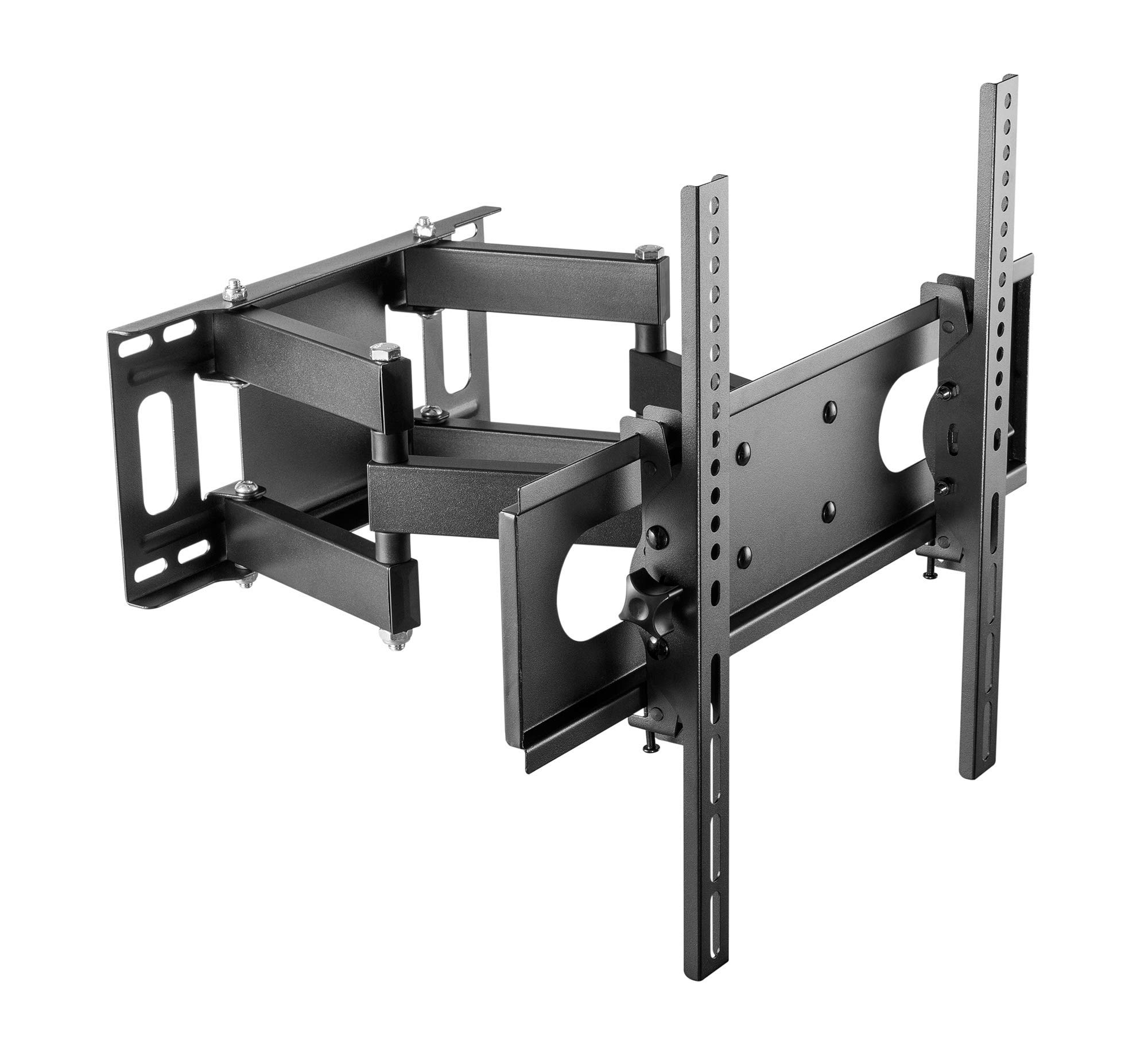
Figure 2: Cabletech UCH0198-2 wall mount in extended position.
- Określ miejsce montażu: Decide on the desired height for your TV. Mark the center point on the wall.
- Lokalizacja słupków (w przypadku ścian z drewnianymi słupkami): Use a stud finder to locate the edges and center of two adjacent wood studs. The wall plate must be mounted to at least two studs for secure installation.
- Pozycja płyty ściennej: Hold the wall plate against the wall at your desired height and center. Use a level to ensure it is perfectly horizontal. Mark the drilling locations through the holes on the wall plate.
- Wywierć otwory pilotażowe:
- Dla Kołki drewniane: Drill pilot holes using a 5.5mm drill bit to a depth of approximately 60mm.
- Dla Ściany z litego betonu/cegły: Drill pilot holes using a 10mm drill bit to a depth of approximately 60mm. Insert the concrete anchors into the drilled holes until they are flush with the wall surface.
- Zamontuj płytę ścienną: Dopasuj płytę ścienną do wywierconych otworów. Przymocuj ją do ściany za pomocą śrub i podkładek dołączonych do zestawu. Dokręć wszystkie śruby mocno, ale nie przekręcaj.
5.4 Zawieszanie telewizora
- With assistance, carefully lift the TV (with brackets attached) and hook the TV bracket arms onto the wall plate.
- Ensure the TV is securely seated on the wall plate. The safety screws or locking mechanisms on the bottom of the TV bracket arms should be engaged to prevent accidental dislodging.
- Przed ponownym montażem delikatnie sprawdź stabilność zamontowanego telewizora.asincałkowicie to.
6. Instrukcja obsługi (regulacja)
Your Cabletech UCH0198-2 mount offers various adjustments for optimal viewing.
6.1 Extending and Retracting the TV

Figure 3: Wall mount extended, showing adjustable distance from wall.
- Gently pull or push the TV to extend it away from the wall (up to 400mm) or retract it closer to the wall (minimum 78mm).
- Ensure cables are not pinched or strained during movement.
6.2 Tilting the TV
- The mount allows for a tilt range of 0° to -20° (downwards).
- Loosen the tilt adjustment knobs or bolts on the TV bracket arms.
- Adjust the TV to the desired tilt angle.
- Retighten the knobs/bolts to secure the TV in position.
6.3 Swiveling the TV (Horizontal Adjustment)
- The articulating arm allows you to swivel the TV horizontally to achieve various viewkąty.
- Gently push or pull the side of the TV to rotate it left or right.
- The mount also features a small horizontal level adjustment of +3° to -3° to correct for minor leveling issues after installation. This is typically adjusted by loosening specific bolts on the TV plate, leveling, and retightening. Refer to the detailed diagrams for specific adjustment points.
6.4 Zarządzanie kablami
- The mount includes a cable winder or clips to help organize and route cables along the articulating arm.
- Secure cables to prevent them from dangling or getting caught during TV movement. Ensure enough slack is provided for full range of motion.
7. Konserwacja
- Czyszczenie: Przetrzyj uchwyt miękką, suchą ściereczką. Nie używaj środków czyszczących ani rozpuszczalników o działaniu ściernym.
- Kontrole okresowe: Regularnie sprawdzaj wszystkie śruby i nakrętki, aby upewnić się, że są dobrze dokręcone i zabezpieczone. W razie potrzeby dokręć je.
- Ruch: If the mount's movement becomes stiff, a small amount of silicone-based lubricant can be applied to the pivot points, avoiding contact with painted surfaces.
8. Rozwiązywanie Problemów
| Problem | Możliwa przyczyna | Rozwiązanie |
|---|---|---|
| Telewizor nie jest wypoziomowany po zainstalowaniu. | Wall plate not perfectly level, or minor adjustment needed. | Use the horizontal level adjustment feature (+3° to -3°). Loosen the specific bolts on the TV plate, adjust with a level, and retighten. |
| Mocowanie wydaje się luźne i niestabilne. | Mounting bolts not fully tightened, or wall structure is inadequate. | Check and retighten all wall mounting bolts. If the wall structure is compromised, consult a professional. Ensure TV safety screws are engaged. |
| TV cannot tilt or swivel smoothly. | Adjustment bolts are too tight, or pivot points need lubrication. | Loosen tilt adjustment knobs/bolts slightly. Apply a small amount of silicone-based lubricant to pivot points if necessary. |
| Cables are getting pinched. | Insufficient slack or improper cable routing. | Reroute cables using the integrated cable management. Ensure enough slack for full range of motion. |
9. Gwarancja i obsługa klienta
This Cabletech UCH0198-2 TV Wall Mount comes with a manufacturer's warranty of 2 lata od daty zakupu.
For warranty claims, technical assistance, or if you have any questions regarding the installation or operation of your product, please contact Cabletech customer support through your retailer or the official Cabletech website. Please have your model number (UCH0198-2) and proof of purchase ready when contacting support.