
Wstęp
This user manual provides comprehensive instructions for the Andoer HDV-201LM 1080P FHD Digital Video Camera. It covers setup, operation, maintenance, and troubleshooting to help you get the most out of your device. The Andoer HDV-201LM is a portable digital video camera designed for capturing high-quality photos and videos, making it ideal for preserving memories.
Zawartość opakowania
Po otwarciu opakowania należy sprawdzić, czy zawiera ono wszystkie poniższe elementy:
- 1 x Digital Video Camera
- 1 x torba na aparat
- 2 x Rechargeable Batteries (one already in camera)
- 1 x kabel USB
- Kabel 1 x AV
- 1 x Pilot zdalnego sterowania
- 1 x Instrukcja obsługi (angielski)

Image: All items included in the Andoer HDV-201LM package, including the camera, batteries, cables, remote, and bag.
Organizować coś
1. Instalacja baterii
The camera comes with two 3.7V 1500mAh rechargeable batteries. One battery is typically pre-installed. Before first use, ensure you remove any insulating film from the battery terminals.
- Open the battery compartment cover, usually located at the bottom or side of the camera.
- Insert the battery, ensuring the correct polarity as indicated inside the compartment.
- Dokładnie zamknij pokrywę komory baterii.
- Charge the battery fully before initial use using the provided USB cable.

Image: The Andoer HDV-201LM camera, two rechargeable batteries, and the remote control, illustrating the main components.
2. Instalacja karty pamięci
The camera requires an SD card (not included) for storing photos and videos. A Class 10 or higher SD card is highly recommended for optimal performance and smooth recording.
- Znajdź gniazdo karty SD, zazwyczaj znajdujące się w pobliżu komory baterii.
- Włóż kartę SD, kierując metalowe styki we właściwym kierunku, aż do zatrzaśnięcia.
- Aby wyjąć kartę, delikatnie wciśnij ją, aż wysunie się.
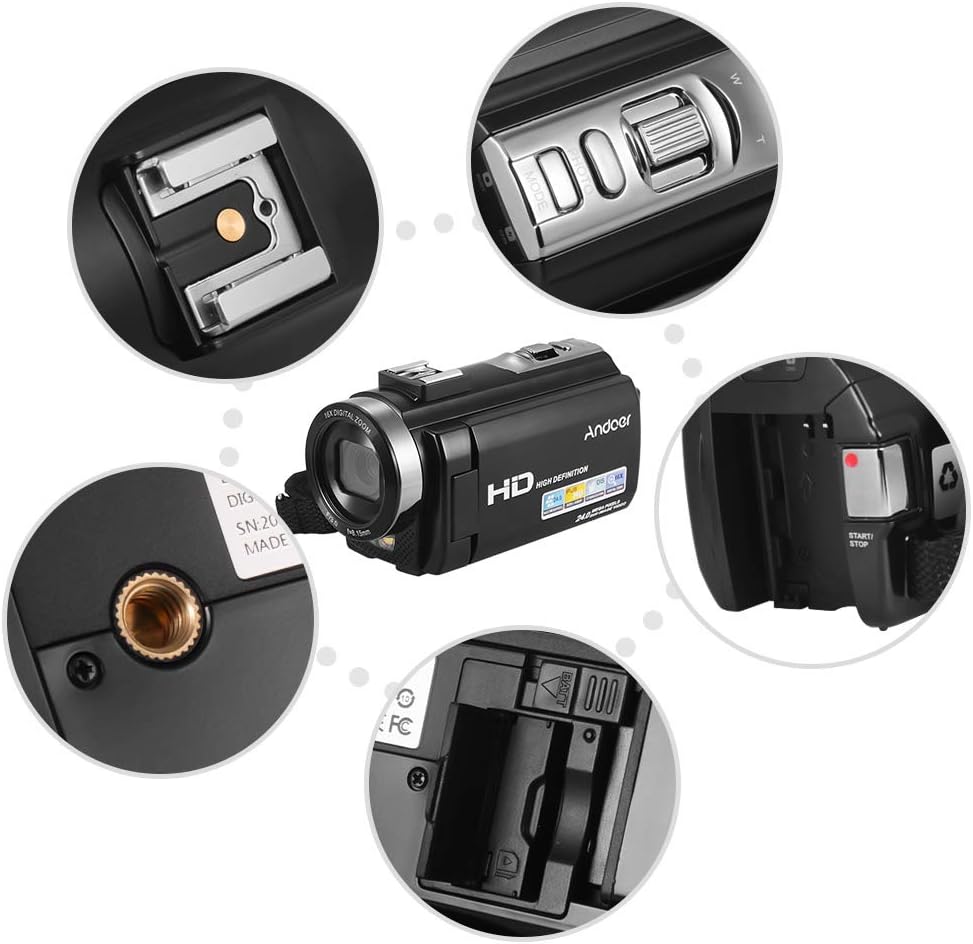
Obraz: Zbliżenie views of various camera components, including the SD card slot, hot shoe mount, and control buttons.
3. Attaching External Accessories
The camera features a hot shoe mount for connecting external accessories such as microphones or LED video lights (sold separately).
- Slide the accessory onto the hot shoe mount located on top of the camera.
- Secure the accessory if it has a locking mechanism.
- For external microphones, connect the audio cable to the camera's microphone input port.

Image: Illustration of the hot shoe mount on the Andoer HDV-201LM camera, showing how external microphones and LED lights can be attached.
Instrukcja obsługi
1. Włączanie/wyłączanie zasilania
- To power on, open the LCD screen or press the MOC przycisk.
- To power off, close the LCD screen or press and hold the MOC przycisk.
2. Nagrywanie filmów
The camera supports 1080P FULL HD video recording.
- Włącz kamerę.
- Ensure the camera is in video recording mode (usually indicated by a video camera icon on the screen). If not, press the TRYB przycisk, aby przełączyć.
- Naciśnij START/STOP Naciśnij przycisk, aby rozpocząć nagrywanie. Zaświeci się wskaźnik nagrywania.
- Naciśnij START/STOP ponownie, aby zatrzymać nagrywanie.
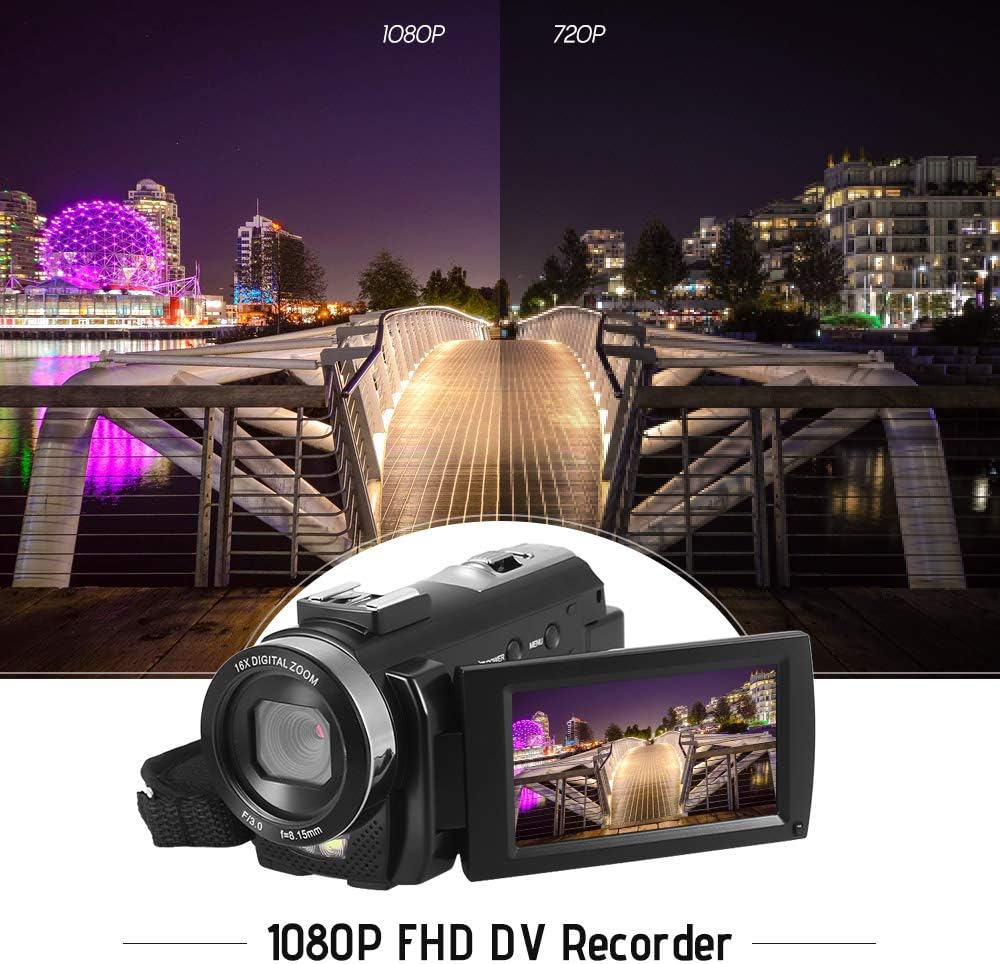
Image: Comparison of 1080P and 720P video quality, highlighting the 1080P FHD capability of the Andoer HDV-201LM camcorder.
3. Robienie zdjęć
The camera can capture still images up to 24MP (interpolation).
- Włącz kamerę.
- Naciśnij TRYB button to switch to photo mode (indicated by a camera icon).
- Skadruj ujęcie korzystając z ekranu LCD.
- Naciśnij ZDJĘCIE button (shutter button) to take a picture.
4. Korzystanie z ekranu LCD
The 3.0-inch TFT-LCD screen offers 270° rotation for flexible viewkąty.
- Rotate the screen to face forward for self-recording or to various angles for comfortable viewing.
- The screen displays recording status, battery level, mode, and other settings.

Image: The Andoer HDV-201LM camera with its rotatable LCD screen open, showing the camera's compact design.
5. Zoom cyfrowy
Aparat wyposażony jest w 16-krotny zoom cyfrowy.
- Użyj W (szeroki) I T (teleobiektyw) buttons, typically located near the top of the camera, to zoom in or out.
- Note: Digital zoom may reduce image quality compared to optical zoom.

Image: Demonstrates the 16X digital zoom capability of the Andoer HDV-201LM, showing a zoomed-in view of a subject.
6. Ustawienia menu
Access the menu to adjust various camera settings:
- Naciśnij MENU aby wejść do menu ustawień.
- Use the navigation buttons (up/down/left/right) to select options.
- Naciśnij OK przycisk, aby potwierdzić wybór.
- Naciskać MENU ponownie, aby wyjść.
Kluczowe ustawienia obejmują:
- Balans bieli: Auto, Daylight, Cloudy, Fluorescent, Tungsten.
- Tryb: Auto, Night, Portrait, Landscape, Backlight, Sport, Party, Beach, High Sensitivity.
- Narażenie: Adjust brightness from ±3.0EV.
- Samowyzwalacz: Off, 2s, 5s, 10s.
- Automatyczny wyłącznik: OFF, 1min, 3min, 5min.
- Inne funkcje: Face detection, smile capture, beauty face, anti-shake.

Image: A user holding and operating the Andoer HDV-201LM camera, demonstrating its portability and ease of use.
7. Podłączanie do komputera (USB)
You can connect the camera to a computer to transfer files.
- Upewnij się, że kamera jest włączona.
- Podłącz aparat do komputera za pomocą dostarczonego kabla USB.
- Aparat będzie widoczny na Twoim komputerze jako dysk wymienny.
- You can now access and transfer your photos and videos.
Supported Operating Systems: Windows XP/Vista/7/8/10.

Obraz: Zbliżenie view of the USB and TV output ports on the Andoer HDV-201LM camera, indicating connectivity options.
8. Connecting to a TV (AV Output)
View your recordings directly on a television using the AV cable.
- Connect one end of the AV cable to the camera's AV output port.
- Connect the other end to the AV input ports on your television (yellow for video, white/red for audio).
- Wybierz odpowiednie źródło sygnału wejściowego AV w telewizorze.
TV Output Standards: NTSC/PAL.
9. Korzystanie z pilota zdalnego sterowania
Dołączony pilot pozwala na wygodną obsługę na odległość.
- Ensure the remote control battery (1 x 3V CR2025) is installed correctly.
- Point the remote control towards the camera's IR receiver.
- Use the buttons on the remote to control recording, playback, zoom, and menu navigation.
Konserwacja
1. Czyszczenie aparatu
- Do czyszczenia korpusu aparatu należy używać miękkiej, suchej ściereczki.
- Do czyszczenia soczewek i ekranu LCD należy używać specjalnej ściereczki i płynu do czyszczenia soczewek. Unikać materiałów ściernych.
- Nie należy używać silnych detergentów ani rozpuszczalników.
2. Pielęgnacja baterii
- Baterie, które nie są używane, przechowuj w chłodnym i suchym miejscu.
- Aby przedłużyć żywotność baterii, należy unikać ich całkowitego rozładowywania.
- Jeżeli aparat nie będzie używany przez dłuższy czas, należy wyjąć baterię.
3. Przechowywanie
- Store the camera in its camera bag to protect it from dust and scratches.
- Trzymaj aparat z dala od ekstremalnych temperatur, wilgoci i bezpośredniego światła słonecznego.
Rozwiązywanie problemów
| Problem | Możliwa przyczyna | Rozwiązanie |
|---|---|---|
| Kamera się nie włącza. | Battery is dead or not inserted correctly. Insulating film on battery. | Charge the battery. Reinsert the battery correctly. Remove insulating film. |
| Nie można nagrywać filmów/robić zdjęć. | No SD card or SD card full/corrupted. Incorrect mode. | Insert a valid SD card. Delete files or format SD card. Switch to correct mode. |
| Słaba jakość obrazu/wideo. | Lens is dirty. Low light conditions. Digital zoom used excessively. | Clean the lens. Use LED fill light. Avoid excessive digital zoom. |
| Pilot nie działa. | Battery dead or incorrectly inserted. Obstruction between remote and camera. | Replace/reinsert remote battery. Ensure clear line of sight to IR receiver. |
| Kamera zawiesza się lub przestaje reagować. | Błąd oprogramowania. | Wyjmij baterię i włóż ją ponownie, aby zresetować kamerę. |
Specyfikacje
| Funkcja | Szczegół |
|---|---|
| Marka | Andoer |
| Numer modelu | HDV-201LM |
| Transduktor | 8MP CMOS Sensor, max. 24MP (interpolation) |
| Pamięć zewnętrzna | SD Card, max. 32G (Not included, Class 10+ recommended) |
| Obiektyw aparatu | Ff (F/3.0 f=8.15mm) |
| Ekran | 3.0 Inch TFT-LCD (16:9), 270° rotation |
| Format i rozdzielczość wideo | AVI, 1920*1080P FULL HD/30fps, 1280*720 HD/30fps, VGA 640*480/30fps, QVGA 320*240/30fps |
| Image Format & Resolution | JPG, 5600*4200 (24MP Interpolation) / 5200*3900 (20MP Interpolation) / 4608*3456 (16MP Interpolation) / 4000*3000 (12MP Interpolation) / 3648*2736 (10MP Interpolation) / 3648*2048 HD (7M-Wide Interpolation) / 2592*1944 (5MP) / 2048*1536 (3MP) / 1920*1080 HD (2M-Wide) / 640*480 VGA |
| Balans bieli | Auto/ Światło dzienne/ Zachmurzenie/ Fluorescencyjne/ Żarowe |
| Tryb | Auto/Night/Portrait/Landscape/Backlight/Sport/Party/Beach/High Sensitivity |
| Narażenie | ± 3.0 EV |
| Samowyzwalacz | Wyłączony, 2s, 5s, 10s |
| Automatyczny wyłącznik | OFF/1min/ 3min/ 5min |
| Port USB | USB2.0 |
| Wyjście TV | NTSC / PAL |
| Wsparcie systemu operacyjnego | Windows XP/Vista/7/8/10 |
| Zasilacz kamery | 1 * Battery 3.7V 1500mAh (included) |
| Bateria do pilota zdalnego sterowania | 1 * 3V CR2025 Battery |
| Rozmiar aparatu | 13.5 * 5.5 * 6.5 cm / 5.3 * 2.2 * 2.6 cala |
| Waga aparatu | 273g / 9.6oz (With battery) |
Gwarancja i wsparcie
This product comes with standard manufacturer support. For extended coverage, consider the following options:
- Plan rozszerzonej gwarancji na 1 rok
- 2 Years Extended Warranty Plan
For technical support or warranty claims, please refer to the contact information provided with your purchase documentation or visit the official Andoer webstrona.