
TOSHIBA 43LF711U20
TOSHIBA 43LF711U20 43-calowy telewizor Smart 4K UHD z Dolby Vision — instrukcja obsługi Fire TV
Model: 43LF711U20
Wstęp
Welcome to the user manual for your new TOSHIBA 43LF711U20 43-inch Smart 4K UHD with Dolby Vision TV. This television features the Fire TV experience built-in, offering a seamless integration of live over-the-air TV and your favorite streaming content on the home screen. With true-to-life 4K Ultra HD picture quality and access to a vast library of movies and TV shows, Toshiba delivers a superior TV experience. The included Voice Remote with Alexa allows for easy navigation, app launching, title searching, music playback, input switching, and smart home device control using voice commands. This TV is designed for smart and simple operation; just plug it in, connect to Wi-Fi, and enjoy. Automatic over-the-air software updates ensure your TV continuously gets smarter with new Alexa skills and features.
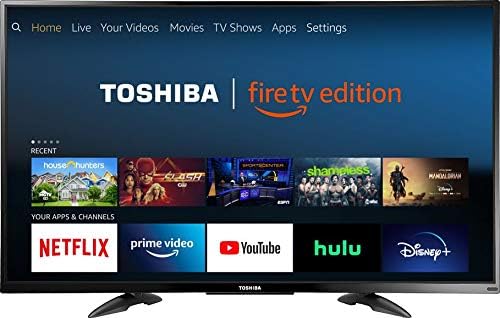
Obraz: Przód view of the TOSHIBA 43LF711U20 43-inch Smart 4K UHD with Dolby Vision TV, displaying the Fire TV interface with various streaming app icons.
Co jest w pudełku
Sprawdź, czy w przesyłce znajdują się wszystkie poniższe elementy:
- TOSHIBA 43LF711U20 43-inch Smart 4K UHD TV
- Voice Remote with Alexa (2 AAA batteries included)
- Stojak pod telewizor (2 sztuki)
- Przewód zasilający
- Quick Setup Guide (this manual)
Organizować coś
1. Montaż stojaka pod telewizor
- Ostrożnie połóż telewizor ekranem do dołu na miękkiej i czystej powierzchni, aby zapobiec zarysowaniom.
- Dopasuj każdy element stojaka do odpowiedniego otworu na spodzie telewizora.
- Secure the stands using the screws provided in the package. Ensure they are firmly attached.

Obraz: kątowy view of the TOSHIBA 43LF711U20 TV, showing the attached stand.
2. Podłączanie kabli
- Moc: Connect the power cord to the AC IN port on the back of the TV and then to a wall outlet.
- Urządzenia HDMI: For external devices like Blu-ray players, game consoles, or cable boxes, connect an HDMI cable from the device to any of the HDMI IN ports on the TV.
- Antena/kabel: To watch live over-the-air TV, connect an HD antenna (sold separately) to the ANT/CABLE IN port.
- Sieć: For a wired internet connection, connect an Ethernet cable from your router to the LAN port. Alternatively, you will connect to Wi-Fi during initial setup.

Image: Close-up of the rear input panel of the TOSHIBA 43LF711U20 TV, showing LAN, ANT/CABLE IN, and AV IN ports.
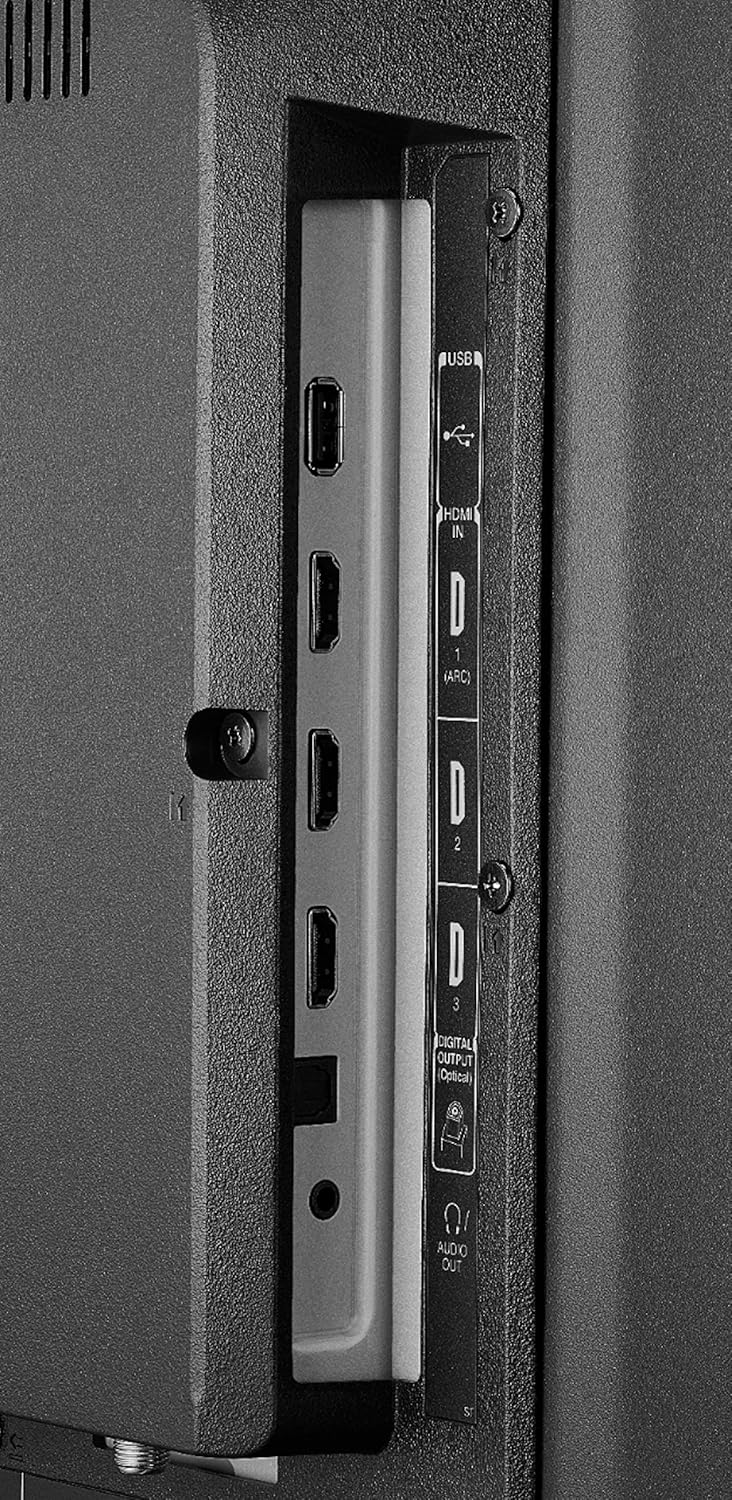
Image: Close-up of the side input panel of the TOSHIBA 43LF711U20 TV, showing USB, HDMI, Digital Audio Out, and Audio Out ports.
3. Initial Power-On and Fire TV Setup
- Podłącz telewizor do gniazdka elektrycznego.
- Naciśnij przycisk zasilania na pilocie.
- Aby dokończyć konfigurację początkową, postępuj zgodnie z instrukcjami wyświetlanymi na ekranie. Konfiguracja obejmuje:
- Wybór języka.
- Connecting to your Wi-Fi network (if not using a wired connection).
- Signing in with your Amazon account or creating a new one.
- Scanning for channels (if an antenna is connected).
Obsługa telewizora
Podstawowe funkcje telewizora
- Włączanie/wyłączanie: Naciśnij Moc przycisk na pilocie.
- Wybór wejścia: Naciśnij Wejście button to cycle through connected devices (HDMI 1, HDMI 2, TV, etc.).
- Regulacja głośności: Użyj Zwiększanie głośności (+) I Ściszanie (-) pikolak.
- Niemy: Naciśnij Niemy przycisk, aby wyciszyć dźwięk.
Korzystanie z interfejsu Fire TV
The Fire TV home screen provides easy access to live TV, streaming apps, and connected devices. Use the navigation ring on your remote to move through menus and select items.
- Ekran główny: Naciśnij Dom button to return to the main Fire TV interface.
- Apps & Channels: Navigate to the 'Your Apps & Channels' row to find and launch installed applications like Netflix, Prime Video, Hulu, and Disney+.
- Telewizja na żywo: If an antenna is connected, access live over-the-air channels directly from the home screen or the Live TV menu.
Pilot głosowy z Alexą
Your TV comes with a Voice Remote featuring Alexa, allowing you to control your TV and smart home devices with your voice.

Image: The Voice Remote with Alexa for the TOSHIBA 43LF711U20 TV, showing buttons for power, voice control, navigation, volume, and dedicated app buttons for Prime Video, Netflix, and HBO.
- Activate Alexa: Naciśnij i przytrzymaj Mikrofon przycisk na pilocie.
- Polecenia głosowe: While holding the button, speak clearly into the remote. Exampobejmują:
- „Alexa, otwórz Netflixa”.
- "Alexa, search for action movies."
- „Alexa, przełącz na HDMI 2”.
- "Alexa, wyłącz telewizor."
- Dedykowane przyciski aplikacji: Use the dedicated buttons for Prime Video, Netflix, and HBO to quickly launch these popular streaming services.
Konserwacja
Aby zapewnić długowieczność i optymalną wydajność telewizora, należy przestrzegać poniższych wskazówek dotyczących konserwacji:
- Czyszczenie ekranu: Delikatnie przetrzyj ekran miękką, suchą, niepozostawiającą włókien ściereczką. W przypadku uporczywych zabrudzeń delikatnie przetrzyj.ampPrzetrzyj ściereczkę wodą lub specjalnym środkiem czyszczącym przeznaczonym do ekranów (nigdy nie spryskuj bezpośrednio ekranu).
- Czyszczenie szafki: Do przecierania obudowy telewizora używaj miękkiej, suchej ściereczki. Unikaj stosowania środków czyszczących o działaniu ściernym, wosków i rozpuszczalników.
- Wentylacja: Ensure the ventilation openings on the back of the TV are not blocked. Allow adequate space around the TV for proper airflow.
- Przewód zasilający: Regularnie sprawdzaj przewód zasilający pod kątem uszkodzeń. W przypadku uszkodzenia, zaprzestań użytkowania i skontaktuj się z obsługą klienta.
Rozwiązywanie problemów
Jeśli masz problemy z telewizorem, zapoznaj się z poniższymi typowymi problemami i ich rozwiązaniami:
| Problem | Możliwe rozwiązanie |
|---|---|
| Brak zasilania | Upewnij się, że przewód zasilający jest prawidłowo podłączony zarówno do telewizora, jak i do sprawnego gniazdka elektrycznego. Spróbuj użyć innego gniazdka. |
| Brak obrazu, ale dźwięk jest | Sprawdź źródło sygnału wejściowego. Naciśnij Wejście button on the remote to select the correct source (e.g., HDMI 1, TV). |
| Brak dźwięku, ale obraz jest | Check the volume level and ensure the TV is not muted. Check audio settings for external devices. |
| Pilot nie działa | Replace the batteries in the remote. Ensure there are no obstructions between the remote and the TV's IR sensor. Re-pair the remote if necessary (refer to Fire TV remote pairing instructions). |
| Nie można połączyć się z siecią Wi-Fi | Ensure your Wi-Fi router is on and working. Re-enter the Wi-Fi password carefully. Try restarting your router and TV. |
| Problemy z jakością obrazu (np. rozmazany, zniekształcony) | Check the resolution settings of your connected device. Ensure cables are securely connected. For antenna, try repositioning the antenna or rescanning channels. |
Specyfikacje
| Funkcja | Szczegół |
|---|---|
| Nazwa marki | TOSHIBA |
| Numer modelu przedmiotu | 43LF711U20 |
| Rozmiar ekranu | 43 cali |
| Technologia wyświetlania | PROWADZONY |
| Rezolucja | 4K (3840x2160) |
| Częstotliwość odświeżania | 60 Hz |
| Proporcje obrazu | 16:9 |
| Wymiary produktu | 9.33 x 38.11 x 23.86 cala |
| Waga przedmiotu | 18.3 funta |
| Nazwa koloru | Czarny |
| Typ głośnika | Wbudowany |
| Cotage | 8 watów |
| Wymagane baterie | 2 baterie AAA (w zestawie do pilota) |
| Technologia łączności | HDMI, NFC (for certain features) |
| Obsługiwane usługi internetowe | Netflix, Pandora, Amazon Instant Video, Hulu Plus (and more via Fire TV) |
Gwarancja i wsparcie
For detailed warranty information, please refer to the warranty card included with your product or visit the official TOSHIBA support website. If you require technical assistance or have questions not covered in this manual, please contact TOSHIBA customer support. Keep your purchase receipt and product serial number handy when contacting support.