
1. Wprowadzenie
This manual provides essential instructions for the safe and efficient operation of your Ishida Digital Counting Scale CX-α 6000. Please read this manual thoroughly before using the scale and keep it for future reference. This scale is designed for precise weighing and accurate piece counting in various applications, with a maximum capacity of 6kg.
2. Informacje dotyczące bezpieczeństwa
To ensure safe operation and prevent damage to the device or injury to users, observe the following precautions:
- Zasilanie: Use only the specified AC adapter. Ensure the power outlet matches the adapter's voltagi wymagania.
- Umieszczenie: Place the scale on a stable, level, and vibration-free surface. Avoid direct sunlight, extreme temperatures, high humidity, and strong air currents.
- Środowisko: Do not operate the scale in environments with explosive gases or flammable materials. Keep liquids away from the scale to prevent electrical shock or damage.
- Obsługiwanie: Do not drop, strike, or subject the scale to excessive force. Do not attempt to disassemble or modify the scale; this will void the warranty and may cause malfunction.
- Czyszczenie: Przed czyszczeniem odłącz zasilanie. Użyj miękkiej, miękkiej szczoteczki.amp ściereczka. Nie należy używać środków czyszczących o właściwościach ściernych ani rozpuszczalników.
3. Zawartość opakowania
Sprawdź, czy po rozpakowaniu wszystkie elementy są obecne i nieuszkodzone:
- Ishida Digital Counting Scale CX-α 6000 Unit
- Szalka do ważenia
- Zasilacz sieciowy
- Instrukcja obsługi (ten dokument)
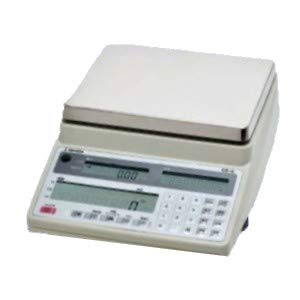
Rysunek 1: Ishida Digital Counting Scale CX-α 6000. This image shows the complete scale unit with its weighing pan and control panel, featuring dual displays for weight and count, and a numeric keypad.
4. Konfiguracja
- Rozpakowywanie: Ostrożnie wyjmij wagę i wszystkie akcesoria z opakowania. Zachowaj opakowanie do transportu lub przechowywania w przyszłości.
- Umieszczenie: Place the scale on a firm, level, and stable surface. Ensure there are no vibrations, drafts, or rapid temperature changes in the vicinity that could affect measurement accuracy.
- Install Weighing Pan: Gently place the weighing pan onto the scale's platform. Ensure it is seated correctly and securely.
- Podłączenie zasilania: Connect the AC adapter to the power input port on the scale, then plug the adapter into a suitable electrical outlet.
- Pierwsze włączenie: Naciśnij MOC button to turn on the scale. The display will perform a self-test and then show "0.000" or similar, indicating it is ready for use.
- Regulacja poziomu: Check the bubble level indicator (if present, typically on the front or side of the scale) and adjust the scale's feet until the bubble is centered. This ensures accurate measurements.
5. Instrukcja obsługi
5.1. Ważenie podstawowe
- Włączanie: Naciśnij MOC button. Wait for the display to stabilize at "0.000".
- Umieść przedmiot: Ostrożnie umieść przedmiot, który chcesz zważyć, na środku szalki wagi.
- Przeczytaj wyświetlacz: The weight will be shown on the main display. Wait for the stability indicator (if present) to confirm a stable reading.
- Funkcja tary: If using a container, place the empty container on the pan and press the TARA button. The display will reset to "0.000". Now, add the items to be weighed into the container; only the net weight of the items will be displayed.
5.2. Funkcja liczenia
The counting function allows for rapid and accurate counting of uniform items by determining their average unit weight.
- Enter Counting Mode: Naciśnij TRYB or LICZYĆ button to switch to counting mode. The display may show "PCS" or a similar indicator.
- Zestaw SampIlość: Use the numeric keypad to enter the number of sample pieces you will place on the pan (e.g., 10, 20, 50). Press the WCHODZIĆ or USTAWIĆ przycisk aby potwierdzić.
- Miejsce Sampna: Carefully place the exact number of sample pieces (e.g., 10 pieces) onto the center of the weighing pan.
- Confirm Unit Weight: The scale will calculate and display the average unit weight. Press WCHODZIĆ or KALKULATOR to confirm this unit weight. The display will then show the sampilość (np. „10 SZT.”).
- Add Items for Counting: Usuń sample pieces. Now, place the bulk quantity of items to be counted onto the pan. The scale will display the total count of the items.
- Wyczyść liczbę: To start a new count, remove all items and press the ZERO or JASNE przycisk.
6. Konserwacja
- Czyszczenie: Regularly clean the scale's exterior and weighing pan with a soft, slightly damp cloth. Do not use harsh detergents, solvents, or abrasive materials, as these can damage the finish or internal components. Ensure no liquid enters the scale's housing.
- Składowanie: When not in use for extended periods, store the scale in a dry, stable environment, away from direct sunlight and extreme temperatures.
- Kalibrowanie: For continued accuracy, periodic calibration may be required. Refer to the detailed calibration section in the full technical manual or contact authorized service personnel for calibration procedures.
- Kontrola: Periodically inspect the power cord and adapter for any signs of damage. If damaged, discontinue use and replace with an authorized Ishida part.
7. Rozwiązywanie Problemów
If you encounter issues with your scale, consult the table below before contacting service.
| Problem | Możliwa przyczyna | Rozwiązanie |
|---|---|---|
| Waga nie włącza się. | No power, faulty AC adapter, or power outlet issue. | Check AC adapter connection. Ensure power outlet is functional. Try a different outlet. |
| Niestabilne odczyty. | Unstable surface, drafts, vibrations, or temperature fluctuations. | Place scale on a firm, level surface. Avoid drafts. Ensure stable environment. Re-level the scale. |
| Wyświetla się komunikat „Err” lub „OL”. | Przeciążenie lub błąd wewnętrzny. | Remove excess weight from the pan. Power cycle the scale. If error persists, contact service. |
| Niedokładne liczenie. | Niepoprawne sample quantity, non-uniform items, or unit weight not properly set. | Upewnij się, żeample quantity matches the number entered. Use uniform items. Re-establish unit weight with a precise sample. |
If the problem persists after attempting these solutions, please contact Ishida customer support or an authorized service center.
8. Specyfikacje
- Model: CX-α 6000
- Marka: Ishida
- Maksymalna pojemność: 6 kilogramów
- Zasilanie: Zasilacz sieciowy (objętość określona)tage/current details typically on adapter label)
- Temperatura pracy: 0°C do 40°C (32°F do 104°F) (Assumed typical range for scales, if not specified)
- Wyświetlacz: Dual LCD (Weight and Count)
9. Gwarancja i wsparcie
Gwarancja: This Ishida Digital Counting Scale CX-α 6000 is covered by a manufacturer's warranty. Please refer to the warranty card included with your purchase or contact your local Ishida distributor for specific warranty terms and conditions. Keep your proof of purchase for warranty claims.
Obsługa klienta: For technical assistance, service, or spare parts, please contact your authorized Ishida dealer or visit the official Ishida website for contact information in your region. When contacting support, please have your model number (CX-α 6000) and serial number (if applicable) ready.