
Wstęp
The Combrite GM205 Wired USB Gaming Mouse is designed to enhance your computing and gaming experience with its advanced features and ergonomic design. This manual provides comprehensive instructions for setting up, operating, customizing, and maintaining your mouse to ensure optimal performance and longevity.
Key features include 7 programmable buttons, adjustable DPI settings up to 4800, vibrant RGB LED lighting, and a comfortable optical sensor for precise tracking. The included Combrite C-Mouse software allows for extensive customization to suit individual user preferences, whether for gaming or general office tasks.
Cechy produktu
- 7 programowalnych przycisków: Customize each button for specific functions using the Combrite C-Mouse software.
- Regulowane DPI: Optical sensor with adjustable DPI from 200 to 4800, ideal for various applications including FPS and MOBA games. Default DPI settings are 800-1200-1600-2400.
- Chroma RGB Backlight: Features rainbow LED lighting with 7 different color modes, offering up to 16.8 million customizable colors for a personalized aesthetic.
- Ergonomiczna konstrukcja: Comfortable rubberized coating and scroll wheel, designed for extended use without discomfort.
- Wysokoprecyzyjny czujnik optyczny: Ensures accurate and responsive tracking for superior performance.
- Plug and Play USB Connectivity: Easy setup with a 1.5-meter braided USB cable.
- Wbudowana pamięć: Onboard memory to save custom profiles.
- Trwałe przełączniki: Switches rated for 20,000,000 clicks lifespan.
- PTFE Mouse Feet: For smooth gliding on various surfaces.
Instrukcje konfiguracji
- Podłącz mysz: Plug the USB connector of the Combrite GM205 mouse into an available USB port on your computer. The mouse is plug-and-play compatible and should be recognized automatically by your operating system (Windows 7/8.1/10, Mac OS, Linux).
- Zainstaluj oprogramowanie (opcjonalne, ale zalecane): For full customization of buttons, DPI, and RGB lighting, download the Combrite C-Mouse software from the official Combrite webwitrynę. Postępuj zgodnie z instrukcjami wyświetlanymi na ekranie, aby dokończyć instalację.
- Test wstępny: Once connected, move the mouse and click the left and right buttons to ensure basic functionality.

Image: The Combrite GM205 mouse, ready for connection to a computer via its braided USB cable.
Instrukcja obsługi
Podstawowa obsługa
- Lewy przycisk myszy: Działanie podstawowe.
- Kliknij prawym przyciskiem myszy: Akcja drugorzędna, zwykle otwiera menu kontekstowe.
- Kółko przewijania: Scroll up/down for navigation. Pressing the scroll wheel acts as a middle click.
Regulacja DPI
The mouse features a dedicated DPI button (typically located behind the scroll wheel) to cycle through preset DPI levels. By default, these are 800, 1200, 1600, and 2400 DPI. The LED lighting may change color to indicate the current DPI setting.
Tryby oświetlenia RGB
The mouse features dynamic RGB lighting. The lighting modes can be adjusted through the Combrite C-Mouse software. Options include rainbow breathing style and various single-color options.

Image: Multiple Combrite GM205 mice showcasing different RGB LED color options, including a rainbow breathing effect.
Customization with Combrite C-Mouse Software
The Combrite C-Mouse software unlocks the full potential of your GM205 mouse, allowing you to personalize its functions to your exact needs.
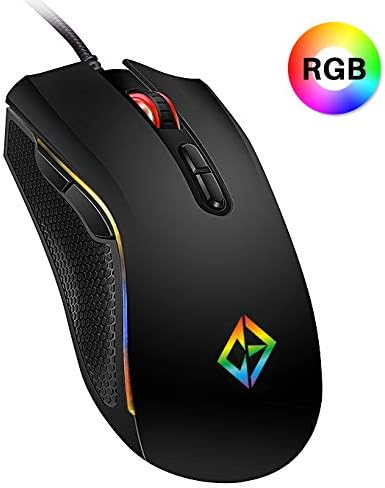
Image: A screenshot of the Combrite C-Mouse Software interface, showing options for programming 7 buttons and adjusting DPI settings.
Programowanie przycisków
- Open the Combrite C-Mouse software.
- Select the button you wish to program from the graphical interface.
- Choose from a variety of functions, including single key presses, macro commands, multimedia controls, or launching applications.
- Save your changes to the mouse's onboard memory.
Ustawienia DPI
- Within the software, you can precisely set custom DPI levels ranging from 200 to 4800.
- Configure multiple DPI stages and assign them to the DPI cycle button for quick switching during use.
Personalizacja oświetlenia RGB
- Access the lighting settings in the software to choose from various effects, colors, and brightness levels.
- Personalize the mouse's appearance to match your setup or mood.
Konserwacja
- Czyszczenie: Do przecierania powierzchni myszy użyj miękkiej, suchej ściereczki. W przypadku uporczywych zabrudzeń delikatnie przetrzyjampPrzetrzyj szmatkę wodą. Unikaj stosowania silnych środków chemicznych i materiałów ściernych.
- Czyszczenie czujnika: Czasami delikatnie przetrzyj wacikiem.ampened with rubbing alcohol to gently clean the optical sensor on the underside of the mouse. Ensure no liquid enters the mouse.
- Pielęgnacja kabli: Aby zapobiec uszkodzeniom, należy unikać ostrego zginania i nadmiernego ciągnięcia plecionego kabla USB.
Rozwiązywanie problemów
- Mysz nie odpowiada:
- Sprawdź, czy kabel USB jest prawidłowo podłączony do działającego portu USB.
- Spróbuj podłączyć mysz do innego portu USB lub innego komputera, aby wykluczyć problemy z portem lub systemem.
- Uruchom ponownie komputer.
- Niedokładne śledzenie:
- Wyczyść czujnik optyczny znajdujący się na spodzie myszy.
- Ensure you are using the mouse on a suitable surface (e.g., a mouse pad). Highly reflective or uneven surfaces can affect tracking.
- Adjust the DPI settings using the DPI button or the C-Mouse software.
- Buttons Not Working/Programmable Functions Not Activating:
- Verify that the Combrite C-Mouse software is installed and that your custom profiles są załadowane.
- Ensure the software is running in the background if required for specific functions.
- Check for any software updates for the C-Mouse application.
- Oświetlenie RGB nie działa/jest nieprawidłowe:
- Check the lighting settings within the Combrite C-Mouse software.
- Upewnij się, że mysz otrzymuje odpowiednie zasilanie z portu USB.
Specyfikacje
| Marka | Combrite |
| Numer modelu | GM205 |
| Technologia łączności | Przewodowy USB |
| Technologia wykrywania ruchu | Optyczny |
| Zakres DPI | 200 - 4800 DPI (regulowana) |
| Liczba przycisków | 7 (Programowalne) |
| Oświetlenie | Chroma RGB LED (Rainbow, 7 modes, 16.8 million colors) |
| Długość kabla | 1.5 meters (Braided) |
| Zmień żywotność | 20,000,000 kliknięć |
| Wymiary produktu | Wymiary 12.7 x 7.01 x 0.1 cm |
| Waga | 202 gramów |
| Kompatybilne systemy operacyjne | Windows 10, Windows 7, Windows 8.1, Mac OS, Linux |
| Zalecane zastosowanie | Hazard |
Gwarancja i wsparcie
For information regarding warranty coverage and technical support for your Combrite GM205 Gaming Mouse, please refer to the warranty card included with your product or visit the official Combrite webStrona. ten website typically provides the most up-to-date information on product support, driver downloads, and contact details for customer service.
Ensure you have your product model number (GM205) and proof of purchase available when contacting support.