
2BOOM BX390
Instrukcja obsługi bezprzewodowego głośnika stereo Bluetooth 2BOOM BX390 Bass King
Model: BX390
1. Wprowadzenie
Dziękujemy za zakupasing the 2BOOM BX390 Bass King Wireless Bluetooth Boombox Stereo Speaker. This manual provides essential information for setting up, operating, and maintaining your speaker to ensure optimal performance and longevity. Please read this manual thoroughly before using the product.

Image 1.1: The 2BOOM BX390 Bass King Wireless Bluetooth Boombox Stereo Speaker.
This image shows the 2BOOM BX390 Bass King speaker in blue, featuring a cylindrical design with a handle/strap attached. The front panel displays the control interface and speaker grille.
2. Zawartość opakowania
Proszę sprawdzić, czy w paczce znajdują się następujące elementy:
- 1 x 2BOOM BX390 Bass King Speaker
- Kabel dodatkowy 1 x 3.5mm
- 1 x kabel ładujący USB
- 1 x Instrukcja obsługi (ten dokument)
- 1 x Attachable Shoulder Strap

Image 2.1: The 2BOOM BX390 speaker shown with its detachable shoulder strap, 3.5mm Aux cable, and USB charging cable.
This image displays the blue 2BOOM BX390 speaker from an angled perspective, highlighting the included shoulder strap attached to its side rings. The USB charging cable and 3.5mm Aux cable are visible in the foreground.
3. Funkcje produktu
- Powerful Bass Sound: Equipped with 4-inch subwoofers and vibrating disks for crisp, clear, loud sound, booming low tones, and dynamic sound effects.
- Łączność Bluetooth: Connects wirelessly to smartphones, tablets, and other Bluetooth-enabled devices up to 33 ft.
- Wbudowany mikrofon: Supports hands-free calls.
- Trwała i przenośna konstrukcja: Features a rugged, rubberized exterior and an attachable strap for easy carrying.
- Wiele opcji wprowadzania: Includes FM Radio, Aux-in Line, USB port, and SD Card slot.
- Zintegrowany panel sterowania: Direct control over volume, bass, and sound equalizer.

Image 3.1: The 2BOOM BX390 speaker with visual callouts for Deep Digital Bass, FM Radio, Long-Lasting Battery, and Straps Included.
This image shows the blue 2BOOM BX390 speaker from the front, with graphic overlays pointing out its key features: deep digital bass, FM radio capability, long-lasting battery, and the inclusion of straps for portability.
4. Elementy sterujące i porty
Familiarize yourself with the control panel and input ports of your BX390 speaker:

Image 4.1: Detailed diagram of the 2BOOM BX390 control panel and input ports.
Na tym zdjęciu widać zbliżenie view of the speaker's front panel, clearly labeling each button, port, and indicator. Labels include USB, DC 5V (charging), AUX, Previous, Play/Pause, Next, Mode, EQ, SD card slot, LED display, Power ON/OFF switch, Volume controls, and Bass controls.
- Port USB: Do odtwarzania z dysku USB.
- DC 5V (Charging Port): Podłącz kabel ładujący USB, aby naładować głośnik.
- Wejście AUX: 3.5mm jack for connecting external audio devices via an Aux cable.
- Previous / Volume -: Krótkie naciśnięcie powoduje przejście do poprzedniego utworu, długie naciśnięcie zmniejsza głośność.
- Odtwórz/Pauza: Press to play or pause audio. In FM mode, short press to auto-scan.
- Next / Volume +: Naciśnij krótko, aby przejść do następnego utworu, naciśnij długo, aby zwiększyć głośność.
- Tryb: Press to switch between Bluetooth, FM Radio, USB, SD Card, and AUX modes.
- EQ (korektor): Naciśnij, aby przełączać się między różnymi ustawieniami korektora.
- Gniazdo karty SD: Włóż kartę SD, aby odtwarzać dźwięk.
- Wyświetlacz LED: Pokazuje aktualny tryb, numer utworu lub częstotliwość FM.
- Włącznik/wyłącznik zasilania: Slide to turn the speaker on or off.
- Głośność +/-: Przyciski służące do zwiększania lub zmniejszania ogólnej głośności.
- Bas +/-: Buttons to increase or decrease the bass level.
5. Konfiguracja
5.1 Ładowanie głośnika
Before first use, fully charge the speaker. Connect the supplied USB charging cable to the DC 5V port on the speaker and the other end to a USB power adapter (not included) or a computer's USB port. The LED display may indicate charging status.
- Czas ładowania może się różnić.
- Aby wydłużyć żywotność akumulatora, po pełnym naładowaniu należy odłączyć ładowarkę.
5.2 Włączanie/wyłączanie
Aby włączyć głośnik ON, slide the Power ON/OFF switch to the 'ON' position. You will hear an audible prompt, and the LED display will light up.
Aby włączyć głośnik WYŁĄCZONY, slide the Power ON/OFF switch to the 'OFF' position.
6. Instrukcja obsługi
6.1 Tryb Bluetooth
The speaker automatically enters Bluetooth pairing mode when powered on if no other input source is connected, or after pressing the TRYB button until "Bluetooth" is indicated.
- Upewnij się, że głośnik jest włączony.
- Na urządzeniu z włączoną funkcją Bluetooth (smartfonie, tablecie itp.) włącz Bluetooth i wyszukaj dostępne urządzenia.
- Wybierać "2BOOM BX390" lub podobne z listy.
- Once paired, the speaker will confirm with an audible prompt.
- Teraz możesz odtwarzać dźwięk ze swojego urządzenia przez głośnik.
Notatka: The speaker will automatically reconnect to the last paired device if it's within range and Bluetooth is enabled.

Image 6.1: The 2BOOM BX390 speaker highlighting its Bluetooth connectivity.
This image shows the blue 2BOOM BX390 speaker with a prominent "Bluetooth" logo and "PORTABLE WIRELESS BASS KING SPEAKER" text, emphasizing its wireless audio capabilities.
Tryb radia FM 6.2
To switch to FM Radio mode, press the TRYB button until "FM" or the radio frequency is displayed.
- W trybie FM naciśnij krótko Odtwórz/Pauza button to automatically scan and save available FM stations. The speaker will cycle through frequencies and store them.
- Użyj Poprzedni I Następny przyciski umożliwiające nawigację pomiędzy zapisanymi stacjami.
- For better reception, extend the antenna (if applicable, or reposition the speaker).
6.3 Tryb USB/karty SD
The speaker supports audio playback from USB flash drives and SD cards.
- Włóż dysk flash USB do Port USB lub kartę SD do Gniazdo karty SD.
- Głośnik automatycznie przełączy się na odpowiedni tryb (USB lub SD) i rozpocznie odtwarzanie dźwięku files. Jeśli nie, naciśnij TRYB przycisk, aby wybrać.
- Użyj Poprzedni, Odtwórz/Pauza, I Następny przyciski do sterowania odtwarzaniem.
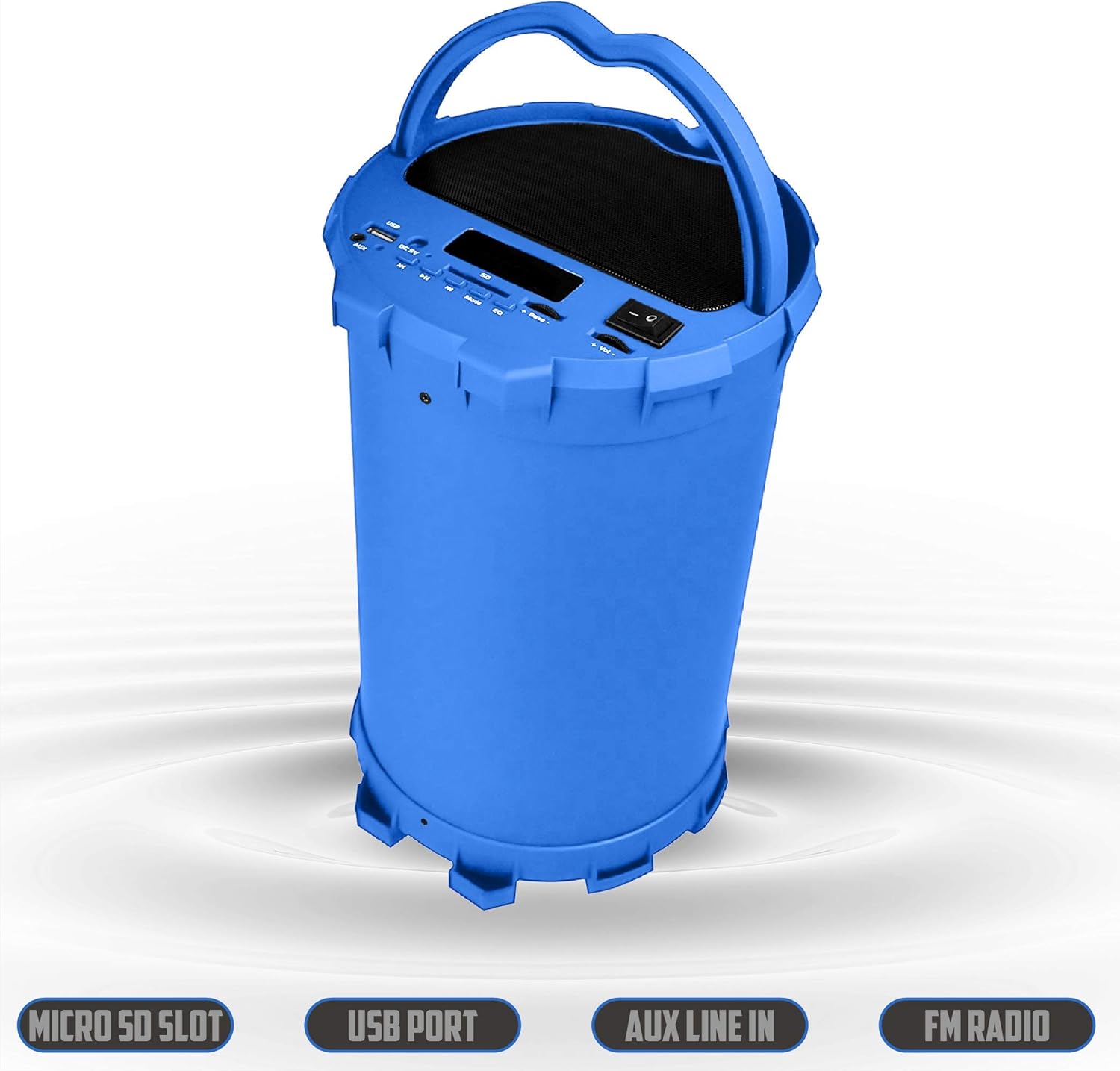
Image 6.2: The 2BOOM BX390 speaker shown upright, emphasizing the Micro SD Slot, USB Port, Aux Line In, and FM Radio capabilities.
This image displays the blue 2BOOM BX390 speaker in an upright position, with graphic overlays highlighting the Micro SD Slot, USB Port, Aux Line In, and FM Radio features on its control panel.
6.4 Tryb wejścia AUX
Connect external audio devices (e.g., MP3 players, computers) using the supplied 3.5mm Aux cable.
- Connect one end of the 3.5mm Aux cable to the Wejście AUX port na głośniku.
- Podłącz drugi koniec do gniazda wyjściowego audio w urządzeniu zewnętrznym.
- Głośnik automatycznie przełączy się w tryb AUX. W przeciwnym razie naciśnij przycisk TRYB przycisk, aby wybrać.
- Steruj odtwarzaniem z urządzenia zewnętrznego.
6.5 Adjusting Volume, Bass, and Equalizer
- Tom: Użyj Objętość +/- buttons (long press Previous/Next) to increase or decrease the overall volume.
- Bas: Użyj Bas +/- buttons to adjust the bass level to your preference.
- Korektor (EQ): Naciśnij EQ button to cycle through various preset equalizer modes (e.g., Pop, Rock, Jazz, Classical, Normal) to optimize sound for different music genres.
7. Konserwacja
- Czyszczenie: Do czyszczenia obudowy głośnika należy używać miękkiej, suchej ściereczki. Nie należy używać środków czyszczących o właściwościach ściernych ani rozpuszczalników.
- Składowanie: Przechowuj głośnik w chłodnym, suchym miejscu, z dala od bezpośredniego światła słonecznego i ekstremalnych temperatur, jeśli nie będziesz go używać przez dłuższy czas.
- Pielęgnacja baterii: Aby przedłużyć żywotność baterii, unikaj częstego całkowitego rozładowywania baterii. Ładuj głośnik regularnie, nawet jeśli nie jest używany.
- Wodoodporność: Ten głośnik nie jest wodoodporny. Unikaj narażenia na działanie wody i nadmiernej wilgoci.
8. Rozwiązywanie Problemów
| Problem | Możliwa przyczyna | Rozwiązanie |
|---|---|---|
| Brak zasilania | Bateria jest słaba lub rozładowana. | Naładuj głośnik w pełni, korzystając z dołączonego kabla USB. |
| Brak dźwięku | Głośność jest zbyt niska; wybrano niewłaściwy tryb; urządzenie nie jest prawidłowo podłączone. | Zwiększ głośność głośnika i podłączonego urządzenia. Naciśnij TRYB to select correct input. Reconnect Bluetooth or Aux cable. |
| Parowanie Bluetooth nie powiodło się | Głośnik nie jest w trybie parowania; urządzenie jest za daleko; występują zakłócenia. | Ensure speaker is in Bluetooth mode. Move device closer to speaker. Turn off other Bluetooth devices. Forget "2BOOM BX390" on your device and re-pair. |
| Słaby odbiór FM | Weak signal; speaker position. | Reposition the speaker. Try auto-scanning again. |
| Karta USB/SD nie jest odtwarzana | Nieobsługiwane file format; karta/napęd nieprawidłowo włożona; uszkodzona files. | Zapewnić files are in a supported format (e.g., MP3). Reinsert the USB drive/SD card. Try a different drive/card. |
9. Specyfikacje
| Funkcja | Szczegół |
|---|---|
| Marka | 2BOOM |
| Model | BX390 Bass King |
| Technologia łączności | Pomocniczy, Bluetooth, USB |
| Typ głośnika | Stereofoniczny |
| Kompatybilne urządzenia | Laptop, smartfon, tablet |
| Subwoofery | 4-inch (Quantity not specified, but implied by "subwoofers" and "dual subwoofers" in image) |
| Zasięg Bluetooth | Do 33 stóp (10 metrów) |
| Porty wejściowe | USB, SD Card, 3.5mm AUX |
| Radio | Radio FM |
10. Gwarancja i wsparcie
The 2BOOM BX390 Bass King speaker comes with an UNLIMITED 2BOOM WARRANTY.
For warranty claims or technical support, please contact 2BOOM customer service. Refer to the product packaging or 2BOOM's official webwitryna do informacji kontaktowych.
Prosimy zachować dowód zakupu w celach gwarancyjnych.
Ask a question about this manual
Ask about setup, troubleshooting, compatibility, parts, safety, or missing instructions. Manuals+ will review the question and use this page’s manual context to help answer it.