
1. Wprowadzenie
This manual provides detailed instructions for the installation, operation, and maintenance of your Sanpyl Bluetooth MP3 Decoder Board. Please read this manual thoroughly before using the product to ensure proper function and to prevent damage.
2. Informacje dotyczące bezpieczeństwa
- Upewnij się, że napięcie zasilaniatage matches the product's specifications (DC 7V-12V or Micro USB 5V). Incorrect voltagmoże spowodować uszkodzenie.
- Nie wystawiaj urządzenia na działanie wilgoci, deszczu i ekstremalnych temperatur.
- Unikaj rozmontowywania lub modyfikowania urządzenia, gdyż może to spowodować unieważnienie gwarancji i zagrożenie bezpieczeństwa.
- Przechowywać w miejscu niedostępnym dla dzieci.
- Przed przystąpieniem do podłączania lub odłączania jakichkolwiek urządzeń należy odłączyć zasilanie.
3. Zawartość opakowania
Sprawdź, czy w opakowaniu znajdują się wszystkie elementy:
- 1 x Sanpyl Bluetooth MP3 Decoder Board
- 1 x Pilot zdalnego sterowania
- 1 x 2-pin Power Cable
- 2 x 3-pin Audio Cables
4. Koniec produktuview
The Sanpyl Bluetooth MP3 Decoder Board is a versatile audio module designed for integrating music playback and FM radio capabilities into various projects. It supports multiple audio sources including USB drives, SD/MMC cards, Bluetooth, and external line-in. It also features hands-free calling and comes with a remote control for convenient operation.
4.1 Układ panelu przedniego

Rysunek 4.1: Front panel of the decoder board. This view shows the digital display, USB port, SD/MMC card slot, and control buttons for playback, volume, and mode selection.
- Wyświetlacz cyfrowy: Shows current mode, track number, frequency, etc.
- Port USB: Do podłączania dysków flash USB.
- Gniazdo karty SD/MMC: For inserting Secure Digital or MultiMediaCards.
- Przyciski sterujące: Play/Pause, Volume Up/Next Track, Volume Down/Previous Track, Mode.
4.2 Połączenia tylne

Rysunek 4.2: Rear connections of the decoder board. This image highlights the various input and output terminals for power, audio, and the FM antenna.
- DC 12V+ / GND: Main power input (7V-12V DC).
- Micro USB 5V Input: Alternative 5V power input.
- L IN / R IN / GND: Stereo audio line input.
- L Output / R Output / GND: Stereo audio line output.
- Antena FM: Connection point for an external FM antenna.
4.3 Wymiary
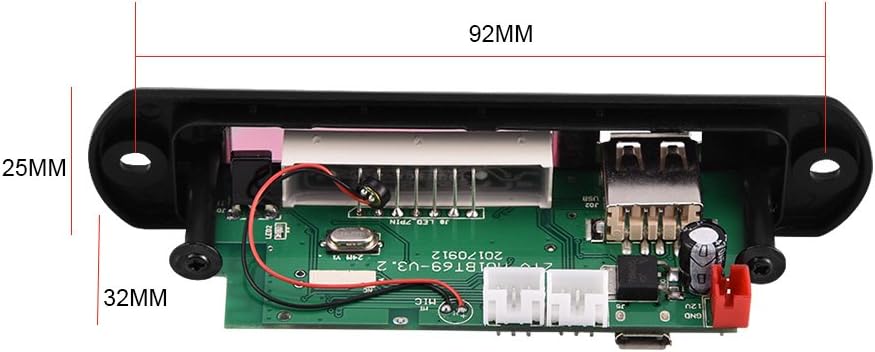
Rysunek 4.3: Physical dimensions of the decoder board. The panel length is 107mm, height is 25mm, and depth is 32mm. The mounting hole spacing is 92mm.
5. Specyfikacje
| Numer modelu | Sanpylcw78yrodhs |
| Objętość operacyjnatage | DC 7V to 12V (main), Micro USB 5V (alternative) |
| Prąd roboczy | Od 800 mA do 1 A. |
| Panel Dimensions (L x H x D) | 107mm x 25mm x 32mm |
| Rozstaw otworów montażowych | 92mm |
| Rozmiar ekranu | 45mm x 8mm |
| Obsługiwane media | USB Disk, SD Card, MMC Card |
| Łączność | Bluetooth, FM Radio, Line-in (AUX) |
| Cechy | Hands-free calls, Multiple EQ modes, Mute function, Digital display |
| Waga przedmiotu | 2.08 uncji (około 59 g) |
6. Konfiguracja
6.1 Połączenie zasilania
The decoder board can be powered in two ways:
- Prąd stały 7 V–12 V: Connect the provided 2-pin power cable to the "DC 12V+" and "GND" terminals on the rear of the board (refer to Figure 4.2). Ensure correct polarity.
- Micro USB 5V: Alternatively, connect a standard Micro USB cable to the "Micro USB 5V Input" port. This is suitable for 5V power sources.
Ostrożność: Do not connect both 12V DC and Micro USB 5V power simultaneously. Choose one power source.
6.2 Połączenia audio
- Wyjście audio: Use the provided 3-pin audio cables to connect the "L Output", "R Output", and "GND" terminals to your ampgłośniki niskotonowe lub aktywne.
- Wejście audio (AUX): If you wish to use an external audio source (e.g., phone, computer), connect it to the "L IN", "R IN", and "GND" terminals. You will need to switch the mode to "LIN" for this input.
6.3 Podłączenie anteny FM
Connect a suitable FM antenna to the "FM Antenna" terminal for optimal radio reception (refer to Figure 4.2).
7. Instrukcja obsługi
7.1 Power On / Automatic Playback
Once powered on, the decoder board will automatically start playing music if a USB disk, SD card, or MMC card is inserted. If no media is present, it will default to the last used mode.
7.2 Wybór trybu
Naciśnij TRYB button on the front panel or remote control to cycle through available modes: USB, SD, Bluetooth, FM, and LIN (Line Input).
7.3 parowanie Bluetooth
- Switch the decoder board to Bluetooth mode. The display will show "BT".
- On your mobile device, search for Bluetooth devices.
- Select the device named M01BT.
- If prompted for a password, enter 0000.
- Once paired, you can play audio from your device through the decoder board.
7.4 Odtwarzanie z kart USB / SD / MMC
- Włóż dysk flash USB do portu USB lub kartę SD/MMC do gniazda karty.
- The board will automatically switch to the corresponding mode (USB or SD) and begin playback.
- Użyj Odtwórz/Pauza, VOL- / Previous, I VOL+ / Dalej przyciski do sterowania odtwarzaniem.
7.5 Obsługa radia FM
- Switch the decoder board to FM tryb.
- Naciśnij i przytrzymaj Odtwórz/Pauza button to initiate an automatic scan for FM stations. The board will save found stations.
- Użyj VOL- / Previous I VOL+ / Dalej przyciski umożliwiające nawigację pomiędzy zapisanymi stacjami.
7.6 Rozmowy w trybie głośnomówiącym
When in Bluetooth mode and paired with a phone, the decoder board supports hands-free calling. Incoming calls can be answered or ended using the remote control or specific buttons on the board (refer to remote control diagram if available, or typically the Play/Pause button).
7.7 Funkcje zdalnego sterowania
Dołączony pilot zdalnego sterowania umożliwia wygodny dostęp do różnych funkcji:
- Moc: Włącz/wyłącz urządzenie.
- Tryb: Switch between USB, SD, Bluetooth, FM, LIN.
- Odtwórz/Pauza: Start or pause playback. Answer/End calls.
- Poprzednie Następne: Skip tracks or navigate FM stations.
- Zwiększanie/zmniejszanie głośności: Dostosuj głośność dźwięku.
- EQ: Cycle through various equalizer sound modes.
- Niemy: Wycisz lub wyłącz wyciszenie dźwięku.
- Przyciski numeryczne: Direct track selection (in USB/SD mode) or FM frequency input.
8. Konserwacja
- Czyść urządzenie miękką, suchą ściereczką. Nie używaj płynnych środków czyszczących ani rozpuszczalników.
- Keep the USB port and SD card slot free from dust and debris.
- Przechowuj urządzenie w chłodnym i suchym miejscu, jeśli nie będziesz go używać przez dłuższy czas.
9. Rozwiązywanie Problemów
| Problem | Możliwa przyczyna | Rozwiązanie |
|---|---|---|
| Brak zasilania / Urządzenie nie włącza się. | Nieprawidłowe podłączenie zasilania; Niewystarczająca głośnośćtage; Faulty power supply. | Check power cable connections and polarity. Ensure power supply is within 7V-12V DC or 5V Micro USB. Test with a different power source. |
| Brak dźwięku. | Volume too low; Mute function active; Incorrect audio output connection; Ampproblem z lifierem. | Increase volume. Press Mute button on remote. Verify audio output cables are correctly connected to amplifier/speakers. Test amplifier with another source. |
| Brak parowania Bluetooth. | Device not in Bluetooth mode; Incorrect pairing password; Distance too far; Interference. | Ensure decoder is in Bluetooth mode ("BT" on display). Re-enter password "0000". Move device closer. Reduce interference from other wireless devices. |
| Karta USB/SD nie jest obsługiwana. | Card/drive not inserted correctly; Unsupported file format; Nośnik uszkodzony. | Re-insert media. Ensure media contains supported audio files (e.g., MP3). Try a different USB drive or SD card. |
| Słaby odbiór radia FM. | No antenna connected; Weak signal; Interference. | Connect an external FM antenna. Reposition the antenna for better signal. Perform an auto-scan again. |
10. Gwarancja i wsparcie
Sanpyl products are designed for reliability and performance. For any issues or questions regarding your Bluetooth MP3 Decoder Board, please contact your retailer or Sanpyl customer support. Please retain your proof of purchase for warranty claims.
Aby uzyskać dalszą pomoc, odwiedź stronę Sklep Sanpyl na Amazonie.