
1. Wprowadzenie
Thank you for choosing the Fazley FSP-200-BK Digital Piano. This manual provides essential information for the safe and efficient use of your instrument. Please read it thoroughly before operating the piano and retain it for future reference.
The Fazley FSP-200-BK is an 88-key digital piano designed for musicians seeking a realistic playing experience with versatile sound options. It features semi-weighted, velocity-sensitive keys, 12 distinct voices, and 32-note polyphony, making it suitable for practice, performance, and creative exploration.
2. Informacje dotyczące bezpieczeństwa
- Zasilanie: Używaj wyłącznie określonego zasilacza. Upewnij się, że napięcietage pasuje do lokalnego źródła zasilania.
- Woda i wilgoć: Do not expose the instrument to water or excessive moisture. Avoid placing liquids on or near the piano.
- Wentylacja: Nie zasłaniaj otworów wentylacyjnych. Zapewnij odpowiedni przepływ powietrza wokół urządzenia, aby zapobiec przegrzaniu.
- Umieszczenie: Ustaw pianino na stabilnej, równej powierzchni. Unikaj bezpośredniego światła słonecznego, źródeł ciepła i nadmiernego zapylenia.
- Czyszczenie: Przed czyszczeniem odłącz zasilanie. Użyj miękkiej, suchej ściereczki. Nie używaj płynnych środków czyszczących ani rozpuszczalników.
- Serwisowanie: Nie próbuj samodzielnie naprawiać urządzenia. Wszelkie prace serwisowe zlecaj wykwalifikowanemu personelowi.
3. Zawartość opakowania
Sprawdź, czy w przesyłce znajdują się wszystkie elementy:
- Fazley FSP-200-BK Digital Piano
- Reszta na nuty
- Zasilacz
- Sustain Pedal (if included with your specific package)
- Instrukcja obsługi (ten dokument)
4. Konfiguracja
4.1 Konfiguracja fizyczna
Carefully remove the digital piano from its packaging. Place it on a sturdy and level surface, such as a keyboard stand or desk. Attach the included music rest into the designated slot on the top panel of the piano.

Obraz 1: Przód view of the Fazley FSP-200-BK Digital Piano with the music rest installed.
4.2 Połączenie zasilania
Locate the DC IN port on the rear panel of the piano. Connect the power adapter to this port, then plug the adapter into a standard electrical outlet. Ensure the connection is secure.

Obraz 2: Tył view of the Fazley FSP-200-BK Digital Piano, illustrating the location of the DC IN and other connection ports.
4.3 Pedal Connection (Optional)
If your package includes a sustain pedal, connect it to the appropriate pedal input jack on the rear panel of the piano.
5. Instrukcja obsługi
5.1 Włączanie/wyłączanie zasilania
Aby włączyć pianino, naciśnij przycisk MOC button located on the left side of the control panel. The indicator light will illuminate. To power off, press the MOC naciśnij przycisk ponownie.

Image 3: Close-up of the power button and volume knob on the control panel.
5.2 Regulacja głośności
Dostosuj ogólną głośność wyjściową za pomocą TOM knob. Turn it clockwise to increase volume and counter-clockwise to decrease it.
5.3 Wybór głosu
The FSP-200-BK offers 12 different voices. To select a voice, press the corresponding button under the "VOICE SELECTION" section on the control panel. Available voices include:
- FORTEPIAN
- PIANINO
- E.PIANO 1
- E.PIANO 2
- WIBRAFON
- ORGANY ROCKOWE
- KLAWESYN
- ORGANY KOŚCIELNE
- SMYCZKI
- CHÓR
- GITARA
- BASS
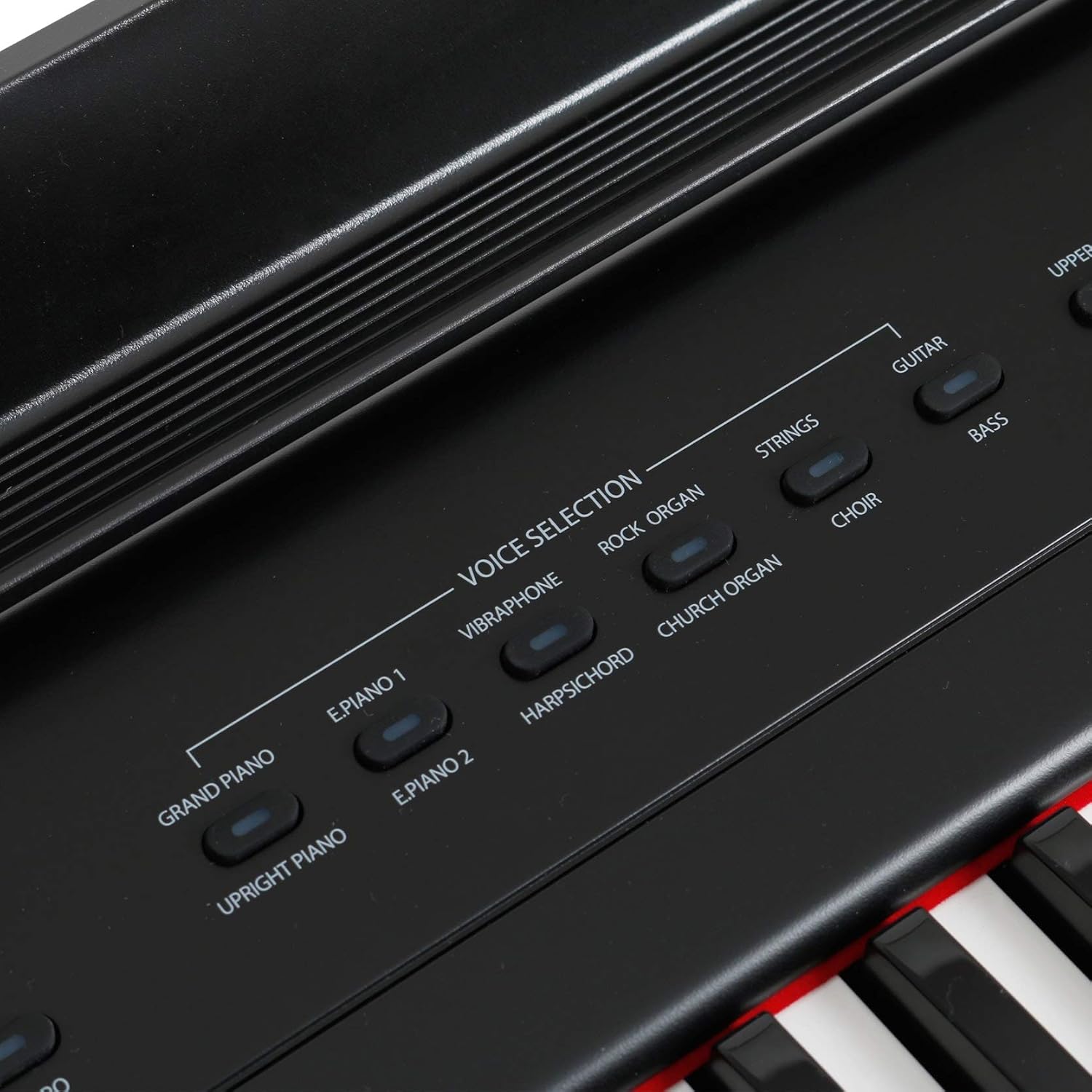
Obraz 4: Zbliżenie view of the voice selection buttons on the control panel.
5.4 Effects (Reverb, Chorus)
The piano includes built-in Reverb and Chorus effects to enhance the sound. Press the POGŁOS or CHÓR buttons to activate or deactivate these effects. The corresponding indicator light will show their status.
5.5 metronom
To assist with timing and practice, the FSP-200-BK features a metronome. Press the METRONOM button to start or stop the metronome. Use the TEMPO button (often combined with a function key) to adjust the metronome's speed.

Image 5: Control panel section displaying the Reverb, Chorus, Metronome, and Tempo buttons.
5.6 piosenek demonstracyjnych
The piano includes demonstration songs to showcase its various voices and features. Press the DEMONSTRACJA button to start playback of the demo songs. Press it again to stop.
5.7 Korzystanie ze słuchawek
W przypadku ćwiczeń prywatnych podłącz standardowe słuchawki stereo do TELEFONY jack on the rear panel. This will mute the internal speakers.
6. Konserwacja
- Czyszczenie: Wipe the surface of the piano with a soft, dry, lint-free cloth. For stubborn dirt, slightly dampen the cloth with water, then wipe dry immediately. Avoid abrasive cleaners, waxes, or solvents.
- Składowanie: When not in use for extended periods, disconnect the power adapter. Store the piano in a cool, dry place, away from extreme temperatures and humidity.
- Kluczowa opieka: Keep the keys clean. Avoid pressing them with excessive force or striking them with sharp objects.
7. Rozwiązywanie Problemów
| Problem | Możliwa przyczyna | Rozwiązanie |
|---|---|---|
| Brak dźwięku | Power not connected; Volume too low; Headphones connected. | Ensure power adapter is securely connected and power is on. Increase volume. Disconnect headphones if using internal speakers. |
| Zniekształcony dźwięk | Volume too high; Faulty connection. | Reduce volume. Check all cable connections. |
| Klawisze nie odpowiadają | Instrument not powered on; Internal malfunction. | Ensure power is on. If problem persists, contact customer support. |
| Metronom nie działa | Metronom nie został aktywowany. | Press the METRONOME button to activate. |
8. Specyfikacje
| Funkcja | Opis |
|---|---|
| Model | FSP-200-BK |
| Klawiatura | 88 semi-weighted, velocity-sensitive keys |
| Głosy | 12 (including Grand Piano, Electric Piano, Organ, Strings) |
| Polifonia | 32 notatki |
| Ruchomości | Pogłos, Chór |
| Funkcje | Metronome, Demo Songs |
| Znajomości | DC IN, Pedal Input, Headphone Output |
| Kolor | Czarny |
| Waga | Około 10 kilogramy |
| Poziom umiejętności | Profesjonalny |
| Funkcja specjalna | Lekka konstrukcja |
9. Gwarancja i wsparcie
Fazley products are designed for reliability and performance. For information regarding warranty coverage, please refer to the warranty card included with your purchase or visit the official Fazley website. For technical support, troubleshooting assistance, or spare parts, please contact your authorized Fazley dealer or customer service representative.