
Amazon Basics ABMT1000
Amazon Basics Line Interactive UPS 1000VA/550W User Manual
Model: ABMT1000
Wstęp
This manual provides essential information for the safe and efficient operation of your Amazon Basics Line Interactive Uninterruptible Power Supply (UPS) 1000VA/550W. A UPS provides battery backup power and surge protection for connected electronic devices, safeguarding against power outagPrzepięcia, skoki napięcia i wahania. Przed instalacją i użytkowaniem należy dokładnie przeczytać niniejszą instrukcję i zachować ją do wykorzystania w przyszłości.

Image: The Amazon Basics Line Interactive UPS 1000VA/550W positioned on a desk, providing power protection for a computer setup.
Ważne instrukcje bezpieczeństwa
Please adhere to these safety guidelines to prevent injury or damage to the UPS and connected equipment:
- Ten UPS jest przeznaczony wyłącznie do użytku wewnątrz pomieszczeń.
- Do not install the UPS in direct sunlight, near heat-emitting appliances, or in areas with excessive humidity or dust.
- Upewnij się, że UPS jest podłączony do uziemionego gniazdka zasilania prądem zmiennym.
- Nie otwierać UPS-aasing. Wewnątrz nie ma żadnych części, które mogłyby być naprawiane przez użytkownika. Wszelkie prace serwisowe należy zlecać wykwalifikowanemu personelowi serwisowemu.
- Risk of electric shock. Do not connect or disconnect the UPS during a thunderstorm.
- The battery inside the UPS is not user-replaceable. Attempting to replace the battery yourself may void the warranty and pose a safety risk.
- In case of fire, use a dry chemical fire extinguisher. Water may cause electrical hazards.
Zawartość opakowania
Sprawdź, czy w przesyłce znajdują się wszystkie elementy:
- Amazon Basics Line Interactive UPS 1000VA/550W Unit
- Kabel komunikacyjny USB
- Instrukcja obsługi (ten dokument)

Image: USB Communication Cable included with the UPS.
Produkt ponadview
Panel przedni

Obraz: Przód view of the Amazon Basics Line Interactive UPS 1000VA/550W, showing the power button, mute button, and LED indicators.
- Przycisk zasilania: Press to turn the UPS ON or OFF.
- Przycisk wyciszenia: Press to silence audible alarms.
- Wskaźniki LED:
- ONLINE: Illuminates when the UPS is providing utility power to connected devices.
- NA AKUMULATORZE: Illuminates when the UPS is operating on battery power.
- AVR (automatyczna objętośćtage Rozporządzenie): Illuminates when the UPS is correcting minor voltage fluctuations without switching to battery power.
- PRZECIĄŻAĆ: Illuminates if connected equipment exceeds the UPS's capacity.
Panel tylny
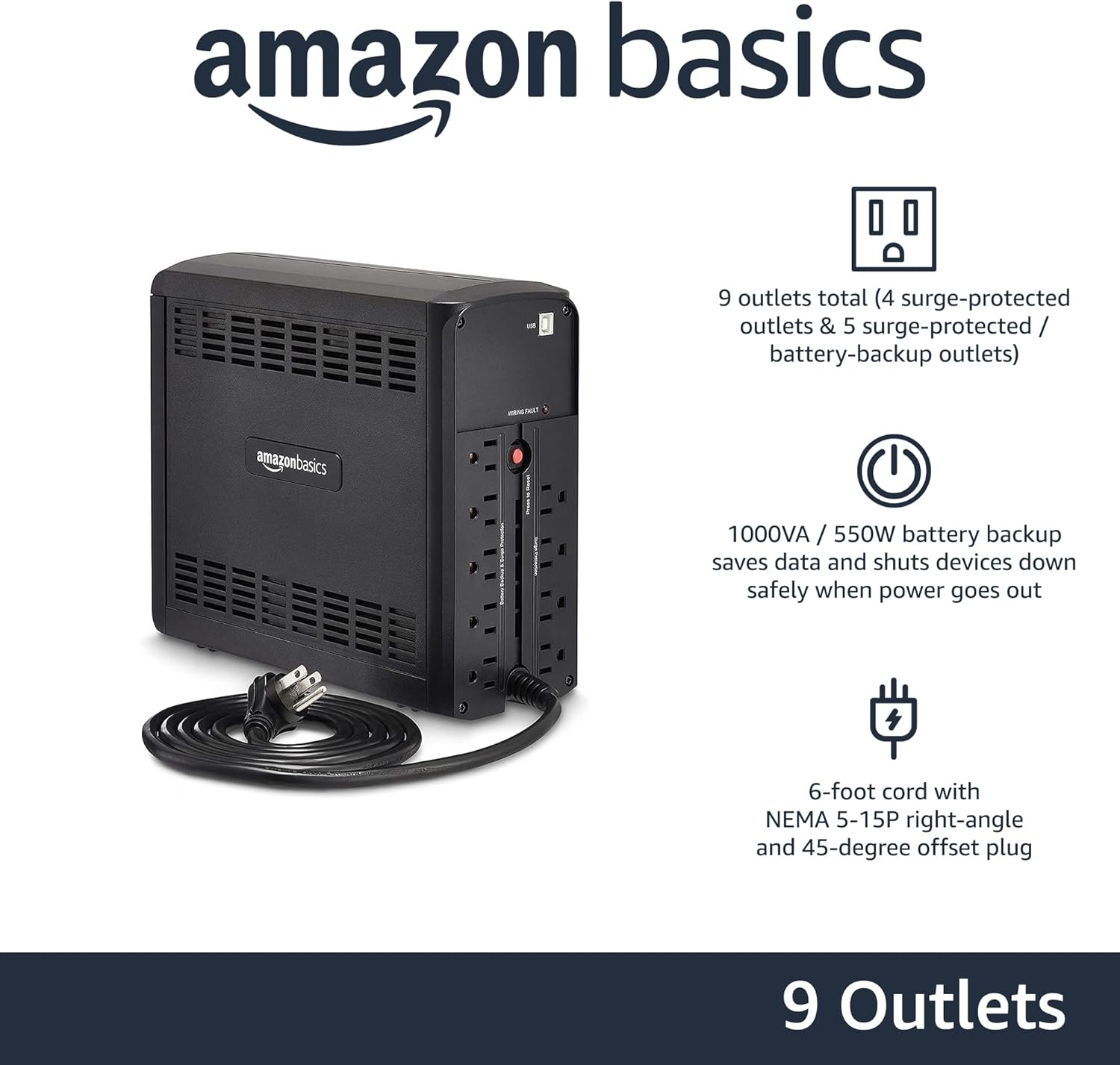
Obraz: Tył view of the Amazon Basics Line Interactive UPS 1000VA/550W, displaying the power cord, battery backup outlets, and surge-only outlets.
- Gniazdka z zasilaniem bateryjnym i zabezpieczeniem przeciwprzepięciowym (5 gniazda): These outlets provide both battery backup power during outages and surge protection. Connect critical devices such as computers, monitors, and network equipment here.
- Surge Protected Outlets (4 outlets): These outlets provide surge protection only. Connect non-critical devices like printers or scanners here.
- Port komunikacyjny USB: Connects to a computer for power management software (e.g., CyberPower PowerPanel Personal).
- Przewód zasilający AC: Łączy UPS z gniazdkiem ściennym.
Organizować coś
- Rozpakuj i sprawdź: Carefully remove the UPS from its packaging. Inspect for any shipping damage. If damage is found, do not use the unit and contact customer support.
- Początkowe ładowanie akumulatora: Before initial use, connect the UPS to a standard wall outlet and allow it to charge for at least 8 hours. This ensures the battery is fully charged and ready to provide optimal backup power. The UPS will charge whether it is turned ON or OFF.
- Podłącz urządzenia:
- Plug critical equipment (e.g., computer, monitor, router) into the Zasilanie bateryjne i gniazda z ochroną przeciwprzepięciową.
- Plug non-critical equipment (e.g., printer, desk lamp) do Gniazda z ochroną przeciwprzepięciową.
- Ostrożność: Do not plug laser printers into battery backup outlets, as their high power draw can overload the UPS.
- Połącz się z komputerem (opcjonalnie): Use the provided USB cable to connect the UPS's USB port to your computer's USB port. This allows for power management software installation, enabling features like automatic shutdown during extended power outagt.j.
- Włączanie: Press and hold the Power Button on the front panel for approximately 2 seconds until you hear a beep and the UPS powers on.
Instrukcja obsługi
Włączanie/wyłączanie UPS-a
- Włączyć: Press and hold the Power Button for 2 seconds. The UPS will beep, and the ONLINE LED will illuminate.
- Wyłączyć: Press and hold the Power Button for 2 seconds. The UPS will beep, and all LEDs will turn off.
Understanding LED Indicators and Alarms
- ONLINE (Green LED): Solid green indicates the UPS is receiving utility power and providing it to connected devices.
- ON BATTERY (Yellow LED): Solid yellow indicates the UPS is supplying battery power. An audible alarm will sound (beeping every 10 seconds).
- AVR (Yellow LED): Solid yellow indicates the UPS is automatically regulating input voltage bez użycia baterii.
- OVERLOAD (Red LED): Solid red indicates that the connected load exceeds the UPS's capacity. An audible alarm will sound continuously. Immediately disconnect non-essential equipment from the battery backup outlets until the alarm stops.
- Niski poziom naładowania baterii: When the UPS is on battery power and the battery level is low, the ON BATTERY LED will flash, and the alarm will beep more frequently (every 1 second).
- Wycisz alarm: Press the Mute Button to silence audible alarms. The alarm will reactivate if the condition changes (e.g., low battery).
Czas pracy baterii
The battery runtime depends on the power consumption of the connected devices. For this 1000VA/550W model:
- At half load (500VA/275W), the UPS provides approximately 7 minut of backup power.
- At full load (1000VA/550W), the UPS provides approximately 1 minuta of backup power.
It is recommended to save your work and safely shut down your computer during a power outage to prevent data loss.
Konserwacja
Pielęgnacja baterii
- To maintain optimal battery life, keep the UPS connected to an AC outlet at all times.
- Jeżeli UPS będzie przechowywany przez dłuższy okres, należy ładować akumulator co trzy miesiące przez co najmniej 8 godziny, aby zapobiec degradacji akumulatora.
- Batteries have a finite lifespan and will eventually require replacement. If you notice a significant decrease in runtime, contact Amazon Basics customer support for guidance on battery replacement options.
Czyszczenie
- Always unplug the UPS from the wall outlet before cleaning.
- Use a soft, dry cloth to wipe the exterior surfaces of the UPS.
- Nie należy używać środków czyszczących w płynie lub aerozolu, ponieważ mogą one zawierać substancje łatwopalne lub spowodować porażenie prądem.
Rozwiązywanie problemów
| Problem | Możliwa przyczyna | Rozwiązanie |
|---|---|---|
| UPS nie włącza się. | Akumulator jest rozładowany lub nie jest podłączony. | Connect the UPS to an AC outlet and allow it to charge for 8 hours. Ensure the power cord is securely plugged in. |
| UPS is beeping continuously and OVERLOAD LED is on. | Too many devices connected to battery backup outlets. | Disconnect non-essential equipment from the battery backup outlets until the alarm stops. Ensure total load does not exceed 550W. |
| UPS często przełącza się na tryb akumulatorowy. | Unstable utility power or voltage wahania. | This is normal operation for a line interactive UPS. The AVR function is working. If it happens excessively, consult an electrician about your home's wiring. |
| Krótki czas pracy na baterii. | Akumulator jest stary lub nie jest w pełni naładowany. | Ensure the battery is fully charged (8 hours). If the battery is several years old, it may need replacement. Contact Amazon Basics support. |
| UPS nie dostarcza zasilania do podłączonych urządzeń. | UPS is off, or outlets are surge-only. | Ensure the UPS is turned on. Verify devices are plugged into the correct battery backup outlets. |
Specyfikacje
| Funkcja | Szczegół |
|---|---|
| Numer modelu | ABMT1000 |
| Pojemność | 1000VA/550W |
| Wejście Voltage | 120 V AC |
| Punkty sprzedaży | 9 total (5 Battery Backup & Surge Protected, 4 Surge Protected) |
| Typ baterii | Uszczelnione kwasowo-ołowiowe |
| Typowy czas ładowania | 8 godzin do 90% pojemności |
| Wymiary (gł. x szer. x wys.) | 10.2 x 3.9 x 9 cala (25.91 x 9.91 x 22.86 cm) |
| Waga | 15 funtów (6.8 kg) |
| Kolor | Czarny |

Image: Diagram showing the dimensions of the Amazon Basics Line Interactive UPS 1000VA/550W.
Gwarancja i wsparcie
This Amazon Basics UPS is backed by a limited 1-year warranty, which includes the battery. For warranty claims, technical support, or questions regarding battery replacement, please contact Amazon Basics customer support through the Amazon webwitrynę lub platformę zakupową.
For the most up-to-date support information, please visit the official Amazon Basics support page or refer to your purchase documentation.