
1. Wprowadzenie
This manual provides instructions for the proper setup, operation, and maintenance of your Ohaus CR5200 Compass Series Portable Balance. Please read this manual thoroughly before using the balance to ensure correct operation and to prevent damage.
The Ohaus CR5200 is a portable digital balance designed for accurate weighing with a capacity of 5200 grams and a readability of 1 gram. It supports multiple weighing units including grams (g), ounces (oz), pounds:ounces (lb:oz), troy ounces (ozt), and pennyweights (dwt).

Obraz 1.1: Góra view of the Ohaus CR5200 Compass Series Portable Balance, showing the display and control buttons.
2. Informacje dotyczące bezpieczeństwa
- Operate the balance on a stable, level surface free from vibrations and drafts.
- Unikaj wystawiania wagi na działanie ekstremalnych temperatur, wilgoci lub bezpośredniego światła słonecznego.
- Nie przeciążaj wagi ponad jej maksymalne obciążenie 5200 gramów.
- Utrzymuj wagę w czystości, bez kurzu i zanieczyszczeń.
- Use only the specified power source (3 AA batteries or compatible AC adapter).
3. Konfiguracja
3.1 Rozpakowanie
Carefully remove the balance from its packaging. Inspect the balance for any signs of damage. Retain the packaging for future transport or storage.
3.2 Powering the Balance
The Ohaus CR5200 can be powered by three AA alkaline batteries or an external AC adapter (not included, but compatible with the side power port).
Montaż baterii:
- Locate the battery compartment on the underside of the balance.
- Otwórz pokrywę komory baterii.
- Włóż trzy baterie alkaliczne AA, zwracając uwagę na prawidłową biegunowość (+/-).
- Dokładnie zamknij pokrywę komory baterii.

Obraz 3.1: Spód view of the balance with the battery compartment open, showing three AA batteries installed.
Podłączenie zasilania zewnętrznego:
If using an AC adapter, connect it to the power input port located on the side of the balance. Ensure the adapter meets the specified voltage and current requirements (e.g., 12V 0.5A).

Obraz 3.2: Bok view of the balance, highlighting the external power input port.
3.3 Umieszczenie
Place the balance on a firm, level, and stable surface. Avoid locations near air vents, windows, or equipment that generates vibrations or electromagnetic interference.
4. Instrukcja obsługi
4.1 Włączanie/wyłączanie zasilania
- Aby włączyć: Naciśnij [WŁ./WYŁ.] button. The display will show a self-test sequence and then settle at 0.0 g.
- Aby wyłączyć: Naciśnij i przytrzymaj [WŁ./WYŁ.] przycisk, aż wyświetlacz się wyłączy.
4.2 Selecting Weighing Units
The balance supports multiple weighing units: grams (g), ounces (oz), pounds:ounces (lb:oz), troy ounces (ozt), and pennyweights (dwt).
- To change the weighing unit: Press the [JEDNOSTKA] button (often labeled with 'g' and an arrow). Each press cycles through the available units.
4.3 Funkcja tary
The tare function allows you to zero out the weight of a container, so only the weight of the contents is measured.
- Połóż pusty pojemnik na szalce wagi. Wyświetlacz pokaże jego wagę.
- Naciśnij [TARA/ZERO] button (often labeled with '→0←'). The display will reset to 0.0.
- Wsyp materiał do ważenia do pojemnika. Na wyświetlaczu pojawi się waga netto materiału.
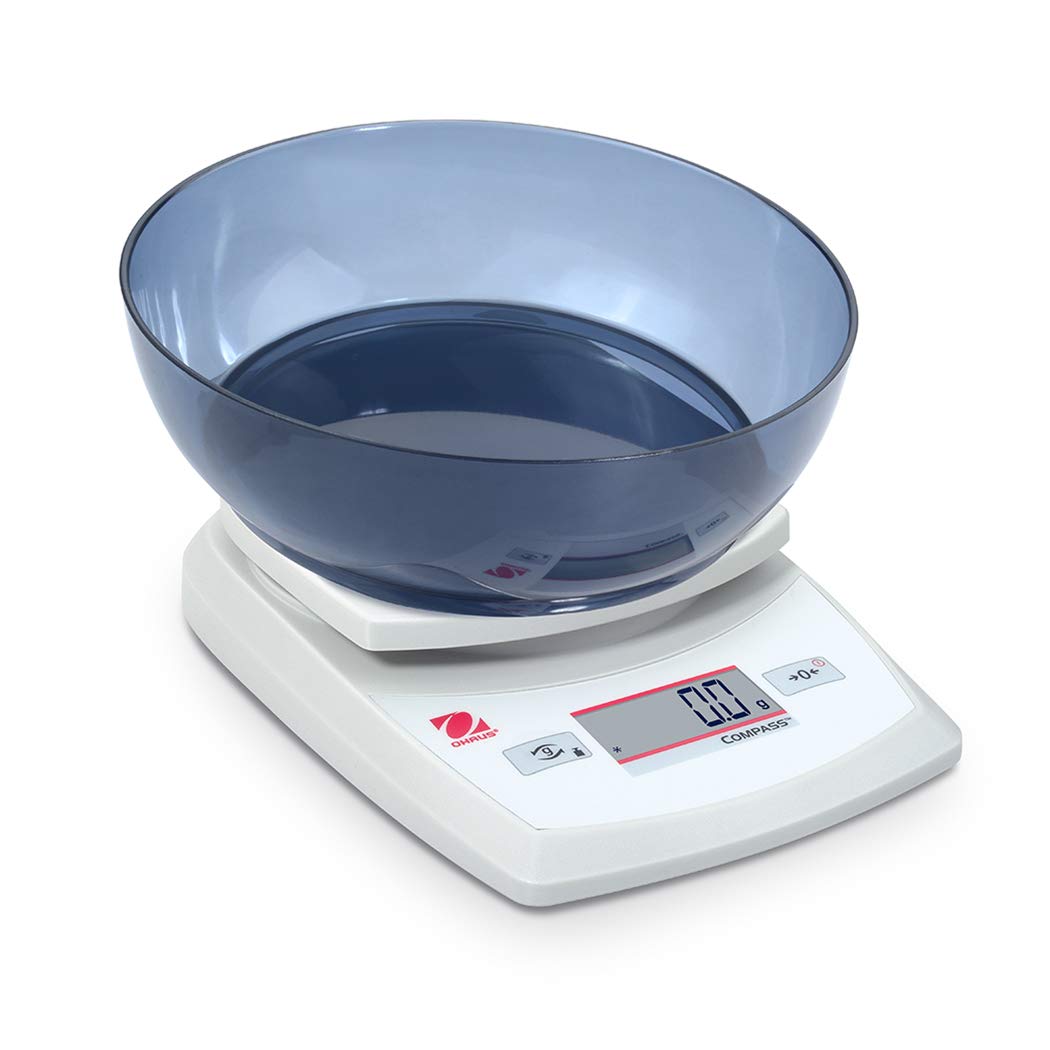
Image 4.1: The balance with an empty bowl on the weighing pan, ready for the tare function.
4.4 Podstawowe ważenie
- Ensure the balance is powered on and the display shows 0.0 in the desired weighing unit.
- Ostrożnie umieść przedmiot, który chcesz zważyć, na środku szalki wagi.
- Poczekaj, aż wyświetlacz się ustabilizuje. Zostanie wyświetlona stabilna waga.
- Wyjmij potrawę z patelni.
4.5 Kalibracja zewnętrzna
The Ohaus CR5200 features external calibration. This process requires a known calibration weight (not included) to ensure accuracy. Refer to the full Ohaus CR Series manual for detailed calibration procedures specific to your model.

Image 4.2: The balance with a cylindrical calibration weight placed on the weighing pan.
5. Konserwacja
5.1 Czyszczenie
- Wipe the balance exterior with a soft, damp ściereczka. Nie należy używać środków czyszczących o właściwościach ściernych ani rozpuszczalników.
- Upewnij się, że do obudowy wagi i wyświetlacza nie dostanie się żadna ciecz.
- Keep the weighing pan clean to ensure accurate readings.
5.2 Wymiana baterii
When the battery indicator appears on the display, replace the three AA alkaline batteries as described in Section 3.2.
5.3 Przechowywanie
When not in use for extended periods, remove the batteries to prevent leakage. Store the balance in a dry, dust-free environment. The Ohaus CR5200 is designed for portability and can be stored in a protective case (if available).

Image 5.1: The Ohaus CR5200 balance shown alongside its protective carrying case.
6. Rozwiązywanie Problemów
| Problem | Możliwa przyczyna | Rozwiązanie |
|---|---|---|
| Waga nie włącza się. | Dead or incorrectly installed batteries; no AC power. | Replace batteries or check AC adapter connection. Ensure correct battery polarity. |
| Niedokładne lub niestabilne odczyty. | Unstable surface; drafts; electromagnetic interference; balance needs calibration. | Move balance to a stable, level surface. Shield from drafts. Recalibrate the balance (refer to Section 4.5). |
| Na wyświetlaczu pojawia się komunikat „Err” lub kod błędu. | Przeciążenie; błąd wewnętrzny. | Remove excess weight if overloaded. Power cycle the balance. If error persists, contact Ohaus support. |
| Funkcja tarowania nie działa. | Balance not stable; button not pressed correctly. | Ensure balance is stable and display is settled. Press the TARE/ZERO button firmly. |
7. Specyfikacje
| Funkcja | Specyfikacja |
|---|---|
| Numer modelu | CR5200 |
| Pojemność | 5200 g (5.2 kg) |
| Czytelność | 1 gramów |
| Jednostki ważenia | g, oz, lb:oz, ozt, dwt |
| Typ kalibracji | Zewnętrzny |
| Źródło zasilania | 3 AA alkaline batteries (included) or AC adapter (not included) |
| Typ wyświetlacza | Cyfrowy |
| Tworzywo | Plastikowy |
| Wymiary produktu (dł. x szer. x wys.) | Wymiary 23.62 x 17.02 x 5.59 cm |
| Waga przedmiotu | 408.23 g (ok. 14.4 uncji) |
| Cechy specjalne | Przenośny |
8. Gwarancja i wsparcie
Aby uzyskać informacje dotyczące gwarancji, pomocy technicznej lub zapytań serwisowych, skontaktuj się z działem obsługi klienta firmy Ohaus lub odwiedź oficjalną stronę internetową firmy Ohaus webZachowaj paragon jako dowód zakupu.