
1. Wprowadzenie i koniecview
Thank you for choosing the Lorex Analog 4K Weatherproof Indoor/Outdoor HD Wired Add-On Security Camera. This manual provides essential information for the proper installation, operation, and maintenance of your new security camera. This camera is designed as an add-on unit and requires a compatible Lorex recorder (DVR/NVR) for full functionality.
This camera features 4K resolution for superior image clarity, robust weatherproof construction for reliable indoor and outdoor use, and advanced deterrence features such as motion-activated lights and remote-triggered sirens. Its long-range night vision ensures comprehensive surveillance even in low-light conditions.
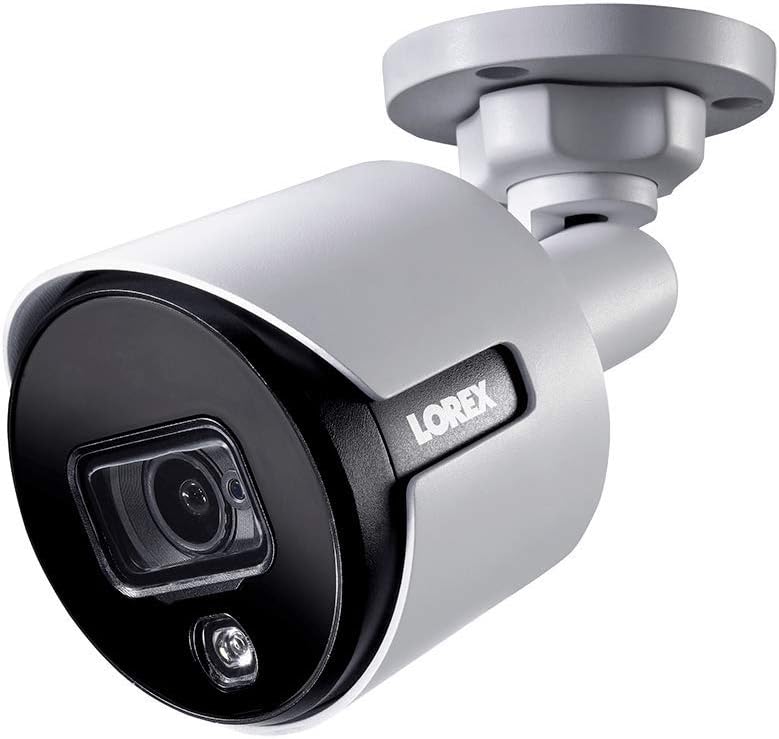
Rysunek 1.1: Kąt przedni view of the Lorex 4K Weatherproof Security Camera. This image shows the camera's bullet form factor, lens, and integrated light.
2. Zawartość opakowania
The Lorex Analog 4K Weatherproof Indoor/Outdoor HD Wired Add-On Security Camera package includes:
- 1 x Lorex Analog 4K Weatherproof Indoor/Outdoor HD Wired Add-On Security Camera (Model: LBV8543XW)
- Mounting Kit (screws and wall plugs)
- Allen Key (for adjustment)
Note: This is an add-on camera. Video cables, power adapters, and a compatible Lorex recorder are sold separately and are required for operation.
3. Główne cechy
- Rozdzielczość 4K Ultra HD: Provides exceptional detail and clarity with an 8MP effective still resolution.
- Konstrukcja odporna na warunki atmosferyczne (IP67): Durable metal housing ensures reliable performance in various weather conditions, suitable for both indoor and outdoor installation.
- Long Range Night Vision: See clearly up to 150 feet (45m) in ambient night conditions and up to 98 feet (30m) in total darkness. Features Color Night Vision for enhanced detail in low light.
- Motion-Activated Warning Light: Integrated LED light can be triggered by motion to deter intruders.
- Syrena uruchamiana zdalnie: Activate a loud siren directly from your Lorex recorder or connected app to scare away unwanted visitors.
- Wired Connectivity (BNC): Ensures a stable and secure connection to your Lorex DVR/NVR system.
- Szeroki zakres temperatur pracy: Functions reliably in temperatures up to 60 degrees Celsius.
4. Konfiguracja i instalacja
Before installation, ensure you have a compatible Lorex recorder (DVR/NVR) and necessary video/power cables.
4.1 Wybór lokalizacji
Wybierz lokalizację, która zapewnia żądane viewing angle and is within reach of your Lorex recorder and a power source. Consider areas prone to intrusion, such as entry points or vulnerable perimeters. The camera is suitable for ceiling mount and wall mount applications.

Rysunek 4.1: Strona view of the Lorex 4K Weatherproof Security Camera, showing its adjustable mounting base.
4.2 Montaż kamery
- Zaznacz otwory wiertnicze: Use the mounting template (if provided) or the camera base to mark the positions for drilling.
- Wiercenie otworów: Drill pilot holes for the mounting screws. If mounting on drywall or masonry, insert the provided wall plugs.
- Bezpieczna kamera: Dopasuj podstawę kamery do wywierconych otworów i przymocuj ją dołączonymi śrubami.
- Dostosuj kąt: Loosen the adjustment screws on the camera body using the Allen key to position the camera for the optimal viewkąt nachylenia. Po ustawieniu dokręć śruby.
4.3 Podłączanie aparatu
- Podłącz kabel wideo: Connect one end of the BNC video cable (not included) to the camera's BNC port and the other end to an available video input channel on your Lorex recorder.
- Podłącz zasilanie: Connect the camera's power input to a compatible power adapter (not included). Ensure the power adapter is connected to a power outlet.
- Włączanie rejestratora: Ensure your Lorex recorder is powered on and properly configured.
5. Instrukcja obsługi
Once the camera is physically installed and connected to your Lorex recorder, you can begin operation.
5.1 Vieww transmisji na żywo
Access your Lorex recorder's interface (via monitor, Lorex Home app, or client software) to view the live video feed from the camera. Ensure the correct channel is selected.

Rysunek 5.1: Zbliżenie view of the Lorex 4K Weatherproof Security Camera's lens and integrated light.
5.2 Motion Detection and Smart Deterrence
Your Lorex recorder manages motion detection settings. Refer to your recorder's manual for detailed instructions on configuring motion zones and sensitivity.
- Motion-Activated Light: The camera's integrated light can be set to activate automatically upon motion detection. This setting is typically configured within your Lorex recorder's deterrence or alarm settings.
- Syrena uruchamiana zdalnie: You can manually activate the camera's siren through your Lorex recorder's interface or the Lorex Home app. This feature is useful for immediate deterrence.

Figure 5.2: The Lorex 4K Weatherproof Security Camera mounted on a brick wall at night, demonstrating its motion-activated light feature.
5.3 Widzenie nocne
The camera automatically switches to night vision mode in low-light conditions. The infrared (IR) LEDs provide illumination for clear black and white video. Color Night Vision (CNV) may be available if there is sufficient ambient light, providing full-color video in low-light scenarios.
6. Konserwacja
Regularna konserwacja zapewnia optymalną wydajność i trwałość kamery bezpieczeństwa.
- Czyszczenie: Okresowo czyść obiektyw i obudowę aparatu miękką,amp ściereczką. Unikaj środków czyszczących o działaniu ściernym i rozpuszczalników, które mogą uszkodzić wykończenie lub soczewkę.
- Sprawdź połączenia: Ensure all cable connections (BNC and power) are secure and free from corrosion, especially for outdoor installations.
- Aktualizacje oprogramowania układowego: Regularly check the Lorex website or your recorder's settings for available firmware updates for your camera and recorder to ensure the latest features and security enhancements.
- Warunki środowiskowe: While weatherproof, extreme conditions outside the specified operating temperature range (up to 60°C) may affect performance.
7. Rozwiązywanie Problemów
If you encounter issues with your Lorex camera, refer to the following common troubleshooting steps:
| Problem | Możliwa przyczyna | Rozwiązanie |
|---|---|---|
| Brak sygnału wideo z kamery | Luźne połączenie kablowe Brak zasilania kamery Incorrect channel selected on recorder | Check BNC and power connections. Ensure power adapter is working and connected. Verify the correct input channel on your Lorex recorder. |
| Słaba jakość obrazu / niewyraźne wideo | Brudny obiektyw Nieprawidłowa ostrość (jeśli regulowana) Cable interference/damage | Oczyść obiektyw aparatu miękką szmatką. Ensure the camera is properly focused (if applicable). Check video cable for damage or interference. Use high-quality cables. |
| Nie działa noktowizor | Zasłonięte diody LED IR Niewystarczająca moc Ustawienia aparatu | Upewnij się, że nic nie blokuje diod LED IR. Verify stable power supply. Check night vision settings on your Lorex recorder. |
| Wykrywanie ruchu nie jest wyzwalane | Incorrect motion zone setup Zbyt niska czułość Przeszkoda w view | Review and adjust motion detection zones on your recorder. Zwiększ czułość ruchu. Clear any obstructions from the camera's field of view. |
For more advanced troubleshooting, consult your Lorex recorder's user manual or visit the Lorex support webstrona.
8. Specyfikacje
| Funkcja | Specyfikacja |
|---|---|
| Numer modelu | LBV8543XW |
| Rozdzielczość przechwytywania wideo | 4K (efektywna rozdzielczość zdjęć 8 MP) |
| Technologia łączności | BNC (Wired) |
| Zastosowanie wewnątrz/na zewnątrz | Wewnątrz, Na zewnątrz |
| Międzynarodowa Ocena Ochrony | IP67 (odporny na warunki atmosferyczne) |
| Zakres noktowizora | 150 stóp (45 m) |
| Cechy specjalne | Motion Sensor, Night Vision, Motion Activated Lights, Remote-Triggered Siren |
| Współczynnik kształtu | Kula |
| Tworzywo | Metal |
| Operating Temperature (Upper) | 60 stopni Celsjusza |
| Wymiary produktu (dł. x szer. x wys.) | 16 x 6 x 6 cala |
| Waga przedmiotu | 0.01 uncji |
| UPC | 695529017136 |
| Metoda kontroli | App, Remote (via compatible Lorex recorder) |
9. Gwarancja i wsparcie
Produkty Lorex zostały zaprojektowane z myślą o niezawodności i wydajności. Informacje dotyczące gwarancji na produkt można znaleźć w regulaminie gwarancyjnym dostępnym na oficjalnej stronie Lorex. website or the documentation included with your Lorex recorder.
For technical support, product registration, or to download the latest software and firmware updates, please visit the official Lorex support page or the Lorex Store:
- Lorex Store: Visit the Lorex Store on Amazon
- Instrukcja użytkownika (PDF): A comprehensive user guide in PDF format is also available for download: Pobierz podręcznik użytkownika
When contacting support, please have your product model number (LBV8543XW) and serial number ready.