
1. Wprowadzenie
This manual provides detailed instructions for the proper setup, operation, and maintenance of your Zerone USB Digital Microscope. This device is designed for various applications including industrial testing, laboratory research, educational purposes, and detailed examination of small objects. Please read this manual thoroughly before using the product to ensure optimal performance and longevity.
2. Informacje dotyczące bezpieczeństwa
- Nie wystawiaj urządzenia na działanie ekstremalnych temperatur, wilgoci ani substancji żrących.
- Avoid direct exposure of the LED lights to eyes.
- Trzymaj urządzenie poza zasięgiem dzieci.
- Use only the provided accessories or compatible replacements.
- Disconnect the device from the power source when not in use or during cleaning.
3. Zawartość opakowania
Sprawdź, czy w opakowaniu znajdują się wszystkie elementy:
- Zerone USB Digital Microscope
- Regulowana podstawka
- USB Cable with LED Dimming Knob
- Płyta instalacyjna oprogramowania (lub link do pobrania)

Image 3.1: Contents of the Zerone USB Digital Microscope package, including the microscope, stand, USB cable, and software CD.
4. Koniec produktuview
The Zerone USB Digital Microscope features a compact design with adjustable magnification and integrated LED illumination. Key components include:
- Korpus mikroskopu: Contains the lens, sensor, and control buttons.
- Zoom/Focus Wheel: Located on the microscope body for adjusting magnification and focus.
- Światła LED: Eight adjustable LEDs surrounding the lens for illuminating the specimen.
- Przycisk zatrzaskowy: Do robienia zdjęć.
- Kabel USB: Connects the microscope to a computer.
- LED Dimming Knob: Integrated into the USB cable for brightness control.
- Regulowany stojak: Provides stable support and allows for precise positioning of the microscope.

Image 4.1: The Zerone USB Digital Microscope mounted on its adjustable stand, connected via USB cable.

Obraz 4.2: Bliższe spojrzenie view of the Zerone USB Digital Microscope on its stand, highlighting its portable design and 1000X zoom capability.
5. Konfiguracja
5.1 Instalacja oprogramowania
- Insert the provided software installation CD into your computer's CD-ROM drive. If your computer does not have a CD-ROM drive, please refer to the manufacturer's webstrona z instrukcjami pobierania oprogramowania.
- Follow the on-screen prompts to install the digital microscope software.
- Po zakończeniu instalacji, jeśli zostaniesz o to poproszony, uruchom ponownie komputer.
5.2 Connecting the Microscope
- Attach the microscope to the adjustable stand. Ensure it is securely fastened.
- Connect the USB cable from the microscope to an available USB port on your computer.
- The computer should automatically detect the device. If not, check your device manager for driver installation status.

Image 5.1: The Zerone USB Digital Microscope set up on a surface, demonstrating its use in a typical research or inspection environment.
6. Instrukcja obsługi
6.1 Starting the Software
Launch the digital microscope software installed on your computer. The live feed from the microscope should appear on your screen.
6.2 Regulacja ostrości i powiększenia
- Place the object you wish to examine under the microscope lens.
- Obróć Zoom/Focus Wheel on the microscope body to adjust the magnification and bring the image into clear focus on your computer screen.
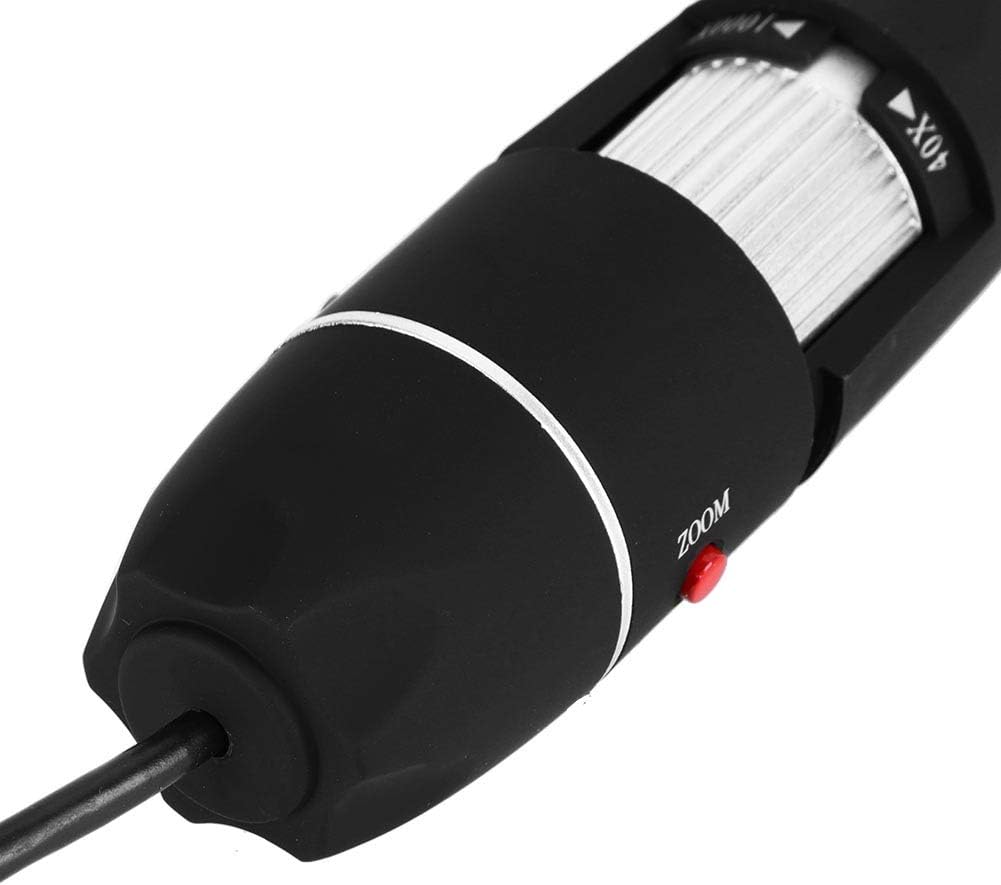
Rysunek 6.1: Szczegółowy view of the zoom and focus adjustment wheel on the microscope body, used for precise image clarity and magnification.
6.3 Regulacja jasności diod LED
The microscope is equipped with 8 adjustable LED lights. Use the LED Dimming Knob located on the USB cable to increase or decrease the brightness. Adjust the lighting to achieve optimal visibility of your specimen.

Image 6.2: A close-up showing the arrangement of the 8 LEDs around the microscope lens, designed to provide even illumination.

Image 6.3: The front of the microscope with its 8 LEDs illuminated, demonstrating the lighting capability for viewing specimens.
6.4 Robienie zdjęć i nagrywanie filmów
To capture a still image, press the Przycisk zatrzaskowy on the microscope body or use the corresponding function within the software. To record video, select the video recording option in the software and follow the prompts.

Image 6.4: A hand holding the Zerone USB Digital Microscope, illustrating its ergonomic design and portability for handheld use.
6.5 Film demonstracyjny produktu
Watch this video for a visual guide on the features and operation of the Zerone USB Digital Microscope.
Film 6.1: Film demonstracyjny pokazującyasing the Zerone 1000X Zoom USB Digital Microscope, highlighting its features and how it functions as a digital magnifier and endoscope camera.
7. Konserwacja
7.1 Czyszczenie
- Gently wipe the microscope body with a soft, dry cloth.
- Do czyszczenia soczewek należy używać specjalnej ściereczki i płynu do czyszczenia soczewek, aby uniknąć zarysowań.
- Nie należy używać środków czyszczących o właściwościach ściernych ani rozpuszczalników.
7.2 Przechowywanie
When not in use, store the microscope in a clean, dry place, away from direct sunlight and extreme temperatures. Use the original packaging or a protective case to prevent dust accumulation and physical damage.
8. Rozwiązywanie Problemów
| Problem | Możliwa przyczyna | Rozwiązanie |
|---|---|---|
| Brak obrazu na ekranie | Microscope not connected properly; Software not launched; Driver issue. | Ensure USB cable is securely connected. Launch the software. Reinstall drivers if necessary. |
| Obraz jest rozmazany | Incorrect focus; Incorrect working distance. | Adjust the Zoom/Focus Wheel. Ensure the microscope is at an appropriate distance from the object. |
| Diody LED nie świecą | LED dimming knob set to minimum; Power issue. | Rotate the LED Dimming Knob to increase brightness. Check USB connection. |
| Oprogramowanie nie wykrywa urządzenia | Driver not installed or corrupted; USB port issue. | Reinstall the software and drivers. Try a different USB port. |
9. Specyfikacje
| Funkcja | Szczegół |
|---|---|
| Marka | Zerone |
| Numer modelu | SKIESOARtbx1zsgua2 |
| Powiększenie | Do 1000X |
| Źródło światła | 8 regulowanych diod LED |
| Łączność | USB |
| Kompatybilne urządzenia | Komputer osobisty |
| Tworzywo | Metal |
| Kolor | Czarny, Srebrny |
| Wymiary produktu | 5.31 x 5.12 x 1.77 cala |
| Waga przedmiotu | 7 uncji |
10. Gwarancja i wsparcie
For warranty information and technical support, please refer to the documentation included with your product or visit the official Zerone webZachowaj paragon jako dowód zakupu na wypadek ewentualnych roszczeń gwarancyjnych.