
Wstęp
This manual provides instructions for the safe and efficient operation of your RIDGID R84086B 18-Volt Cordless Mini Bluetooth Radio. This compact and versatile device offers portable audio entertainment and device charging, featuring AM/FM radio, Bluetooth connectivity, and an auxiliary input. It is powered by RIDGID 18-Volt batteries and can also function as a power bank for charging other devices.
Informacje dotyczące bezpieczeństwa
Przed użyciem tego produktu należy zawsze przeczytać i zrozumieć wszystkie ostrzeżenia i instrukcje dotyczące bezpieczeństwa. Nieprzestrzeganie tych instrukcji może spowodować porażenie prądem elektrycznym, pożar i/lub poważne obrażenia.
- Do not expose the radio to rain or wet conditions. Water entering the radio will increase the risk of electric shock.
- Use only with specified battery packs. Using any other battery packs may create a risk of injury and fire.
- Do not operate the radio in explosive atmospheres, such as in the presence of flammable liquids, gases, or dust.
- Keep the radio away from heat sources, direct sunlight, and extreme temperatures.
- Always ensure the battery is properly seated before use.
Produkt ponadview
Familiarize yourself with the components of your RIDGID R84086B radio.
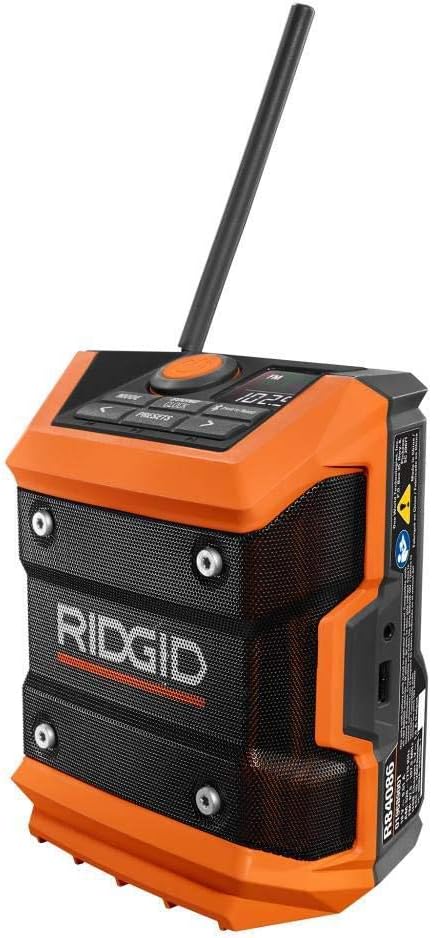
Rycina 1: Przód view of the RIDGID R84086B radio, showing the control panel, speaker, and extended antenna.

Figure 2: The RIDGID R84086B radio in a workshop setting, demonstrating its portability and use with a smartphone.
Organizować coś
Instalacja baterii
- Sprawdź, czy radio jest wyłączone.
- Align a charged RIDGID 18-Volt battery pack with the battery port on the radio.
- Wsuń akumulator do portu, aż zatrzaśnie się pewnie na swoim miejscu.
Regulacja anteny
For optimal radio reception, extend and adjust the antenna as needed. The antenna can be rotated and tilted to improve signal strength.
Instrukcja obsługi
Włączanie/wyłączanie zasilania
Press the orange power button located on the control panel to turn the radio on or off.
Wybór trybu
Naciśnij TRYB button to cycle through available audio sources: FM Radio, AM Radio, Bluetooth, and Auxiliary (AUX) input.
Strojenie radia (AM/FM)
- Wybierz tryb FM lub AM za pomocą TRYB przycisk.
- Użyj lewego (<) i prawo (>) arrow buttons to manually tune to a desired frequency.
- Aby zapisać stację jako ustawienie wstępne, naciśnij i przytrzymaj PRESETY button, then use the arrow buttons to select a preset number and press PRESETY jeszcze raz, aby potwierdzić.
Parowanie Bluetooth
- Wybierz tryb Bluetooth za pomocą TRYB button. The Bluetooth icon on the display will flash, indicating it is in pairing mode.
- Na swoim urządzeniu mobilnym włącz Bluetooth i wyszukaj dostępne urządzenia.
- Select "RIDGID Radio" from the list of devices to pair. Once paired, the Bluetooth icon will stop flashing and remain solid.
Wejście pomocnicze
To use the auxiliary input, connect an audio device (e.g., smartphone, MP3 player) to the 3.5mm AUX port on the side of the radio using a standard audio cable. Select AUX mode using the TRYB przycisk.
Regulacja dźwięku
Naciśnij SOUND/CLOCK button to access sound settings. Use the arrow buttons to adjust bass and treble levels for your preferred audio experience.
Funkcjonalność Power Banku
The radio features a USB port that allows you to charge compatible devices. Connect your device to the USB port using an appropriate charging cable. The radio's battery will provide power to charge your device.
Video: Demonstration of the RIDGID R84086B radio's features, including battery installation, mode selection, radio tuning, auxiliary input, and power bank functionality.
Konserwacja
Czyszczenie
Regularnie czyść radio miękką,amp cloth. Do not use harsh chemicals or abrasive cleaners. Ensure all ports are free of dust and debris.
Pielęgnacja baterii
Store battery packs in a cool, dry place away from direct sunlight. Do not store battery packs in a discharged condition. Always charge batteries fully before extended storage.
Rozwiązywanie problemów
Brak zasilania
- Sprawdź, czy akumulator jest całkowicie naładowany i prawidłowo włożony.
- Check for any obstructions in the battery port.
Słaby odbiór radia
- Extend and adjust the antenna for better signal.
- Move the radio to a different location to avoid interference.
Problemy z łącznością Bluetooth
- Upewnij się, że radio jest w trybie parowania Bluetooth.
- Upewnij się, że Bluetooth w Twoim urządzeniu mobilnym jest włączony i znajduje się w zasięgu.
- Spróbuj rozparować i ponownie sparować urządzenie.
Specyfikacje
| Marka | Sztywny |
| Numer modelu | R84086B |
| Technologia łączności | Bluetooth |
| Źródło zasilania | Battery Powered (RIDGID 18-Volt) |
| Waga przedmiotu | 1.75 funtów |
| Kompatybilne urządzenia | Smartfon |
| Interfejs sprzętowy | USB |
| UPC | 723548648427 |
Gwarancja i wsparcie
Informacje o gwarancji
This product comes with a 90-day limited warranty. Please refer to the warranty card included with your purchase for full terms and conditions.
Obsługa klienta
For technical assistance, troubleshooting, or warranty claims, please contact RIDGID customer support. Contact information can typically be found on the official RIDGID webstronie internetowej lub na opakowaniu produktu.