
Wstęp
This manual provides comprehensive instructions for the proper setup, operation, and maintenance of your Eosphorus SF-400C Science Digital Scale. This high-precision digital scale is designed for accurate weight measurements in various settings, including laboratories, schools, and home use. It features a 0.01g accuracy, a capacity of up to 600g, multiple units of measure, and a backlit LCD display for clear readings.
Co jest w pudełku
Po rozpakowaniu należy sprawdzić, czy znajdują się w nim wszystkie poniższe elementy:
- Eosphorus SF-400C Electronic Scale
- Przewód USB
- Zasilacz AC/DC
- Instrukcja obsługi (ten dokument)

Image: The Eosphorus SF-400C digital scale, showing the main unit, USB cord, and AC/DC adapter, representing the typical contents of the product package.
Organizować coś
- Umieszczenie: Place the scale on a firm, flat, and stable surface to ensure accurate readings. Avoid surfaces prone to vibrations or drafts.
- Zasilanie: The scale offers multiple power options:
- Kabel USB: Connect the included USB cord to the scale and a compatible USB power source (e.g., computer USB port, USB wall adapter).
- Zasilacz AC/DC: Connect the included AC/DC adapter to the scale and a standard electrical outlet.
- Baterie: (Batteries not included) Insert 2 x 1.5V AAA batteries into the battery compartment located on the underside of the scale, observing correct polarity.
- Montaż szyby przedniej: The scale includes a plastic windshield to minimize the impact of air movement on measurements, especially for very small weights. Carefully place the windshield over the weighing pan.
- Pierwsze włączenie: Naciśnij „WŁ./WYŁ." button to turn on the scale. The display will show "88888" and then "0.00g" (or the last used unit) when ready for use.

Image: The digital scale with its various power supply options, including the USB cable, AC/DC adapter, and a representation of AAA batteries.
Instrukcja obsługi
Ważenie podstawowe
- Upewnij się, że waga stoi na stabilnej powierzchni i jest włączona.
- Wait for the display to show "0.00g" (or your desired unit).
- Gently place the item to be weighed onto the center of the stainless steel weighing pan.
- Odczytaj wagę wyświetlaną na ekranie LCD.
Funkcja tarowania
Funkcja tarowania umożliwia odjęcie ciężaru pojemnika, dzięki czemu mierzysz tylko wagę netto jego zawartości.
- Umieść pusty pojemnik na szalce wagi.
- Naciśnij „TARAPrzycisk ". Wyświetlacz powróci do stanu "0.00g".
- Dodaj do pojemnika przedmioty, które chcesz zważyć. Na wyświetlaczu pojawi się tylko waga dodanych przedmiotów.
Funkcja przytrzymania
The Hold function allows you to freeze the displayed weight on the LCD screen, even after removing the item from the pan.
- While an item is on the scale and its weight is displayed, press the "TRZYMAĆ" przycisk.
- The displayed weight will remain on the screen until the button is pressed again or the scale is turned off.
Multiple Units of Measure
The scale supports various units of measure. To switch between units, press the "TRYB" button repeatedly until your desired unit is displayed.
Supported units include:
- gram (g)
- Uncja (oz)
- Funt (lb)
- Kilogram (kg)
- Thulam (tl)
- Piece Counting (pcs)

Image: The scale's display showing different measurement units, illustrating the multiple weighing modes available for selection.
Piece Counting (PCS)
This function allows you to count a large number of small, uniform items.
- With the scale on, press the "PCS" przycisk.
- Wybierz jakoample size (e.g., 10, 20, 50, 100 pieces) by pressing the "TRYB" przycisk.
- Podaj dokładną liczbę sample pieces (e.g., 10 pieces) on the weighing pan.
- Naciśnij „PCS" button again to confirm the sample. Na wyświetlaczu pojawi się „PCS” i liczba sztuk.
- Teraz możesz dodać więcej elementów, a waga policzy je na podstawieampwaga.
Kalibrowanie
Your Eosphorus SF-400C scale comes pre-calibrated from the factory. However, external calibration is accessible to the user if needed to maintain accuracy over time or after significant environmental changes.
For detailed calibration instructions, please refer to the specific calibration procedure outlined in the full electronic user's manual available on the Amazon product page in the "Product guides and documents" section. Typically, calibration requires a known weight (not included).
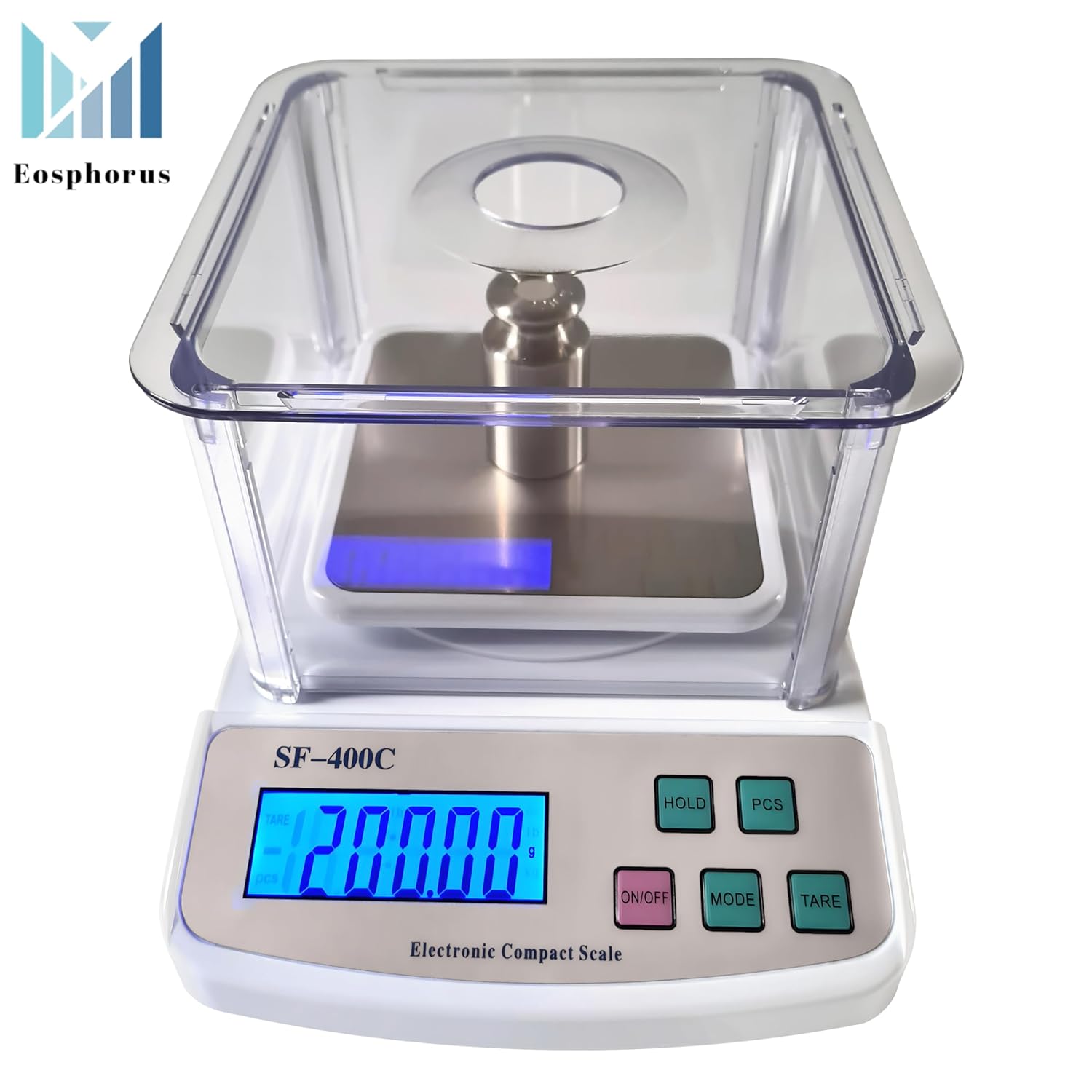
Image: The digital scale showing a successful calibration indicated by "PASS" on the display, with a calibration weight placed on the weighing pan.
Konserwacja
- Czyszczenie: Wipe the scale surface and weighing pan with a soft, damp cloth. Do not use abrasive cleaners or immerse the scale in water. The plastic windshield can be removed and cleaned separately with mild soap and water.
- Składowanie: Store the scale in a clean, dry environment away from extreme temperatures, humidity, and direct sunlight.
- Wymiana baterii: If using batteries, replace them when the low battery indicator appears on the display to ensure continued accurate operation.
- Zachowaj ostrożność: Avoid dropping the scale or subjecting it to sudden shocks, as this can damage the internal sensors.
Rozwiązywanie problemów
| Problem | Możliwa przyczyna | Rozwiązanie |
|---|---|---|
| Waga nie włącza się. | Brak zasilania, rozładowane baterie lub wadliwe podłączenie zasilania. | Check USB cord/AC adapter connection. If using batteries, replace them. |
| Niedokładne lub niespójne odczyty. | Unstable surface, drafts, scale not calibrated, or overloaded. | Place scale on a firm, level surface. Avoid drafts. Ensure weight is within capacity. Perform calibration if necessary. |
| "EEEE" or "O-Ld" displayed. | Skala jest przeciążona. | Remove excess weight immediately. Do not exceed the maximum capacity of 600g. |
| Na wyświetlaczu pojawia się napis „UNST”. | Unstable reading due to movement or vibration. | Ensure the scale is on a stable surface and there is no movement during weighing. |
Specyfikacje
- Model: SF-400C
- Pojemność: 600 Grams (0.01g accuracy)
- Dokładność: 0.01g / 0.0005 uncji
- Jednostki miary: Gram (g), Ounce (oz), Pound (lb), Kilogram (kg), Thulam (tl), Piece Counting (pcs)
- Typ wyświetlacza: Podświetlany wyświetlacz LCD
- Weighing Pan Size: Square 4.7 x 4.7 inches (Stainless Steel)
- Zasilanie: USB cord, AC/DC adapter (included), 2 x 1.5V AAA batteries (not included)
- Cechy szczególne: Backlit Display, High Precision, Unit Conversion, Tare Function, Hold Function, Piece Counting, Windshield
- Wymiary opakowania: 10.63 x 8.03 x 4.57 cala
- Waga przedmiotu: 1.98 funtów
- Producent: Eosphorus US
Gwarancja i wsparcie
Eosphorus products are designed for reliability and performance. For any questions, technical support, or warranty inquiries, please contact Eosphorus customer service through the retailer where the product was purchased or visit the official Eosphorus store page on Amazon: