
LG SL5Y
Instrukcja obsługi soundbara LG SL5Y 2.1-kanałowego o wysokiej rozdzielczości
Model: SL5Y
1. Wprowadzenie
This manual provides essential information for the safe and efficient use of your LG SL5Y 2.1 Channel High Resolution Sound Bar with DTS Virtual:X. Please read it thoroughly before operating the device and retain it for future reference.
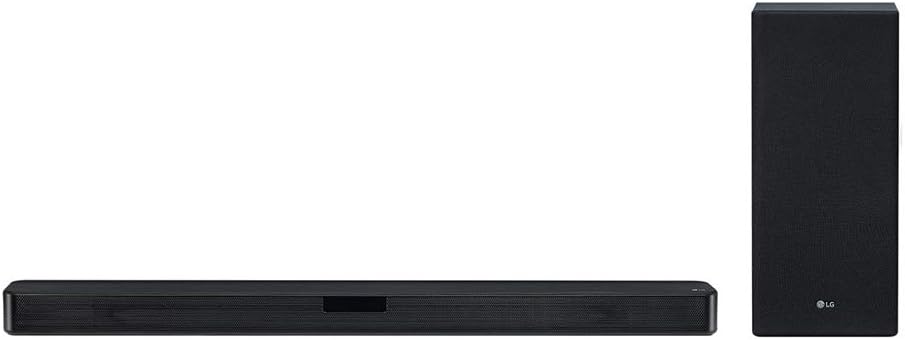
This image displays the LG SL5Y sound bar, a long, slender black unit, positioned horizontally, alongside its accompanying wireless subwoofer, a taller, rectangular black unit, positioned vertically. Both components feature a mesh grille design.
2. Informacje dotyczące bezpieczeństwa
Aby zapobiec porażeniu prądem elektrycznym, pożarowi lub uszkodzeniu produktu, należy przestrzegać następujących środków ostrożności:
- Źródło zasilania: Connect the product only to an AC outlet rated 100-240V, 50/60Hz.
- Wentylacja: Zapewnij odpowiednią wentylację. Nie blokuj otworów wentylacyjnych.
- Woda i wilgoć: Do not expose the product to water, rain, or moisture. Do not place objects filled with liquids, such as vases, on the apparatus.
- Źródła ciepła: Keep the product away from heat sources such as radiators, heat registers, stoves, or other apparatus (including amp(lifiers) wytwarzające ciepło.
- Czyszczenie: Unplug the product from the wall outlet before cleaning. Use a dry cloth only.
- Serwisowanie: Nie próbuj samodzielnie naprawiać tego produktu. Wszelkie czynności serwisowe należy powierzyć wykwalifikowanemu personelowi serwisowemu.
3. Zawartość opakowania
Sprawdź, czy w opakowaniu znajdują się wszystkie elementy:
- LG SL5Y Sound Bar
- Bezprzewodowy subwoofer
- Zdalne sterowanie
- Baterie (AAA x 2)
- Kabel optyczny
- Uchwyt ścienny
- Karta gwarancyjna
4. Konfiguracja
4.1. Umieszczenie
Place the sound bar centrally below your TV. The wireless subwoofer can be placed anywhere in the room, ideally near the sound bar for optimal bass distribution. Ensure there is clear space around both units for proper sound projection and ventilation.
4.2. Podłączanie do telewizora
Wybierz jedną z następujących metod połączenia:
- HDMI ARC (zalecane):
- Connect one end of an HDMI cable (not included) to the HDMI OUT (TV ARC) port on the sound bar.
- Podłącz drugi koniec do portu HDMI IN (ARC) w telewizorze.
- Enable HDMI ARC/CEC functions in your TV's settings. This allows your TV remote to control the sound bar's volume.
- Kabel optyczny:
- Connect the included optical cable to the OPTICAL IN port on the sound bar.
- Podłącz drugi koniec do portu optycznego wyjścia audio cyfrowego w telewizorze.
- Select 'Optical' as the input source on the sound bar using the remote control.
4.3. Wireless Subwoofer Connection
The wireless subwoofer should automatically pair with the sound bar when both units are powered on. If the connection is not established:
- Ensure both the sound bar and subwoofer are plugged into power outlets.
- Check the LED indicator on the subwoofer. A solid green light indicates a successful connection. A blinking green light indicates it is searching for a connection.
- If pairing fails, press the PAIRING button on the back of the wireless subwoofer. The LED will blink green. Then, turn off and on the sound bar. The subwoofer should pair automatically.
5. Obsługa Soundbara
5.1. Podstawowe sterowanie
Use the included remote control to operate the sound bar:
- Moc (⑁): Włącza lub wyłącza urządzenie.
- Głośność (+/-): Dostosowuje główny poziom głośności.
- Function (F): Selects the input source (HDMI ARC, Optical, Bluetooth, USB).
- Wycisz (🔇): Wycisza lub włącza dźwięk.
5.2. Tryby dźwięku
The LG SL5Y features DTS Virtual:X technology for an immersive audio experience. Use the remote control to select various sound effects:
- AI Sound Pro: Optimizes sound settings automatically based on content.
- Wirtualny DTS:X: Provides a virtual surround sound experience.
- Standard: Do ogólnego słuchania.
- Bass Blast+: Enhances bass sound.
5.3. Połączenie Bluetooth
Aby podłączyć urządzenie Bluetooth:
- Press the Function (F) button on the remote control until 'BT' appears on the sound bar display.
- Na swoim urządzeniu Bluetooth (np. smartfonie) włącz Bluetooth i wyszukaj dostępne urządzenia.
- Select 'LG SL5Y' from the list of devices.
- Once paired, the sound bar will indicate a successful connection, and you can play audio from your device.
6. Konserwacja
Proper care ensures the longevity of your sound bar:
- Czyszczenie: Do czyszczenia powierzchni soundbara i subwoofera używaj miękkiej, suchej ściereczki. Nie używaj płynnych środków czyszczących ani materiałów ściernych.
- Wentylacja: Utrzymuj otwory wentylacyjne w czystości, bez kurzu i zanieczyszczeń.
- Składowanie: Jeśli urządzenie będzie przechowywane przez dłuższy czas, należy odłączyć je od gniazdka elektrycznego i przechowywać w chłodnym, suchym miejscu.
7. Rozwiązywanie Problemów
Aby zapoznać się z typowymi problemami i ich rozwiązaniami, zapoznaj się z poniższą tabelą:
| Problem | Możliwa przyczyna | Rozwiązanie |
|---|---|---|
| Brak zasilania | Przewód zasilający nie jest podłączony. | Ensure the power cord is securely plugged into the wall outlet and the sound bar. |
| Brak dźwięku | Incorrect input source selected. Volume is too low or muted. | Press the Function (F) button to select the correct input. Increase volume or unmute. |
| Subwoofer nie łączy się | Subwoofer is out of range or not paired. | Move the subwoofer closer to the sound bar. Follow the manual pairing steps in Section 4.3. |
| Połączenie Bluetooth nie działa | Urządzenie nie jest w trybie parowania lub znajduje się poza zasięgiem. | Ensure the sound bar is in Bluetooth pairing mode. Move your device closer to the sound bar. |
| Pilot nie działa | Batteries are depleted or inserted incorrectly. Obstruction between remote and sound bar. | Replace batteries with new AAA batteries. Ensure correct polarity. Remove any obstructions. |
8. Specyfikacje
| Funkcja | Szczegół |
|---|---|
| Numer modelu | SL5Y |
| Typ głośnika | Soundbar |
| Konfiguracja kanału dźwięku przestrzennego | 2.1 |
| Moc wyjściowatage | 400 watów |
| Technologia łączności | Wireless (Bluetooth, Subwoofer) |
| Kompatybilne urządzenia | Laptop, komputer osobisty, smartfon, tablet |
| Wymiary produktu (soundbar) | 3.3" gł. x 35" szer. x 2.2" wys. |
| Waga przedmiotu | 0.01 Ounces (Soundbar only, approximate) |
| Metoda kontroli | Remote Control, App |
| Źródło zasilania | Elektryczny przewodowy |
| Rodzaj gwarancji | 1 rok na części i robociznę |
| UPC | 719192629035 |
9. Gwarancja i wsparcie
This LG SL5Y Sound Bar comes with a 1 rok na części i robociznę warranty. For detailed warranty terms and conditions, please refer to the warranty card included in your package.
For technical support, troubleshooting assistance, or service inquiries, please visit the official LG webOdwiedź witrynę lub skontaktuj się bezpośrednio z obsługą klienta LG. Dane kontaktowe zazwyczaj można znaleźć na stronie internetowej LG. webstronie lub w dokumentacji produktu.
Ask a question about this manual
Ask about setup, troubleshooting, compatibility, parts, safety, or missing instructions. Manuals+ will review the question and use this page’s manual context to help answer it.