
1. Wprowadzenie
This manual provides detailed instructions for the installation, operation, and maintenance of your Anlapus FULL HD 1080P H.265+ Surveillance Kit. This system includes an 8-channel DVR with a pre-installed 1TB hard drive, 4 bullet cameras, and 4 dome cameras, designed to provide comprehensive security monitoring for your property.

Figure 1.1: Anlapus 8-channel DVR surveillance system components.
2. Zawartość opakowania
Sprawdź, czy wszystkie wymienione poniżej elementy znajdują się w Twojej paczce. Jeśli brakuje któregokolwiek z nich lub jest on uszkodzony, skontaktuj się z obsługą klienta.
- 1x 8-Channel DVR (with 1TB HDD pre-installed)
- 4 kamery monitorujące Bullet 1080P
- 4x 1080P Dome Surveillance Cameras
- 8x 60ft BNC Video Cables
- 3x Power Adapters (12V 2A)
- 2 rozdzielaczy zasilania 1 do 4
- 1x mysz USB
- 1x Instrukcja obsługi (ten dokument)
- 8x Torebki na śruby montażowe
- 8x naklejki ostrzegawcze

Figure 2.1: Contents of the Anlapus surveillance kit package.
3. Funkcje produktu
- Rozdzielczość Full HD 1080P: Captures clear and detailed images with 2.0-megapixel quality.
- Zaawansowana kompresja wideo H.265+: Zmniejsza file sizes by up to 50% compared to H.264, allowing for longer recording times and more efficient storage.
- Ulepszone widzenie w nocy: Equipped with 24 IR LEDs and an IR-CUT filter, providing clear black and white night vision up to 24 meters (80 feet).
- Stopień ochrony przed warunkami atmosferycznymi IP66: Cameras are designed for both indoor and outdoor use, capable of withstanding various extreme weather conditions.
- Wykrywanie ruchu i alerty: Configurable motion detection zones with instant email alerts and push notifications to your smartphone.
- Wiele trybów nagrywania: Supports 24/7 continuous recording, motion-activated recording, scheduled recording, and manual recording.
- Dostęp zdalny: View transmisje na żywo i nagraniatage from anywhere using the free mobile application on your smartphone or tablet.
- Pre-installed 1TB Hard Drive: Ready for immediate use, eliminating the need to purchase and install a separate hard drive.

Rysunek 3.1: Widzenie dzienne i nocne.
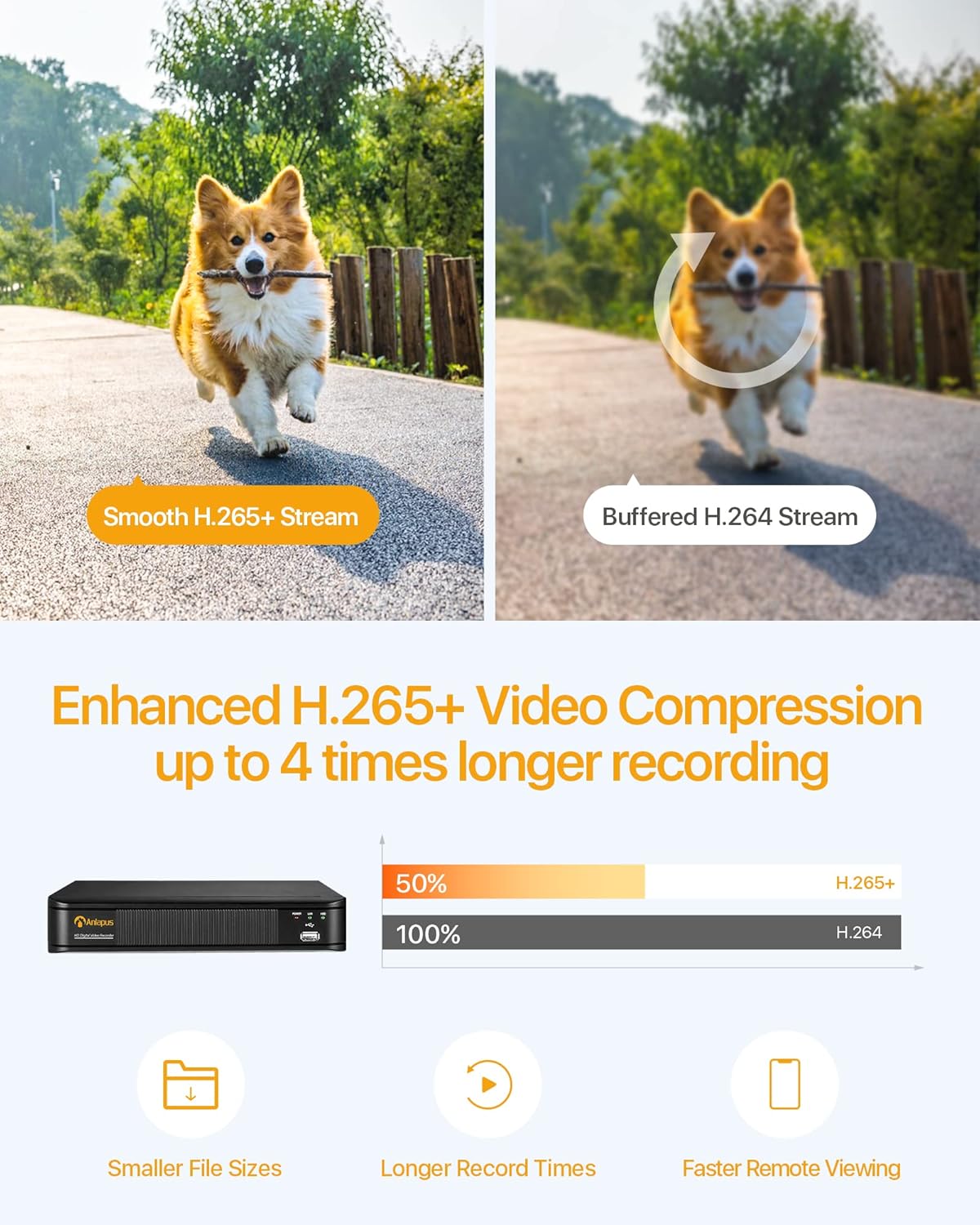
Figure 3.2: H.265+ Video Compression Benefits.

Figure 3.3: Day and Night Surveillance Example.

Figure 3.4: All-Weather Protection and Applications.
4. Komponenty systemuview
4.1 DVR (cyfrowy rejestrator wideo)
The DVR is the central unit for recording, storing, and managing video footage from all connected cameras. It features multiple video input ports, audio input/output, VGA and HDMI outputs for display, and USB ports for mouse control and data backup.
4.2 Kamery monitorujące
The kit includes both bullet and dome cameras. Both types offer 1080P resolution, night vision capabilities, and IP66 weatherproof housing. Bullet cameras are typically used for directional surveillance, while dome cameras offer a more discreet appearance and are often vandal-resistant.

Figure 4.1: Camera and DVR Connection Diagram.
5. Przewodnik konfiguracji
5.1 Połączenie początkowe
- Podłącz kamery: Use the provided BNC video cables to connect each camera to the 'VIDEO IN' ports on the back of the DVR.
- Kamery elektryczne: Use the power adapters and 1-to-4 power splitters to provide power to all cameras.
- Podłącz DVR do wyświetlacza: Connect the DVR to a monitor or TV using either an HDMI or VGA cable.
- Podłącz DVR do sieci: Connect the DVR's 'NETWORK' port to your router using an Ethernet cable for remote access.
- Podłącz mysz USB: Podłącz mysz USB do jednego z portów USB rejestratora DVR, aby korzystać z nawigacji.
- Włącz DVR: Connect the DVR to its power adapter and plug it into an electrical outlet. The system will boot up.

Figure 5.1: Simple Connection for Mobile Access.
5.2 Konfiguracja aplikacji mobilnej
- Pobierz aplikację: Szukaj the official Anlapus security app on Google Play Store or Apple App Store and install it on your smartphone.
- Zarejestruj Konto: Otwórz aplikację i postępuj zgodnie z instrukcjami wyświetlanymi na ekranie, aby zarejestrować nowe konto użytkownika.
- Dodaj urządzenie: Scan the QR code displayed on your DVR's monitor or manually enter the device ID to add your DVR to the app.
- View Kamery: Po dodaniu możesz view live feeds from your cameras and access recorded footage zdalnie.
6. Instrukcja obsługi
6.1 Tryby nagrywania
Your DVR supports several recording modes:
- Nagrywanie ciągłe (24/7): Records continuously, overwriting the oldest footage gdy dysk twardy jest pełny.
- Nagrywanie z wykrywaniem ruchu: Rejestruje tylko po wykryciu ruchu, oszczędzając miejsce na dysku.
- Zaplanowane nagrywanie: Ustaw konkretne godziny nagrywania.
- Nagrywanie ręczne: Ręczne rozpoczynanie i zatrzymywanie nagrywania.
Configure these settings via the DVR's main menu using the USB mouse.

Figure 6.1: 24/7 Recording View.
6.2 Detekcja ruchu i alerty
System można skonfigurować tak, aby wykrywał ruch i wysyłał alerty:
- Konfiguruj strefy wykrywania: In the DVR settings, define specific areas within the camera's view do wykrywania ruchu.
- Ustaw czułość: Dostosuj czułość wykrywania ruchu, aby zminimalizować liczbę fałszywych alarmów.
- Włącz alerty: Activate email alerts and push notifications through the DVR settings and mobile app. When motion is detected, you will receive an alert on your smartphone.

Figure 6.2: Motion Detection and Smartphone Alert.

Figure 6.3: Smart Motion Detection Features.
6.3 Remote Access & Playback
Access your surveillance system from anywhere:
- Na żywo View: Open the mobile app to view live video streams from all connected cameras.
- Odtwarzanie nagranego dźwięku: Use the app's playback function to review nagrano footage stored on the DVR's hard drive. You can select specific dates and times.
- Wiele urządzeń Viewing: System obsługuje jednoczesne viewing on multiple devices, including smartphones, tablets, and desktop computers.

Figure 6.4: Mobile App Playback Interface.

Figure 6.5: Multi-Device Remote Viewing.
7. Konserwacja
- Czyste aparaty: Okresowo czyść obiektywy aparatu miękką,amp ściereczką, aby zapewnić wysoką jakość obrazu. Unikaj środków czyszczących o działaniu ściernym.
- Sprawdź kable: Ensure all cables are securely connected and free from damage. Replace any damaged cables immediately.
- Wentylacja DVR: Upewnij się, że dekoder DVR znajduje się w dobrze wentylowanym pomieszczeniu, aby zapobiec przegrzaniu. Utrzymuj otwory wentylacyjne w czystości.
- Aktualizacje oprogramowania układowego: Sprawdź producenta webOdwiedzaj witrynę okresowo w celu uzyskania aktualizacji oprogramowania sprzętowego, aby zapewnić optymalną wydajność i bezpieczeństwo.
- Kopia zapasowa danych: Regularnie twórz kopie zapasowe ważnych plikówtage from the DVR's hard drive to an external USB device.

Figure 7.1: USB Data Backup.
8. Rozwiązywanie Problemów
- Brak sygnału wideo: Check all cable connections between cameras and DVR, and between DVR and display. Ensure cameras and DVR are powered on.
- Słaba jakość obrazu: Clean camera lenses. Ensure cameras are properly focused (if adjustable). Check cable integrity.
- Brak dostępu zdalnego: Verify the DVR is connected to the internet. Check network settings on the DVR and ensure your router is functioning correctly. Confirm the mobile app is properly configured and the device is added.
- Wykrywanie ruchu nie działa: Review motion detection settings in the DVR menu. Adjust sensitivity and detection zones. Ensure alerts are enabled in both DVR and mobile app settings.
- Rejestrator DVR nie nagrywa: Check hard drive status in DVR settings. Ensure recording schedules or motion detection settings are correctly configured.
Aby uzyskać dalszą pomoc, zapoznaj się z sekcją pomocy technicznej lub skontaktuj się z obsługą klienta.
9. Specyfikacje
| Marka | Anlapus |
| Numer modelu | AJ-AM8A4B-4W441E-106202S |
| Rozdzielczość wideo | 1080p Full HD |
| Kompresja wideo | H.265 + |
| Kanały DVR | 8 kanały |
| Pojemność magazynowa | Dysk twardy 1 TB (wstępnie zainstalowany) |
| Typ aparatu | Bullet and Dome Cameras |
| Zakres noktowizora | Do 24 metrów (80 stóp) |
| Ocena odporności na warunki atmosferyczne | IP66 |
| Technologia łączności | Przewodowy |
| Źródło zasilania | Cable Electric (12 Volts DC) |
| Wymiary produktu (dł. x szer. x wys.) | 19.99 x 19.99 x 19.99 cm (DVR) |
| Waga przedmiotu | 7.36 kilogramy (całe opakowanie) |
| Producent | Anlapus |
10. Gwarancja i wsparcie
The manufacturer, ZOSI (parent company of Anlapus), provides the following support and warranty:
- 30-dniowa gwarancja satysfakcji: If you are not satisfied, you may be eligible for a refund or exchange within 30 days.
- Dożywotnia pomoc techniczna: Comprehensive technical support is available for the lifetime of the product.
- 2-letnia gwarancja: Produkt jest objęty roczną gwarancją obejmującą wady produkcyjne.
For technical support or warranty claims, please refer to the contact information provided with your product packaging or visit the official Anlapus/ZOSI webstrona.