
Wstęp
Thank you for choosing the EZQuest USB C Hub Docking Station 8-in-1. This manual provides detailed instructions for setting up, operating, and maintaining your device. Please read this manual thoroughly before use to ensure optimal performance and longevity of your product.
Produkt ponadview
The EZQuest USB C Hub Docking Station 8-in-1 is designed to expand the connectivity of your USB-C enabled devices, offering a comprehensive solution for various peripherals and display needs. It features multiple ports for data transfer, video output, network connection, and power delivery.
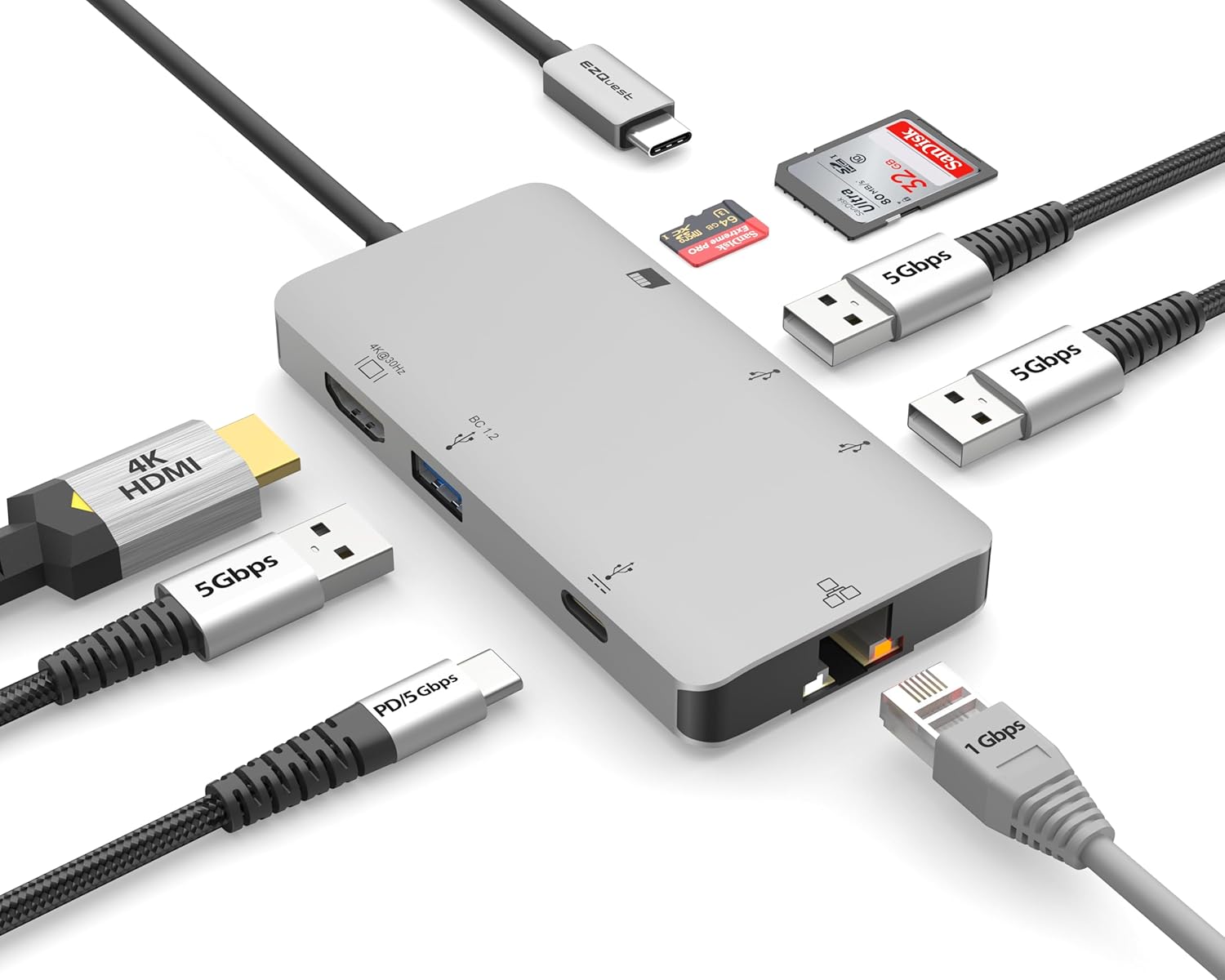
Image: The EZQuest USB C Hub Docking Station 8-in-1, showcasindzięki kompaktowej konstrukcji i zintegrowanemu kablowi USB-C.

Image: A diagram illustrating the 8-in-1 expansion capabilities of the hub, including HDMI, USB-C PD, USB 3.0, Ethernet, and card readers.
Instrukcje konfiguracji
- Połącz z urządzeniem hosta: Plug the integrated USB-C cable of the EZQuest hub into an available USB-C/Thunderbolt 3/4 port on your laptop, tablet, or smartphone.
- Dostarczanie mocy (opcjonalnie): For charging your host device, connect your USB-C power adapter to the USB-C Power Delivery port on the hub. The hub supports up to 100W input with 85W pass-through charging.
- Wyświetlacz HDMI: Connect an HDMI cable from your monitor to the HDMI port on the hub for 4K 30Hz video output.
- Połączenie Ethernet: For a stable wired network, connect an Ethernet cable to the Gigabit Ethernet port on the hub.
- Urządzenia peryferyjne USB: Connect your USB-A devices (e.g., mouse, keyboard, external hard drive) to the three USB-A 3.0 ports.
- Karty SD/Micro SD: Insert your SD or Micro SD cards into the respective slots for data transfer.

Image: A user connecting the EZQuest USB C Hub to a laptop's USB-C port.

Image: Illustrates connecting a power adapter to the hub for pass-through charging of a laptop.
Instrukcja obsługi
Wyjście wyświetlacza (HDMI)
The HDMI port supports 4K resolution at 30Hz. Connect an HDMI-enabled display to extend or mirror your desktop for enhanced productivity or multimedia viewing. Ensure your display and device support 4K 30Hz for optimal performance. Note that the USB-C ports on the hub are for data and power delivery, not for connecting a monitor.
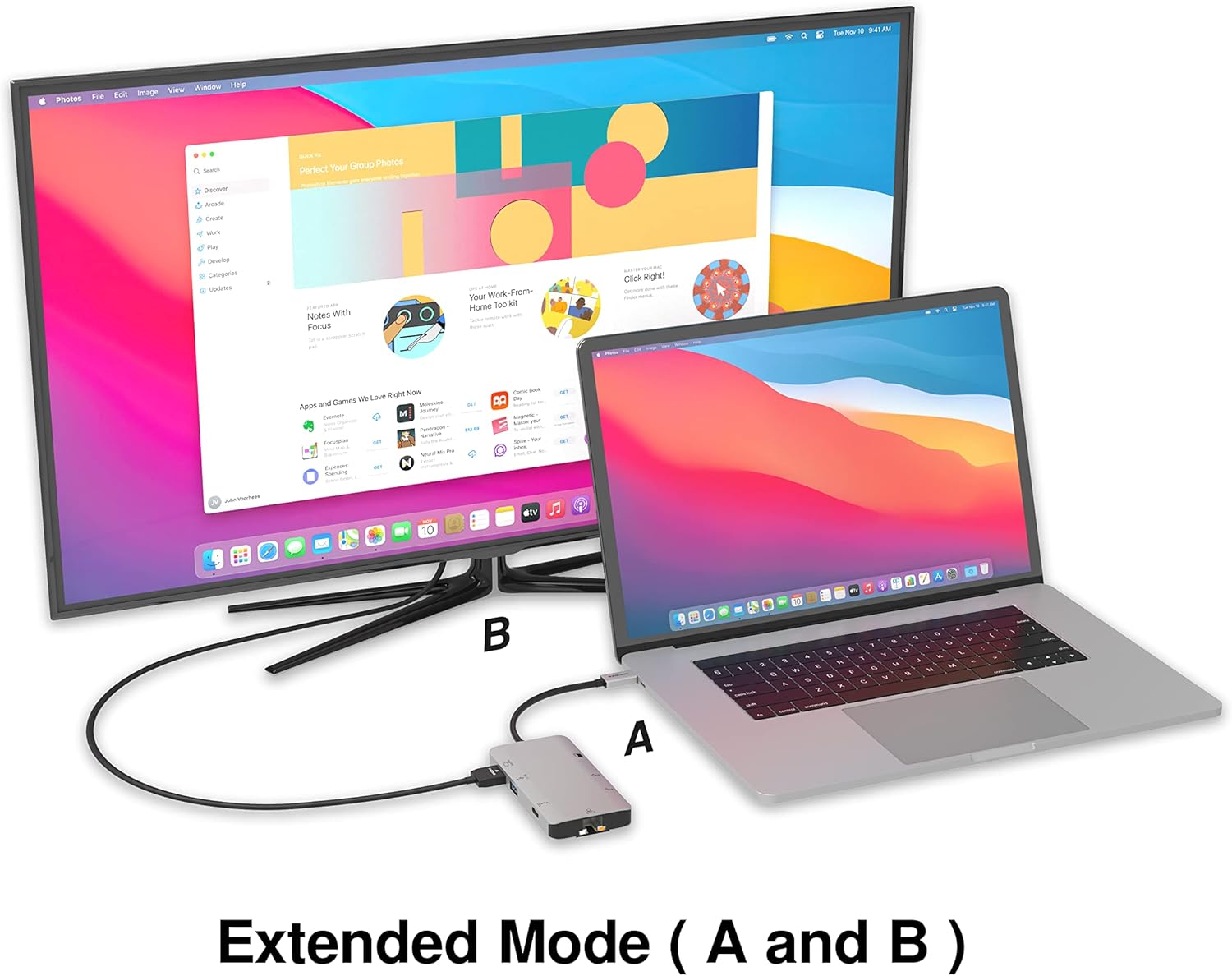
Image: A laptop connected to an external monitor via the hub, demonstrating extended display mode.
Data Transfer (USB-A & SD/Micro SD)
The three USB-A 3.0 ports offer data transfer speeds up to 5Gbps. The SD and Micro SD card slots allow for simultaneous read and write operations, facilitating quick file transfery z kart pamięci.

Image: Various devices like USB drives, SD cards, and an Ethernet cable connected to the EZQuest hub.
Network Connection (Gigabit Ethernet)
The Gigabit Ethernet port provides a stable and high-speed wired internet connection, ideal for large downloads, uploads, or streaming where Wi-Fi might be unreliable. An LED indicator confirms network activity.
Dystrybucja mocy
The USB-A ports distribute power efficiently. One USB-A port with BC1.2 outputs 5V/1.5A (7.5W), while the other two USB-A ports deliver 5V/0.9A (4.5W) each. The total shared power when all ports are in use is 10 watts.

Image: A diagram detailing the power output and data transfer speeds of the USB-A ports on the hub.
Funkcje i porty
| Rodzaj portu | Ilość | Funkcjonalność |
|---|---|---|
| HDMI | 1 | 4K @ 30Hz Video Output (Extended/Mirror Mode) |
| USB-C Power Delivery/Data | 1 | Up to 100W Power Input (85W Pass-Through), 5Gbps Data Transfer |
| USB-A 3.0 | 3 | 5Gbps Data Transfer (One port BC1.2 5V/1.5A, two ports 5V/0.9A) |
| Gigabitowy Ethernet | 1 | 10/100/1000 Mbps Wired Network Connection with LED Indicator |
| Czytnik kart SD | 1 | SDHC/SDXC Read/Write |
| Czytnik kart Micro SD | 1 | Micro SDHC/SDXC Read/Write |
Zgodność
This USB C Hub is compatible with a wide range of devices:
- Computers featuring USB-C, USB 4, Thunderbolt 4, or Thunderbolt 3 ports.
- USB-C smartphones and tablets equipped with OTG (On-The-Go) support.
Unsupported Device:
- The USB-A ports on this docking station do not support Apple SuperDrive. For connecting an Apple SuperDrive, an alternative adapter (e.g., EZQuest X40100 USB-C to USB-A Female Mini Adapter) directly to your Mac is recommended.
Rozwiązywanie problemów
- Brak wyjścia wyświetlacza:
- Upewnij się, że port USB-C Twojego urządzenia hosta obsługuje wyjście wideo (tryb alternatywny DisplayPort).
- Sprawdź wszystkie połączenia kablowe (USB-C od koncentratora do urządzenia, HDMI od koncentratora do monitora).
- Verify your monitor input source is set correctly to HDMI.
- Jeśli to możliwe, wypróbuj inny kabel HDMI lub monitor.
- Problemy z ładowaniem:
- Upewnij się, że zasilacz USB-C jest podłączony do portu USB-C PD koncentratora.
- Sprawdź, czy Twój zasilacz zapewnia wystarczającą moctage (up to 100W recommended for laptops).
- Check if the host device's USB-C port supports Power Delivery.
- Powolny transfer danych:
- Aby uzyskać optymalną prędkość, upewnij się, że używasz urządzeń i kabli zgodnych ze standardem USB 3.0.
- The total shared power for USB-A ports is 10W; excessive power draw from multiple devices may affect performance.
- Ethernet nie działa:
- Sprawdź połączenie kabla Ethernet zarówno z koncentratorem, jak i z routerem/modemem.
- Sprawdź ustawienia sieciowe na swoim urządzeniu hosta.
- Ensure the LED indicator on the Ethernet port is active.
- SD/Micro SD Card Not Recognized:
- Sprawdź, czy karta została włożona do właściwego gniazda.
- Spróbuj włożyć kartę ponownie lub użyć innej karty.
- Sprawdź czy karta nie jest uszkodzona lub zniszczona.
Specyfikacje
| Funkcja | Szczegół |
|---|---|
| Numer modelu | X40030 |
| Wymiary produktu | 0.81 x 1.63 x 0.2 cala |
| Waga przedmiotu | 1.6 uncji |
| Interfejs sprzętowy | USB typu C |
| Wyjście HDMI | 4K przy 30 Hz |
| Wejście USB-C PD | Do 100 W |
| Wyjście USB-C PD | Do 85 W |
| USB-A 3.0 Data Speed | 5 Gb/s |
| Prędkość Ethernetu | 1 Gigabit (10/100/1000 Mbps) |
| Obsługa czytnika kart | SDHC, SDXC, Micro SDHC, Micro SDXC |
| Tworzywo | Obudowa z anodowanego aluminium |
Konserwacja
- Czyszczenie: Do czyszczenia piasty używaj miękkiej, suchej ściereczki. Unikaj płynnych środków czyszczących i aerozoli.
- Składowanie: Przechowuj piastę w chłodnym, suchym miejscu, z dala od bezpośredniego światła słonecznego i ekstremalnych temperatur.
- Obsługiwanie: Unikaj upuszczania urządzenia i narażania go na silne uderzenia. Nie próbuj demontować piasty.
Gwarancja i wsparcie
The EZQuest USB C Hub Docking Station 8-in-1 comes with a 1-roczna gwarancja bez obaw. This warranty covers manufacturing defects and ensures peace of mind regarding your investment.
For technical support, warranty claims, or any product-related inquiries, please visit the official EZQuest website or contact their customer service team through the contact information provided with your product packaging.