
YAVIS 631517845978
YAVIS Metal Code Access Control Keypad (Model 631517845978) User Manual
Szczegółowe instrukcje dotyczące instalacji, obsługi i konserwacji.
Wstęp
The YAVIS Metal Code Access Control Keypad is a secure and automated solution for managing door access. This updated version features modern technology for sensitive and rapid response. It supports various door opening methods and is suitable for both indoor and outdoor applications in homes, hotels, offices, apartments, and factories.
This manual provides detailed instructions to help you set up, operate, and maintain your access control system effectively.
1. Konfiguracja i instalacja
Before installation, ensure all components are present: 1 RFID Access Control Keypad, 1 User Manual, 1 Screw Bag, 1 Rain Cover, and 10 RFID Keyfobs (5 blue + 5 yellow).
1.1 Koniec komponentuview

Figure 1: Keypad Component Analysis. This image highlights key features of the keypad including the work indicator lights, backlight button, back outlet for wiring, and fixed screw location.
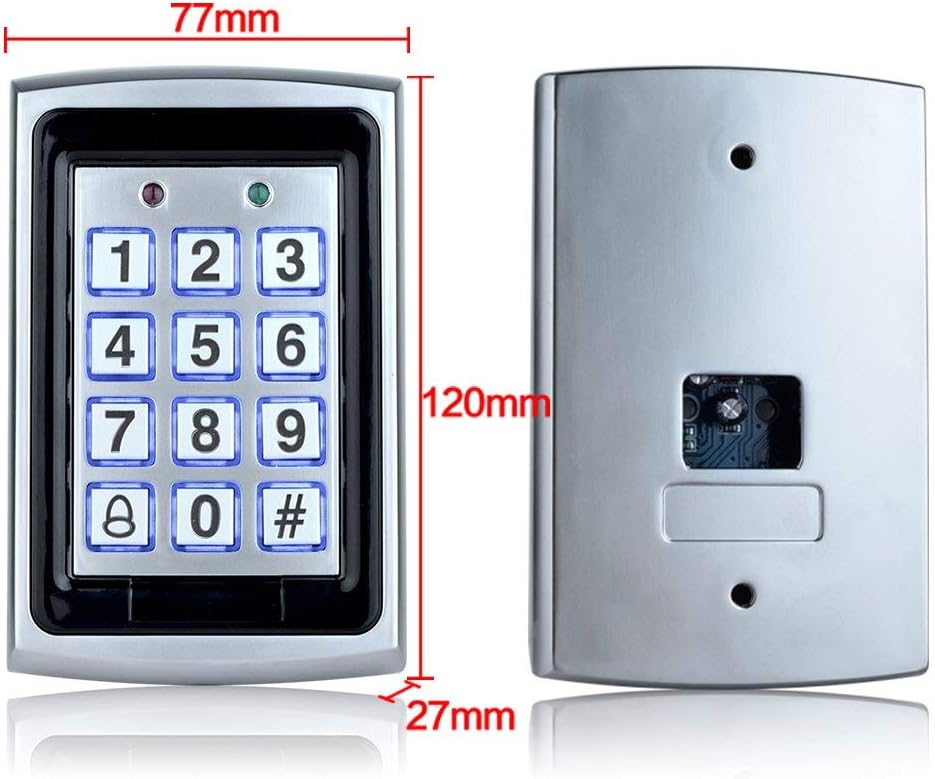
Figure 2: Keypad Dimensions. The keypad measures 120mm in height, 77mm in width, and 27mm in depth.

Figure 3: Rain Cover Dimensions. The protective rain cover measures approximately 15cm in length, 10.4cm in height, and 9cm in width, designed to shield the keypad from weather elements.
1.2 Schemat okablowania
The access controller requires a 12V power supply. Connect the keypad to your electric lock system (e.g., electric mortise lock, electronic lock, magnetic lock) and an optional exit button as per the diagram below. Ensure all connections are secure and correctly polarized.

Rysunek 4: Schemat połączeń. This diagram illustrates how to connect the access controller to a power supply, various types of electric locks, and an optional exit button. Note the connections for +12V, GND, NO, NC, COM, and PUSH terminals.
Ważny: This diagram shows connections for the access control unit only. Ensure your power supply is compatible (12 Volts) and correctly wired.
1.3 Montaż klawiatury
- Choose a suitable location for installation, considering both indoor and outdoor use (with rain cover).
- Use the provided screw bag to securely mount the keypad to a wall or door frame. The installation type is screw-in.
- If installing outdoors, ensure the rain cover is properly fitted over the keypad to protect it from weather elements.

Rysunek 5: Instalacja Example. This image shows a typical installation of the access controller next to a door, connected to an electric drop lock and an exit button.
2. Instrukcja obsługi
The YAVIS Access Control Keypad offers flexible door opening methods and user management.
2.1 Door Opening Modes
The system supports three primary modes for opening the door:
- Card Only: Present a registered RFID card (keyfob) to the reader.
- Tylko hasło: Enter a valid password on the keypad.
- Card + Password: Present a registered RFID card, then enter the associated password.
The keypad features a blue backlight for visibility in low-light conditions and a doorbell button for visitor communication.
2.2 User Management (Programming)
Full programming, including adding or deleting cards and setting passwords, is performed directly via the keypad. Refer to the detailed user manual included in your package for specific programming steps. The system supports up to 1000 standard users.
Notatka: The included manual provides comprehensive instructions for programming user access. If you require assistance, please contact customer support.
3. Konserwacja
To ensure the longevity and optimal performance of your YAVIS Access Control Keypad, follow these maintenance guidelines:
- Czyszczenie: Regularly wipe the keypad surface with a soft, dry cloth. Avoid using abrasive cleaners or solvents, which can damage the finish or electronic components.
- Ochrona środowiska: If installed outdoors, ensure the waterproof rain cover is securely in place to protect the unit from rain, dust, and direct sunlight.
- Kontrola okablowania: Periodically check all wiring connections for any signs of wear, corrosion, or looseness. Ensure connections remain secure.
- Aktualizacje oprogramowania: While not user-serviceable, ensure the system firmware is up-to-date if updates become available (contact support for details).
4. Rozwiązywanie Problemów
If you encounter issues with your access control keypad, refer to the following common troubleshooting steps:
| Problem | Możliwa przyczyna | Rozwiązanie |
|---|---|---|
| Klawiatura nie reaguje / Brak zasilania | Brak zasilania lub nieprawidłowe okablowanie. | Check power connections and ensure the 12V power supply is active. Verify wiring according to the diagram. |
| RFID card not recognized | Card not registered or damaged. Incorrect card type. | Ensure the card is registered in the system. Try another registered card. Verify it's a 125 kHz EM compatible card. |
| Hasło nie działa | Incorrect password entered. Password not set or changed. | Double-check the password entry. Refer to the manual for programming instructions to reset or verify the password. |
| Door does not unlock | Lock mechanism issue. Incorrect wiring to the lock. | Check the electric lock's power and functionality independently. Verify the wiring between the keypad and the lock. |
| Keypad backlight not working | Backlight feature disabled or malfunction. | Consult the manual for backlight settings. If problem persists, contact support. |
If these steps do not resolve the issue, please contact YAVIS customer support for further assistance.
5. Specyfikacje
| Funkcja | Szczegół |
|---|---|
| Nazwa produktu | Klawiatura kontroli dostępu |
| Numer modelu | 631517845978 |
| Kompatybilne karty | EM or EM compatible cards |
| Tworzywo | Metal |
| Aktualny | <1200 mA |
| Proximity Reader Frequency | 125kHz |
| Odległość odczytu karty | 3-12cm |
| Wymiary (dł. x szer. x wys.) | 120 × 77 × 27 mm (4.72 × 3.03 × 1.06 cala) |
| Door Opening Options | RFID Card Only / Password Only / RFID Card + Password |
| Pojemność użytkownika | 1000 standard users (26 bits) |
| Źródło zasilania | Wired (Cable electric) |
| Tomtage | 12 wolty |
| Technologia łączności | Przewodowy |
| Typ instalacji | Wkręcane |
| Zawarte komponenty | Keypad, Rain Cover, 10 RFID Keyfobs, Screw Bag, User Manual |
6. Gwarancja i wsparcie
The YAVIS Access Control Keypad comes with a 1-letnia gwarancja I dożywotnie wsparcie.
If you have any questions, require technical assistance, or need instructions in your local language, please contact YAVIS customer support. Our team is dedicated to providing comprehensive support for your product.
For support, please refer to the contact information provided with your purchase or visit the official YAVIS webstrona.
Ask a question about this manual
Ask about setup, troubleshooting, compatibility, parts, safety, or missing instructions. Manuals+ will review the question and use this page’s manual context to help answer it.