
Wstęp
The Plugable Performance Onyx Gaming Headset is designed to provide an immersive audio experience and clear communication for gamers across multiple platforms. Featuring 53mm dynamic drivers, a retractable microphone, and comfortable memory foam ear cushions, this headset is built for extended gaming sessions. This manual provides detailed instructions for setting up, operating, maintaining, and troubleshooting your headset.
Co jest w pudełku
Your Plugable Performance Onyx Gaming Headset package includes the following components:
- Plugable Performance Onyx Headset
- 30cm 3.5mm TRRS extension with in-line volume and mute control
- 250cm 3.5mm TRRS to TRS Y-cable extension
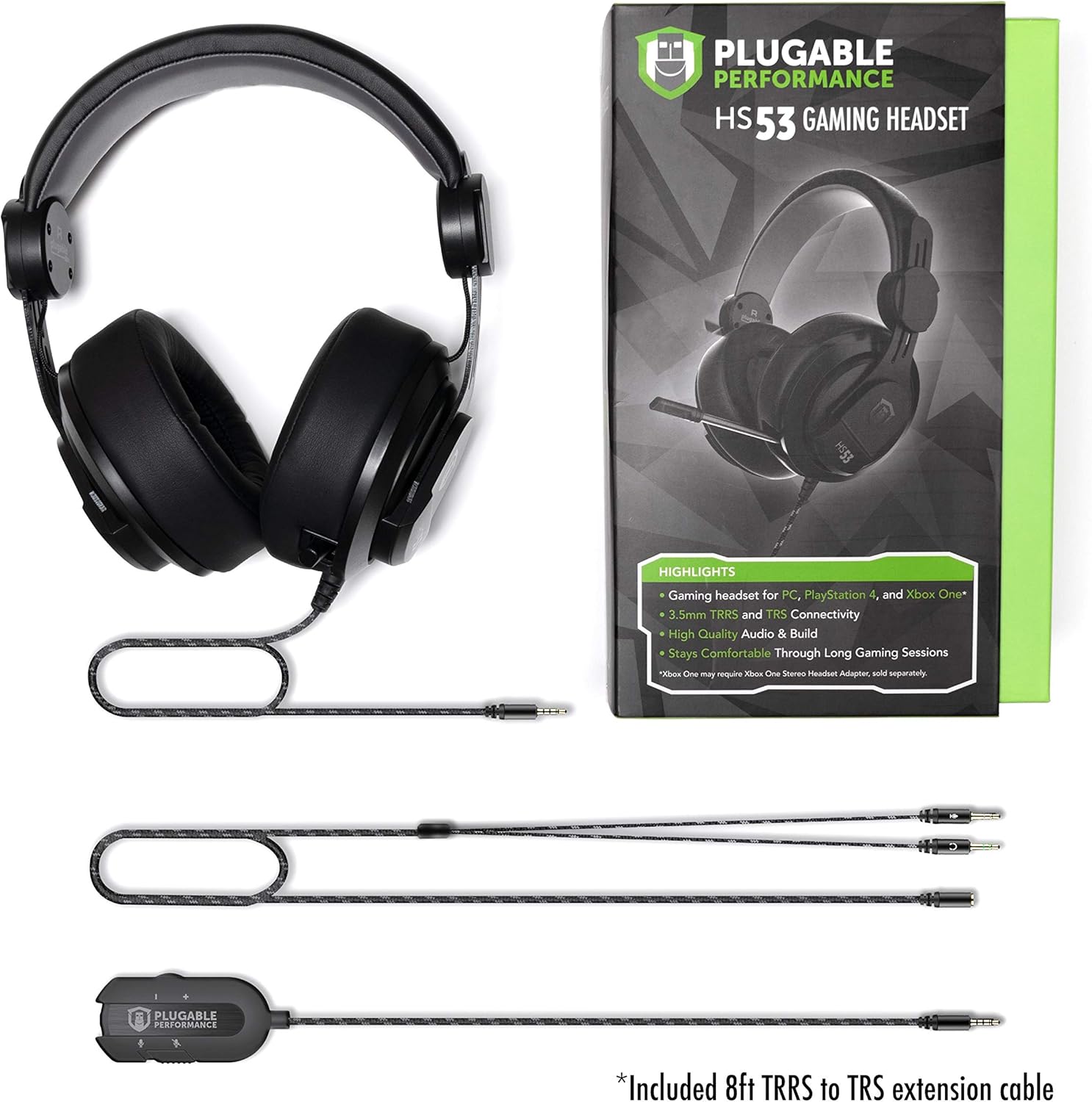
Image: All components included with the Plugable Performance Onyx Gaming Headset.
Organizować coś
Follow these steps to connect your Plugable Performance Onyx Gaming Headset to your device.
Connecting to PCs, Gaming Consoles, Tablets, and Smartphones
The headset offers versatile connectivity options using its 3.5mm jack and included adapters.
- W przypadku urządzeń z pojedynczym portem TRRS 3.5 mm (połączony dźwięk/mikrofon): Connect the headset's 3.5mm TRRS plug directly to your device. For added convenience and control, you can use the 30cm 3.5mm TRRS extension with in-line volume and mute control.
- For devices with separate 3.5mm TRS audio and microphone ports (e.g., many desktop PCs): Connect the headset's 3.5mm TRRS plug to the 250cm 3.5mm TRRS to TRS Y-cable extension. Then, plug the green connector (headphone) into your device's audio output jack and the pink connector (microphone) into your device's microphone input jack.

Image: Modular connectivity options for the headset.
Regulacja zestawu słuchawkowego
Adjust the headband for a comfortable and secure fit. The sturdy brushed aluminum framing allows for precise adjustments.

Image: Detail of the headset's quality fit and adjustable headband.
Pozycjonowanie mikrofonu
The microphone is retractable and flexible. Pull it out and bend it to position it optimally for clear voice capture. When not in use, it can be retracted back into the earcup.

Image: The retractable microphone extended for use.

Image: Headset connected and ready for gaming.
Korzystanie ze słuchawek
Funkcje audio
The headset features 53mm large surface area diaphragm drivers, delivering 2.0 stereo sound quality. This design reproduces audio elements with accuracy and clarity, true to the developer's intent. The closed-back dynamic design provides passive noise isolation.

Image: Memory foam padding and dynamic audio features.

Image: Noise isolating design of the earcups.
Użycie mikrofonu
The high-precision unidirectional microphone ensures clear communication with your teammates. Extend the microphone from the left earcup and adjust its flexible arm to position it near your mouth.
Sterowanie liniowe
When using the 30cm TRRS extension cable, you have access to convenient in-line volume and microphone mute controls. Use the scroll wheel to adjust audio volume and the switch to mute or unmute the microphone.
Konserwacja
Właściwa pielęgnacja przedłuży żywotność zestawu słuchawkowego.
- Czyszczenie nauszników: Gently wipe the memory foam ear cushions with a soft, damp płótno. Unikaj stosowania ostrych chemikaliów lub materiałów ściernych.
- Ogólne sprzątanie: Use a dry, soft cloth to wipe down the rest of the headset. Keep the connectors clean and free of dust.
- Składowanie: Przechowuj zestaw słuchawkowy w chłodnym, suchym miejscu, z dala od bezpośredniego światła słonecznego i ekstremalnych temperatur.
Rozwiązywanie problemów
Jeśli masz problemy ze swoim zestawem słuchawkowym, zapoznaj się z poniższymi typowymi rozwiązaniami:
No Audio or Low Volume
- Ensure all 3.5mm connections are fully inserted into the correct ports on your device and the headset.
- Check the in-line volume control (if used) and ensure it is turned up.
- Verify the audio output settings on your computer or console. Make sure the headset is selected as the default audio device.
- Przetestuj zestaw słuchawkowy z innym urządzeniem, aby wykluczyć problem związany z danym urządzeniem.
Mikrofon nie działa
- Check the in-line mute switch (if used) and ensure the microphone is not muted.
- Confirm the microphone connection is secure, especially if using the Y-splitter cable.
- Verify the microphone input settings on your computer or console. Ensure the headset microphone is selected and its input volume is not set to zero.
- Sprawdź, czy mikrofon jest całkowicie rozciągnięty i prawidłowo ustawiony.
Sound Distortion or Static
- Sprawdź wszystkie połączenia kablowe pod kątem luzu i uszkodzeń.
- Try connecting the headset to a different audio port or device to see if the issue persists.
- Ensure your audio source is not overdriven or set to an excessively high volume.
Specyfikacje
| Nazwa modelu | TRRS-HS53 |
| Technologia łączności | Przewodowy (gniazdo 3.5 mm) |
| Typ sterownika audio | Dynamiczny sterownik |
| Kształt słuchawki | Nauszne |
| Zakres częstotliwości | 20 Hz - 20 kHz |
| Impedancja | 32 omy |
| Typ mikrofonu | Unidirectional, Retractable |
| Typ sterowania | Volume Control, Mic Mute (in-line) |
| Tworzywo | Plastic, Metal (headband) |
| Waga przedmiotu | 2.05 funta |
| Wymiary produktu | 5 x 8.75 x 10 cala |
Gwarancja i wsparcie
Plugable products are designed and tested for quality and reliability. The Plugable Performance Onyx Gaming Headset is backed by a 2-Year Warranty, certified to exceed standards.
For technical support, troubleshooting assistance, or warranty claims, please visit the official Plugable support website or contact their customer service. Refer to the product packaging or Plugable's official webna tej stronie znajdziesz najbardziej aktualne dane kontaktowe.