
1. Koniec produktuview
The APC SMT2200 Smart-UPS is an Uninterruptible Power Supply (UPS) designed to provide reliable battery backup and surge protection for electronic equipment. This unit delivers 2200VA / 1980W of power, ensuring continuous operation during power outages and protecting against damaging power fluctuations. It features a pure sine wave output for compatibility with sensitive electronics and active PFC power supplies, an LCD display for status monitoring, and network manageability options.

Rysunek 1: Przód view of the APC SMT2200 Smart-UPS unit. This image shows the front panel with the APC logo and the Smart-UPS 2200 branding.
Główne cechy:
- Zasilacz awaryjny UPS o mocy 2200 VA / 1980 W z akumulatorem
- Pure Sine Wave UPS for compatibility with active PFC power supplies and electronics
- 8 battery backup and surge protector outlets
- Integrated LCD Display for real-time status and configuration
- Network-grade power conditioning protects from surges and disruptive noise
- Solid state Automatic Voltage Regulation (AVR) boosts low input voltage and trims high voltage without battery operation
- Network manageable via serial, USB, or optional Ethernet
- Typical recharge time: 3 hours
2. Konfiguracja i instalacja
2.1 Rozpakowanie i kontrola
Carefully unpack the UPS and inspect it for any shipping damage. If any damage is found, notify the carrier and reseller. The package should contain the UPS unit, documentation, and necessary cables.
2.2 Umieszczenie
Place the UPS in a protected area free from excessive dust, corrosive fumes, and conductive contaminants. Ensure the ambient temperature is within the operating range of 32°F to 104°F (0°C to 40°C). Maintain adequate clearance around the unit for proper ventilation, especially around the rear fan.
2.3 Podłączenie akumulatora
The UPS battery may be disconnected for shipping. Refer to the specific instructions provided with your unit for connecting the internal battery. Typically, this involves rotating or pushing a battery connector into place.
2.4 Podłączanie sprzętu
Connect your equipment to the appropriate outlets on the rear panel of the UPS. The SMT2200 features 8 outlets, providing both battery backup and surge protection. Ensure that the total load does not exceed the UPS's capacity of 1980W.

Rysunek 2: Rear panel of the APC SMT2200 Smart-UPS. This image displays the input power cord, output receptacles (NEMA 5-15R and NEMA 5-20R), USB port, serial port, and optional SmartSlot for network management cards.
- Gniazdka z zasilaniem bateryjnym i ochroną przeciwprzepięciową: Connect critical equipment such as computers, monitors, and network devices to these outlets. These devices will receive power from the battery during an outage.
- Moc wejściowa: Connect the UPS power cord to a properly grounded 120V AC outlet.
2.5 Początkowe ładowanie akumulatora
Allow the UPS battery to charge for at least 3 hours before connecting any equipment or performing a self-test. This ensures maximum runtime capability.
3. Działanie
3.1 Włączanie UPS-a
Press the power button on the front panel. The LCD display will illuminate, and the UPS will perform a self-test. Once the self-test is complete, the UPS will be in Online mode, providing conditioned power to connected equipment.
3.2 Wyłączanie UPS-a
To turn off the UPS and remove power from connected equipment, press and hold the power button until the unit powers down. For a controlled shutdown, ensure all connected devices are properly shut down first.
Wyświetlacz LCD 3.3
The LCD display provides real-time information about the UPS status, including input/output voltage, procent obciążeniatage, battery charge level, and estimated runtime. Use the navigation buttons on the front panel to scroll through the display menus and configure settings.
3.4 Autotest
It is recommended to perform a self-test periodically to ensure the battery and internal components are functioning correctly. Refer to the LCD menu for initiating a self-test.
4. Konserwacja
4.1 Wymiana baterii
The SMT2200 uses maintenance-free sealed Lead-Acid batteries. The typical battery life is 3-5 years, but this can vary based on environmental conditions and usage. The UPS will indicate when the battery needs replacement. Always replace batteries with APC-approved replacement battery cartridges (RBC55) to ensure optimal performance and safety. Refer to the APC website or your reseller for replacement instructions.
4.2 Czyszczenie
Keep the UPS free of dust and debris. Use a dry cloth to clean the exterior. Do not use liquid cleaners or solvents. Ensure ventilation openings are clear of obstructions.
5. Rozwiązywanie Problemów
W tej sekcji znajdziesz rozwiązania typowych problemów. W przypadku bardziej złożonych problemów skontaktuj się z pomocą techniczną APC.
| Problem | Możliwa przyczyna | Rozwiązanie |
|---|---|---|
| UPS się nie włącza | Battery not connected; No input power; Faulty unit | Ensure battery is fully connected. Verify input power cable is securely plugged into a live outlet. Contact support if issue persists. |
| UPS wydaje ciągły sygnał dźwiękowy | On battery power; Overload; Low battery | Check if utility power is present. Reduce connected load. Allow battery to recharge. |
| "Replace Battery" indicator on LCD | Zbliża się koniec żywotności baterii | Order and install a new APC replacement battery cartridge (RBC55). |
| Podłączony sprzęt traci moc | UPS overload; Battery depleted; UPS fault | Reduce load. Allow battery to recharge. Check LCD for error messages. |
6. Specyfikacje techniczne
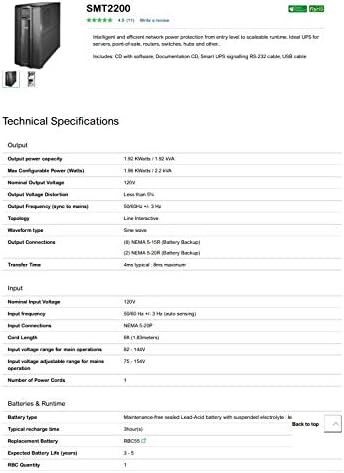
Rysunek 3: Part 1 of the APC SMT2200 Technical Specifications sheet, detailing output, input, and battery information.

Rysunek 4: Part 2 of the APC SMT2200 Technical Specifications sheet, detailing communications, surge protection, physical dimensions, environmental, and conformance information.
| Funkcja | Szczegół |
|---|---|
| Marka | APC |
| Numer modelu | SMT2200 |
| Moc wyjściowa | 1980 W / 2200 VA |
| Moc nominalna Objętośćtage | 120 V |
| Typ przebiegu | Fala sinusoidalna |
| Połączenia wyjściowe | 8 (NEMA 5-15R, NEMA 5-20R) |
| Nominalna Objętość Wejściowatage | 120 V |
| Częstotliwość wejściowa | 50/60 Hz +/- 3 Hz (automatyczne wykrywanie) |
| Typ baterii | Bezobsługowy, szczelny akumulator kwasowo-ołowiowy |
| Typowy czas ładowania | 3 godziny |
| Oczekiwana żywotność baterii | 3-5 lat |
| Porty interfejsu | SmartSlot, USB |
| Współczynnik kształtu | Wieża |
| Wymiary przedmiotu (wys. x szer. x gł.) | 7.72 x 21.42 x 17.01 cala (196 x 544 x 432 mm) |
| Waga przedmiotu | 130 funtów (59.09 kg) |
| Temperatura pracy | 32 - 104 °F (0 - 40 °C) |
| Materiał obudowy | Metal |
7. Gwarancja i wsparcie
7.1 Informacje o gwarancji
This APC SMT2200 Smart-UPS unit comes with a 90-day limited warranty. Please retain your proof of purchase for warranty claims. The warranty covers defects in materials and workmanship under normal use.
7.2 Wsparcie techniczne
For technical assistance, troubleshooting, or warranty inquiries, please contact APC customer support. Visit the official APC webstrona zawierająca informacje kontaktowe i dodatkowe zasoby.