
1. Wprowadzenie
This manual provides instructions for the Zerone Universal Remote Control, designed as a replacement for various Haier TV models. It is compatible with Haier HTR-A18M, 55D3550, 40D3500M, and 48D3500 series televisions. This remote control offers direct access to digital TV functions without complex programming.

Image 1.1: The Zerone Universal Remote Control in use, demonstrating its compatibility with Haier HTR-A18M, 55D3550, 40D3500M, and 48D3500 TV models.
2. Konfiguracja
2.1 Instalacja baterii
Do działania pilota zdalnego sterowania potrzebne są dwie (2) baterie AAA (brak w zestawie). Aby zainstalować baterie, wykonaj następujące czynności:
- Znajdź komorę baterii z tyłu pilota.
- Naciśnij zatrzask i przesuń pokrywę baterii.
- Włóż dwie baterie AAA, upewniając się, że bieguny dodatni (+) i ujemny (-) są prawidłowo ustawione względem oznaczeń wewnątrz komory.
- Wsuń pokrywę baterii z powrotem na miejsce, aż zaskoczy.
The remote is ready for use immediately after battery installation; no additional programming is required for compatible Haier TV models.

Rysunek 2.1: Szczegółowy view of the remote control, highlighting the battery compartment for AAA battery installation.
3. Instrukcja obsługi
3.1 Podstawowe funkcje
This remote control provides standard functions for your Haier TV. Point the remote directly at your television's infrared receiver for optimal performance.
- Przycisk zasilania (U): Włącza lub wyłącza telewizor.
- Wejście: Wybiera źródła sygnału wideo (HDMI, AV itp.).
- Przyciski numeryczne (0-9): Bezpośredni wybór kanału.
- GŁOŚNOŚĆ +/-: Reguluje głośność w górę lub w dół.
- CH +/-: Zmienia kanały w górę lub w dół.
- NIEMY: Wycisza lub włącza dźwięk telewizora.
- MENU: Dostęp do głównego menu telewizora.
- Przyciski nawigacyjne (w górę, w dół, w lewo, w prawo, OK): Porusza się po menu i potwierdza wybory.
- WSTECZ / WYJŚCIE: Returns to the previous screen or exits the current menu.
- WYŚWIETLACZ: Shows current channel information.
- SAP / AUDIO: Selects audio language or mode.
- SPAĆ: Sets the sleep timer.
- PICTURE / WIDE: Adjusts picture mode or aspect ratio.
- CH.LIST / FAVORITE: Accesses channel list or favorite channels.
- Przyciski sterowania multimediami (odtwarzanie, pauza, przewijanie do przodu, przewijanie do tyłu): Steruje odtwarzaniem multimediów.
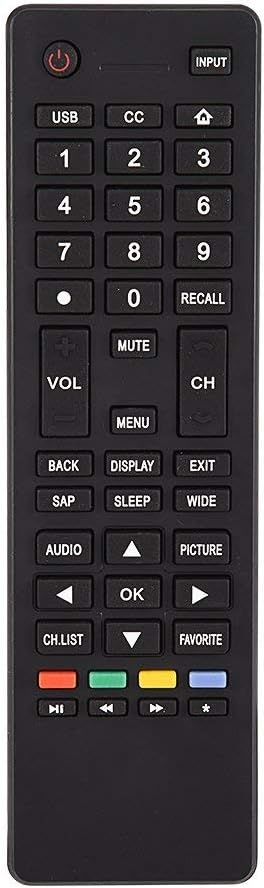
Obraz 3.1: Koniecview of the remote control's button layout for easy identification of functions.
3.2 Zakres roboczy
The remote control has a stable signal transmission distance of up to 10 meters (33 feet). Actual remote distance may vary depending on environmental factors and the specific model of your TV.
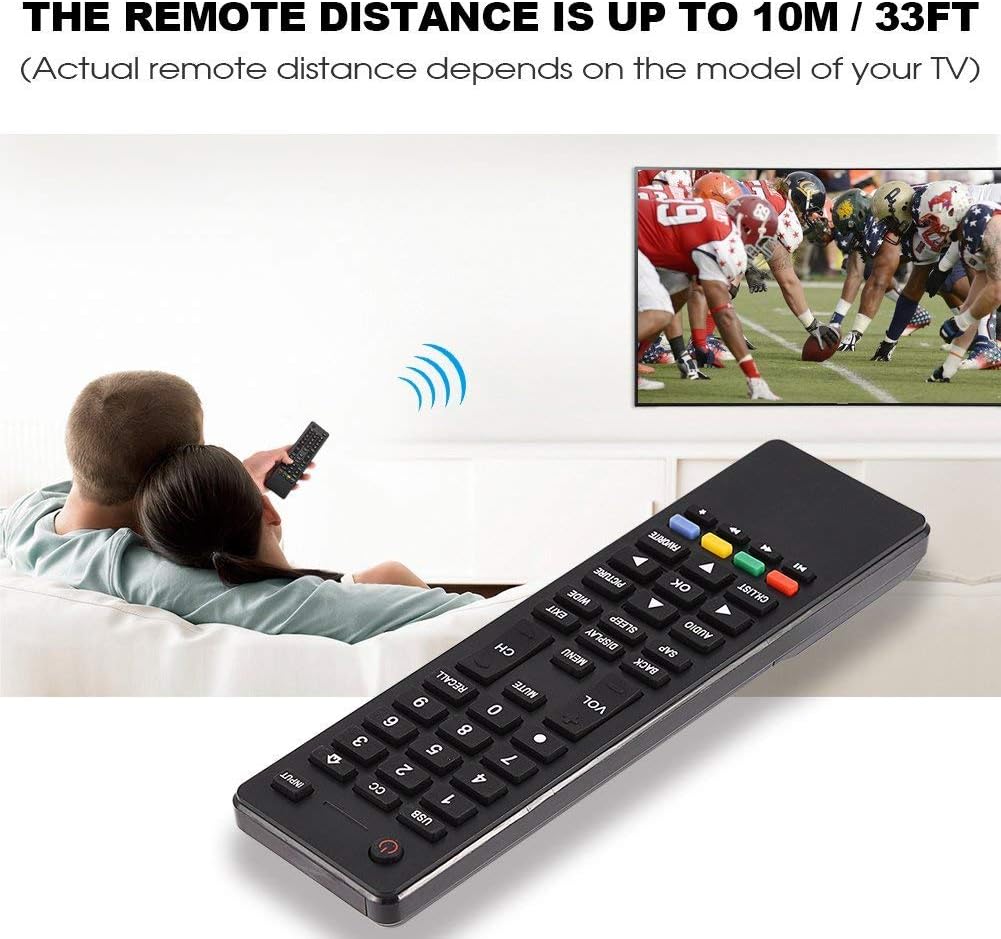
Image 3.2: Visual representation of the remote control's effective operating distance to the television.
4. Konserwacja
4.1 Czyszczenie
Do czyszczenia pilota należy używać miękkiej, suchej ściereczki. W przypadku uporczywych zabrudzeń należy delikatnie przetrzeć.ampen the cloth with water or a mild cleaning solution. Avoid using harsh chemicals or abrasive cleaners, as these can damage the remote's surface or internal components.
4.2 Pielęgnacja baterii
- Wymień baterie, gdy pilot zdalnego sterowania reaguje wolniej lub przestaje działać.
- Nie mieszaj starych i nowych baterii ani różnych typów baterii.
- Jeżeli pilot nie będzie używany przez dłuższy czas, wyjmij baterie, aby zapobiec wyciekowi.
- Zużytych baterii należy pozbywać się w sposób odpowiedzialny, zgodnie z lokalnymi przepisami.
5. Rozwiązywanie Problemów
5.1 Pilot nie odpowiada
- Sprawdź baterie: Ensure batteries are inserted correctly with the correct polarity (+/-) and are not depleted. Replace with fresh AAA batteries if necessary.
- Linia widzenia: Make sure there are no obstructions between the remote control and the TV's infrared sensor.
- Dystans: Confirm you are within the effective operating range (up to 10 meters / 33 feet).
- Zgodność z telewizorem: Verify that your TV model is listed as compatible (Haier HTR-A18M, 55D3550, 40D3500M, 48D3500).
5.2 Buttons Not Working Correctly
- Wyczyść pilota: Dust or debris under buttons can cause malfunction. Refer to the Maintenance section for cleaning instructions.
- Sprawdzenie baterii: Weak batteries can lead to inconsistent button responses. Replace batteries.
6. Specyfikacje
| Funkcja | Szczegół |
|---|---|
| Marka | Zerone |
| Kompatybilne urządzenia | Haier HTR-A18M, 55D3550, 40D3500M, 48D3500 TVs |
| Technologia łączności | Podczerwony |
| Maksymalny zasięg | 10 metrów (33 stóp) |
| Typ baterii | 2 x AAA (brak w zestawie) |
| Typ kontrolera | Sterowanie przyciskami |
| Tworzywo | ABS |
| Numer modelu | Zerone9rnag3b5y4-cr |
| UPC | 647213811490 |

Image 6.1: Physical dimensions of the Zerone Universal Remote Control.
7. Informacje o gwarancji
This product is offered as an Amazon Renewed item. Amazon Renewed products are professionally inspected and tested to work and look like new. If you are not satisfied with your purchase, renewed products are eligible for replacement or refund under the Amazon Renewed Guarantee.
Additionally, the manufacturer provides a 90-dniowa ograniczona gwarancja. For specific details regarding the terms and conditions of this warranty, please refer to the documentation provided at the time of purchase or contact customer support.
8. Obsługa klienta
If you encounter any issues or have questions regarding your Zerone Universal Remote Control that are not addressed in this manual, please contact the seller or Amazon Renewed customer service for assistance.
For Amazon Renewed Guarantee claims, please visit the Amazon Renewed program page or contact Amazon customer support directly.