
1. Wprowadzenie
The MOXA MGate MB3660-16-2DC is a high-performance 16-port Modbus gateway designed for converting between Modbus TCP and Modbus RTU/ASCII protocols. This device facilitates seamless communication between Modbus TCP hosts and Modbus RTU/ASCII serial devices. It features dual DC power inputs for enhanced reliability and redundancy, making it suitable for critical industrial automation applications.
This manual provides essential information for the proper installation, configuration, operation, and maintenance of your MGate MB3660-16-2DC gateway.
2. Informacje dotyczące bezpieczeństwa
Please read and understand all safety instructions before operating the device. Failure to do so may result in injury or damage to the equipment.
- Upewnij się, że napięcie zasilaniatage matches the device's requirements (dual DC input).
- Przed przystąpieniem do jakichkolwiek czynności instalacyjnych lub konserwacyjnych należy odłączyć zasilanie.
- Aby zapobiec przegrzaniu, należy zainstalować urządzenie w dobrze wentylowanym pomieszczeniu.
- Unikaj wystawiania urządzenia na działanie wilgoci, ekstremalnych temperatur i środowiska korozyjnego.
- Instalację i serwisowanie powinien wykonywać wyłącznie wykwalifikowany personel.
3. Zawartość opakowania
Sprawdź, czy w przesyłce znajdują się następujące elementy:
- MOXA MGate MB3660-16-2DC Modbus Gateway
- Szybki przewodnik instalacji
- Karta gwarancyjna
- Listwa zaciskowa do wejścia zasilania
- DIN-rail mounting kit (if applicable)
If any of these items are missing or damaged, please contact your sales representative immediately.
4. Opis sprzętu
The MGate MB3660-16-2DC features multiple ports and indicators for easy setup and monitoring.
4.1 Panel przedni
The front panel typically includes LED indicators for power, network activity, and serial port status.
- Dioda LED PWR1/PWR2: Indicates status of primary/secondary DC power input.
- Dioda AWARII: Indicates system errors or warnings.
- Diody LED LAN1/LAN2: Indicate Ethernet link and activity.
- Serial Port LEDs (1-16): Indicate data transmission/reception on each serial port.
4.2 Rear/Side Panels
These panels house the connection ports:
- Pobór mocy: Dual DC power input terminal blocks for redundant power.
- Porty Ethernet: RJ45 ports for Modbus TCP network connection.
- Porty szeregowe: 16 DB9 or terminal block connectors for Modbus RTU/ASCII devices.
- Przycisk resetowania: For restoring factory default settings.
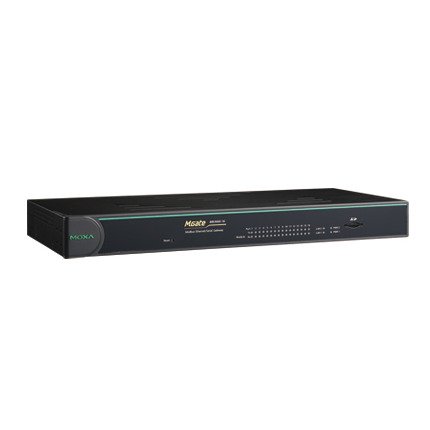
Rycina 1: Przód view of the MOXA MGate MB3660-16-2DC Modbus Gateway, showing LED indicators and general form factor.
5. Konfiguracja
5.1 Montaż
The MGate MB3660-16-2DC can be mounted on a DIN-rail or wall-mounted using the provided kit.
- Montaż na szynie DIN: Attach the DIN-rail clip to the back of the device and snap it onto a standard DIN-rail.
- Montaż na ścianie: Secure the wall-mount plates to the device, then use screws to fix the device to a wall or panel.
5.2 Połączenie zasilania
Connect two independent DC power sources to the dual power input terminal blocks for redundancy. Ensure correct polarity.
- Connect the positive (+) wire to the V+ terminal.
- Connect the negative (-) wire to the V- terminal.
- Connect the ground wire to the ⊗ terminal.
5.3 Połączenie sieciowe
Connect the Ethernet ports to your Modbus TCP network using standard RJ45 Ethernet cables.
5.4 Serial Device Connection
Connect your Modbus RTU/ASCII serial devices to the 16 serial ports. Configure the serial port settings (baud rate, data bits, parity, stop bits, mode) via the device's web console or utility to match your serial devices.
5.5 Konfiguracja początkowa
Uzyskaj dostęp do urządzenia web-based management interface by connecting a computer to the same network segment and entering the default IP address (refer to the Quick Installation Guide for the default IP). Configure network settings, Modbus mapping, and serial port parameters as required for your application.
6. Obsługa bramki
Once configured, the MGate MB3660-16-2DC operates as a transparent Modbus gateway, converting requests between Modbus TCP masters and Modbus RTU/ASCII slaves.
6.1 Modbus Communication Flow
- Modbus TCP master sends a request to the gateway's IP address and configured TCP port.
- The gateway translates the Modbus TCP request into a Modbus RTU/ASCII request.
- The gateway sends the serial request to the designated Modbus RTU/ASCII slave device via the appropriate serial port.
- The slave device responds to the gateway.
- The gateway translates the serial response back to Modbus TCP and forwards it to the Modbus TCP master.
6.2 Monitorowanie statusu
Regularly check the LED indicators on the front panel to monitor the device's operational status:
- Zasilacz1/Zasilacz2: Should be solid green when power is supplied.
- WINA: Should be off during normal operation. A red light indicates an error.
- Diody LED sieci LAN: Solid green for link, blinking for activity.
- Serial Port LEDs: Blink when data is being transmitted or received on that port.
7. Konserwacja
To ensure optimal performance and longevity of your MGate MB3660-16-2DC, follow these maintenance guidelines:
- Czyszczenie: Periodically clean the device's exterior with a soft, dry cloth. Do not use liquid or aerosol cleaners.
- Aktualizacje oprogramowania układowego: Sprawdź MOXA website for the latest firmware versions. Apply updates as recommended to enhance features and security.
- Kontrola środowiskowa: Upewnij się, że środowisko pracy mieści się w określonym zakresie temperatury i wilgotności.
- Kontrola kabla: Regularly inspect all connected cables for damage or loose connections.
8. Rozwiązywanie Problemów
W tej sekcji znajdziesz rozwiązania typowych problemów, na jakie możesz natrafić.
| Problem | Możliwa przyczyna | Rozwiązanie |
|---|---|---|
| Device not powering on (PWR LEDs off) | No power supply; faulty power adapter; incorrect wiring. | Check power connections and source; verify power adapter functionality. |
| No network connectivity (LAN LEDs off) | Faulty Ethernet cable; incorrect network settings; switch/router issue. | Check Ethernet cable; verify IP settings; test with another network port. |
| Błąd komunikacji szeregowej | Incorrect serial port settings (baud rate, parity); wrong wiring; slave device issue. | Verify serial port settings match slave device; check serial cable wiring; test slave device independently. |
| Dioda LED BŁĘDU świeci na czerwono | System error; hardware malfunction. | Consult the product manual for specific FAULT codes or contact technical support. Try power cycling the device. |
8.1 Przywracanie ustawień fabrycznych
If issues persist, you may need to perform a factory reset. Locate the reset button (usually a small pinhole) and press it for 5-10 seconds while the device is powered on. This will restore all settings to their default values.
9. Specyfikacje
| Funkcja | Specyfikacja |
|---|---|
| Model | MGate MB3660-16-2DC |
| Porty szeregowe | 16 (RS-232/422/485, software selectable) |
| Porty Ethernet | 2 x 10/100BaseT(X) auto-sensing RJ45 (typically for redundancy) |
| Obsługiwane protokoły | Modbus TCP, Modbus RTU, Modbus ASCII |
| Moc wejściowa | Dual DC Power Input (e.g., 12-48 VDC, specific range may vary by model revision) |
| Nadmierność | Dual power inputs |
| Temperatura pracy | Typically -40 to 75°C (Industrial Grade) |
| Temperatura przechowywania | Typically -40 to 85°C |
| Wilgotność | 5 do 95% RH (bez kondensacji) |
| Wymiary (szer. x gł. x wys.) | Specific dimensions vary, refer to product datasheet for exact measurements. |
| Waga | Około 22 funta (10 kg) |
| Producent | MOKS |
10. Gwarancja i wsparcie
10.1 Gwarancja na produkt
MOXA products typically come with a standard manufacturer's warranty. Please refer to the warranty card included in your package or visit the official MOXA website for detailed warranty terms and conditions specific to the MGate MB3660-16-2DC.
10.2 Wsparcie techniczne
For technical assistance, troubleshooting, or further inquiries, please contact MOXA's technical support team. Support resources, including FAQs, drivers, and documentation, are available on the official MOXA webstrona.
- MOKS Webstrona: www.moxa.pl
- Kontakt z pomocą techniczną: Refer to the 'Support' section on the MOXA webstrona zawierająca regionalne informacje kontaktowe.