
1. Wprowadzenie
This manual provides essential information for the safe and efficient operation of your Strong SRT 32HB3003 32-inch HD LED TV. Please read these instructions carefully before using the television and retain them for future reference.
2. Informacje dotyczące bezpieczeństwa
Aby zapobiec porażeniu prądem, pożarowi lub uszkodzeniu telewizora, należy zawsze przestrzegać poniższych środków ostrożności:
- Nie wystawiaj telewizora na działanie deszczu ani wilgoci.
- Nie otwieraj telewizoraasing; wszelkie prace serwisowe należy zlecać wykwalifikowanemu personelowi.
- Zapewnij odpowiednią wentylację wokół telewizora.
- Odłączaj telewizor od zasilania podczas burzy z piorunami lub jeśli nie używasz go przez dłuższy czas.
- Trzymaj telewizor z dala od źródeł ciepła i bezpośredniego światła słonecznego.
3. Zawartość opakowania
Sprawdź, czy w opakowaniu znajdują się wszystkie elementy:
- Strong SRT 32HB3003 LED TV
- Zdalne sterowanie
- 2 baterie AAA
- Stojak TV
- Instrukcja obsługi

Image: The Strong SRT 32HB3003 TV packaging, highlighting key features such as DVB-T2/C/S2 tuner, HDMI, USB, and Dolby Audio.
4. Konfiguracja
4.1 Instalacja stojaka
Aby zamontować stojak pod telewizor:
- Ostrożnie połóż telewizor ekranem do dołu na miękkiej i czystej powierzchni, aby zapobiec uszkodzeniu ekranu.
- Dopasuj podstawy stojaka do odpowiednich otworów na spodzie telewizora.
- Przymocuj stojaki za pomocą dołączonych śrub.
4.2 Połączenia
Podłącz urządzenia zewnętrzne do telewizora, korzystając z odpowiednich portów.
- Antena/kabel: Connect your DVB-T2 or DVB-C antenna/cable to the 'ANT IN' port.
- Satelita: Connect your satellite dish to the 'SATELLITE IN' port for DVB-S2 reception.
- Urządzenia HDMI: Use HDMI ports for high-definition devices like Blu-ray players, game consoles, or set-top boxes. HDMI 1 supports ARC (Audio Return Channel).
- Urządzenia USB: Insert USB drives into the USB 2.0 ports for media playback.
- Moduł CI+: Insert a CI+ module (Common Interface) into the CI+ slot for encrypted channels.
- Wyjście audio: Use the Headphone jack for private listening or the Digital Optical Output (TOS-Link) for external audio systems.
- Wejście AV: For older devices, use the AV IN port.

Obraz: Tył view of the Strong SRT 32HB3003 TV, illustrating the placement of connection ports including HDMI, USB, and antenna inputs.

Image: A diagram detailing the Common Interface (CI) slot and other connectivity options such as USB, headphone jack, AV IN, HDMI 1, HDMI 2, Satellite IN, and S/PDIF (digital optical audio out).
4.3 Pierwsza instalacja
After connecting the power cable and turning on the TV, the First Time Installation wizard will guide you through initial setup steps, including language selection, country, and channel scanning for DVB-T2, DVB-C, or DVB-S2.
5. Obsługa
5.1 Zdalne sterowanieview
Pilot zdalnego sterowania umożliwia dostęp do wszystkich funkcji telewizora. Włóż dwie baterie AAA do pilota, zwracając uwagę na prawidłową biegunowość.

Image: The remote control for the Strong SRT 32HB3003 TV, featuring buttons for power, numerical input, volume control, channel selection, menu access, source input, and media playback functions.
5.2 Podstawowe funkcje
- Moc: Naciśnij czerwony przycisk zasilania aby włączyć lub wyłączyć telewizor.
- Tom: Użyj GŁOŚNOŚĆ +/- Przyciski do regulacji głośności.
- Kanał: Użyj CH +/- przyciski do zmiany kanałów.
- Niemy: Naciśnij NIEMY przycisk, aby tymczasowo wyciszyć dźwięk.
5.3 Wybór źródła
Naciśnij ŹRÓDŁO button on the remote control to select the desired input source (e.g., HDMI 1, HDMI 2, DVB-T2, DVB-C, DVB-S2, AV).
5.4 Nawigacja po menu
Naciśnij MENU button to access the main menu. Use the arrow buttons to navigate and OK to confirm selections. The Z POWROTEM button returns to the previous menu or exits the current menu.
5.5 Odtwarzanie multimediów (USB)
Insert a USB storage device into one of the USB ports. The TV supports playback of photos, videos, and music files. Access the media player through the main menu or by selecting the USB source.
5.6 Elektroniczny przewodnik po programach (EPG)
Naciśnij EPG przycisk do view Elektroniczny przewodnik po programach, który wyświetla programy kanałów cyfrowych.
5.7 Tryb hotelowy
The TV features a Hotel Mode, which allows for restricted access to certain settings and functions, ideal for hospitality environments. Consult the advanced settings menu for Hotel Mode configuration.
6. Konserwacja
6.1 Czyszczenie
- Zawsze odłączaj telewizor od zasilania przed czyszczeniem.
- Do przecierania ekranu i obudowy używaj miękkiej, suchej ściereczki.
- W przypadku uporczywych plam delikatnieampWyczyść szmatkę wodą lub delikatnym, nieściernym środkiem czyszczącym przeznaczonym specjalnie do urządzeń elektronicznych.
- Never spray cleaning liquids directly onto the TV.
6.2 Przechowywanie
If storing the TV for an extended period, ensure it is kept in a cool, dry place, protected from dust and extreme temperatures. It is recommended to use the original packaging for storage.
7. Rozwiązywanie Problemów
Jeśli masz problemy z telewizorem, zapoznaj się z poniższymi typowymi rozwiązaniami:
| Problem | Możliwa przyczyna / rozwiązanie |
|---|---|
| Brak zasilania | Check if the power cable is securely connected. Ensure the power outlet is functional. |
| Brak obrazu, ale dźwięk jest | Sprawdź wybrane źródło sygnału wejściowego. Upewnij się, że urządzenia zewnętrzne są włączone i prawidłowo podłączone. |
| Brak dźwięku, ale obraz jest | Check volume level and mute status. Verify audio settings in the menu. |
| Pilot nie działa | Check and replace batteries. Ensure no obstructions between remote and TV sensor. |
| Niska jakość obrazu | Sprawdź połączenie antenowe/kablowe. Dostosuj ustawienia obrazu w menu. |
8. Specyfikacje
Detailed technical specifications for the Strong SRT 32HB3003 HD LED TV:
| Funkcja | Specyfikacja |
|---|---|
| Numer modelu | SRT32HB3003 |
| Rozmiar ekranu | 32 cali (80 cm) |
| Rezolucja | 1366 x 768 pikseli (HD-Ready) |
| Technologia wyświetlania | PROWADZONY |
| Częstotliwość odświeżania | 60 Hz |
| Technologia tunera | DVB-C, DVB-S2, DVB-T2 |
| Porty HDMI | 2 (1x HDMI ARC) |
| Porty USB 2.0 | 2 |
| Inne interfejsy | Headphone, Digital Optical Out (TOS-Link), CI+ interface, AV IN |
| Cechy specjalne | Electronic Program Guide (EPG), USB Media Playback, Parental Control, Hotel Mode |
| Pobór mocy | 50 waty |
| Klasa efektywności energetycznej | A+ |
| Roczne zużycie energii | 45 kWh / rok |
| Wymiary produktu (szer. X wys. X gł.) | Wymiary 73.2 x 43.5 x 7.78 cm |
| Waga | 4.15 kilogramów |

Image: The energy efficiency label for the Strong SRT 32HB3003, indicating an A+ rating and an annual energy consumption of 45 kWh.
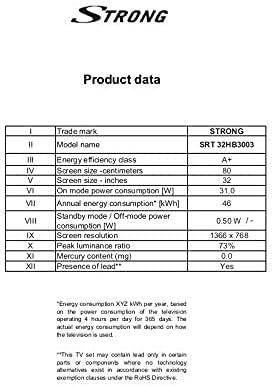
Image: A product data table providing detailed specifications for the Strong SRT 32HB3003, including screen size, resolution, and power consumption.
9. Gwarancja i wsparcie
Your Strong SRT 32HB3003 TV comes with a limited warranty. For specific warranty terms and conditions, please refer to the warranty card included in your product packaging or visit the official Strong website. For technical support, troubleshooting assistance, or service inquiries, please contact Strong customer service through their official channels.
Aby uzyskać dalszą pomoc, odwiedź stronę Strong official webstrona.