
Wstęp
This manual provides detailed instructions for the installation, operation, and maintenance of your ASHATA MP5-SWM9601 Car Stereo. This single-DIN multimedia player features a 7-inch retractable touchscreen, Bluetooth connectivity for calls and music streaming, and supports various audio and video formats via USB, TF card, and AUX input. Please read this manual thoroughly before using the product to ensure proper function and safety.
Cechy produktu
- 7-inch high-definition retractable touchscreen display.
- Bluetooth umożliwiający wykonywanie połączeń bez użycia rąk i strumieniowe przesyłanie dźwięku.
- Supports various audio formats including APE, FLAC, WAV, DIS, MP3, WMA, ACC, OGG, RA, AC3, MP2, AMR.
- Supports various video formats including AVI, MP4, FLV, PMP, RM, RMVB, MPG.
- USB 2.0 and TF card slot for media playback.
- AUX audio input for external devices.
- Obsługuje tył view camera input for parking assistance.
- Electronic sound processing (EQ) with adjustable treble, bass, balance, and sound field.
- Memory playback function for songs.
- W zestawie znajduje się pilot zdalnego sterowania zapewniający wygodną obsługę.
Konfiguracja i instalacja
Proper installation is crucial for the performance and safety of your car stereo. It is recommended to have this unit installed by a professional technician. Ensure the vehicle's battery is disconnected before starting installation.
Wymiary
Before installation, verify that the unit's dimensions are compatible with your car's dashboard opening. The unit is a standard single-DIN size.

Rysunek 1: Dimensions of the ASHATA MP5-SWM9601 car stereo. The unit measures approximately 18.4 cm (7.2 inches) in width, 6.2 cm (2.4 inches) in height, and 17.8 cm (7.0 inches) in depth.
Schemat okablowania
Prawidłowe połączenia przewodów przedstawiono na poniższym schemacie. Nieprawidłowe podłączenie może spowodować uszkodzenie urządzenia lub układu elektrycznego pojazdu.
Rysunek 2: Tył view of the ASHATA MP5-SWM9601 showing the wiring harness connector and RCA outputs for audio and video. The wiring harness typically includes connections for power (ACC, B+, Ground), speakers, antenna, and steering wheel controls (if applicable).
- Połączenia zasilania: Connect the yellow wire to the constant 12V power supply (B+), the red wire to the accessory 12V power supply (ACC), and the black wire to ground.
- Połączenia głośnikowe: Connect the speaker wires to the corresponding positive and negative terminals for each speaker (e.g., front left +, front left -).
- Antena: Podłącz antenę radiową samochodu do wejścia antenowego.
- Tył View Kamera: Connect the video input from your rear view camera to the designated video input on the unit. Ensure the reverse trigger wire is connected to activate the camera display when reversing.
- Wyjścia RCA: Use the RCA outputs for connecting external ampwyświetlacze lub dodatkowe wyświetlacze.
Instrukcja obsługi
Włączanie/wyłączanie i podstawowe sterowanie

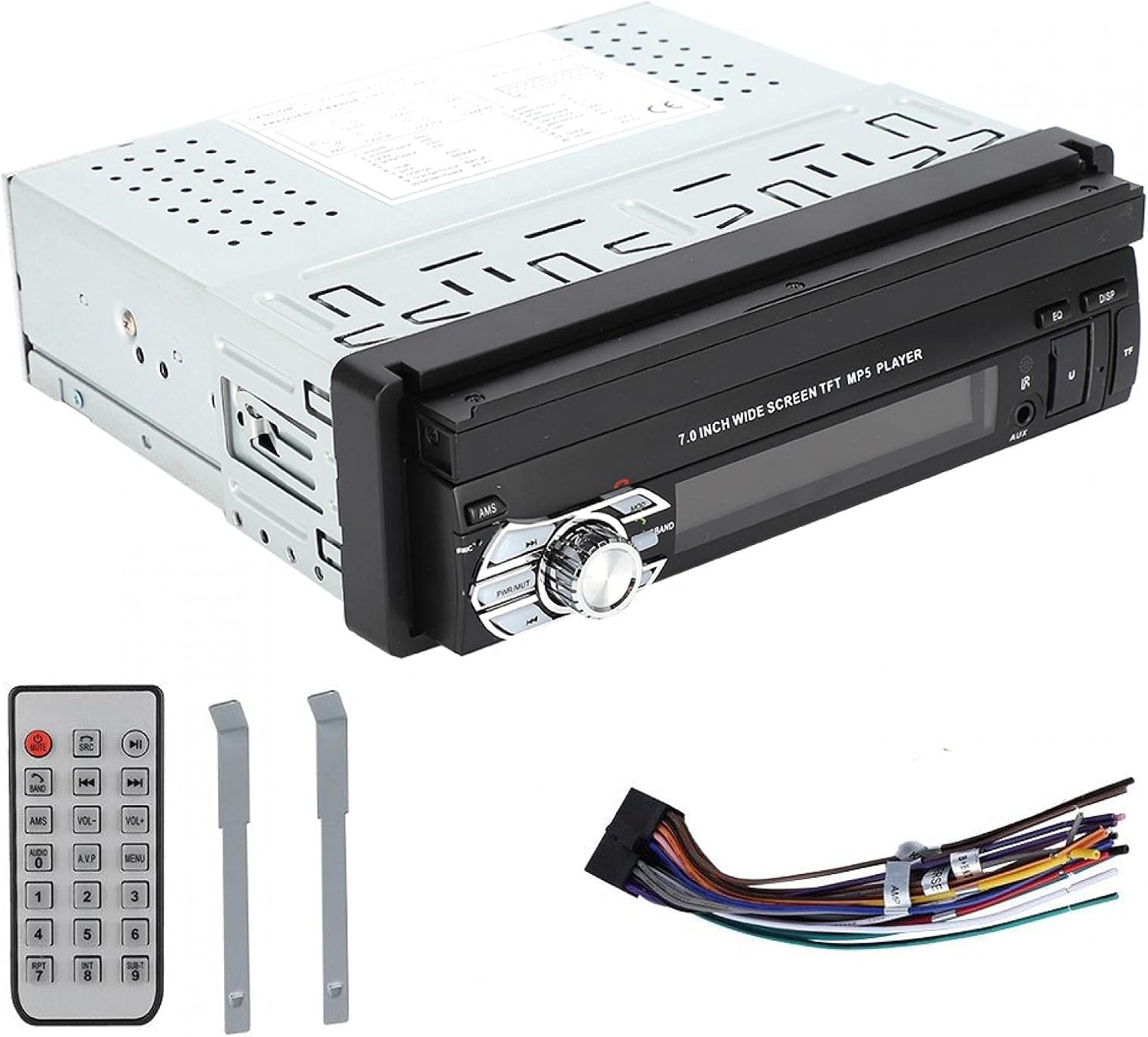
Rysunek 3: Front panel of the ASHATA MP5-SWM9601 showing the main controls, including the power/volume knob, mode button, band button, and USB/AUX/TF card slots.
- Włączanie/wyłączanie: Naciśnij PWR/MUT button to turn the unit on. Press and hold to turn off. A short press will mute/unmute the audio.
- Regulacja głośności: Aby dostosować głośność, obróć pokrętło centralne.
- Wybór trybu: Naciśnij TRYB button to cycle through available sources (Radio, USB, TF, AUX, Bluetooth).
- Retract/Extend Screen: The screen can be manually or automatically retracted/extended. Refer to the on-screen menu for specific settings.
Łączność Bluetooth
Pair your mobile phone with the car stereo to enjoy hands-free calling and wireless audio streaming.
- Turn on the unit and select Bluetooth mode using the TRYB przycisk.
- Włącz Bluetooth w telefonie komórkowym i wyszukaj dostępne urządzenia.
- Select "ASHATA" or a similar device name from the list. If prompted for a password, enter "0000" or "1234".
- Once paired, you can make/receive calls and play music through the car stereo.
Odtwarzanie multimediów (USB/TF/AUX)
- Odtwarzanie z USB: Insert a USB drive into the USB port. The unit will automatically switch to USB mode and begin playing compatible media files.
- Odtwarzanie kart TF: Insert a TF (MicroSD) card into the TF card slot. The unit will automatically switch to TF mode and begin playing compatible media files.
- Wejście AUX: Connect an external audio device (e.g., MP3 player, phone) to the AUX input using a 3.5mm audio cable. Select AUX mode using the TRYB przycisk.
- Obsługiwane formaty:
- Audio: DIS, MP3, WMA, ACC, OGG, WAV, RA, AC3, MP2, AMR, APE, FLAC.
- Video: AVI, MP4, FLV, PMP, RM, RMVB, MPG.
- Image: JPEG.
Ustawienia dźwięku
Adjust the audio output to your preference using the electronic sound processing (EQ) features.
- Naciśnij EQ button to access equalizer presets or custom settings.
- Navigate through the menu to adjust electronic volume, treble, bass, left/right balance, and front/rear sound field.

Rysunek 4: The display showing sound adjustment options, including electronic volume, treble, bass, left and right balance, and front and rear sound field settings.
Tył View Funkcja aparatu
Kiedy tył view camera is connected and the vehicle is in reverse gear, the unit will automatically display the camera feed on the screen, providing assistance for parking and maneuvering.
Konserwacja
- Czyszczenie ekranu: Use a soft, dry, lint-free cloth to gently wipe the touchscreen. Do not use abrasive cleaners or solvents.
- Czyszczenie urządzenia: Wipe the exterior of the unit with a soft, dry cloth. Avoid getting liquids inside the unit.
- Temperatura: Unikaj wystawiania urządzenia na działanie ekstremalnych temperatur lub bezpośredniego światła słonecznego przez dłuższy czas.
Rozwiązywanie problemów
| Problem | Możliwa przyczyna | Rozwiązanie |
|---|---|---|
| Brak zasilania | Nieprawidłowe okablowanie; Przepalony bezpiecznik; Niski poziom naładowania akumulatora pojazdu. | Check power connections (B+, ACC, Ground). Inspect and replace fuse if necessary. Check vehicle battery. |
| Brak dźwięku | Volume too low; Mute function active; Incorrect speaker wiring; Faulty speakers. | Increase volume. Press PWR/MUT to unmute. Check speaker connections. Test with different speakers if possible. |
| Bluetooth nie łączy się | Bluetooth not enabled on phone/unit; Incorrect pairing procedure; Device out of range. | Ensure Bluetooth is active on both devices. Repeat pairing steps. Move phone closer to the unit. |
| Karta USB/TF nie działa | Niezgodny file format; Uszkodzony nośnik; Karta/napęd nie jest prawidłowo włożony. | Zapewnić files are in supported formats. Try a different USB drive/TF card. Reinsert the media. |
| Screen not retracting/extending | Mechanical obstruction; Software glitch. | Check for any physical obstructions. Try resetting the unit (if a reset button is available, or disconnect power briefly). |
Jeśli po wypróbowaniu tych rozwiązań problem nadal występuje, skontaktuj się z obsługą klienta.
Specyfikacje
| Funkcja | Szczegół |
|---|---|
| Marka | ASZATA |
| Numer modelu | MP5-SWM9601 (9601G) |
| Technologia łączności | Bluetooth |
| Typ kontrolera | Zdalne sterowanie |
| Funkcja specjalna | Odtwarzacz multimedialny |
| Kompatybilne urządzenia | MP3 Player, Mobile Phone |
| Typ złącza | USB |
| Tryb wyjścia audio | Stereofoniczny |
| Konfiguracja kanału dźwięku przestrzennego | 2.0 |
| Liczba kanałów | 2 |
| Metoda kontroli | Zdalne sterowanie |
| Typ wyjścia audio | AUX, Speaker, USB |
| Zgodność z inteligentnym domem | Not Smart Home Compatible |
| Format mediów cyfrowych | AVI, WAV, WMA (also supports DIS, MP3, ACC, OGG, RA, AC3, MP2, AMR, APE, FLAC, MP4, FLV, PMP, RM, RMVB, MPG, JPEG) |
| UPC | 783335388899 |
| Kraj pochodzenia | Chiny |
Gwarancja i wsparcie
Aby uzyskać informacje o gwarancji lub pomocy technicznej, zapoznaj się z dokumentacją dołączoną do produktu lub skontaktuj się bezpośrednio ze sprzedawcą/producentem. Zachowaj dowód zakupu na wypadek roszczeń gwarancyjnych.