
Sygonix SY-RS2W-X1
Sygonix SY-RS2W-X1 Wireless Wall Switch Instruction Manual
Model: SY-RS2W-X1 | Part Number: SY-3525558
1. Wprowadzenie
Thank you for choosing the Sygonix SY-RS2W-X1 Wireless Wall Switch. This device is designed to provide convenient and reliable control over two separate electrical appliances or lighting circuits. Its robust construction and IP66 rating make it suitable for both indoor and outdoor applications, offering protection against dust and powerful water jets. Please read this manual thoroughly before installation and operation to ensure safe and efficient use of the product.
2. Instrukcje bezpieczeństwa
- Bezpieczeństwo elektryczne: Installation and wiring must be performed by a qualified electrician in accordance with all local and national electrical codes. Incorrect installation can lead to electric shock, fire, or damage to the device.
- Odłączenie zasilania: Always disconnect the main power supply before performing any installation, maintenance, or troubleshooting.
- Tomtage i obciążenie: Ensure the connected devices do not exceed the maximum combined switching load of 2000W and the specified current rating of 1 Amptam.
- Warunki środowiskowe: The device is IP66 rated, meaning it is protected against dust ingress and powerful water jets. However, avoid submerging the device in water. Ensure all cable glands are properly tightened to maintain the IP66 rating.
- Kontrola uszkodzeń: Nie używaj urządzenia, jeśli wygląda na uszkodzone. Skontaktuj się z obsługą klienta, aby uzyskać pomoc.
- Dzieci: Przechowywać urządzenie w miejscu niedostępnym dla dzieci.
3. Zawartość opakowania
Przed rozpakowaniem sprawdź, czy wszystkie elementy są obecne i nieuszkodzone.
- 1x Sygonix SY-RS2W-X1 Wireless Wall Switch
- Instrukcja obsługi (ten dokument)
4. Funkcje produktu
- Independent 2-Way Control: Capable of switching two separate devices or circuits independently.
- Outdoor Ready (IP66): Designed for use in challenging environments, offering protection against dust and strong water jets.
- Wysoka przepustowość przełączania: Supports a combined switching load of up to 2000 Watts.
- Działanie bezprzewodowe: Provides flexible control without the need for direct wiring to the controlled devices.
- Trwała konstrukcja: Made from robust plastic material for longevity.
5. Konfiguracja i instalacja
Ważny: All electrical work should be carried out by a qualified professional. Ensure power is disconnected before starting installation.
5.1 Montaż przełącznika
- Choose a suitable wall-mounting location that is easily accessible and provides optimal wireless signal transmission.
- Mark the drilling points on the wall using the switch's mounting holes as a template.
- Drill holes and insert appropriate wall plugs (not included).
- Secure the switch to the wall using screws, ensuring it is firmly attached.
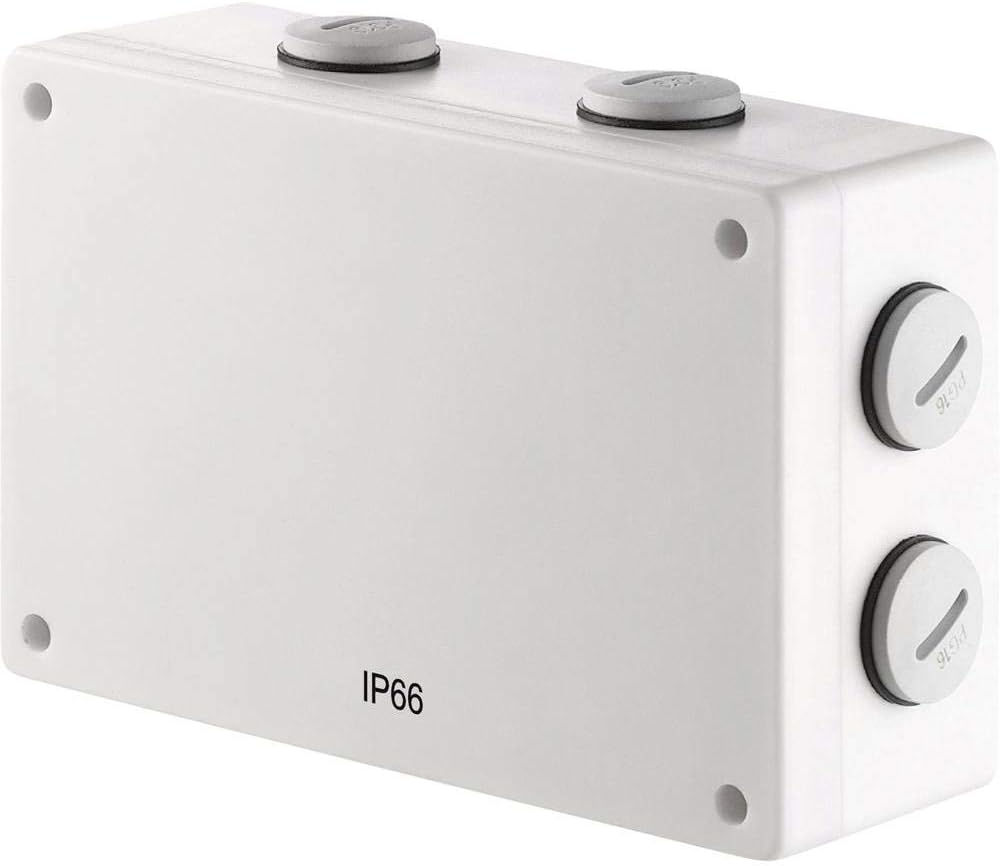
Przód view of the Sygonix SY-RS2W-X1 wireless wall switch, showing its compact design and IP66 rating.
5.2 Okablowanie
The SY-RS2W-X1 is a wireless wall switch and typically does not require direct wiring to the controlled devices. It sends wireless signals to compatible receivers (sold separately). However, if it acts as a transmitter for a wired system, follow these general guidelines:
- Open the housing of the switch carefully.
- Feed the necessary electrical cables through the provided cable glands. Ensure the cable glands are securely tightened after wiring to maintain the IP66 rating.
- Connect the wires to the appropriate terminals inside the switch. Refer to the wiring diagram provided with your specific receiver or system for correct connections.
- Close the housing securely, ensuring all seals are properly seated.

Strona view of the Sygonix SY-RS2W-X1 switch, highlighting the cable glands for secure and waterproof cable entry, essential for its IP66 rating.
5.3 Pairing with Receivers
The SY-RS2W-X1 operates wirelessly. To control devices, it must be paired with compatible wireless receivers (e.g., Sygonix 1275696 or similar). Refer to the instruction manual of your specific receiver for detailed pairing procedures. Generally, this involves:
- Placing the receiver into pairing mode.
- Pressing the desired button on the SY-RS2W-X1 switch to transmit the pairing signal.
- Potwierdzenie pomyślnego sparowania z odbiornikiem.

Diagram illustrating the wireless functionality of the RS2W wall switch, showing signal transmission.
6. Instrukcja obsługi
Once installed and paired with compatible receivers, the SY-RS2W-X1 operates as a simple ON/OFF switch for two independent channels.
- Channel 1 Control: Press the designated button for Channel 1 to toggle the connected device ON or OFF.
- Channel 2 Control: Press the designated button for Channel 2 to toggle the connected device ON or OFF.
The switch operates in a normally open contact type, meaning the circuit is open (OFF) until the button is pressed.

Z bliska view of the Sygonix RS2W wireless wall switch, detailing its button interface.
7. Konserwacja
The Sygonix SY-RS2W-X1 requires minimal maintenance.
- Czyszczenie: Wipe the exterior of the switch with a soft, damp cloth. Do not use abrasive cleaners or solvents. Ensure no water enters the housing.
- Kontrola: Periodically inspect the switch for any signs of physical damage, wear, or loose connections. Check the integrity of the cable glands and housing seals, especially if used outdoors, to maintain the IP66 rating.
- Brak części nadających się do samodzielnej naprawy przez użytkownika: There are no user-serviceable parts inside the switch. Do not attempt to open or repair the device yourself.
8. Rozwiązywanie Problemów
If you encounter issues with your Sygonix SY-RS2W-X1 switch, refer to the following common troubleshooting steps:
- Urządzenie nie odpowiada:
- Ensure the switch is properly paired with its receiver. Refer to the receiver's manual for pairing instructions.
- Check the power supply to the receiver and the connected device.
- Verify that the switch buttons are functioning correctly (e.g., no physical obstruction).
- Check for any obstructions or excessive distance between the switch and the receiver that might interfere with the wireless signal.
- Działanie przerywane:
- Wireless interference from other devices can cause intermittent operation. Try relocating the switch or receiver.
- Ensure the switch is securely mounted and not experiencing any physical movement that could affect internal components.
- IP66 Rating Compromised:
- If water ingress is suspected, immediately disconnect power to the circuit.
- Inspect cable glands and housing seals for damage or improper seating. Replace if necessary.
If these steps do not resolve the issue, contact Sygonix customer support or a qualified electrician.
9. Specyfikacje
| Funkcja | Specyfikacja |
|---|---|
| Producent | Sygonix |
| Numer modelu | SY-3525558 |
| Wymiary produktu (dł. x szer. x wys.) | Wymiary 15.5 x 5.2 x 10.5 cm |
| Waga | 369 gramów |
| Tworzywo | Plastikowy |
| Źródło zasilania | Podręcznik |
| Połączony Wattage | Do 2000 W |
| Obecna ocena | 1 Amptutaj |
| Typ przełącznika | 2-way, Wireless Wall Mounting |
| Typ montażu | Montaż na ścianie |
| Tryb pracy | WŁ-WYŁ |
| Typ kontaktu | Normalnie otwarty |
| Certyfikaty | TÜV, IP66, CE |
| Wymagane baterie | NIE |
10. Gwarancja i wsparcie
For warranty information, please refer to the terms and conditions provided at the time of purchase or contact your retailer. Sygonix products are designed for reliability and performance.
If you require technical support or have questions not covered in this manual, please visit the official Sygonix webodwiedź witrynę lub skontaktuj się z działem obsługi klienta, aby uzyskać pomoc.
Ask a question about this manual
Ask about setup, troubleshooting, compatibility, parts, safety, or missing instructions. Manuals+ will review the question and use this page’s manual context to help answer it.