
1. Wprowadzenie
The OWON B41T+ is a high-precision 4 1/2 digit (21999 counts) True RMS digital multimeter designed for accurate electrical measurements. It features Bluetooth connectivity, allowing seamless integration with Android (4.3+) and iOS (7.0+) smartphones and tablets. This device supports various measurement functions including voltage, current, resistance, capacitance, frequency, duty cycle, and temperature. Advanced features include standalone data logging, graphical display of measurements on connected smart devices, and Japanese voice output for readings.
2. Informacje dotyczące bezpieczeństwa
Please read and understand all safety instructions before operating the OWON B41T+ Digital Multimeter. Failure to follow these instructions may result in electric shock, fire, or damage to the device.
- Przed podłączeniem przewodów pomiarowych do obwodu należy zawsze upewnić się, że multimetr jest ustawiony na właściwy tryb działania.
- Do not exceed the maximum input limits for any measurement range.
- Przed każdym użyciem sprawdź przewody pomiarowe pod kątem uszkodzeń. Uszkodzone przewody należy natychmiast wymienić.
- Unikaj używania multimetru w wilgotnym otoczeniu lub podczas burz elektrycznych.
- Przed dokonaniem pomiaru rezystancji, pojemności lub ciągłości należy zawsze odłączyć zasilanie badanego obwodu.
- Zachowaj ostrożność podczas pracy z objętościątagNie należy używać urządzeń o napięciu powyżej 30 V AC RMS, 42 V szczytowym lub 60 V DC, ponieważ stwarzają one zagrożenie porażenia prądem.
3. Koniec produktuview i komponenty
The OWON B41T+ Digital Multimeter is designed for ease of use and durability. Below are the main components and included accessories.
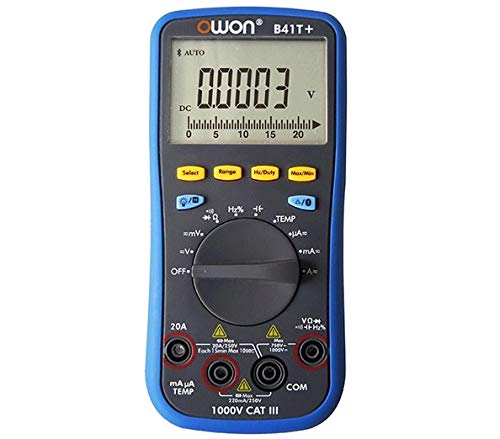
Rysunek 3.1: Przód i bok view of the OWON B41T+ Digital Multimeter, showing the display, function dial, and input jacks.
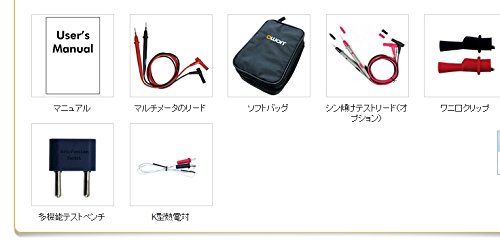
Rysunek 3.2: Included accessories: User's Manual, Multimeter test leads, Soft bag, K-type thermocouple (temperature probe), and a multi-function test bench adapter.
4. Konfiguracja
4.1 Instalacja baterii
The OWON B41T+ is powered by batteries. To install or replace batteries:
- Upewnij się, że multimetr jest wyłączony.
- Znajdź pokrywę komory baterii z tyłu urządzenia.
- Użyj śrubokręta, aby otworzyć komorę baterii.
- Włóż wymagane baterie, zwracając uwagę na prawidłową biegunowość.
- Dokładnie zamknij pokrywę komory baterii.
4.2 Instalacja aplikacji i parowanie Bluetooth
To utilize the smart device connectivity features, download the OWON multimeter application from your device's app store (compatible with Android 4.3+ and iOS 7.0+).
- Download and install the official OWON multimeter app on your smartphone or tablet.
- Turn on the OWON B41T+ multimeter.
- Włącz Bluetooth w swoim inteligentnym urządzeniu.
- Open the OWON app and follow the on-screen instructions to search for and pair with your B41T+ device. The Bluetooth icon on the multimeter display will indicate a successful connection.
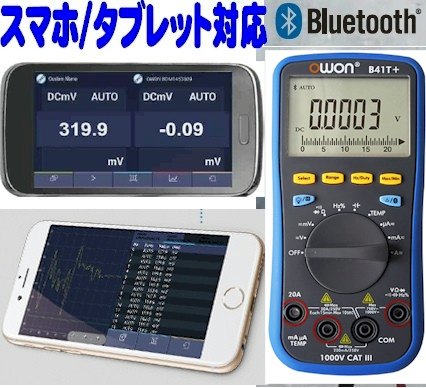
Rysunek 4.1: The OWON B41T+ multimeter displaying a measurement, with a smartphone screen showing the corresponding app interface.
5. Instrukcja obsługi
The OWON B41T+ offers a wide range of measurement functions. Use the central rotary dial to select the desired measurement mode.
5.1 Pomiary podstawowe
Aby wykonać podstawowy pomiar:
- Select the appropriate function (e.g., V for voltage, A for current, Ω for resistance) using the rotary dial.
- Connect the test leads to the correct input jacks on the multimeter (e.g., COM and VΩmA for voltage/resistance, COM and 20A or mAμA for current).
- Podłącz przewody pomiarowe do testowanego obwodu lub elementu.
- Read the measurement value on the multimeter's display.
5.2 Advanced Features with Bluetooth Connectivity
When connected to a smartphone or tablet via Bluetooth, the OWON B41T+ provides enhanced functionality:
- Rejestrowanie danych: Record measurement data over time directly to your smart device.
- Wyświetlacz graficzny: View real-time measurement trends and historical data in graphical format.
- Wyjście głosowe: The device can announce measurement readings in Japanese, allowing for hands-free operation.
- Zarządzanie danymi: Save, store, print, and email measurement data (CSV format) directly from the app.
- Połączenie wielu urządzeń: Connect two OWON B41T+ units simultaneously to your smart device to monitor two different parameters (e.g., voltage and current, or voltage and resistance) on a dual-screen display.
- Zdalna obsługa: Utilize remote desktop applications like TeamViewer to control the connected smartphone/tablet from anywhere, enabling remote monitoring and operation of the multimeter.

Rysunek 5.1: Illustration of advanced features including simultaneous measurement with two multimeters, data logging, graphical display, and voice output.
6. Specyfikacje
The following table details the technical specifications of the OWON B41T+ Digital Multimeter.

Rysunek 6.1: Detailed specifications including measurement ranges, resolution, and accuracy.
| Parametr | Zakres | Rezolucja | Dokładność |
|---|---|---|---|
| Objętość DCtagmi (V) | 220mV, 2.2V, 22V, 220V, 1000V | 0.01mV, 0.1mV, 1mV, 10mV, 0.1V | ±(0.05%+10dig) to ±(0.8%+25dig) |
| AC Objętośćtagmi (V) | 220mV, 2.2V, 22V, 220V, 750V | 0.01mV, 0.1mV, 1mV, 10mV, 0.1V | ±(1.0%+25 cyfr) |
| Prąd stały (A) | 220μA, 2200μA, 22mA, 220mA, 20A | 0.01μA, 0.1μA, 1μA, 10μA, 1mA | ±(0.8%+10dig) to ±(2.0%+25dig) |
| Prąd przemienny (A) | 220μA, 2200μA, 22mA, 220mA, 20A | 0.01μA, 0.1μA, 1μA, 10μA, 1mA | ±(1.5%+25dig) to ±(2.5%+35dig) |
| Rezystancja (Ω) | 220Ω, 2.2kΩ, 22kΩ, 220kΩ, 2.2MΩ, 22MΩ, 220MΩ | 0.01Ω, 0.1Ω, 1Ω, 10Ω, 100Ω, 1kΩ, 10kΩ | ±(0.4%+5dig) to ±(5%+10dig) |
| Pojemność (F) | 2.2nF, 22nF, 220nF, 2.2μF, 22μF, 220μF, 2.2mF, 22mF | 1pF, 10pF, 100pF, 1nF, 10nF, 100nF, 1μF, 10μF | ±(2.5%+15 cyfr) |
| Częstotliwość (Hz) | 220Hz, 2.2kHz, 22kHz, 220kHz, 2.2MHz, 22MHz | 0.01Hz, 0.1Hz, 1Hz, 10Hz, 100Hz, 1kHz | ±(0.1%+4 cyfr) |
| Cykl pracy | 0.1% - 99.9% (>1kHz) | 0.1% | ±(1.2%+3 cyfr) |
| Temperatura (°C/°F) | -50°C do 400°C, -58°F do 752°F | 0.1°C, 0.1°F | ±(2.5%+3dig) to ±(1.2%+8dig) |
| Maksymalna liczba | 21999 | ||
| Wyświetl Sampmolwa | 3 razy / sekundę | ||
| Auto Range | Tak | ||
| Rejestrator danych | 10 hours, 10,000 points | ||
| Prawdziwy RMS | Tak | ||
| Podświetlenie | Tak | ||
| Test Diody | Tak | ||
| Test ciągłości | Tak | ||
| Zabezpieczenie nadprądowe | KAT III 1000 V, KAT IV 600 V | ||
| Źródło zasilania | 3V (1.5V x 2) AA Alkaline Batteries | ||
| Bluetooth | Android 4.3+, iOS 7.0+ | ||
| Wymiary | 85mm x 185mm x 30mm | ||
| Waga | Około 320g | ||
7. Konserwacja
Proper maintenance ensures the longevity and accuracy of your OWON B41T+ Digital Multimeter.
- Czyszczenie: Przetrzyj urządzenie suchą, miękką ściereczką. Nie używaj środków czyszczących o właściwościach ściernych ani rozpuszczalników.
- Wymiana baterii: Replace batteries promptly when the low battery indicator appears on the display. Refer to Section 4.1 for battery installation instructions.
- Składowanie: Przechowuj multimetr w chłodnym, suchym miejscu, z dala od bezpośredniego światła słonecznego i ekstremalnych temperatur. W przypadku przechowywania przez dłuższy czas wyjmij baterie, aby zapobiec wyciekowi.
- Przewody testowe: Regularly inspect test leads for any signs of wear, cuts, or damage. Replace them if necessary to ensure safe and accurate measurements.
8. Rozwiązywanie Problemów
If you encounter issues with your OWON B41T+ Digital Multimeter, refer to the following common problems and solutions:
| Problem | Możliwa przyczyna | Rozwiązanie |
|---|---|---|
| Urządzenie nie włącza się. | Rozładowane lub nieprawidłowo zainstalowane baterie. | Wymień baterie, zwracając uwagę na prawidłową biegunowość. |
| Brak odczytu lub wyświetlenie komunikatu „OL” (Przeciążenie). | Wybrano nieprawidłową funkcję, obwód jest otwarty lub pomiar wykracza poza zakres. | Select the correct function. Check for proper circuit connection. Switch to a higher range if available. |
| Połączenie Bluetooth nie powiodło się. | Bluetooth not enabled, app not running, or device out of range. | Ensure Bluetooth is on for both devices. Restart the app. Move devices closer. Check app compatibility with OS version. |
| Niedokładne odczyty. | Damaged test leads, environmental interference, or incorrect measurement technique. | Inspect and replace test leads if damaged. Ensure proper connection. Avoid strong electromagnetic fields. |
9. Gwarancja i wsparcie
For warranty information and technical support, please refer to the documentation included with your purchase or visit the official OWON website. If you require further assistance, contact OWON customer service through their designated support channels.