
1. Wprowadzenie
This manual provides instructions for the installation, operation, and maintenance of the Cisco CP-68KEM-3PCC Expansion Module. This module is designed to enhance the functionality of your Cisco IP Phone 6851 by providing additional programmable keys.
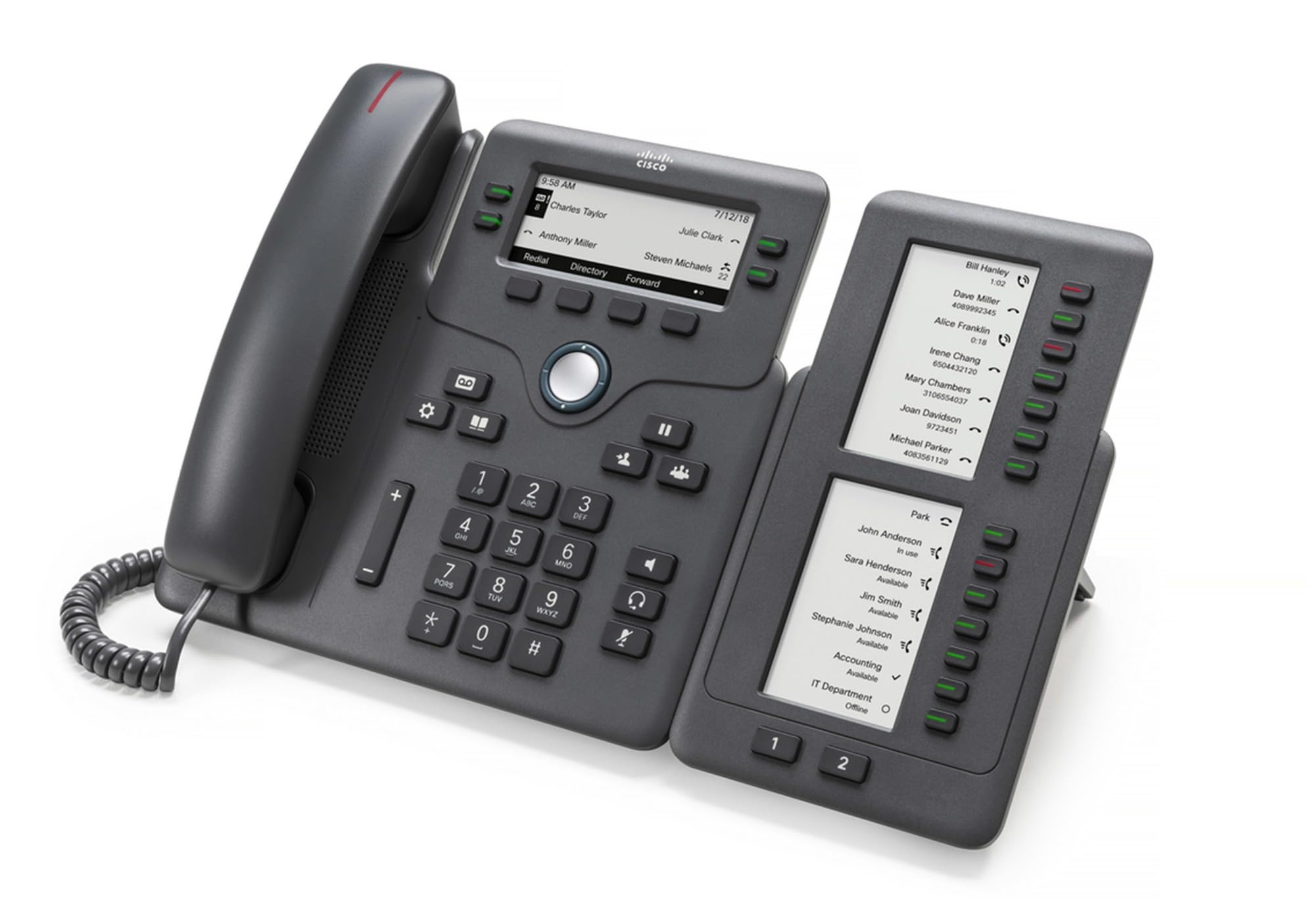
Figure 1: Cisco CP-68KEM-3PCC Expansion Module. This image shows the front view of the expansion module with its grayscale LCD screen and programmable keys.
The Cisco CP-68KEM-3PCC Expansion Module adds 14-line keys and 2-page keys, totaling 28 additional keys, with an easy-to-read grayscale LCD screen. It is ideal for monitoring and managing call status, directory numbers, and speed dial functions.
2. Co znajduje się w pudełku
Ostrożnie rozpakuj pudełko i upewnij się, że znajdują się w nim wszystkie elementy:
- Cisco CP-68KEM-3PCC Phone Expansion Module
- Connecting Cable (typically included for linking to the phone)
- Dokumentacja (niniejsza instrukcja obsługi, informacje dotyczące bezpieczeństwa)
If any items are missing or damaged, please contact your vendor or Cisco support immediately.
3. Instrukcje konfiguracji
Follow these steps to connect your Cisco CP-68KEM-3PCC Expansion Module to your Cisco IP Phone 6851.
- Prepare the IP Phone: Ensure your Cisco IP Phone 6851 is powered off and disconnected from the network.
- Connect the Expansion Module: Locate the expansion port on the back or side of your Cisco IP Phone 6851. Connect the provided connecting cable from the expansion module to this port.
- Zabezpiecz połączenie: Ensure the cable is securely fastened to prevent accidental disconnection.
- Włączanie: Reconnect your Cisco IP Phone 6851 to the network and power it on. The expansion module should be detected automatically.
- Sprawdź funkcjonalność: Once the phone has booted, check the expansion module's display and keys to ensure they are responsive.
For detailed visual instructions, refer to the official Cisco documentation or support webstrona.
4. Operating the Expansion Module
The expansion module provides additional keys for various functions, enhancing your call management capabilities.
4.1 Programowalne klawisze
The 28 programmable keys (14 keys across 2 pages) can be configured for:
- Directory Numbers (DNs): Assign specific phone lines or extensions.
- Szybkie wybieranie: Program frequently called numbers for quick access.
- Klucze funkcji: Assign functions like call transfer, conference, or call park.
- Call Status Monitoring: Monitor the status of other lines (e.g., busy, ringing).
4.2 Page Navigation
Use the dedicated page keys (usually located near the display) to switch between the two pages of programmable keys. The grayscale LCD screen will update to show the labels for the currently active page.
4.3 Konfiguracja
Configuration of the programmable keys is typically managed through your organization's phone system administrator or via the web interface of the Cisco IP Phone 6851. Consult your IT department for specific configuration instructions.
5. Konserwacja
To ensure the longevity and optimal performance of your Cisco CP-68KEM-3PCC Expansion Module, follow these maintenance guidelines:
- Czyszczenie: Use a soft, dry, lint-free cloth to clean the exterior surfaces. For stubborn marks, slightly dampPrzetrzyj ściereczkę wodą. Unikaj stosowania silnych środków chemicznych, ściernych środków czyszczących i rozpuszczalników, ponieważ mogą one uszkodzić powłokę i elementy elektroniczne.
- Środowisko: Keep the module in a clean, dry environment, away from direct sunlight, excessive heat, and moisture.
- Obsługiwanie: Handle the module with care. Avoid dropping it or subjecting it to strong impacts.
- Zarządzanie kablami: Ensure connecting cables are not kinked, pinched, or under strain.
There are no user-serviceable parts inside the expansion module. Do not attempt to open or repair the device yourself.
6. Rozwiązywanie Problemów
If you encounter issues with your expansion module, try the following troubleshooting steps:
| Problem | Możliwa przyczyna | Rozwiązanie |
|---|---|---|
| Module not recognized by phone | Loose cable connection, phone not restarted, incompatible phone model. |
|
| Klawisze nie odpowiadają | Software glitch, configuration issue. |
|
| Wyświetlacz jest pusty lub miga | Problem z zasilaniem, usterka wewnętrzna. |
|
If these steps do not resolve the issue, please contact Cisco technical support or your authorized reseller.
7. Specyfikacje
| Funkcja | Szczegół |
|---|---|
| Numer modelu | CP-68KEM-3PCC |
| Marka | Cisco |
| Kompatybilne urządzenia | Telefon IP Cisco 6851 |
| Kolor | Czarny |
| Tworzywo | Metal |
| Wymiary produktu (DxSxW) | Wymiary 5.1 x 10.2 x 20.3 cm |
| Źródło zasilania | Corded (powered via host IP Phone) |
| Liczba kluczy | 28 (14 keys across 2 pages) |
| Wyświetlacz | Grayscale LCD |
| GTIN/UPC | 889728068383 |
8. Informacje o gwarancji
The Cisco CP-68KEM-3PCC Expansion Module comes with a 2-letnia gwarancja na produkt from the date of purchase. This warranty covers defects in materials and workmanship under normal use. It does not cover damage caused by misuse, accidents, unauthorized modifications, or external causes.
For warranty claims or detailed terms and conditions, please refer to the official Cisco warranty policy available on their webodwiedź witrynę lub skontaktuj się z punktem sprzedaży.
9. Wsparcie
For technical assistance, product information, or to report issues, please contact Cisco support:
- Wsparcie Cisco Webstrona: Odwiedź oficjalną stronę Wsparcie Cisco webstrona for documentation, downloads, and contact options.
- Authorized Reseller: Contact the reseller from whom you purchased the product.
When contacting support, please have your product model (CP-68KEM-3PCC) and serial number ready.