
1. Informacje dotyczące bezpieczeństwa
Przed montażem i użyciem należy uważnie przeczytać wszystkie instrukcje. Zachowaj tę instrukcję do wykorzystania w przyszłości.
- Wymagany montaż: This desk requires self-assembly. Follow the provided assembly instructions meticulously to prevent injuries.
- Limit wagowy: This desk is not designed to carry heavy objects. The maximum weight capacity is approximately 17 kg (37.5 lbs) to ensure stability.
- Nadzór: Children should be supervised while using the desk, especially during adjustments.
- Umieszczenie: Ustaw biurko na płaskiej i stabilnej powierzchni.
2. Koniec produktuview
The TecTake Children's Desk is designed to provide a comfortable and adaptable workspace for various activities such as drawing, homework, and crafts. Its thoughtful design allows for height and tilt adjustments to suit the user's needs.
Główne cechy:
- Pochylany pulpit: The work surface can be tilted to provide an ergonomic position for different tasks.
- Regulowana wysokość: The desk legs are adjustable in 7 steps, allowing the desk to grow with your child.
- Zintegrowana szuflada: A convenient drawer provides storage for school supplies, drawing materials, and other items.
- Removable Stopper Strips: Two removable stopper strips on the lower edge of the desktop prevent materials from sliding off when the surface is tilted.
- Stabilna konstrukcja: Built with robust materials for durability and stability during daily use.
- Zaokrąglone rogi: The desktop features rounded corners for enhanced safety.
- Łatwe do czyszczenia: The surface is washable with a damp płótno.

Figure 1: TecTake Children's Desk, showcasinjego konstrukcji i cech.

Rysunek 2: Koniecview of key features including adjustable height, tilting desktop, and storage.
3. Konfiguracja
The desk comes with detailed assembly instructions in the package. Please refer to the included manual for step-by-step guidance on assembling your TecTake Children's Desk.
Etapy Zgromadzenia Ogólnego:
- Rozpakuj wszystkie komponenty i sprawdź je na liście części zawartej w załączonej instrukcji.
- Złóż główną konstrukcję ramy, korzystając z dostarczonych elementów montażowych.
- Attach the desktop to the frame, ensuring the tilting mechanism is correctly installed.
- Install the storage drawer and stopper strips.
- Przed użyciem należy upewnić się, że wszystkie śruby i elementy mocujące są mocno dokręcone.

Figure 3: The desk's flexible design allows for various adjustments to suit user needs.
4. Instrukcja obsługi
4.1 Regulacja wysokości biurka
- Locate the height adjustment mechanisms on the desk legs.
- Carefully loosen the fasteners or pins that secure the legs at their current height.
- Adjust the desk to one of the 7 available height positions (from approximately 63 cm to 94 cm).
- Ensure both sides are adjusted to the same height and securely fasten the mechanisms before use.
4.2 Tilting the Desktop
- The desktop features a tilting mechanism for ergonomic positioning.
- To tilt, lift the desktop slightly and adjust it to the desired angle.
- Ensure the desktop is securely locked into place at the chosen angle.
- Utilize the two removable stopper strips to prevent items from sliding off the tilted surface.
4.3 Korzystanie z szuflady do przechowywania
- The integrated drawer provides convenient storage.
- Wysuń szufladę, aby uzyskać dostęp do jej zawartości.
- Push the drawer back in until it is fully closed to keep items secure and maintain a tidy workspace.
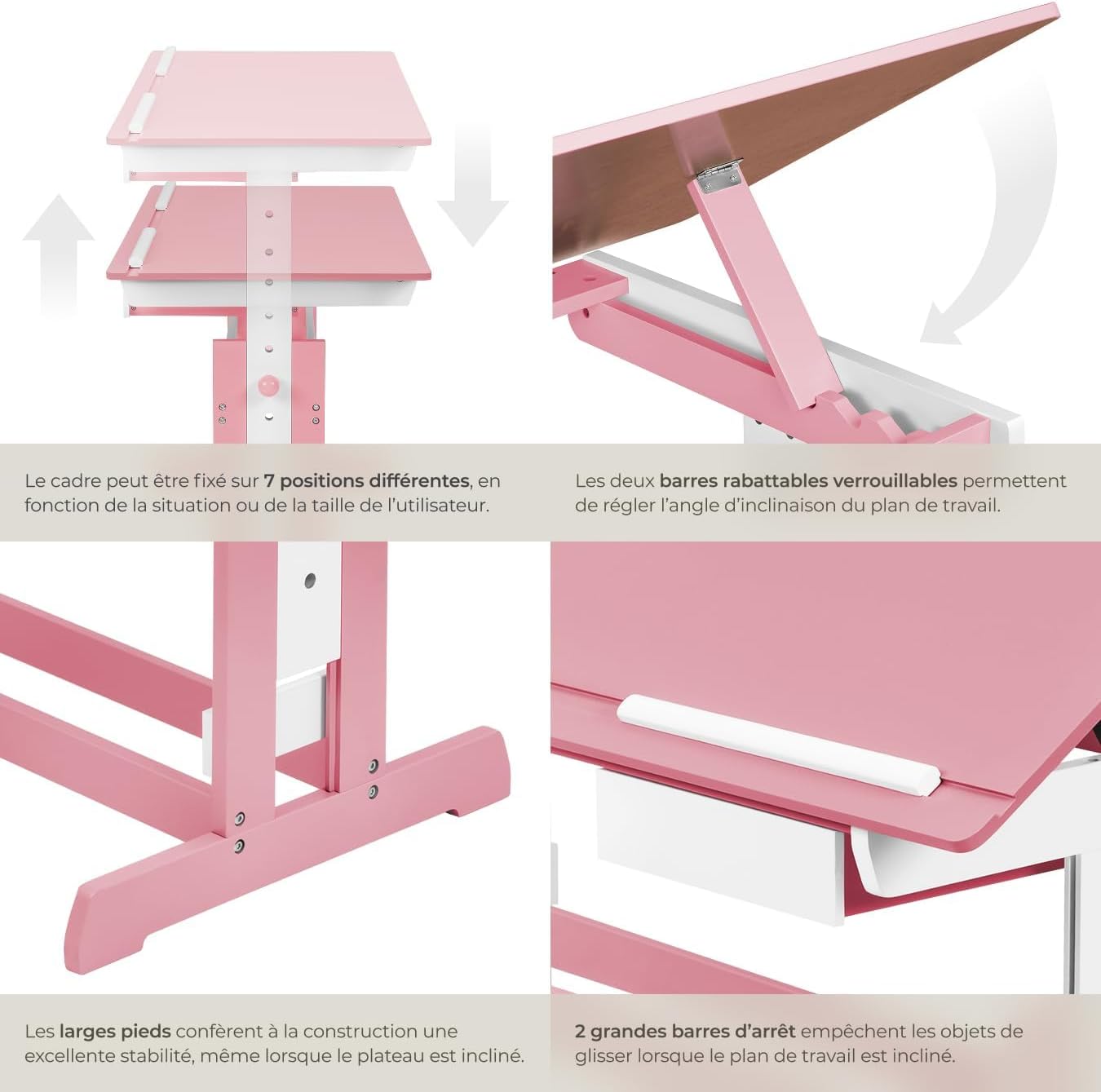
Figure 4: Close-up of the height adjustment and tilting mechanism.
5. Konserwacja
- Czyszczenie: Przetrzyj powierzchnie biurek wodąamp szmatką. Unikaj środków czyszczących o działaniu ściernym i silnych środków chemicznych, które mogłyby uszkodzić wykończenie.
- Kontrola: Okresowo sprawdzaj wszystkie śruby i elementy mocujące, aby upewnić się, że są dobrze dokręcone. W razie potrzeby dokręć.
- Unikaj nadmiernej wilgoci: Do not expose the desk to excessive moisture or direct sunlight for prolonged periods to prevent warping or discoloration.
6. Rozwiązywanie Problemów
If you encounter any issues with your TecTake Children's Desk, please refer to the following common solutions:
- Chwieje się biurko: Ensure the desk is placed on a level surface. Check that all assembly screws and bolts are securely tightened.
- Trudności w regulacji wysokości/pochylenia: Verify that no obstructions are present in the adjustment mechanisms. Ensure fasteners are sufficiently loosened before attempting to adjust.
- Brakujące lub uszkodzone części: If any parts are missing or damaged upon arrival, please contact TecTake customer support for assistance.
7. Specyfikacje
| Funkcja | Specyfikacja |
|---|---|
| Marka | TecTake |
| Numer modelu | 800117 |
| Wymiary powierzchni roboczej | Ok. 109 x 55 cm (43 x 21.7 cala) |
| Zakres regulacji wysokości | Approx. 63 cm to 94 cm (24.8 to 37 inches) in 7 steps |
| Drawer Interior Dimensions (HxWxD) | Około 6 x 27 x 22 cm (2.4 x 10.6 x 8.7 cala) |
| Waga | Około 17 kg (37.5 funty) |
| Tworzywo | Plywood (lacquered) / Metal |
| Funkcja specjalna | Adjustable, Tilting Desktop |
| Instrukcje pielęgnacji | Wyczyść z reklamąamp płótno |

Figure 5: Detailed dimensions and technical specifications of the desk.
8. Gwarancja i wsparcie
For warranty information, product support, or to order replacement parts, please refer to the documentation included with your purchase or visit the official TecTake webStrona. Kontaktując się z pomocą techniczną, przygotuj numer modelu (800117) i datę zakupu.