
1. Wprowadzenie
This manual provides essential information for the installation, operation, and maintenance of your UPBRIGHT 250W Power Supply Unit (PSU). This PSU is designed as a compatible replacement or upgrade component for various Dell slim desktop systems. Please read this manual thoroughly before proceeding with installation to ensure proper function and safety.
2. Informacje dotyczące bezpieczeństwa
Always observe the following safety precautions when handling and installing electronic components:
- Odłącz zasilanie: Always unplug the computer from the wall outlet before opening the case or performing any installation.
- Wyładowanie statyczne: Wear an anti-static wrist strap or frequently touch a grounded metal object (like the unpainted metal chassis of the computer) to discharge static electricity. Static discharge can damage sensitive electronic components.
- Wentylacja: Ensure adequate ventilation around the computer. Do not block the PSU's fan or vents.
- Poprawna cztage: Sprawdź, czy objętośćtage selector switch (if present) on the PSU is set to the correct voltage for your region (e.g., 115V for North America, 230V for Europe). This PSU is auto-sensing for 100-240V.
- Profesjonalna instalacja: Jeśli masz jakiekolwiek wątpliwości, skonsultuj się z wykwalifikowanym technikiem.
3. Zgodność
This UPBRIGHT 250W PSU is compatible with a range of Dell slim desktop systems and replaces various Dell PSU models. Verify your system's requirements and existing PSU model number before installation.
3.1. Compatible Dell System Models:
- Optiplex Series: 390, 790, 990, 3010, 7010
- Inspiron Series: 530s, 537s, 540s, 545s, 546s, 560s, 570s, 580s, 620s
- Vostro Series: Lata 200., 220., 230., 260., 400
- Studio Series: 540s, 537s, 560s
3.2. Compatible Dell PSU Part Numbers (P/N) and Model Numbers:
This PSU is designed to replace or be compatible with the following Dell part numbers and model numbers:
- Dell Model Numbers: L250NS-00, PS-5251-08D, D250AD-00, PS-5251-5, H250AD-00, D250A1005L, D250ED-00, DPS-250AB-67 A, F250ED-00, D-0250ADU00-101, D250ND-00, DPS-250AB-73A, AC250NS-00, PCA038, TFX0250D5WB, D250AD-01, DPS-250AB-79 A, DPS-250AB-68 A, D250ED-01, F250AD-00, D-0250ADU00-201, PC7068, HP-D2506R0, DPS-250AB-36, H250ED-00, D250E006L, PS-5251-06, L250AD-00, PS-5251-01DI, PS-00-5251DA, HU11AD-250, HK00-350FP S71, PS-00AB-250 A
- Dell P/N Models: CYY97, 7GC81, HY6D2, WX9P8, 6MVJH, YJ1JT, 3MV8H, 3WFNF, 5FFR5, 76VCK, MPX3V, PWJ55, T498G, W208D, W209D, W210D, X3KJ8, XFWXR, 0HY6D2, CN-0HY6D2, 77GHN, 077GHN, CN-077GHN, 03MV8H, CN-03MV8H, 06MVJH, CN-06MVJH, 076VCK, CN-076VCK, 0CYY97, FY9H3, 0FY9H3, CN-FY9H3, DY72N, 0DY72N, CN-0DY72N, 07GC81, CN-076VCK, 0YJ1JT, CN-0YJ1JT, 0MPX3V, CN-0MPX3V, 0X3KJ8, CN-0X3KJ8, K2H58, 0K2H58, CN-0K2H58, PS-5251-03, P164N, 0P164N, HP-D2503R001, H058N, H7NF9, PS-5251-08D
4. Instrukcje instalacji
Replacing a power supply unit requires careful handling of internal computer components. Follow these steps precisely:
- Przygotuj miejsce pracy:
Ensure your workspace is clean, well-lit, and free of static-generating materials. Gather necessary tools, such as a Phillips head screwdriver.
- Wyłącz i rozłącz:
Shut down your computer completely. Unplug the power cord from the wall outlet and from the back of the computer. Disconnect all other peripherals (monitor, keyboard, mouse, etc.).
- Otwórz obudowę komputera:
Remove the side panel(s) of your computer case to access the internal components. Refer to your computer's specific manual for instructions on opening the case.
- Discharge Static Electricity:
Before touching any internal components, ground yourself by touching an unpainted metal part of the computer chassis. Maintain grounding throughout the process.
- Disconnect Existing PSU Cables:
Carefully disconnect all power cables from the motherboard, hard drives, optical drives, and any other components. Note the routing of these cables for easier reinstallation.

Obraz: View of the power supply unit with its various cables disconnected, showing the main 24-pin connector, 4-pin CPU connector, and SATA power connectors.
- Remove the Old PSU:
Unscrew the mounting screws that secure the old PSU to the computer chassis. Typically, these are located at the back of the computer. Carefully slide the old PSU out of its bay.

Image: The UPBRIGHT 250W Power Supply Unit, showing its compact form factor and integrated cables. This unit is ready for installation.
- Install the New UPBRIGHT PSU:
Slide the new UPBRIGHT 250W PSU into the empty PSU bay. Align the screw holes and secure the PSU with the mounting screws. Ensure it is firmly seated.
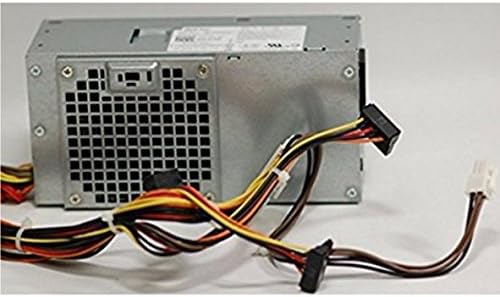
Obraz: Tył view of the power supply unit, highlighting the AC power input and the exhaust fan grill. This perspective shows how the unit fits into a computer chassis.
- Podłącz kable zasilacza:
Connect the new PSU cables to the motherboard (main 24-pin connector, 4-pin or 8-pin CPU connector), hard drives, optical drives, and any other components that require power. Ensure all connections are secure and correctly oriented. Do not force connectors.

Obraz: Zbliżenie view of the various power connectors, including the main 24-pin ATX connector, 4-pin CPU connector, and SATA power connectors, ready for connection to computer components.
- Zarządzanie kablami:
Route cables neatly to improve airflow and prevent interference with other components. Use cable ties if necessary.
- Zamknij obudowę komputera:
Replace the side panel(s) of your computer case and secure them.
- Reconnect Peripherals and Power:
Reconnect all external peripherals and the power cord to the computer and the wall outlet.
5. Działanie
Once installed, the UPBRIGHT 250W PSU operates automatically to provide stable power to your computer's components. The PSU is designed for continuous operation within its specified wattagi limity.
- Włączanie: Press the power button on your computer. The PSU will initiate power delivery to the motherboard and connected devices.
- Monitorowanie: Modern operating systems and BIOS/UEFI interfaces may provide basic power monitoring. Ensure your system boots normally and operates without unexpected shutdowns or errors.
6. Konserwacja
Proper maintenance helps extend the lifespan of your PSU and computer system:
- Usuwanie kurzu: Periodically (every 6-12 months, depending on environment) open your computer case and use compressed air to gently remove dust buildup from the PSU's fan and vents. Ensure the computer is powered off and unplugged before cleaning.
- Przepływ powietrza: Ensure the computer's ventilation openings are not obstructed. Maintain adequate space around the computer for proper airflow.
- Zarządzanie kablami: Regularly check that internal cables are neatly routed and not obstructing airflow or fan operation.
7. Rozwiązywanie Problemów
If you encounter issues after installing your new PSU, consider the following common troubleshooting steps:
- Komputer się nie włącza:
- Verify the power cord is securely plugged into both the wall outlet and the PSU.
- Ensure the power switch on the back of the PSU (if present) is in the "On" position.
- Check all internal power connections (24-pin motherboard, CPU, SATA, etc.) to ensure they are firmly seated.
- Confirm the wall outlet is functional by plugging in another device.
- System włącza się, ale nie ma obrazu:
- Sprawdź, czy monitor jest podłączony i włączony.
- Reseat RAM modules and graphics card (if applicable).
- Verify the CPU power connector is securely attached.
- Intermittent Shutdowns or Instability:
- Check for overheating. Ensure PSU and case fans are spinning freely and not obstructed by dust.
- Verify that the total power draw of your components does not exceed the PSU's 250W capacity.
- Ensure all power connections are stable and not loose.
- Nietypowe dźwięki:
- A grinding or rattling noise may indicate a faulty fan. If the noise is coming from the PSU, contact support.
If these steps do not resolve the issue, contact UPBRIGHT customer support or a qualified technician.
8. Specyfikacje
| Marka | UPBRIGHT |
| Moc wyjściowatage | 250 watów |
| Kompatybilne urządzenia | Personal Computer (Dell Optiplex, Inspiron, Vostro, Studio Slim Desktop Systems) |
| Metoda chłodzenia | Powietrze |
| Wejście Voltage | 100-240V AC (Auto-sensing) |
| Objętość wyjściatage/Bieżący | +5V / 15A MAX, +12V / 18A MAX, +3.3V / 14A MAX |
| Model Numbers (UPBRIGHT) | D250AD-00, H250AD-00, F250ED-00 (and compatible with many Dell models/P/Ns) |
Uwaga: Specyfikacje mogą ulec zmianie bez powiadomienia. Aby uzyskać najdokładniejsze informacje, zapoznaj się z etykietą produktu.
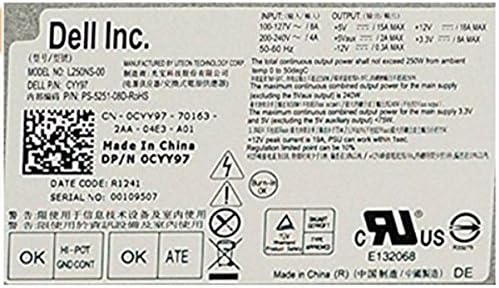
Image: Close-up of the specification label on the power supply unit, detailing input/output voltages, currents, and various certifications.
9. Gwarancja i wsparcie
UPBRIGHT stands behind the quality of its products. This power supply unit comes with the following coverage:
- Polityka zwrotów: 30 days refund period from the date of purchase.
- Polityka wymiany: 24 months exchange period for defective units.
For technical support, warranty claims, or further assistance, please contact UPBRIGHT customer service through your point of purchase or the official UPBRIGHT webstrona.