
1. Wprowadzenie
This manual provides essential information for the proper installation, setup, and operation of your YoLuKe P1-4X-2.5 PTZ Dome IP Security Camera. This camera is designed for both indoor and outdoor surveillance, offering high-definition video, pan-tilt-zoom capabilities, and advanced features to enhance your security monitoring.
2. Składniki produktu
Familiarize yourself with the various parts of your camera and included accessories:

Figure 2.1: YoLuKe PTZ Dome IP Camera Components. This image displays the main camera unit with its high-intensity antenna, HD zoom lens, waterproof IP66 body, microphone, reset button, power interface, audio port, and network interface.
- PTZ Dome IP Camera: Main surveillance unit.
- High-Intensity Antenna: Do łączności bezprzewodowej.
- HD Zoom Lens: Provides clear, magnified views.
- Waterproof Body (IP66): Ensures durability in various weather conditions.
- Mikrofon: Do wejścia audio.
- Przycisk resetowania: W celu zresetowania urządzenia.
- Interfejs zasilania: Do podłączenia zasilacza.
- Port audio: Do zewnętrznych połączeń audio.
- Interfejs sieciowy: Do przewodowego połączenia sieciowego.
- Zasilacz: To supply power to the camera.
- Kabel Ethernet: Do początkowej konfiguracji i połączenia przewodowego.
- Sprzęt montażowy: Screws and anchors for installation.
- PŁYTA CD: Contains software and drivers.
- Skrócona instrukcja obsługi: Additional setup instructions.
3. Konfiguracja
3.1 Fizyczna instalacja
Follow these steps for secure physical installation of your camera:

Figure 3.1: Detailed steps for mounting the PTZ camera. This image illustrates rotating the base, determining screw hole locations, drilling holes, inserting the base, and securing the camera.
- Rotate and Remove Base: Rotate the camera base to align with the arrow and remove it from the tail line.
- Określ miejsce montażu: Identify and mark the desired location for the mounting screw holes on the ceiling or wall.
- Wiercenie otworów: Drill holes at the marked positions and insert the expansion screws.
- Insert Base: Insert the camera base into the tail line and lift it into position.
- Bezpieczna kamera: Insert the screws into the expansion screws to firmly secure the camera.
3.2 Konfiguracja sieci i oprogramowania
Connect your camera to the network and set up the monitoring software:

Figure 3.2: Steps for setting up the camera using the CamHiPro app. This image shows downloading the app, powering on the camera, connecting the network cable, configuring Wi-Fi settings, and remote viewing.
- Download CamHiPro APP: Scan the QR code in the quick operation guide or search for "CamHiPro" in your mobile app store (Google Play or Apple App Store).
- Włącz i podłącz: Power on the camera and connect it to your network router using the provided Ethernet cable.
- Ustawienia wifi: Follow the in-app instructions to configure Wi-Fi settings for wireless operation.
- Remote Watch: Once configured, you can monitor your camera anytime, anywhere via the app.
3.3 Pairing with NVR (Network Video Recorder)
If you are using an NVR system, follow these steps to pair your camera:
Video 3.1: Manual Camera Addition to NVR. This video demonstrates the process of manually adding a camera to an NVR system, including powering on the devices, resetting the camera, and searching for it on the NVR interface.
- Power On NVR and Camera: Ensure both your NVR and the camera are powered on.
- Zresetuj kamerę: Long press the reset button on the camera until you hear a sound indicating a successful reset.
- Szukaj Cameras on NVR: On your NVR interface, navigate to the camera setup or add device section and initiate a search for new cameras.
- Potwierdź parowanie: Once the camera is detected and a "Wireless connection is successful" sound is heard, confirm the pairing on the NVR.
4. Instrukcja obsługi
4.1 Sterowanie obrotem, pochyleniem i powiększeniem (PTZ)
Kontroluj kamerę viewing angle and zoom level remotely:
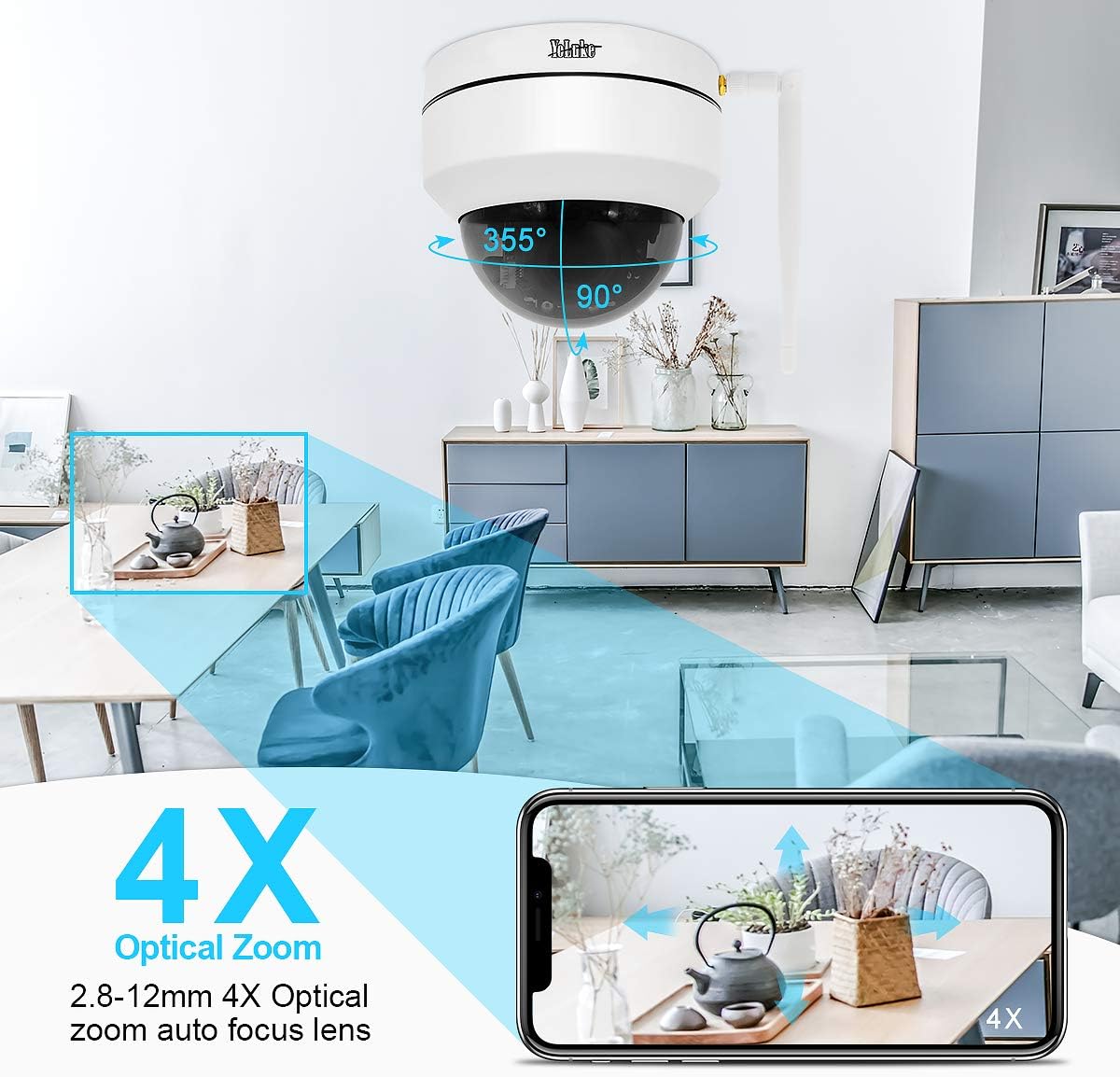
Figure 4.1: Remote PTZ and 4X Optical Zoom. This image demonstrates the camera's 355° horizontal rotation and 90° vertical pan, along with its 4X optical zoom capability, controllable via a smartphone app.
- Chleb: Obróć kamerę poziomo o 355°.
- Przechylenie: Możliwość regulacji położenia kamery w pionie do 90°.
- Brzęczenie: Utilize the 4X optical zoom lens (2.8-12MM) for detailed views.
- Kontrola: All PTZ functions are easily operable through the mobile application or PC client.
4.2 Widzenie nocne
Kamera zapewnia wyraźny nadzór nawet w warunkach słabego oświetlenia:

Figure 4.2: Day and Night Vision Comparison. This image illustrates the camera's ability to provide 24-hour surveillance with clear day vision and effective 20m night vision using LED arrays.
- Automatyczne przełączanie: The camera automatically switches between day and night vision modes based on ambient light.
- Ulepszone widzenie w nocy: Equipped with two LED arrays, extending night vision range up to 65.6 feet (20 meters) in complete darkness.
4.3 Detekcja ruchu i alarm
Stay informed of any detected activity:
- Regulowana czułość: Motion detection area and alarm sensitivity can be customized via the app.
- Natychmiastowe powiadomienia: Upon motion detection, the camera sends notifications to your mobile phone and video clips to your email.
- Syrena alarmowa: The camera supports an alarm siren feature for deterrence.
4.4 Dźwięk dwukierunkowy
Communicate through the camera:
- Wbudowany mikrofon: Nagrywa dźwięk z otoczenia kamery.
- Speaker Support: Connect an external speaker for two-way communication.
4.5 Rejestrowanie i przechowywanie
Manage your video recordings:
- Obsługa kart SD: Obsługuje karty SD o pojemności do 128 GB (brak w zestawie) do przechowywania lokalnego.
- Smart H.265 Video Coding: Efficient compression allows for up to 15 days of 24-hour recording on a 128GB card.
- Zdalne odtwarzanie: View recorded videos on your PC client, mobile app, or web przeglądarka.
5. Konserwacja
- Regularne czyszczenie: Okresowo czyść obiektyw i obudowę aparatu miękką,amp ściereczką, aby zapewnić wysoką jakość obrazu. Unikaj środków czyszczących o działaniu ściernym.
- Aktualizacje oprogramowania układowego: Sprawdź producenta webodwiedź witrynę lub aplikację, aby sprawdzić dostępne aktualizacje oprogramowania sprzętowego i zapewnić optymalną wydajność i bezpieczeństwo.
- Sprawdzenie zasilania: Ensure the power adapter and cables are securely connected and free from damage.
- Łączność sieciowa: Verify stable network connection (wired or Wi-Fi) for uninterrupted monitoring.
6. Rozwiązywanie Problemów
Jeśli masz problemy z aparatem, zapoznaj się z poniższymi, typowymi rozwiązaniami:
| Problem | Możliwa przyczyna | Rozwiązanie |
|---|---|---|
| Kamera nie włącza się | Zasilacz odłączony lub uszkodzony. | Check power connections; try a different power outlet or adapter. |
| Nie można połączyć się z siecią Wi-Fi | Incorrect Wi-Fi password; camera too far from router; network interference. | Verify Wi-Fi password; move camera closer to router; reset camera and reconfigure. |
| Brak źródła wideo | Network issue; camera offline; software glitch. | Check network connection; reboot camera and router; restart monitoring app/software. |
| Wykrywanie ruchu nie działa | Detection area not set; sensitivity too low; schedule not configured. | Adjust motion detection settings in the app/software; ensure schedule is active. |
| Słaba jakość widzenia w nocy | Obstruction in front of lens; insufficient ambient IR light. | Clear any obstructions; ensure IR LEDs are not blocked; consider additional IR illuminators if needed. |
7. Specyfikacje
| Funkcja | Szczegół |
|---|---|
| Efektywna rozdzielczość wideo | 5 MP (1920*1080p@20fps) |
| Obiektyw | 2.8-12MM 4X Optical Zoom Lens |
| Zakres obrotu/pochylenia | 355° w poziomie, 90° w pionie |
| Wizja nocna | Up to 65.6 feet (20 meters) with two LED arrays |
| Składowanie | 128GB Max SD card support (H.265 coding) |
| Łączność | Wireless (Wi-Fi) and Wired (Ethernet) |
| Audio | 2-Way Audio (Built-in Mic, external speaker support) |
| Ocena odporności na warunki atmosferyczne | IP66 |
| Wykrywanie ruchu | Adjustable area and sensitivity, alarm siren |
| Moc | 12 woltów, 24 wata |
| Wymiary | 5.91 x 5.91 x 5.91 cala |
| Waga | 2.27 funtów |
8. Gwarancja i wsparcie
Your YoLuKe P1-4X-2.5 PTZ Dome IP Security Camera is backed by a Pełna roczna gwarancja from the date of purchase. For any questions regarding installation, technical support, or warranty claims, please contact our support team via Amazon or through the contact information provided in your quick operation guide. We are always here to help.
For additional support and resources, please refer to the official YoLuKe store on Amazon: Visit YoLuKe Store