
Reloop RP-1000-MK2
Reloop RP-1000 MK2 Professional Belt Drive Turntable System
Instrukcja obsługi
1. Wprowadzenie
This user manual provides comprehensive instructions for the setup, operation, and maintenance of your Reloop RP-1000 MK2 Professional Belt Drive Turntable System. Please read this manual thoroughly before using the product to ensure proper function and to prevent damage.
The Reloop RP-1000 MK2 is designed for both aspiring DJs and HiFi enthusiasts, offering high-quality audio reproduction through its belt-driven mechanism. This design effectively isolates the platter from motor vibrations, ensuring clear, distortion-free sound. The MK2 version features an enhanced top panel construction, improved metallic buttons, and a pre-fitted Ortofon OM Black pick-up system for immediate playback.
2. Instrukcje bezpieczeństwa
To ensure safe operation and prolong the life of your turntable, please observe the following safety guidelines:
- Zasilanie: Connect the unit only to an AC outlet with the correct voltage as indicated on the product. Ensure the power cord is not pinched or walked on.
- Wilgoć: Nie wystawiaj urządzenia na działanie deszczu, wilgoci ani nadmiernej wilgotności. Nie stawiaj na urządzeniu przedmiotów wypełnionych płynami, takich jak wazony.
- Wentylacja: Zapewnij odpowiednią wentylację wokół urządzenia. Nie blokuj otworów wentylacyjnych.
- Źródła ciepła: Trzymaj urządzenie z dala od źródeł ciepła, takich jak grzejniki, kratki wentylacyjne, piece lub inne urządzenia (w tym amp(lifiers) wytwarzające ciepło.
- Czyszczenie: Czyścić wyłącznie suchą ściereczką. Unikać stosowania płynów czyszczących i aerozoli.
- Serwisowanie: Do not attempt to service the unit yourself. Refer all servicing to qualified service personnel. Servicing is required when the apparatus has been damaged in any way, such as power-supply cord or plug is damaged, liquid has been spilled or objects have fallen into the apparatus, the apparatus has been exposed to rain or moisture, does not operate normally, or has been dropped.
- Umieszczenie: Place the turntable on a stable, level surface to prevent vibrations and ensure proper tracking.
3. Zawartość opakowania
Sprawdź, czy w przesyłce znajdują się wszystkie wymienione poniżej elementy:
- Talerz gramofonu
- System odbioru OM Black (firmy Ortofon)
- Nakrycie głowy
- Slipmata
- Przeciwwaga
- Przewód zasilający
- Instrukcja obsługi (ten dokument)
Jeśli brakuje któregokolwiek z elementów lub jest on uszkodzony, należy natychmiast skontaktować się ze sprzedawcą lub działem obsługi klienta Reloop.
4. Koniec produktuview
Familiarize yourself with the main components of your Reloop RP-1000 MK2 turntable.

Rysunek 4.1: Kątowy view gramofonu Reloop RP-1000 MK2, pokazasing the platter, tonearm, and control panel.
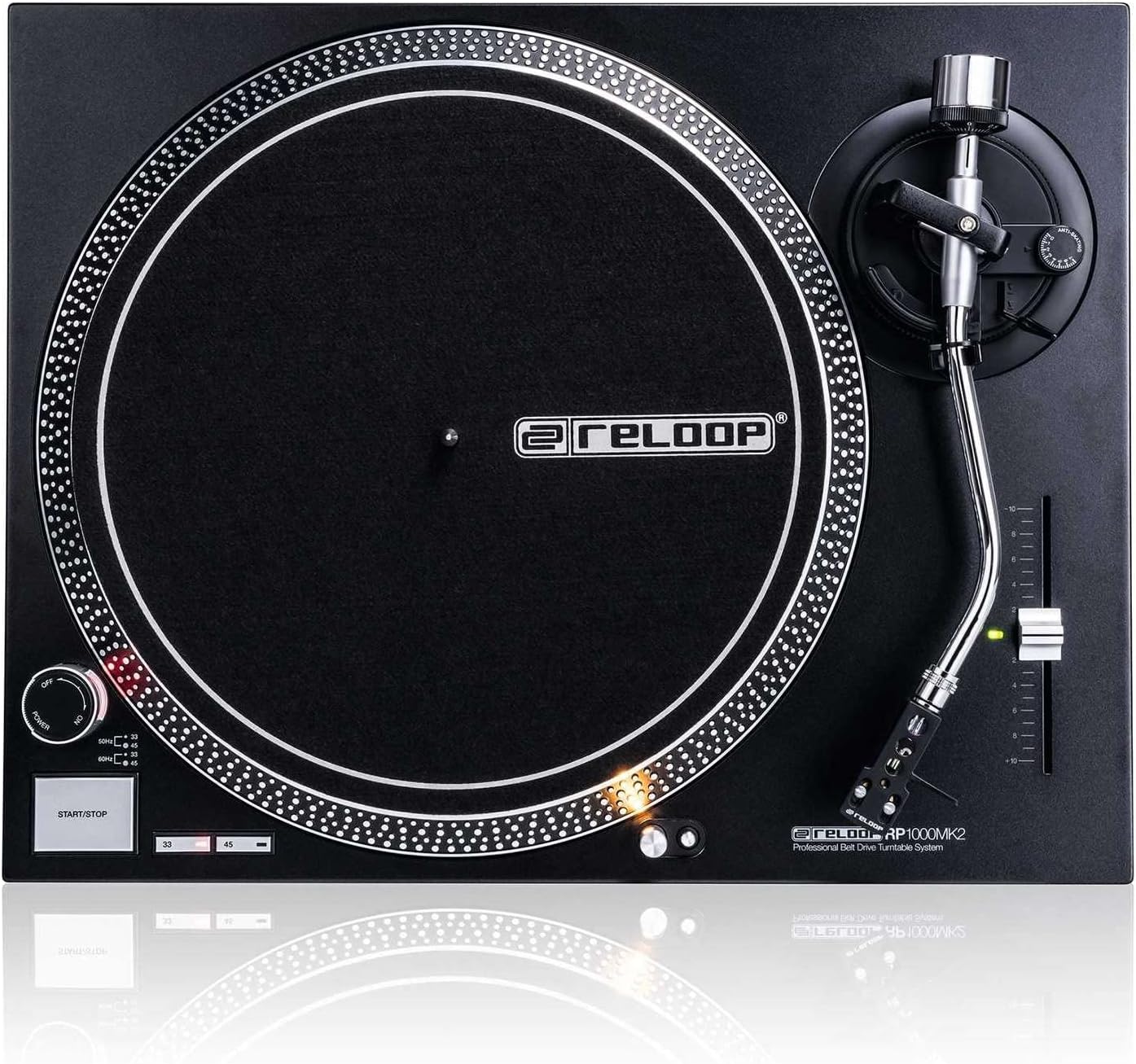
Rysunek 4.2: Widok z góry na dół view highlighting the platter, slipmat with Reloop logo, S-shaped tonearm, and pitch control slider.

Rysunek 4.3: Szczegółowy view of the S-shaped tonearm, headshell, and the pre-fitted Ortofon OM Black pick-up system.
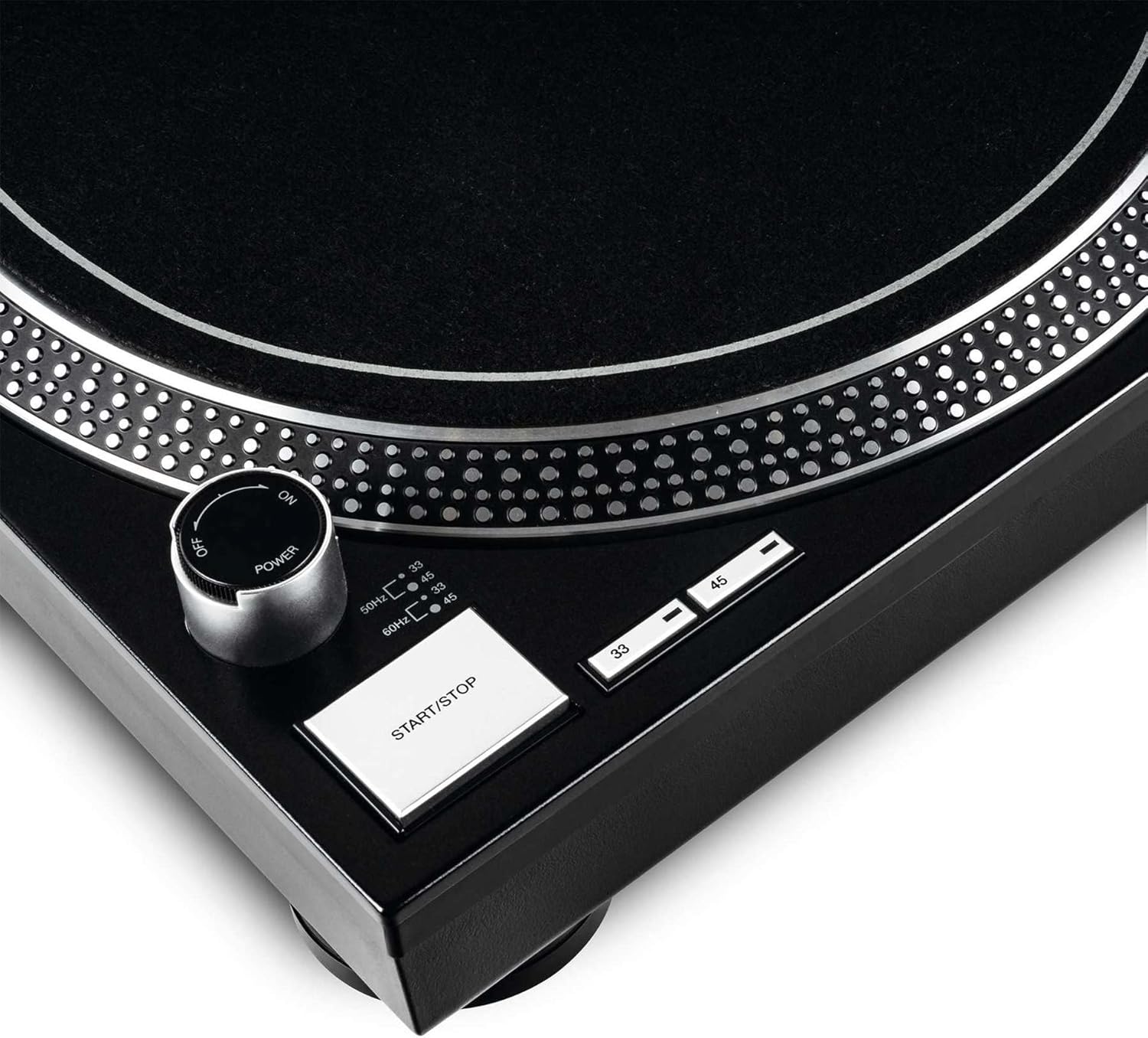
Figure 4.4: Close-up of the power knob, start/stop button, and speed selection buttons (33/45 RPM).
Kluczowe komponenty:
- Talerz: Precision-engineered, die-cast aluminum platter for stable rotation.
- Ramię: Statically balanced S-shaped tonearm with hydraulic lift and anti-skating mechanism.
- Nabój: High-quality OM Black pick-up system by Ortofon, pre-fitted to a headshell.
- Kontrola wysokości dźwięku: Adjustable slider with a range of +/-10% for fine speed adjustments.
- Speed Select Buttons: Buttons for selecting 33 1/3 RPM and 45 RPM playback speeds.
- Przycisk Start/Stop: Controls the rotation of the platter.
- Światło docelowe: Extendable aluminum target light to illuminate the needle position in dark environments.
- Shock-absorbing Feet: Improve isolation from unwanted vibrations.
5. Konfiguracja
5.1 Rozpakowywanie i umieszczanie
- Ostrożnie wyjmij wszystkie elementy z opakowania. Zachowaj opakowanie do transportu lub przechowywania w przyszłości.
- Place the turntable on a flat, stable, and level surface, away from direct sunlight, heat sources, and strong magnetic fields.
- Ensure there is sufficient space around the unit for ventilation.
5.2 Montaż talerza i pasa
- Umieść talerz na środkowym wrzecionie. Upewnij się, że jest dobrze osadzony.
- Locate the drive belt. Carefully stretch the belt around the inner rim of the platter and hook it onto the motor pulley, which is visible through one of the platter's openings.
- Połóż filcową matę slipmat na talerzu.
5.3 Konfiguracja ramienia
The OM Black pick-up system is pre-fitted to the headshell. Follow these steps to balance the tonearm:
- Attach the headshell with the pre-fitted cartridge to the front end of the tonearm. Secure it by turning the locking ring clockwise.
- Place the counterweight onto the rear of the tonearm and rotate it until it is approximately centered.
- Zwolnij ramię clamp and lower the tonearm lift.
- Carefully adjust the counterweight by rotating it forwards or backwards until the tonearm is perfectly balanced and floats horizontally.
- Once balanced, hold the counterweight steady and rotate only the numbered ring on the front of the counterweight to '0' (zero).
- Rotate the entire counterweight (including the numbered ring) counter-clockwise to set the recommended tracking force for the Ortofon OM Black cartridge, typically between 1.5 to 2.0 grams. Refer to the cartridge manufacturer's specifications for the precise recommended tracking force.
- Set the anti-skating dial to the same value as your tracking force.
- Odłóż ramię gramofonu do pozycji spoczynkowej i zabezpiecz je za pomocą klucza.amp.
5.4 złącza audio i zasilania
- Podłącz kable audio RCA od wyjścia gramofonu do wejścia PHONO w swoim gramofonie. ampLicznik lub mikser. Upewnij się, że połączenia kanału lewego (białego) i prawego (czerwonego) są prawidłowe.
- Podłącz przewód uziemiający gramofonu do zacisku uziemiającego na swoim ampfiltr lub mikser w celu zminimalizowania brumienia.
- Plug the power cord into the turntable's power input and then into a suitable AC power outlet.
6. Instrukcja obsługi
6.1 Podstawowa obsługa
- Włączanie: Turn the power knob clockwise to the "ON" position. The platter will not start spinning until the START/STOP button is pressed.
- Wybierz prędkość: Press the "33" or "45" button to select the desired playback speed according to the record you are playing. The corresponding LED will illuminate.
- Miejsce zapisu: Carefully place a vinyl record onto the platter.
- Talerz startowy: Press the START/STOP button. The platter will begin to rotate.
- Pozycja ramienia: Zwolnij ramię clamp. Use the tonearm lift lever to raise the tonearm. Carefully move the tonearm over the desired track on the record.
- Dolne ramię gramofonu: Gently lower the tonearm lift lever to allow the stylus to descend onto the record groove.
- Gra: The audio will now play through your connected audio system.
- Zatrzymaj odtwarzanie: At the end of the record, or when you wish to stop, use the tonearm lift lever to raise the tonearm, return it to its rest, and secure it with the clamp. Press the START/STOP button to stop the platter rotation.
- Wyłączone: Turn the power knob counter-clockwise to the "OFF" position when not in use.
6.2 Using Pitch Control
The pitch control slider allows you to finely adjust the playback speed by +/-10%. Move the slider up or down to increase or decrease the speed. The center detent indicates 0% pitch adjustment (nominal speed).
6.3 Target Light
Press the aluminum target light button to extend the light, illuminating the needle position. This is particularly useful in low-light environments. Press it again to retract the light.
7. Konserwacja
7.1 Czyszczenie urządzenia
- Przed czyszczeniem należy zawsze odłączyć przewód zasilający.
- Use a soft, dry, lint-free cloth to wipe the surface of the turntable.
- W przypadku uporczywych plam, należy zastosować niewielką ilośćamp Można użyć ściereczki, a następnie natychmiast wytrzeć do sucha. Unikać środków czyszczących o działaniu ściernym i rozpuszczalników.
7.2 Pielęgnacja rysika
- Rylec (igła) to delikatny element. Należy obchodzić się z nim z najwyższą ostrożnością.
- Igłę należy regularnie czyścić miękką szczoteczką przeznaczoną do czyszczenia igieł. Należy ją delikatnie czyścić od tyłu do przodu.
- A worn or dirty stylus can damage your records and degrade sound quality. Replace the stylus when signs of wear are apparent (e.g., distorted sound, skipping).
7.3 Wymiana paska
The belt is a wear-and-tear part. If you notice inconsistent speed or the platter not spinning, the belt may need replacement. Contact Reloop support or an authorized service center for replacement belts and instructions.
7.4 Dust Cover Care (if applicable)
If your turntable includes a dust cover, clean it with a soft, damp cloth. Avoid using dry cloths as they can scratch the acrylic surface. Do not use harsh chemicals.
8. Rozwiązywanie Problemów
Before contacting support, please refer to the following common issues and their solutions:
| Problem | Możliwa przyczyna | Rozwiązanie |
|---|---|---|
| No power / Platter not spinning | Power cord not connected; Power switch off; Belt not installed or broken. | Ensure power cord is securely plugged in. Turn power switch ON. Check if the drive belt is correctly installed around the platter and motor pulley. Replace belt if broken. |
| Brak dźwięku lub bardzo cichy dźwięk | Kable RCA nie są prawidłowo podłączone; Amplifier/mixer input incorrect; Stylus damaged or dirty; Cartridge not properly seated. | Check RCA connections to amplifier/mixer (PHONO input). Ensure ground wire is connected. Clean stylus. Re-seat cartridge in headshell. |
| Distorted sound / Skipping | Stylus dirty or worn; Tracking force incorrect; Anti-skating incorrect; Turntable not level; Record dirty or damaged. | Clean or replace stylus. Re-adjust tracking force and anti-skating. Ensure turntable is on a level surface. Clean record. |
| Niespójna prędkość | Worn or stretched belt; Motor issue. | Inspect the drive belt for wear and replace if necessary. If the issue persists, contact service. |
9. Specyfikacje
| Funkcja | Opis |
|---|---|
| Nazwa modelu | RP-1000 MK2 Professional Belt Drive Turntable System |
| Typ napędu | Napęd pasowy |
| Układ silnika | Powerful belt-drive motor system absorbs unwanted vibration and noise |
| Talerz | Precision-engineered, die-cast aluminum platter with stable rotation |
| Prędkości | 2 selectable speeds (33 1/3 & 45 RPM) |
| Kontrola wysokości tonu | Adjustable range of +/-10% |
| Ramię | Statically balanced S-shaped tonearm with hydraulic lift and anti-skate |
| Budowa | Redesigned metal top panel, tactile buttons, reinforced housing construction, optimized damping features, shock-absorbing feet |
| Wymiary (szer. x gł. x wys.) | 17.72 x 13.86 x 5.67 cala (ok. 45 x 35.2 x 14.4 cm) |
| Waga | 16.06 funta (ok. 7.3 kg) |
| Łączność | Analog RCA output, Ground terminal |
| Źródło zasilania | Corded Electric, 220 Volts (check local voltag(wymagania) |
10. Gwarancja i wsparcie
10.1 Informacje o gwarancji
Reloop products are manufactured to the highest quality standards. This product comes with a manufacturer's warranty. Please refer to the warranty card included in your package or visit the official Reloop webAby zapoznać się ze szczegółowymi warunkami gwarancji obowiązującymi w Twoim regionie, odwiedź naszą witrynę.
Zachowaj dowód zakupu (paragon lub fakturę), ponieważ będzie on wymagany w przypadku reklamacji.
10.2 Obsługa klienta
Should you encounter any issues not covered in the troubleshooting section, or require further assistance, please contact Reloop customer support or your authorized dealer. Contact information can typically be found on the official Reloop webstronie internetowej lub na opakowaniu produktu.
For the latest information, FAQs, and support resources, please visit the official Reloop webstrona: www.reloop.com
Ask a question about this manual
Ask about setup, troubleshooting, compatibility, parts, safety, or missing instructions. Manuals+ will review the question and use this page’s manual context to help answer it.