
1. Ważne instrukcje bezpieczeństwa
Please read all instructions carefully before using this projector and retain them for future reference. Improper operation may result in electric shock, fire, or other hazards.
- Źródło zasilania: Use only the power adapter supplied with the projector. Ensure the voltage odpowiada lokalnemu zasilaniu.
- Wentylacja: Nie blokuj żadnych otworów wentylacyjnych. Zapewnij odpowiedni przepływ powietrza wokół projektora, aby zapobiec przegrzaniu.
- Umieszczenie: Umieść projektor na stabilnej, płaskiej powierzchni. Unikaj umieszczania go w bezpośrednim świetle słonecznym, w pobliżu źródeł ciepła oraz w środowiskach o dużej wilgotności i zapyleniu.
- Woda i wilgoć: Do not expose the projector to rain, moisture, or immerse it in water. If liquid enters the device, disconnect power immediately and contact support.
- Czyszczenie: Przed czyszczeniem odłącz projektor od gniazdka elektrycznego. Użyj miękkiej, suchej ściereczki. Nie używaj środków czyszczących w płynie ani aerozolu.
- Serwisowanie: Nie próbuj samodzielnie naprawiać tego produktu. Wszelkie prace serwisowe zlecaj wykwalifikowanemu personelowi. Otwieranieasing może narazić Cię na niebezpieczną ilośćtaglub innych zagrożeń.
- Ochrona oczu: Nie patrz bezpośrednio w obiektyw projektora, gdyamp jest włączony, ponieważ jasne światło może uszkodzić wzrok.
2. Zawartość opakowania
Sprawdź, czy wszystkie wymienione poniżej elementy znajdują się w Twojej paczce. Jeśli brakuje któregokolwiek z nich lub jest on uszkodzony, skontaktuj się z obsługą klienta.
- DBPOWER T22 Portable Video Projector
- Zdalne sterowanie
- Kabel HDMI
- Kabel AV
- Kabel zasilający
- Instrukcja obsługi
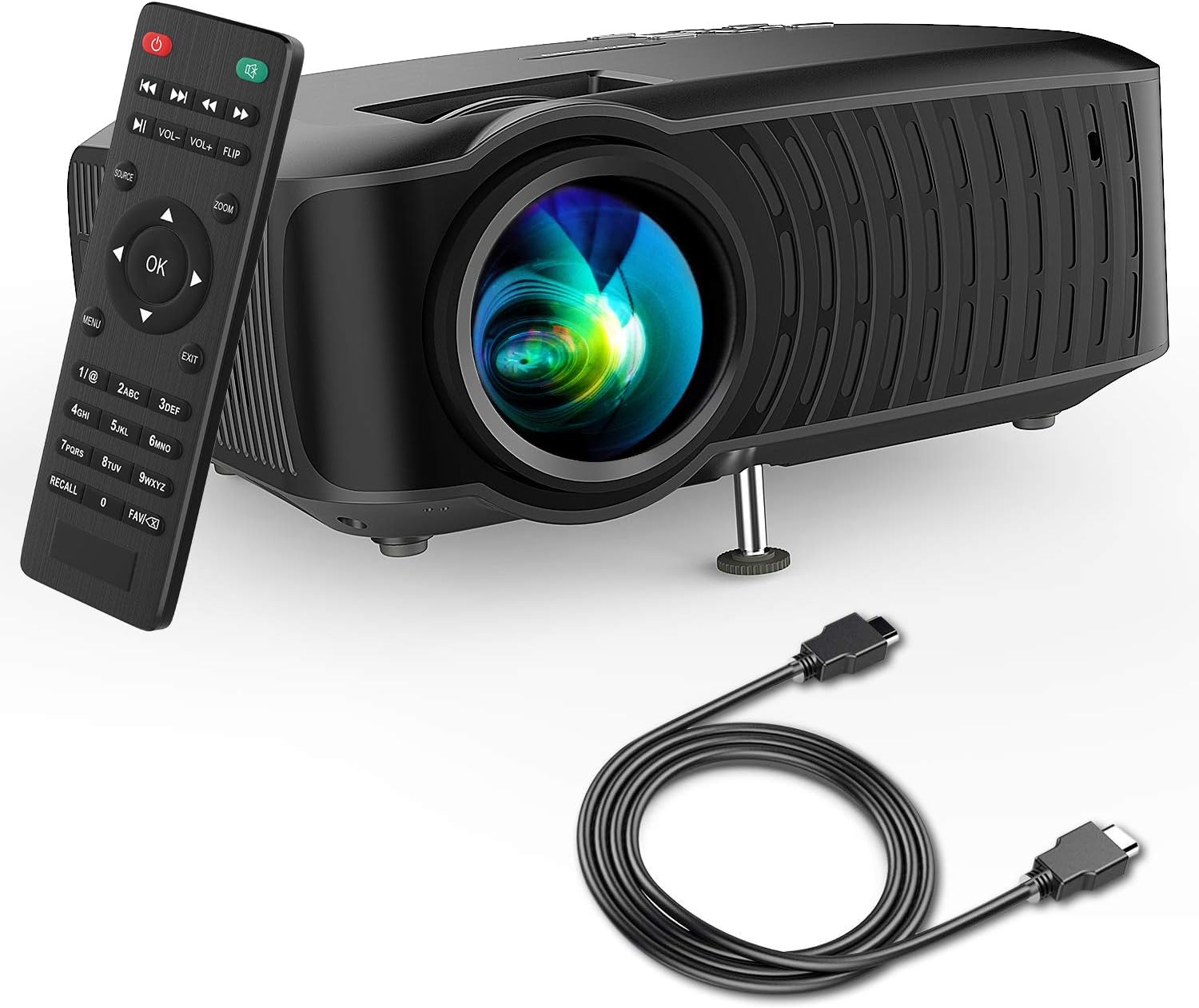
Image: The DBPOWER T22 Portable Video Projector, its remote control, and an HDMI cable, representing the typical package contents.
3. Koniec produktuview
Familiarize yourself with the various parts of your DBPOWER T22 projector.
3.1 Przód i bok View

Obraz: strona A view of the DBPOWER T22 projector with dimensions indicating its compact and portable design (21.8cm length, 17.2cm width, 9.16cm height).
- Soczewka projekcyjna: Wyświetla obraz na ekranie.
- Pierścień ostrości: Dostosowuje klarowność obrazu.
- Keystone Correction Ring: Koryguje trapezoidalne zniekształcenia obrazu.
- Otwory wentylacyjne: Do odprowadzania ciepła. Nie blokować.
- Regulowana stopa: Podnosi lub obniża przód projektora.
3.2 Panel tylny i łączność
The rear panel provides various input and output ports for connecting external devices.
- Port HDMI: Connects to devices like laptops, Blu-ray players, game consoles, and TV sticks.
- Port USB: Connects to USB flash drives for media playback.
- Port AV: Możliwość połączenia ze starszymi urządzeniami za pomocą dołączonego kabla AV.
- Gniazdo karty SD: Do odtwarzania multimediów bezpośrednio z karty SD.
- Wyjście audio (gniazdo 3.5 mm): Umożliwia podłączenie zewnętrznych głośników lub słuchawek.
- Pobór mocy: Łączy się z zasilaczem.
3.3 Pilot zdalnego sterowania
The remote control allows convenient operation of the projector from a distance.
- Przycisk zasilania: Włącza/wyłącza projektor.
- Przycisk źródła: Selects input source (HDMI, AV, USB, SD).
- Przyciski nawigacyjne (góra/dół/lewo/prawo): Umożliwia nawigację po menu.
- Przycisk OK: Potwierdza wybór.
- Przycisk menu: Dostęp do ustawień projektora.
- Przycisk wyjścia: Wychodzi z bieżącego menu lub funkcji.
- Głośność +/-: Regulacja głośności głośnika.
- Przycisk Flip: Rotates the projected image.
- Przycisk Zoom: Adjusts image zoom (digital zoom).
4. Konfiguracja
4.1 Włączanie/wyłączanie
- Connect the power cable to the projector's power input, then plug the other end into a power outlet.
- Press the power button on the projector or the remote control to turn it on. The indicator light will change.
- Aby wyłączyć, naciśnij ponownie przycisk zasilania.
4.2 Regulacja ostrości obrazu i zniekształcenia trapezowego
Achieve a clear and rectangular image by adjusting the focus and keystone correction.

Image: Diagram showing the manual keystone correction and focus rings on the side of the projector, with examples of de-focused and focused images, and trapezoidal correction.
- Centrum: Obróć Pierścień ostrości until the projected image appears sharp and clear.
- Korekcja Keystone'a: If the image appears trapezoidal (wider at the top or bottom), rotate the Keystone Correction Ring to make the image rectangular. The projector supports ±15° manual keystone correction.
4.3 Podłączanie urządzeń zewnętrznych
The DBPOWER T22 supports multiple input sources.
- HDMI: Connect an HDMI cable from your device (e.g., laptop, game console, Amazon Fire TV Stick) to the projector's HDMI port.
- USB: Włóż dysk flash USB do portu USB.
- AV: Do podłączania urządzeń z wyjściem AV należy używać dołączonego kabla AV.
- Karta SD: Włóż kartę SD do gniazda karty SD.
- Smartfony: For iOS devices, an external Lightning to HDMI adapter is required. For Android devices, an external Micro USB/Type-C to HDMI adapter is required. (Adapters not included).
5. Obsługa projektora
5.1 Wybór źródła sygnału wejściowego
After connecting your device, you need to select the correct input source.
- Naciśnij Źródło button on the remote control or the projector.
- Use the navigation buttons to select the desired input source (e.g., HDMI, USB, AV, SD).
- Naciskać OK aby potwierdzić.
5.2 Odtwarzanie multimediów (USB/SD)
When a USB drive or SD card is inserted, the projector will display a media browser.
- Poruszaj się po folderach i files using the remote control's navigation buttons.
- Wybierz file (e.g., video, photo, music, text) and press OK grać.
5.3 Wyjście audio
The projector features an improved built-in speaker system. For enhanced audio, you can connect external speakers.

Image: An illustration of the DBPOWER T22 projector highlighting its stereo speakers, indicating that external speakers are not always necessary for an enjoyable audio experience.
- Wbudowany głośnik: The projector's internal speaker provides audio. Adjust volume using the GŁOŚNOŚĆ +/- przyciski na pilocie.
- Głośniki zewnętrzne/słuchawki: Connect a 3.5mm audio cable from your external audio device to the projector's Audio Out port.
5.4 Projector Settings (Menu)
Naciśnij Menu button on the remote to access settings such as Picture Mode, Aspect Ratio, Sound Mode, and other system preferences.
6. Konserwacja
6.1 Czyszczenie obiektywu
Use a professional lens cleaning cloth or lens paper to clean the projector lens. Avoid touching the lens directly with your hands.

Obraz: Wybuch view of the projector lens assembly, highlighting the tempered glass lens and the importance of a dust cover to protect it from scratches and dust.
6.2 Czyszczenie obudowy projektora
Wipe the projector body with a soft, dry cloth. Do not use abrasive cleaners or solvents.
6.3 Heat Dispersion System
The projector features an advanced cooling system to ensure stable operation and extend lamp life. Ensure ventilation ports are clear.

Obraz: Wnętrze view of the DBPOWER T22 projector, illustrating the advanced heat dispersion system with air flowing through cooling fins to maintain optimal operating temperature.
6.4 Łamp Życie
Dioda LEDamp in your DBPOWER T22 projector has an extended lifespan of over 50,000 hours, significantly reducing the need for lamp wymiana.
7. Rozwiązywanie Problemów
Jeśli napotkasz problemy, zapoznaj się z poniższymi, często występującymi problemami i rozwiązaniami.
| Problem | Możliwa przyczyna | Rozwiązanie |
|---|---|---|
| Brak obrazu lub komunikat „Brak sygnału” | Wybrano nieprawidłowe źródło sygnału wejściowego; luźne połączenie kablowe; urządzenie nie jest włączone. |
|
| Rozmazany obraz | Nie ustawiono ostrości; projektor jest zbyt blisko/daleko od ekranu. |
|
| Obraz trapezowy | Projektor nie jest ustawiony prostopadle do ekranu. |
|
| Brak dźwięku lub niska głośność | Volume too low; mute enabled; external audio device issues. |
|
| Pilot nie działa | Dead batteries; obstruction; remote not pointed at IR receiver. |
|
8. Specyfikacje
Detailed technical specifications for the DBPOWER T22 Portable Video Projector.
| Funkcja | Szczegół |
|---|---|
| Marka | DBPOWER |
| Numer modelu | T22 |
| Jasność | 120 ANSI Lumens (80% brighter than most market projectors) |
| Współczynnik kontrastu | 2000:1 |
| Obsługiwana rozdzielczość | 1080P (Pełna rozdzielczość HD) |
| Natywna rozdzielczość wyświetlania | 800x480 |
| Typ wyświetlacza | LCD |
| Lamp Życie | 50,000 godziny |
| Rozmiar projekcji | 32-176 cala |
| Odległość projekcji | 1-5.2 metrów |
| Korekcja trapezowa | Manualny ±15° |
| Technologia łączności | HDMI, USB, AV, SD Card |
| Wbudowany głośnik | Yes (Improved system) |
| Wymiary produktu | Wymiary 21.59 x 17.02 x 9.14 cm |
| Waga przedmiotu | 1.9 kilogramów |
| Cotage | 24 watów |
9. Gwarancja i wsparcie
DBPOWER products are designed and manufactured to the highest quality standards. For warranty information, technical support, or customer service inquiries, please refer to the contact information provided with your purchase or visit the official DBPOWER webstrona.
Urzędnik Webstrona: www.dbpower.co (Proszę zanotować: URL may vary by region. Refer to product packaging for specific regional support details.)