
1. Koniec produktuview
The Sato One-Touch Timer TM-22 is a versatile digital timer designed for various timing needs, from kitchen use to laboratory applications. It combines ease of use with practical features to enhance your daily tasks.
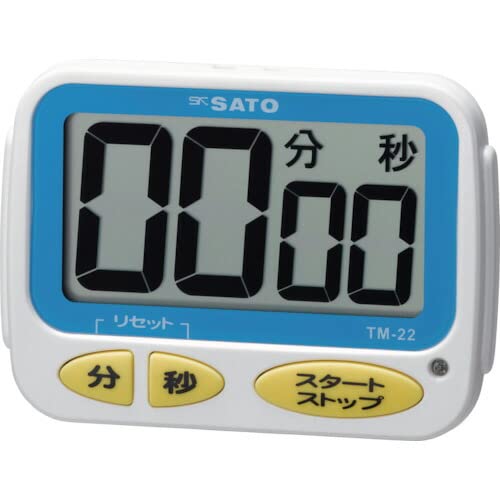
Obraz 1: Przód view of the Sato One-Touch Timer TM-22. The timer features a clear digital display and control buttons.
Główne cechy:
- Automatic Reset Alarm: The alarm sounds for 5 seconds at the set time and automatically resets to the initial set time.
- Prosta obsługa: The primary key is for starting; no complex operations are required to stop the timer's alarm cycle.
- Dual Notification: Alerts users with both sound (70dB) and light.
- Drip-Proof Construction: Designed to resist splashes, making it suitable for kitchen environments.
- Wiele opcji montażu: Equipped with a magnet on the back for attachment to metal surfaces and a strap for hanging.
- Funkcje odliczania i zliczania: Supports both decreasing i zwiększaćasing time measurements.
2. Konfiguracja
Montaż baterii:
The TM-22 timer requires one AAA battery for operation. A battery is included with the unit.
- Znajdź pokrywę komory baterii znajdującą się z tyłu timera.
- Aby otworzyć komorę, przesuń lub odepnij pokrywę.
- Włóż jedną baterię AAA, upewniając się, że bieguny dodatni (+) i ujemny (-) są prawidłowo ustawione względem oznaczeń wewnątrz komory.
- Dokładnie załóż pokrywę komory baterii.
The timer should power on, and the display will show '00:00' or the last set time.
3. Instrukcja obsługi
The TM-22 timer features both countdown and count-up functionalities.
3.1. Timer odliczający
This function allows you to set a specific duration, and the timer will count down to zero.
- Ustaw czas: Use the 'M' (Minute) button and 'S' (Second) button to adjust the desired countdown duration. The timer can be set from 1 second up to 99 minutes and 59 seconds.
- Start Countdown: Press the 'START' button to begin the countdown.
- Powiadomienie o alarmie: When the time reaches zero, an alarm will sound for 5 seconds, accompanied by a flashing light.
- Automatyczne resetowanie: After the 5-second alarm, the timer automatically resets to the initial set time, ready for the next countdown without manual intervention.
- Wstrzymaj/Zatrzymaj: To pause the countdown, press the 'START' button again. To resume, press 'START' once more. To clear the set time, press the 'RESET' button (if available) or hold the 'START' button for a few seconds.
3.2. Count-up Timer
This function measures elapsed time from zero.
- Start Count-up: Ensure the timer display shows '00:00'. If not, press the 'RESET' button to clear any previous settings. Press the 'START' button to begin counting upwards from zero.
- Wstrzymaj/Wznów: To pause the count-up, press the 'START' button. To resume, press 'START' again.
- Reset: To reset the count-up timer to '00:00', press the 'RESET' button (if available) or hold the 'START' button for a few seconds while paused.
4. Konserwacja
Czyszczenie:
To maintain the timer's appearance and functionality:
- Wipe the exterior of the timer with a soft, dry cloth.
- Nie należy używać środków czyszczących o działaniu ściernym, rozpuszczalników ani środków chemicznych, ponieważ mogą one uszkodzićasing lub wyświetlacz.
- The timer is drip-proof, but do not immerse it in water or expose it to heavy splashing.
Wymiana baterii:
Replace the battery when the display becomes dim or the timer's functions become erratic.
- Follow the battery installation steps outlined in the "2. Setup" section.
- Always use a fresh AAA battery.
- Zużyte baterie należy utylizować zgodnie z lokalnymi przepisami.
5. Rozwiązywanie Problemów
If you encounter issues with your TM-22 timer, refer to the following common problems and solutions:
| Problem | Możliwa przyczyna | Rozwiązanie |
|---|---|---|
| Timer się nie włącza. | Bateria jest rozładowana lub nieprawidłowo zainstalowana. | Sprawdź biegunowość baterii. Wymień baterię AAA na nową. |
| Display is faint or flickering. | Niski poziom naładowania baterii. | Wymień baterię AAA. |
| Alarm nie włącza się. | Volume obstruction or internal issue. | Ensure the speaker is not covered. Check battery level. If problem persists, contact support. |
| Timer does not reset automatically after alarm. | This feature is specific to the countdown function. | Ensure you are using the countdown function. For count-up, manual reset is required. |
6. Specyfikacje
| Funkcja | Szczegół |
|---|---|
| Numer modelu | TM-22 |
| Maksymalny czas | 99 minut 59 sekundy |
| Minimum Timing | 1 sekunda |
| Wymiary (wys. x szer. x gł.) | Wymiary: 67mm x 93mm x 20mm |
| Waga | 96 gramów |
| Źródło zasilania | 1 baterie AAA (w zestawie) |
| Głośność alarmu | 70dB |
| Funkcje | Countdown, Count-up |
| Cechy specjalne | Drip-proof construction, Magnet on back, Hanging strap, Sound and light notification |
7. Gwarancja i wsparcie
For warranty information, technical assistance, or customer support regarding your Sato One-Touch Timer TM-22, please contact your authorized retailer or the manufacturer, Sato Corporation. Keep your purchase receipt as proof of purchase.
Please visit the official Sato webwitryna zawierająca najnowsze informacje dotyczące pomocy technicznej i dane kontaktowe.