
TecTake 800664
TecTake Electric Height-Adjustable Sit-Stand Desk User Manual
Model: 800664 | Brand: TecTake
1. Wprowadzenie
Thank you for choosing the TecTake Electric Height-Adjustable Sit-Stand Desk. This ergonomic desk is designed to optimize your workspace, allowing you to seamlessly switch between sitting and standing positions. Its robust construction and intelligent features provide comfort, stability, and versatility for various uses, including office work, gaming, and telecommuting. This manual provides essential information for the safe and efficient assembly, operation, and maintenance of your new desk.
2. Informacje dotyczące bezpieczeństwa
Przed montażem i użytkowaniem należy uważnie przeczytać wszystkie instrukcje bezpieczeństwa. Nieprzestrzeganie tych instrukcji może spowodować obrażenia ciała lub uszkodzenie produktu.
- This electric sit-stand desk is designed for safe and efficient use. It features an adjustable anti-collision system and a stable structure, even when fully extended.
- The maximum supported weight is 125 kg (275 funta)Nie przekraczaj tego limitu wagowego.
- It is recommended to follow the provided assembly instructions precisely to ensure proper stability, especially when the desk is used in a high position.
- Podczas regulacji wysokości trzymaj ręce i przedmioty z dala od ruchomych części.
- Sprawdź, czy kabel zasilający nie jest ściśnięty lub uszkodzony.
- Nie należy pozwalać dzieciom na obsługę biurka bez nadzoru osoby dorosłej.
- Przed przystąpieniem do czyszczenia lub wykonywania prac konserwacyjnych należy odłączyć zasilanie.
3. Koniec produktuview
The TecTake Electric Height-Adjustable Sit-Stand Desk frame is engineered for durability and ease of use. It features a robust steel construction, powerful motors, and an intuitive control panel.

Rysunek 3.1: Główne komponenty. This image displays the complete desk frame, including the two lifting columns, the crossbar, the control panel, and the power supply unit. It illustrates the adjustable width and height capabilities.

Figure 3.2: Control Panel and Cable Management. Szczegółowy view of the intuitive control panel with its digital display, up/down arrows, memory presets (1, 2, 3), and alarm function (A). The image also highlights the spacious cable pass-through for organized wiring.
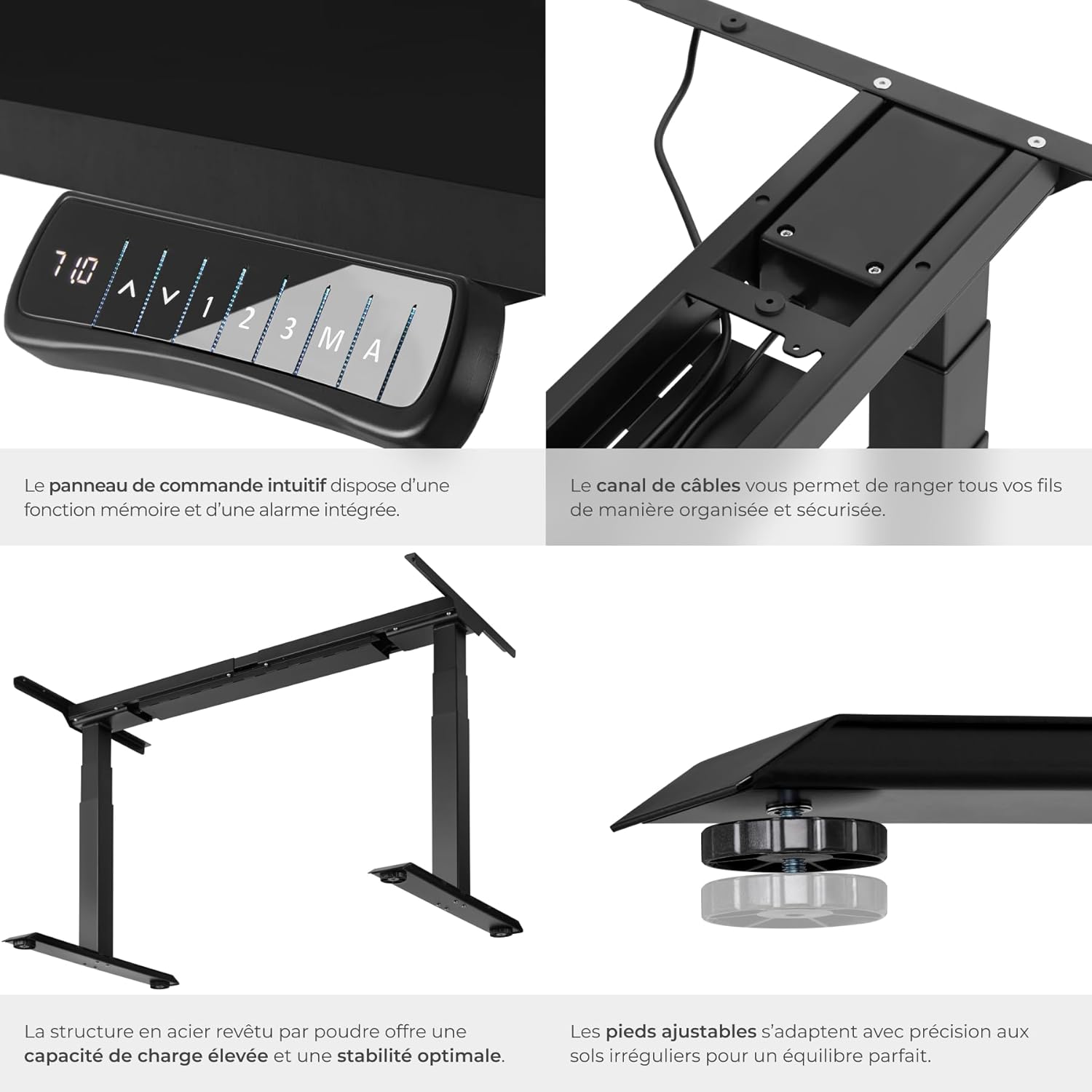
Rysunek 3.3: Główne cechy. Close-up shots demonstrating the intuitive control panel, the integrated cable channel for tidy wiring, the robust powder-coated steel structure for high load capacity and stability, and the adjustable feet for precise leveling on uneven floors.

Figure 3.4: Functional Highlights. This image visually explains the desk's key functionalities: continuously adjustable height, variable width to fit different tabletops, a load capacity of up to 125 kg, silent motors for discreet operation, an anti-collision system that stops movement upon obstruction, and 100% stability thanks to solid T-shaped feet.
4. Instrukcje konfiguracji
Assembly of the TecTake desk frame is straightforward. Please ensure you have all components and tools as indicated in the packaging. A tabletop is not included and must be purchased separately.
4.1 Rozpakowanie i sprawdzenie komponentów
- Ostrożnie rozpakuj wszystkie elementy i rozłóż je na czystej, miękkiej powierzchni, aby zapobiec zarysowaniom.
- Verify that all parts listed in the packing list are present. Refer to Figure 3.1 for a visual guide of the main components.
- Ensure the mounting material (screws, tools) is included as shown in the product information (refer to image 71GtxctSrjL._AC_SL1500_.jpg for reference).
4.2 Montaż ramy
- Attach the lifting columns to the crossbar according to the instructions provided in the separate assembly manual (not included in this digital manual, but typically provided with the product).
- Przymocuj stopy do dolnej części kolumn podnoszących.
- Install the control panel in the designated slot on the frame.
- Connect all necessary cables (power, motor cables) to the control box and ensure they are properly routed through the cable management channels.
4.3 Mocowanie blatu stołu
- Place your chosen tabletop upside down on a soft, protected surface.
- Carefully position the assembled desk frame onto the tabletop, ensuring it is centered and aligned as desired.
- Mark the screw holes for attaching the tabletop to the frame.
- Pre-drill pilot holes if necessary (check tabletop material and thickness).
- Przymocuj blat do ramy za pomocą dostarczonych śrub.
- Carefully flip the desk upright and place it in its desired location.
5. Instrukcja obsługi
Your TecTake Electric Sit-Stand Desk is equipped with an intuitive control panel for easy height adjustment and memory functions.
5.1 Podstawowa regulacja wysokości
- Podłącz kabel zasilający do odpowiedniego gniazdka elektrycznego.
- Użyj W górę (▲) I W dół (▼) arrow buttons on the control panel to adjust the desk height. The digital display will show the current height.
- Zwolnij przycisk po osiągnięciu żądanej wysokości.
5.2 Funkcje pamięci
The desk allows you to save up to three preferred height positions for quick recall.
- Dostosuj wysokość biurka do swoich potrzeb za pomocą przycisków Góra/Dół.
- Naciśnij 'M' przycisk. Na wyświetlaczu pojawi się 'S-'.
- Within 3 seconds, press one of the memory preset buttons ('1', '2', Lub '3'). The display will show 'S-1', 'S-2', or 'S-3' to confirm the position has been saved.
- To recall a saved position, simply press the corresponding memory button ('1', '2', Lub '3'). Biurko automatycznie przesunie się na zapisaną wysokość.
5.3 funkcja alarmu;
The alarm function (button 'A') can be used to remind you to change your position after a set period, promoting healthier work habits. Consult your product's specific manual for detailed instructions on setting and activating the alarm, as functionality may vary.
5.4 System antykolizyjny
The desk is equipped with an adjustable anti-collision system. If the desk encounters an obstacle during movement (up or down), it will automatically stop and reverse slightly to prevent damage. The sensitivity of this system may be adjustable; refer to your specific product manual for details on how to modify this setting if needed.
6. Konserwacja
Regular maintenance will help prolong the life of your TecTake desk.
- Czyszczenie: Przetrzyj ramę biurka i blat stołu miękką szmatką.amp szmatką. Unikaj środków czyszczących o działaniu ściernym i rozpuszczalników, które mogą uszkodzić wykończenie.
- Zarządzanie kablami: Periodically check that all cables are securely connected and not pinched or frayed. Re-route cables if necessary to prevent damage.
- Sprawdzenie stabilności: Ensure all screws and bolts remain tight. If the desk feels wobbly, check and tighten all connections.
- Pielęgnacja silnika: The motors are designed for maintenance-free operation. Avoid overloading the desk beyond its specified weight capacity.
7. Rozwiązywanie Problemów
If you encounter issues with your desk, try the following solutions before contacting support.
| Problem | Możliwa przyczyna | Rozwiązanie |
|---|---|---|
| Biurko się nie porusza. | Odłączony kabel zasilający; Przeciążenie; Przegrzanie silnika. | Check power connection. Reduce weight on desk. Allow motors to cool down for 20 minutes. |
| Biurko porusza się nierównomiernie lub wydaje nietypowe dźwięki. | Luźne połączenia; Przeszkody; Nierównomierne rozłożenie ciężaru. | Check and tighten all assembly screws. Remove any obstructions. Redistribute weight evenly on the tabletop. |
| System antykolizyjny uruchamia się zbyt łatwo. | Sensitivity setting too high. | Refer to your specific product manual for instructions on adjusting anti-collision sensitivity. |
| Funkcja pamięci nie działa. | Nieprawidłowa procedura zapisywania. | Ensure you press 'M' then the preset number within 3 seconds. |
8. Specyfikacje
Key technical specifications for the TecTake Electric Height-Adjustable Sit-Stand Desk (Model 800664):
| Funkcja | Specyfikacja |
|---|---|
| Marka | TecTake |
| Numer modelu | 800664 |
| Kolor | Czarny |
| Wymiary produktu (dł. x szer. x wys.) | 68 x 190 x 123 cm (ok. 26.8 x 74.8 x 48.4 cala) |
| Waga | 31 kilograma (ok. 68.3 funty) |
| Tworzywo | Stal malowana proszkowo |
| Nośność | 125 kg (ok. 275 funta) |
| Prędkość podnoszenia | 38 mm/s |
| Tomtage | 100 - 240 V |
| Moc silnika | 40 W |
| Zakres regulacji wysokości | 58 - 123 cm (ok. 22.8 - 48.4 cala) |
| Zakres regulacji szerokości | 110 - 190 cm (ok. 43.3 - 74.8 cala) |
| Zalecane wymiary blatu stołu | 120 x 60 cm to 200 x 80 cm |
| Cechy specjalne | Adjustable, Memory Function (3 positions), Alarm Function, Anti-collision System, Silent Motors |
9. Gwarancja i wsparcie
For warranty information, please refer to the documentation provided with your purchase or contact your retailer. TecTake products typically come with a manufacturer's warranty covering defects in materials and workmanship.
If you require further assistance, have questions about assembly, operation, or troubleshooting that are not covered in this manual, please contact TecTake customer support or your point of purchase. Keep your purchase receipt and model number handy for faster service.
For more information, you may visit the official TecTake store on Amazon: TecTake Amazon Store