
1. Koniec produktuview
The EZoneTronics Android Car Radio is a double DIN multimedia system designed for in-car entertainment and navigation. It features a touch screen display, Android operating system, built-in Bluetooth, Wi-Fi connectivity, and GPS capabilities. This unit supports various applications and media playback, enhancing your driving experience.
Główne cechy:
- Sterowanie z kierownicy: Compatible with factory steering wheel controls (resistive analog signal input only). Digital CANBUS signals may require an external converter.
- Nawigacja GPS: Integrated GPS module. Download preferred map applications from the Play Store after connecting to Wi-Fi.
- Wbudowane Wi-Fi: Allows downloading applications from the Play Store.
- Bluetooth i radio FM: Bluetooth for hands-free calls and music streaming. FM radio with preset stations for real-time traffic, news, and weather.
Zawartość zestawu:
The package includes the Android Player unit, GPS Antenna, Power Harness, 2 USB adapters, User Manual, RCA output wire, Camera Input wire, and 2 Installation brackets.

Figure 1: EZoneTronics Android Car Radio unit and included accessories.
2. Instalacja
Prawidłowa instalacja jest kluczowa dla optymalnej wydajności. Jeśli nie masz doświadczenia w okablowaniu car audio, zaleca się zlecenie instalacji profesjonaliście.
2.1 Połączenia okablowania:
- Uprząż mocy: Connect the main power harness to your vehicle's power supply, ensuring correct positive, negative, and accessory connections.
- Antena GPS: Podłącz antenę GPS i umieść ją w miejscu z wolnym dostępem do światła. view nieba dla najlepszego odbioru sygnału.
- Adaptery USB: Utilize the provided USB adapters for connecting external devices or media.
- Wyjście RCA: Połącz z zewnętrznym amplifiers or subwoofers using the RCA output wires.
- Wejście kamery: Podłącz tyłview camera to the dedicated camera input wire for parking assistance.
2.2 Steering Wheel Control (SWC):
If your vehicle has factory steering wheel controls based on a resistive analog signal, the SWC feature can be retained by connecting the appropriate wires. For vehicles using a digital CANBUS data signal, an additional digital-to-resistive converter may be required. If your car does not have factory SWC, an external steering wheel controller (wired connection) can be added.

Figure 2: Steering Wheel Control in operation.
3. Działanie
3.1 Podstawowe sterowanie:
The unit features a fully capacitive touch screen for control. Side buttons typically include Power, Volume Up/Down, Home, and Back functions.
3.2 Nawigacja GPS:
After connecting to a Wi-Fi network, access the Play Store to download your preferred navigation application. Ensure the GPS antenna is properly installed for accurate positioning.

Figure 3: GPS Navigation Function.
3.3 Łączność Bluetooth:
Enable Bluetooth on your mobile phone and search for the car radio. Pair the devices to enable hands-free calling, access your phone book, and stream audio via A2DP.

Figure 4: Bluetooth features including hands-free calls and EQ regulation.
3.4 Wi-Fi and App Installation:
Connect the unit to a Wi-Fi hotspot (e.g., from your mobile phone) to access the Play Store. You can download and install various applications, including streaming services like Netflix.
3.5 Mirror Link Function:
The Mirror Link function allows you to display your smartphone screen on the car radio. Android phones can be controlled via USB, while iPhones can mirror video and audio wirelessly.
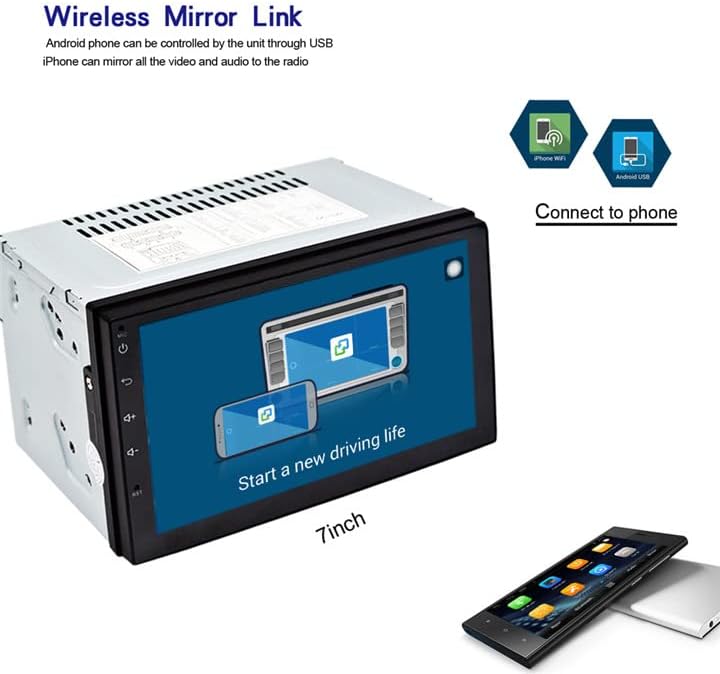
Figure 5: Wireless Mirror Link setup.
Radio 3.6 FM:
Access the FM radio function to tune into local stations. You can save your favorite stations as presets for quick access.

Rysunek 6: Interfejs radia FM.
4. Specyfikacje
| Funkcja | Opis |
|---|---|
| Marka | EZoneTronics |
| Numer modelu | 10 |
| Technologia łączności | Bluetooth, WiFi |
| Typ kontrolera | Android |
| Cechy specjalne | Built-In Bluetooth, Touchscreen |
| Kompatybilne urządzenia | Smartfon |
| Typ złącza | USB |
| Tryb wyjścia audio | Stereofoniczny |
| Konfiguracja kanału dźwięku przestrzennego | 4.0 |
| Kodowanie wideo | H.264 |
| Moc wyjściowa | 45 watów |
| Liczba kanałów | 4 |
| Obsługiwane usługi internetowe | Netflix |
| Metoda kontroli | Aplikacja, dotyk |
| Typ wyjścia audio | Bluetooth |
| Format | WMA |
| Producent | Rhythm Electronics Limited |

Rysunek 7: Wymiary produktu.
5. Rozwiązywanie Problemów
If you encounter issues with your EZoneTronics Android Car Radio, please refer to the following general troubleshooting steps:
- Brak zasilania: Check all power connections, including the main power harness and vehicle's fuse box. Ensure the accessory wire is correctly connected.
- Brak dźwięku: Verify speaker connections and ensure the volume is not muted or set to minimum. Check RCA connections if using external ampwężownice.
- Problemy z sygnałem GPS: Upewnij się, że antena GPS jest zainstalowana w miejscu, gdzie nie ma przeszkód. view nieba. Sprawdź połączenie anteny z urządzeniem.
- Problemy z połączeniem Bluetooth: Upewnij się, że Bluetooth jest włączony zarówno w radiu samochodowym, jak i w urządzeniu mobilnym. Spróbuj rozparować i ponownie sparować urządzenia.
- Ekran dotykowy nie reaguje: Try restarting the unit. If the issue persists, a factory reset might be necessary (refer to the on-screen settings for this option).
- Awarie aplikacji: Ensure the unit is connected to Wi-Fi and the app is updated to the latest version. Clear the app's cache or reinstall it if necessary.
For persistent issues, contact EZoneTronics customer support for further assistance.
6. Informacje dotyczące bezpieczeństwa
Always prioritize safety while operating your vehicle. Do not operate the car radio in a way that distracts you from driving. Adjust settings or interact with applications only when the vehicle is safely parked. Adhere to all local traffic laws and regulations.