
1. Wprowadzenie
This manual provides detailed instructions for the setup, operation, and maintenance of your Xiaomi Mi Home Security Camera 360 1080P (Model MYSXJ02M). Please read this manual thoroughly before using the product to ensure proper functionality and safety.
2. Koniec produktuview
2.1 Główne cechy
- Full HD 1080p video capture resolution for clear imaging.
- Panoramiczny 360 stopni viewkąt nachylenia zapewniający kompleksowe pokrycie.
- Advanced night vision with a range of up to 9 meters.
- Motion detection capabilities with instant alerts.
- Local recording to a microSDXC card (up to 64GB recommended).
- Dwukierunkowa komunikacja audio.
- Wireless Wi-Fi connectivity for remote access via the Mi Home app.
- Compact and durable design, suitable for indoor use.
2.2 Zawartość opakowania
- Xiaomi Mi Home Security Camera 360 1080P
- USB Power Cable (approx. 2 meters)
- Mounting Accessories (for ceiling/wall installation)
- Instrukcja obsługi
Notatka: A power adapter (USB charger) is not included and must be supplied by the user. A 5V/2A adapter is recommended for optimal performance.
2.3 składniki produktu

Rycina 1: Przód view of the camera, showing the lens and indicator light.

Rysunek 2: Kątowy view of the camera, highlighting its dome shape and base.

Rysunek 3: Tył view of the camera, showing the speaker grille and USB power port.
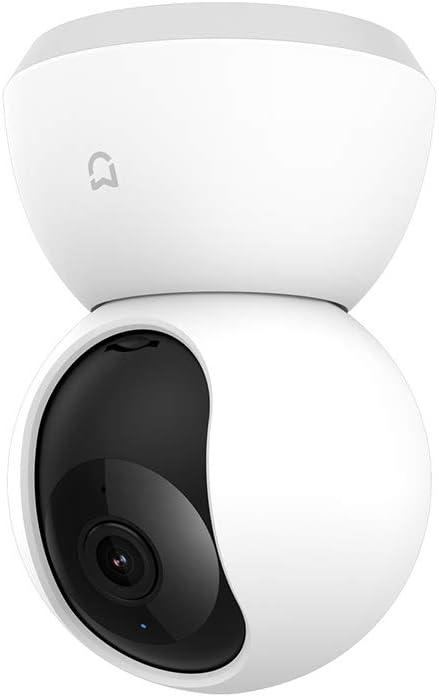
Figure 4: The camera with its lens rotated upwards, revealing the microSD card slot underneath.
3. Przewodnik konfiguracji
3.1 Włączanie kamery
- Connect the provided USB cable to the camera's micro-USB port located at the rear base.
- Podłącz drugi koniec kabla USB do zasilacza USB 5 V/2 A (nie ma go w zestawie), a następnie do gniazdka elektrycznego.
- The camera will power on, and the indicator light will flash orange, indicating it is ready for connection.
3.2 Instalowanie aplikacji Mi Home
- Pobierz Mój dom app from the Google Play Store (for Android devices) or the Apple App Store (for iOS devices).
- Open the app and create a Mi account or log in with an existing one.
3.3 Parowanie kamery z aplikacją
- Upewnij się, że Twój smartfon jest połączony z siecią Wi-Fi 2.4 GHz. Aparat nie obsługuje Wi-Fi 5 GHz.
- W aplikacji Mi Home dotknij „+Kliknij ikonę w prawym górnym rogu, aby dodać nowe urządzenie.
- Select "Mi Home Security Camera 360 1080P" from the list of available devices.
- Follow the on-screen instructions to reset the camera if prompted (usually by pressing a reset button, often located near the microSD slot, for a few seconds until the indicator light flashes orange).
- Scan the QR code displayed on your phone screen using the camera's lens. Hold the phone approximately 15-20 cm (6-8 inches) from the camera.
- Once the QR code is successfully scanned, the camera will emit a voice prompt indicating successful connection. The indicator light will turn blue.
- Name your camera and assign it to a room for easier management within the app.
3.4 Installing a MicroSD Card (Optional)
For local video recording, a microSD card is required. The camera supports cards up to 64GB. A High Endurance microSD card is recommended for continuous recording.
- Power off the camera by unplugging the USB cable.
- Gently push the camera lens upwards until the microSD card slot is revealed (refer to Figure 4).
- Włóż kartę microSD do gniazda stykami skierowanymi w dół, aż do kliknięcia.
- Return the camera lens to its original position.
- Reconnect the power cable. The camera will automatically detect the card. You may need to format the card via the Mi Home app settings.
3.5 Montaż kamery (opcjonalnie)
The camera can be placed on a flat surface or mounted on a wall or ceiling using the included mounting accessories.
- Umieszczenie na pulpicie: Wystarczy umieścić kamerę na stabilnej, płaskiej powierzchni.
- Montaż na ścianie/suficie: Use the mounting base as a template to mark and drill holes. Secure the base with screws, then attach the camera to the base. Ensure the camera is securely fastened. In the Mi Home app settings, you can enable "Invert Image" if the camera is mounted upside down.

Figure 5: The camera positioned on a table, demonstrating typical indoor placement.
4. Instrukcja obsługi
All primary functions of the Xiaomi Mi Home Security Camera are controlled via the Mi Home app.
4.1 Na żywo View i sterowanie obrotem/pochyleniem
- Otwórz aplikację Mi Home i wybierz kamerę z listy urządzeń.
- Wyświetli się transmisja wideo na żywo.
- Swipe your finger across the screen to pan (horizontal movement) and tilt (vertical movement) the camera lens, utilizing its 360-degree viewmożliwości.
- Use the pinch-to-zoom gesture to digitally zoom into the live feed.
4.2 Dźwięk dwukierunkowy
- Na żywo view, tap the microphone icon to enable two-way audio.
- Mów do mikrofonu w telefonie, aby Twój głos był przesyłany przez głośnik kamery.
- The camera's built-in microphone will capture audio from its surroundings, which will be played through your phone's speaker.
4.3 Nagrywanie i odtwarzanie
- Nagrywanie ręczne: Tap the record icon in the live view interface to start or stop manual video recording directly to your phone.
- Local Recording (MicroSD): If a microSD card is installed, the camera can record continuously or based on motion detection. Configure these settings in the camera's settings within the Mi Home app.
- Odtwarzanie nagranego dźwięku: Uzyskaj dostęp do nagranego pliku footage by tapping the "Playback" or "History" icon in the camera's interface within the app. You can browse by date and time.
4.4 Detekcja ruchu i alerty
- Enable motion detection in the camera settings within the Mi Home app.
- Dostosuj poziomy czułości i ustaw strefy wykrywania według potrzeb.
- When motion is detected, the camera will automatically record a short video clip and send a notification to your smartphone.
4.5 Widzenie nocne
- The camera automatically switches to infrared night vision mode in low-light conditions.
- Night vision provides clear black and white video up to 9 meters.
- Settings for night vision (auto, on, off) can be adjusted in the Mi Home app.
5. Konserwacja
5.1 Czyszczenie aparatu
- Przed czyszczeniem upewnij się, że aparat jest wyłączony.
- Do czyszczenia korpusu aparatu należy używać miękkiej, suchej ściereczki.
- For the lens, use a lens cleaning cloth specifically designed for optics to avoid scratches. Do not use harsh chemicals or abrasive materials.
5.2 Zarządzanie kartami MicroSD
- Regularly check the status of your microSD card in the Mi Home app.
- If the card is full, older recordings will be overwritten automatically (loop recording).
- Format the microSD card periodically through the app settings to maintain optimal performance and prevent data corruption.
6. Rozwiązywanie Problemów
| Problem | Możliwa przyczyna | Rozwiązanie |
|---|---|---|
| Kamera nie łączy się z siecią Wi-Fi. | Incorrect Wi-Fi password, 5 GHz network, weak signal, camera too far from router. | Ensure correct 2.4 GHz Wi-Fi password. Move camera closer to router. Reset camera and try pairing again. |
| Indicator light is not blue after setup. | Connection failed or camera is offline. | Check Wi-Fi connection. Restart camera and router. Reset camera and re-pair. |
| No video recording to microSD card. | No microSD card, card full, card not formatted, faulty card. | Ensure card is inserted correctly. Format card via app. Replace card if faulty (High Endurance recommended). |
| Niska jakość obrazu. | Dirty lens, low network bandwidth, insufficient lighting. | Clean the camera lens. Ensure stable internet connection. Adjust lighting conditions. |
| Kamera nie reaguje. | Problem z zasilaniem, błąd oprogramowania. | Unplug and replug the power cable to restart. If issue persists, perform a factory reset. |
7. Specyfikacje
| Funkcja | Szczegół |
|---|---|
| Numer modelu | MYSXJ02M |
| Rozdzielczość wideo | 1080p Full HD |
| Viewing kąt | 360 stopni (obrót/pochylenie) |
| Zakres noktowizora | Do 9 metrów |
| Łączność | Wi-Fi (2.4 GHz) |
| Składowanie | MicroSDXC card (up to 64GB) |
| Moc wejściowa | 5 V/2 A (USB) |
| Wymiary (dł. x szer. x wys.) | Wymiary 16 x 9 x 8 cm |
| Waga | 260 gramów |
| Do użytku wewnątrz/na zewnątrz | Wnętrz |
| Kompatybilne urządzenia | Smartfon, tablet (Android, iOS) |
8. Gwarancja i wsparcie
For warranty information, please refer to the warranty card included with your purchase or visit the official Xiaomi website for your region. If you encounter any issues not covered in this manual, please contact Xiaomi customer support for assistance.
Oficjalny Xiaomi Webstrona: www.mi.com