
MIFA A20
Instrukcja obsługi głośnika Bluetooth MIFA A20
Wzór: A20
1. Koniec produktuview
The MIFA A20 is a portable Bluetooth speaker designed to deliver high-quality audio with powerful bass and True Wireless Stereo (TWS) capabilities. Its robust aluminum alloy housing ensures durability and a premium aesthetic. This manual will guide you through its features, setup, and operation.


2. Funkcje
- Exceptional Wireless Stereo: Connect two A20 speakers via a single device for huge stereo sound and double the volume; two exposed radiators let you see the sound.
- Impressive Bass: Dual drivers, triple radiators and Class-D chips ensure distortion-free crystal loud sound and strong bass with 30W peak power output.
- Długie odtwarzanie: 4000 mAh rechargeable Li-ion battery offers 12 hours playtime at 70% volume; LED indicators to tell you the battery remaining; can play while charging.
- Endless Audio Options: Aux capability for non-Bluetooth devices; 32GB Micro SD card supported to save your phone's battery; built-in microphone for HD hands-free calls.
- Bluetooth 4.2: Instantly pairs with your Smartphone, Tablet, Laptop, iPhone, Samsung, etc.; auto-reconnects to the last used device within 66 feets away.
3. Zawartość opakowania
Proszę zaznaczyć pole dotyczące następujących elementów:
- Głośnik Bluetooth MIFA A20
- Kabel ładujący USB
- Kabel audio 3.5 mm (AUX)
- Instrukcja obsługi
4. Diagram produktu i elementy sterujące
Zapoznaj się z układem głośnika i przyciskami sterującymi.
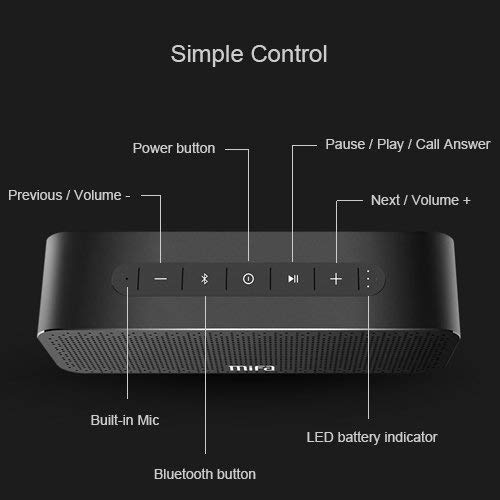
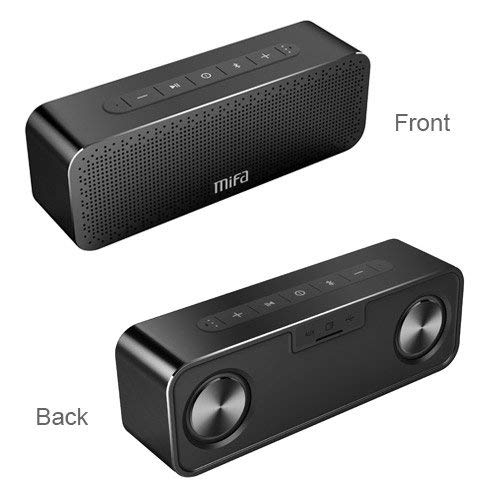
Przyciski sterujące:
- Przycisk zasilania: Naciśnij i przytrzymaj, aby włączyć/wyłączyć.
- Przycisk Bluetooth: Naciśnij, aby przejść do trybu parowania Bluetooth.
- Play/Pause / Call Answer Button: Press to play/pause music; press to answer/end calls.
- Previous / Volume - Button: Press to go to previous track; press and hold to decrease volume.
- Next / Volume + Button: Press to go to next track; press and hold to increase volume.
Indicators and Ports:
- Wbudowany mikrofon: Do połączeń bez użycia rąk.
- Wskaźnik poziomu naładowania baterii LED: Pokazuje stan baterii.
- Port ładowania: Port USB do ładowania.
- Wejście AUX: Gniazdo 3.5 mm do przewodowego połączenia audio.
- Gniazdo kart Micro SD: For playing music directly from a Micro SD card (up to 32GB).
5. Konfiguracja
5.1 Ładowanie głośnika
Before first use, fully charge the speaker. Connect the provided USB charging cable to the speaker's charging port and the other end to a USB power adapter (not included) or a computer's USB port. The LED indicator will show charging status and turn off when fully charged.
5.2 parowanie Bluetooth
- Turn on the MIFA A20 speaker by pressing and holding the Power button.
- The speaker will automatically enter Bluetooth pairing mode, indicated by a flashing blue LED. If not, press the Bluetooth button.
- Na swoim urządzeniu (smartfonie, tablecie, laptopie) włącz Bluetooth i wyszukaj dostępne urządzenia.
- Wybierz „MIFA A20” z listy urządzeń.
- Po sparowaniu dioda LED zaświeci się na niebiesko i usłyszysz dźwięk potwierdzający.
- The speaker will automatically reconnect to the last paired device when turned on, if within range.
5.3 Prawdziwe bezprzewodowe parowanie stereo (TWS)
Aby uzyskać szerszy dźwięk stereotage, you can pair two MIFA A20 speakers together.
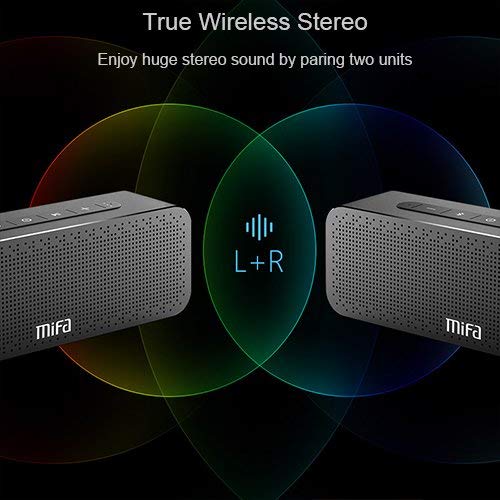
- Ensure both MIFA A20 speakers are turned on and not connected to any Bluetooth device.
- Na jednym głośniku (będzie to głośnik główny) naciśnij i przytrzymaj przycisk Bluetooth, aż usłyszysz komunikat informujący o trybie parowania TWS.
- The two speakers will automatically search for and connect to each other. This may take a few seconds.
- Once connected, you will hear a confirmation sound, and the LED indicators on both speakers will change to reflect the TWS connection.
- Teraz połącz urządzenie z głównym głośnikiem przez Bluetooth, jak opisano w punkcie 5.2. Dźwięk będzie odtwarzany przez oba głośniki w stereo.
5.4 Korzystanie z karty Micro SD
Insert a Micro SD card (up to 32GB, formatted to FAT32) with your music files into the Micro SD card slot. The speaker will automatically switch to Micro SD card mode and begin playing music.
5.5 Korzystanie z wejścia AUX
Connect one end of the 3.5mm audio cable to the AUX input port on the speaker and the other end to the audio output jack of your non-Bluetooth device. The speaker will automatically switch to AUX mode.
6. Obsługa głośnika
6.1 Odtwarzanie muzyki
- Odtwórz/Pauza: Naciśnij przycisk Odtwórz/Pauza.
- Zwiększenie głośności: Naciśnij i przytrzymaj przycisk zwiększania głośności.
- Ściszanie: Naciśnij i przytrzymaj przycisk głośności -.
- Następny utwór: Short press the Next / Volume + button.
- Poprzedni utwór: Short press the Previous / Volume - button.
6.2 Rozmowy w trybie głośnomówiącym
Po podłączeniu za pomocą Bluetooth głośnika można używać do prowadzenia rozmów w trybie głośnomówiącym.
- Odbierz połączenie: Press the Play/Pause / Call Answer button.
- Zakończ połączenie: Press the Play/Pause / Call Answer button during a call.
- Odrzuć połączenie: Press and hold the Play/Pause / Call Answer button when a call comes in.
7. Konserwacja
- Czyszczenie: Do czyszczenia głośnika należy używać miękkiej, suchej ściereczki. Nie należy używać środków czyszczących o właściwościach ściernych ani rozpuszczalników.
- Pielęgnacja baterii: Aby przedłużyć żywotność baterii, unikaj częstego całkowitego rozładowywania głośnika. Ładuj go regularnie, nawet jeśli nie jest używany przez dłuższy czas.
- Składowanie: Przechowuj głośnik w chłodnym, suchym miejscu, z dala od bezpośredniego światła słonecznego i ekstremalnych temperatur.
- Wodoodporność: The speaker is designed to be waterproof (as per specifications). However, avoid submerging it in water for extended periods or exposing it to high-pressure water jets. Ensure charging port cover is securely closed when near water.
8. Rozwiązywanie Problemów
| Problem | Możliwa przyczyna | Rozwiązanie |
|---|---|---|
| Głośnik się nie włącza | Niski poziom baterii | Naładuj głośnik całkowicie. |
| Brak dźwięku | Zbyt niski poziom głośności; Urządzenie nie jest podłączone; Nieprawidłowy tryb wprowadzania | Increase volume on speaker and device; Ensure successful Bluetooth pairing or AUX connection; Check if correct input mode (Bluetooth/AUX/SD card) is selected. |
| Nie można sparować przez Bluetooth | Speaker not in pairing mode; Device Bluetooth off; Too far from speaker; Interference | Ensure speaker is in pairing mode (flashing blue LED); Turn on Bluetooth on your device; Move device closer to speaker; Turn off other Bluetooth devices nearby. |
| Zniekształcony dźwięk | Volume too high; Low battery; Device too far | Reduce volume; Charge speaker; Move device closer to speaker. |
| Parowanie TWS nie powiodło się | Speakers already connected to a device; Not in TWS pairing mode | Disconnect both speakers from any Bluetooth devices; Ensure both speakers are in TWS pairing mode. |
9. Specyfikacje

| Funkcja | Szczegół |
|---|---|
| Nazwa modelu | A20 |
| Tworzywo | Aluminium |
| Typ głośnika | Głośnik niskotonowy |
| Technologia łączności | Bluetooth, Auxiliary, Wireless |
| Wersja Bluetooth | 4.2 |
| Zasięg bezprzewodowej | Do 66 stóp (20 metrów) |
| Maksymalna moc wyjściowa głośnika | 30 watów |
| Tryb wyjścia audio | Stereofoniczny |
| Konfiguracja kanału dźwięku przestrzennego | 2.0 |
| Pojemność baterii | 4000 mAh |
| Żywotność baterii | Do 12 godzin (przy 70% głośności) |
| Obsługa kart Micro SD | Do 32 GB |
| Wbudowany mikrofon | Tak |
| jest wodoodporny | Tak |
| Kolor | Czarny |
10. Gwarancja i wsparcie
Informacje o gwarancji
The MIFA A20 Bluetooth Speaker comes with a 30-dniowa gwarancja Gwarancja obowiązuje od daty zakupu i obejmuje wady produkcyjne. Prosimy zachować dowód zakupu na wypadek roszczeń gwarancyjnych.
Obsługa klienta
For any questions, technical assistance, or warranty inquiries, please contact MIFA customer support through the retailer's platform or the official MIFA webStrona. Kontaktując się z pomocą techniczną, przygotuj model produktu i szczegóły zakupu.
Ask a question about this manual
Ask about setup, troubleshooting, compatibility, parts, safety, or missing instructions. Manuals+ will review the question and use this page’s manual context to help answer it.