
Wstęp
Thank you for choosing the MIFA A3 Soundbox Bluetooth Portable Speaker. This manual provides essential information for the safe and efficient use of your device. Please read it thoroughly before operating the speaker and retain it for future reference.
Informacje dotyczące bezpieczeństwa
- Nie wystawiaj głośnika na działanie ekstremalnych temperatur, bezpośredniego światła słonecznego i wysokiej wilgotności.
- Unikaj upuszczania głośnika i narażania go na silne uderzenia.
- Nie rozmontowuj ani nie próbuj samodzielnie naprawiać głośnika. Skontaktuj się z wykwalifikowanym serwisantem.
- Keep the speaker away from water and liquids, despite its waterproof rating, to prevent damage to charging ports or internal components.
- Należy używać wyłącznie wskazanego kabla ładującego i adaptera.
Zawartość opakowania
Proszę sprawdzić, czy w paczce znajdują się następujące elementy:
- MIFA A3 Bluetooth Portable Speaker
- Kabel ładujący USB
- Kabel audio AUX
- Instrukcja obsługi (ten dokument)
Produkt ponadview
The MIFA A3 speaker features intuitive touch controls and multiple connectivity options. Familiarize yourself with the speaker's layout:
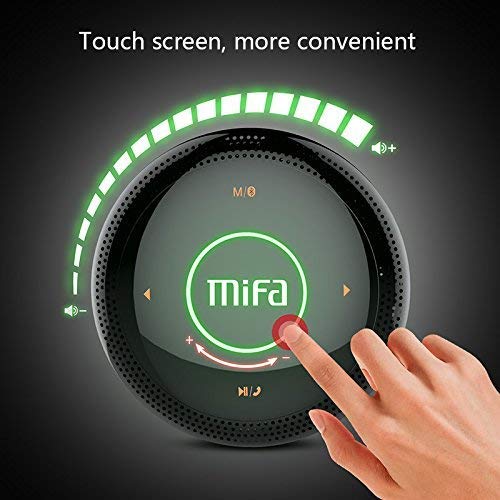
Rysunek 1: Szczyt view of the MIFA A3 speaker, highlighting the touch-sensitive control panel. The panel displays volume indicators, play/pause, and track navigation buttons. A central 'Mifa' logo is also visible.
- Dotykowy panel sterowania: Located on the top surface for volume adjustment, playback control, and mode selection.
- Mikrofon: Do połączeń bez użycia rąk.
- Port ładowania: Port micro USB do ładowania.
- Wejście AUX: Gniazdo audio 3.5 mm do połączenia przewodowego.
- Gniazdo kart Micro SD: Do odtwarzania muzyki bezpośrednio z karty pamięci.
Organizować coś
1. Ładowanie głośnika
Before first use, fully charge the speaker. Connect the provided USB charging cable to the speaker's charging port and the other end to a USB power adapter (not included) or a computer's USB port.
- Podczas ładowania zaświeci się kontrolka ładowania.
- The indicator will turn off or change color once fully charged.
- A full charge provides approximately 8 hours of continuous playtime.
2. Włączanie/wyłączanie zasilania
- Włączanie: Press and hold the Power button (usually integrated into the touch panel or a dedicated button) for 2-3 seconds until you hear an audible prompt or see an indicator light.
- Aby wyłączyć: Press and hold the Power button again for 2-3 seconds.
Instrukcja obsługi
1. Parowanie Bluetooth
- Sprawdź, czy głośnik jest włączony i czy znajduje się w trybie parowania Bluetooth (co sygnalizuje migające niebieskie światło lub sygnał dźwiękowy).
- Na swoim urządzeniu (smartfonie, tablecie, komputerze) włącz Bluetooth i wyszukaj dostępne urządzenia.
- Wybierz „MIFA A3” z listy urządzeń.
- Po sparowaniu głośnik wyda dźwięk potwierdzający, a kontrolka zacznie świecić ciągłym niebieskim światłem.
- The speaker will automatically connect to the last-paired device when powered on, if that device's Bluetooth is active and within range.
2. Połączenie AUX
For devices without Bluetooth, use the provided 3.5mm AUX audio cable:
- Podłącz jeden koniec kabla AUX do portu wejściowego AUX głośnika.
- Podłącz drugi koniec do gniazda słuchawkowego urządzenia audio.
- Głośnik automatycznie przełączy się na tryb AUX.
3. Odtwarzanie z karty Micro SD
Insert a Micro SD card (up to 32GB, FAT32 format) with music files into the designated slot. The speaker will automatically detect the card and begin playback.
4. Touch Control Operations
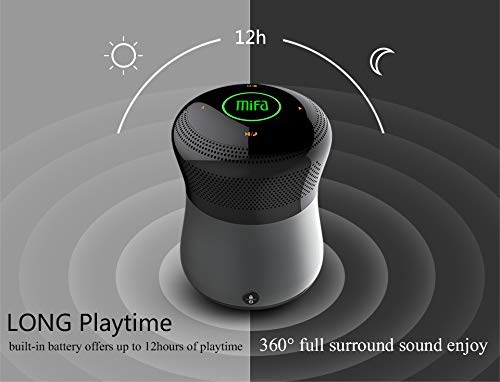
Rysunek 2: The MIFA A3 speaker shown with an overlay indicating "LONG Playtime" (up to 12 hours) and "360° full surround sound enjoy." This image emphasizes the speaker's battery life and audio dispersion.
- Regulacja głośności: Slide your finger clockwise on the touch panel to increase volume, counter-clockwise to decrease.
- Odtwórz/Pauza: Tap the central Play/Pause icon.
- Następny utwór: Tap the "Next" arrow icon.
- Poprzedni utwór: Tap the "Previous" arrow icon.
- Zmiana trybu: Tap the "M/O" icon to cycle between Bluetooth, AUX, and Micro SD card modes.
- Przycisk blokady: Press the lock icon to prevent accidental touch inputs.
5. Call Handling (Bluetooth Mode)
- Odbierz połączenie: Tap the Play/Pause icon when a call comes in.
- Zakończ połączenie: Tap the Play/Pause icon again.
- Odrzuć połączenie: Press and hold the Play/Pause icon for 2 seconds.
Konserwacja
- Czyść głośnik miękką, suchą ściereczką. Nie używaj środków czyszczących o właściwościach ściernych ani rozpuszczalników.
- Przechowuj głośnik w chłodnym i suchym miejscu, jeśli nie będziesz go używać przez dłuższy czas.
- Charge the battery at least once every three months to maintain battery health.
Rozwiązywanie problemów
| Problem | Możliwe rozwiązanie |
|---|---|
| Głośnik nie włącza się. | Upewnij się, że bateria jest naładowana. Podłącz ją do źródła zasilania i spróbuj ponownie. |
| Nie można sparować przez Bluetooth. |
|
| Brak dźwięku. |
|
| Niska jakość dźwięku. |
|
Specyfikacje
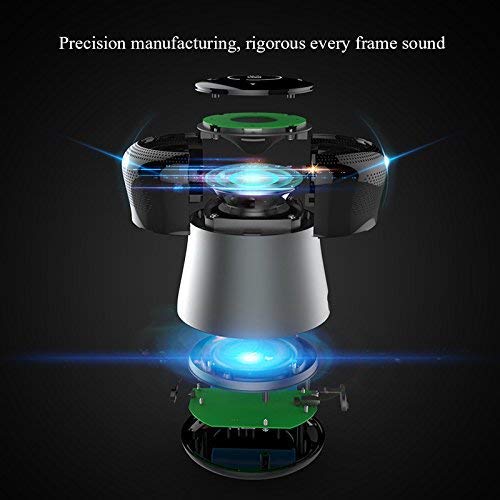
Rysunek 3: An exploded diagram of the MIFA A3 speaker, illustrating its internal components and structural design, emphasizing precision manufacturing.
| Model | MIFA A3 |
| Moc wyjściowa | 10 W |
| Łączność | Bluetooth 4.2, AUX, karta Micro SD |
| Bateria | 1800 mAh litowo-jonowy |
| Pauza w szkole | Do 8 godzin (przy 60% głośności) |
| Czas ładowania | Około 3-4 godzin |
| Mikrofon | Wbudowany do rozmów w trybie głośnomówiącym |
| Wodoodporny | Yes (as per product specifications, but general caution advised for ports) |
| Metoda kontroli | Dotykać |
| Kompatybilne urządzenia | Laptop, PC, smartfon, tablet |
Gwarancja i wsparcie
MIFA products are designed to provide reliable performance. For warranty information or technical support, please refer to the warranty card included with your purchase or visit the official MIFA webZachowaj dowód zakupu na wypadek roszczeń gwarancyjnych.
For further assistance, you may contact MIFA customer support through their official channels.