
Wstęp
The Kestrel 5500FW Fire Weather Meter Pro with Link is a rugged, handheld device designed for accurate environmental monitoring, specifically tailored for fire weather applications. This meter provides essential data including heat stress index, wet bulb temperature, temperature, humidity, and wind speed, along with specialized fire weather measurements like Probability of Ignition (PIG) and Fine Dead Fuel Moisture (FDFM). Equipped with Bluetooth LiNK, it allows for real-time data monitoring and alerts on compatible iOS/Android devices.
This manual provides instructions for the proper setup, operation, maintenance, and troubleshooting of your Kestrel 5500FW meter to ensure optimal performance and longevity.

Przód view of the Kestrel 5500FW Fire Weather Meter Pro with Link in orange.
Organizować coś
1. Instalacja baterii
The Kestrel 5500FW requires one AA battery for operation. Ensure the battery is inserted with the correct polarity as indicated inside the battery compartment.
- Otwórz pokrywę komory baterii znajdującą się z tyłu urządzenia.
- Insert one AA battery, matching the positive (+) and negative (-) terminals.
- Dokładnie zamknij pokrywę komory baterii.

Z powrotem view of the Kestrel 5500FW, illustrating the battery compartment and design details.
2. Kalibracja kompasu
Calibrating the compass is crucial for accurate wind direction, headwind, crosswind, and ballistic measurements. Calibration is required after changing the battery, updating firmware, or changing geographical locations. It is also recommended every 2-3 weeks for optimal accuracy. If the display shows "***" for direction, recalibration is needed.
- Press the "gear" button to enter the main menu.
- Scroll to "SYSTEM" using the arrow buttons and press the center button to select.
- Przejdź do „KALIBRACJA KOMPASU” i naciśnij środkowy przycisk.
- The screen will prompt you to "Hold Kestrel upright. Rotate slowly for 30 seconds."
- Press the center button to start the calibration.
- Slowly rotate the Kestrel meter one full turn every 6 seconds for 30 seconds, keeping it upright and away from any metal objects.
- Once "Cal Complete" appears, the compass is calibrated.
Troubleshooting Compass Calibration: If "Cal Failed" appears, try calibrating in a different location. If the issue persists, perform a soft reset by removing the battery, holding down the power button for 30 seconds, then reinserting the battery and attempting calibration again.
Video demonstrating the compass calibration process for Kestrel 5400, 5500, and 5700 series meters.
3. Bluetooth LiNK Connection
The Kestrel 5500FW features Bluetooth LiNK for wireless data transfer to iOS and Android devices. This allows for real-time monitoring, data logging, and alerts via the Kestrel LiNK app.
- Download the Kestrel LiNK app from your device's app store.
- Ensure Bluetooth is enabled on your Kestrel meter (check system settings).
- Open the Kestrel LiNK app and follow the on-screen instructions to pair your device.
- Po połączeniu możesz view live data, configure settings, and download logged data.

The Kestrel 5500FW displaying data, with a tablet and smartphone showing the Kestrel LiNK app interface.
Instrukcja obsługi
The Kestrel 5500FW provides a wide range of environmental measurements critical for fire weather assessment and other applications. The device is designed for intuitive navigation using its keypad and display.
1. Poruszanie się po menu
- Użyj przyciski strzałek (up/down/left/right) to navigate through screens and menu options.
- Ten środkowy przycisk acts as a "Select" or "Enter" key.
- Ten gear button typically accesses the main menu or settings.
- Ten przycisk zasilania turns the device on/off.
- Ten light bulb button activates the backlight for the display.

Close-up of the Kestrel 5500FW's display and control buttons for navigation.
2. Key Measurements
The Kestrel 5500FW accurately monitors and displays various environmental parameters:
- Wind Speed/Air Speed: Measured by the impeller.
- Temperatura: Ambient air temperature.
- Wilgotność: Wilgotność względna.
- Wskaźnik stresu cieplnego: A critical measure for safety in hot environments.
- Wet Bulb Temperature (Psychrometric) & Naturally Aspirated Wet Bulb Temperature.
- Barometric Pressure & Station Pressure (Absolute Pressure).
- Altitude (Barometric) & Density Altitude.
- Dew Point Temperature & Vapor Pressure Deficit (VPD).
- Wind Chill.
- Compass Direction, Crosswind, Headwind/Tailwind: Requires calibrated compass.
- Pressure Trend.
- Fire Weather Specifics:
- Probability of Ignition (PIG): Indicates the likelihood of a fire starting.
- Fine Dead Fuel Moisture (FDFM): Measures moisture content in fine fuels, crucial for fire behavior prediction.
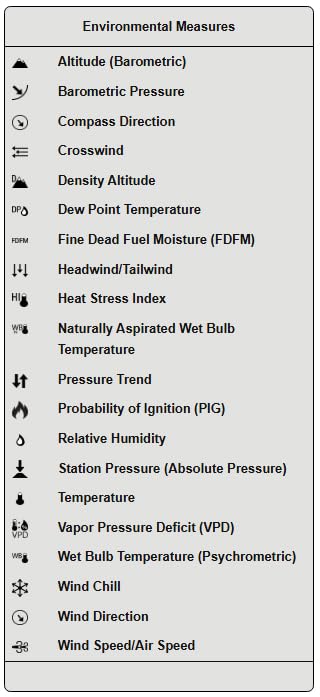
A comprehensive list of environmental measures provided by Kestrel meters, including specialized fire weather metrics.
3. Using the Weather Vane Mount
For continuous and accurate wind direction measurements, especially when stationary, the Kestrel Weather Vane Mount (sold separately) can be used. This accessory allows the Kestrel 5500FW to be mounted on a tripod, ensuring it always faces into the wind for precise readings.

The Kestrel 5500FW mounted on a tripod with a weather vane for continuous wind direction monitoring.
Konserwacja
Proper maintenance ensures the longevity and accuracy of your Kestrel 5500FW meter.
- Czyszczenie: Przetrzyj urządzenie miękką, damp szmatką. Unikaj środków czyszczących o działaniu ściernym i rozpuszczalników.
- Składowanie: Store the Kestrel in a cool, dry place when not in use. If storing for extended periods, remove the battery to prevent leakage.
- Wymiana baterii: Replace the AA battery as needed. Always recalibrate the compass after battery replacement.
- Aktualizacje oprogramowania układowego: Periodically check the Kestrel Instruments website or the Kestrel LiNK app for available firmware updates to ensure your device has the latest features and performance enhancements.
- Trwałość: The Kestrel 5500FW is waterproof (IP67 rated) and drop-tested (MIL-STD-810F), designed to withstand harsh outdoor conditions. However, avoid unnecessary exposure to extreme impacts or submersion beyond its rated depth.
Rozwiązywanie problemów
| Wydanie | Możliwa przyczyna | Rozwiązanie |
|---|---|---|
| Compass displays "***" or "Cal Failed" | Compass requires calibration or interference from metal objects. | Perform compass calibration as described in the Setup section. Ensure you are away from metal objects. If calibration repeatedly fails, perform a soft reset (remove battery, hold power for 30s, reinsert battery) and try again. |
| Urządzenie nie włącza się | Rozładowana lub nieprawidłowo zainstalowana bateria. | Replace the AA battery with a fresh one. Check battery orientation. |
| Bluetooth LiNK not connecting | Bluetooth not enabled on Kestrel or mobile device, or app issue. | Ensure Bluetooth is enabled on both the Kestrel and your mobile device. Restart the Kestrel LiNK app. Try re-pairing the device through the app. |
| Niedokładne odczyty | Sensor obstruction, environmental factors, or calibration needed. | Ensure the impeller and other sensors are clear of debris. Calibrate the compass if wind direction is affected. Allow the device to acclimate to new environmental conditions. |
Specyfikacje
| Funkcja | Szczegół |
|---|---|
| Marka | Pustułka |
| Numer modelu | OB-KEST-0855FWLVORA |
| Źródło zasilania | Zasilany bateryjnie (w zestawie 1 bateria AA) |
| Technologia łączności | Bluetooth |
| Funkcja specjalna | Weather Resistant (IP67), Drop-tested (MIL-STD-810F) |
| Tworzywo | Metal, Plastik |
| Kolor | Pomarańczowy |
| Typ wyświetlacza | LCD |
| Waga przedmiotu | 1.2 uncji (0.03 kilograma) |
| Wymiary produktu | 6 x 6 x 1 cala |
| Dokładność temperatury | 1 degree Celsius or better |
| Górna ocena temperatury | 140 stopni Fahrenheita |
| Technologia czujników | High-precision, industry-standard sensors |
Gwarancja i wsparcie
Kestrel Instruments are designed, built, sold, and supported in the USA by Nielsen-Kellerman Company. They specialize in rugged, waterproof environmental and sports performance instruments.
Plany ochrony
Extended protection plans are available for your Kestrel 5500FW:
- 2-letni plan ochrony: Dostępna za 47.99 USD.
- 3-letni plan ochrony: Dostępna za 60.99 USD.
For further support, product information, or to explore other Kestrel products, visit the official Kestrel Store: Sklep Kestrel na Amazonie.