
1. Wprowadzenie
Thank you for choosing the Feelworld S55 V3 5.5-inch DSLR Camera Field Monitor. This manual provides essential information for setting up, operating, and maintaining your monitor. Please read it thoroughly before use to ensure optimal performance and longevity of the device.
Rycina 1.1: Przód view of the Feelworld S55 V3 monitor.
2. Koniec produktuview
2.1 Główne cechy
- Clear 5.5-inch Full HD Display: Features a 1920x1080 native resolution, 450nit brightness, and a 1000:1 contrast ratio for vivid and accurate image reproduction.
- Advanced Color Control: Supports REC.709 3D LUT Log and user 3D LUT uploads (up to 32) for precise color calibration and custom looks.
- Versatile 4K HDMI Connectivity: Equipped with 4K HDMI input and output ports for live signal display and simultaneous output to other monitors.
- Lekka i przenośna konstrukcja: Weighs approximately 190 grams, making it ideal for outdoor and handheld applications. Compatible with gimbals and lightweight camera systems.
- Elastyczne rozwiązanie zasilania: Supports NP-F series batteries (F550 included), Canon LP-E6 batteries (not included), 12V DC input, and 5V Type-C input. Includes a DC power output port to power your camera.
- Professional Video Assist Functions: Includes Histogram, Peaking Filter, False Colors, Exposure, Nine Grid, Embedded Audio, Pixel-to-Pixel, Check Field, Image Flip, Anamorphic Mode, Image Freeze, and Zoom-in.
2.2 Zawartość opakowania
W skład standardowego pakietu wchodzą następujące elementy:
- Feelworld S55 V3 Monitor
- Kabel Micro HDMI
- Akumulator F550
- Torba do przechowywania
- Parasol
- Tilt Arm Mounting Support
- Instrukcja obsługi

Figure 2.1: Included accessories with the S55 V3 monitor.
2.3 Układ monitora
Familiarize yourself with the ports and buttons on your S55 V3 monitor:
- Górny panel: Control buttons for menu navigation and function shortcuts.
- Lewa strona: HDMI Input, HDMI Output, DC IN 12V, DC OUT 8.4V, 3.5mm Ear Phone Slot.
- Prawa strona: Type-C Input (for power).
- Tył: Battery plate for NP-F series or LP-E6 batteries.

Rysunek 2.2: Strona view showing HDMI and power ports.

Figure 2.3: Top control buttons and menu interface.
3. Konfiguracja
3.1 Zasilanie monitora
The S55 V3 offers multiple power options:
- Akumulator NP-F: Attach a compatible NP-F series battery (e.g., F550, F750, F970) to the battery plate on the rear of the monitor. An F550 battery is included.
- LP-E6 Battery: The multipurpose battery plate also supports Canon LP-E6 batteries (not included).
- Wejście prądu stałego 12 V: Connect the included 12V/1.5A power adapter to the DC IN 12V port.
- Wejście typu C: For convenient power, connect a 5V/2A mobile phone charger or power bank to the Type-C port.
- Wyjście prądu stałego (8.4 V): Use the DC OUT 8.4V port with an optional dummy battery cable to power your DSLR or mirrorless camera directly from the monitor's battery.

Figure 3.1: Flexible power solutions for the monitor.
3.2 Montaż monitora
The S55 V3 can be mounted in several ways:
- Camera Hot Shoe: Use the included tilt arm to mount the monitor directly onto your camera's hot shoe or cold shoe mount.
- Gimbal/Stabilizer: The lightweight design and compact size make it suitable for mounting on gimbals or stabilizers using standard mounting points.
- Tripod/Rig: The monitor features 1/4-inch screw threads for attachment to tripods, magic arms, or camera rigs.
Figure 3.2: Monitor mounted on a camera, demonstrating DC output to power the camera.
3.3 Podłączanie do kamery
Connect your camera to the monitor using an HDMI cable:
- Ensure both the monitor and camera are powered off.
- Connect one end of the HDMI cable (e.g., Micro HDMI to HDMI) to your camera's HDMI output port.
- Podłącz drugi koniec kabla HDMI do HDMI IN port on the S55 V3 monitor.
- If you need to output the signal to another monitor, connect a second HDMI cable from the Wyjście HDMI port on the S55 V3 to the input of the secondary monitor.
- Power on your camera, then power on the S55 V3 monitor. The camera's video feed should appear on the monitor.
4. Instrukcja obsługi
4.1 Podstawowa obsługa
- Włączanie/wyłączanie: Press and hold the power button (usually located on the top right) for a few seconds to turn the monitor on or off.
- Nawigacja po menu: Use the 'MENU' button to access the main menu. Use the arrow buttons (left/right) to navigate through options and 'F1/V' or 'F2/Λ' to confirm or adjust settings.
- Przyciski funkcyjne (F1, F2, F3): These are customizable shortcut buttons. You can assign frequently used functions (e.g., Peaking, False Color, Histogram) to these buttons via the menu.
4.2 Funkcje zaawansowane
The S55 V3 includes a suite of professional video assist functions:

Figure 4.1: Professional video assist features display.
- Histogram: Displays the tonal distribution of your image, helping to prevent clipping in highlights and shadows.
- Peaking Focus: Highlights sharp edges in your image, assisting with precise manual focusing.
- Fałszywe kolory: Uses color overlays to represent different exposure levels, aiding in accurate exposure setting.
- Ekspozycja (zebry): Displays zebra patterns over areas exceeding a set exposure threshold.
- Dziewięć siatek: Provides a compositional guide for framing your shots.
- Wbudowany dźwięk: Wyświetla poziomy dźwięku na ekranie.
- Piksel do piksela: Shows the image at its native resolution without scaling.
- Pole wyboru: Displays a single color channel (Red, Green, Blue, or Mono) for color calibration.
- Odwracanie obrazu: Flips the image horizontally or vertically, useful for various mounting orientations.
- Tryb anamorficzny: Usuwa anamorficzne footage za właściwe viewing.
- Zatrzymanie obrazu: Freezes the current frame on the screen.
- Zbliżenie: Powiększa fragment obrazu w celu uzyskania lepszej ostrości.
4.3 Color Calibration and 3D LUTs
The S55 V3 supports professional color calibration:
- REC.709 Standard: The monitor is factory calibrated to the REC.709 standard for accurate color reproduction.
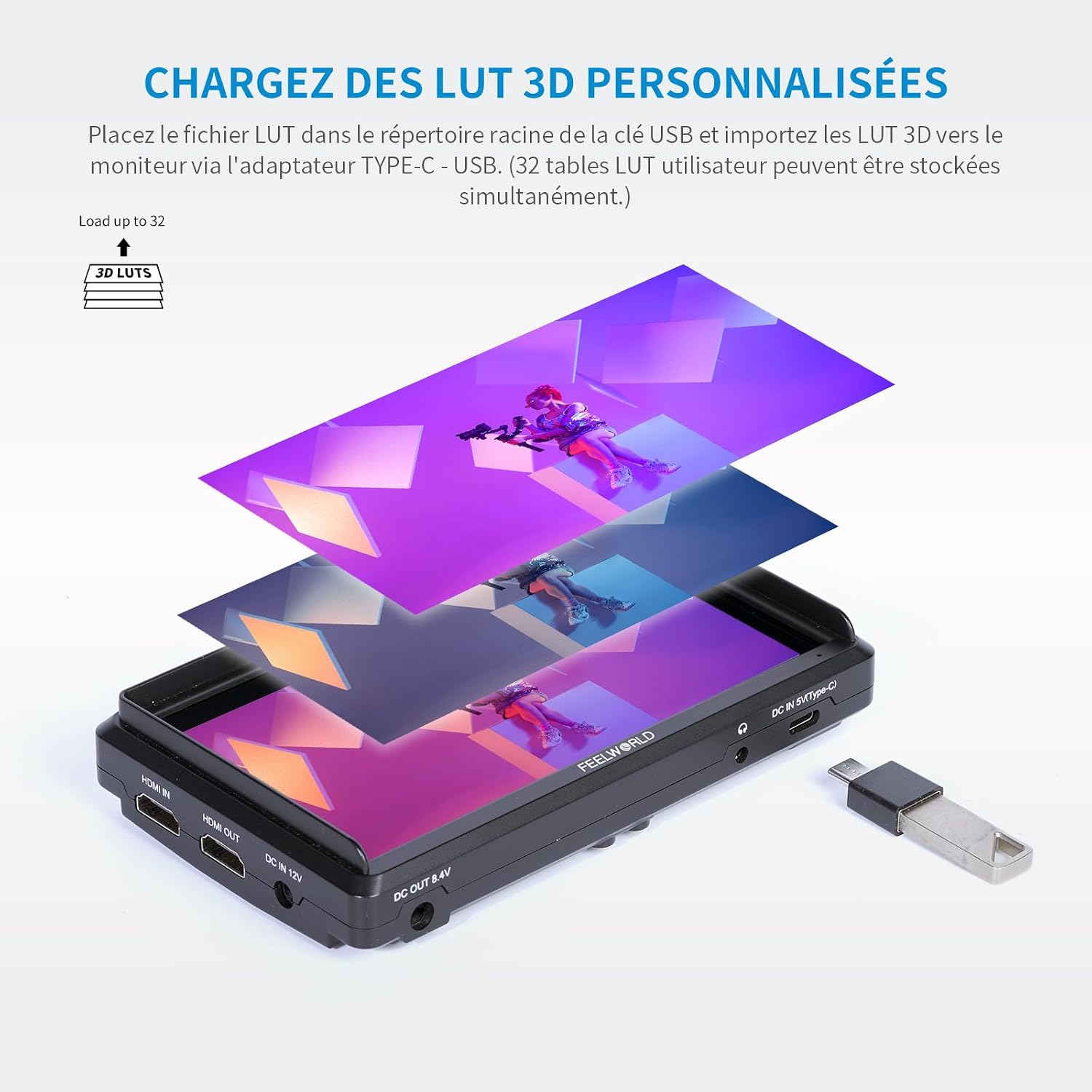
- Obsługa 3D LUT: You can upload up to 32 custom 3D LUTs (Look Up Tables) to the monitor. This allows you to preview twój głupektage with specific color grades or log conversions in real-time.
To load 3D LUTs:
- Save your .cube LUT files to the root directory of a USB flash drive.
- Connect the USB drive to the monitor via a Type-C to USB adapter.
- Navigate to the LUT menu option and select 'Import LUT'. Follow the on-screen instructions to load your desired LUTs.

Figure 4.2: Loading custom 3D LUTs via USB.

Figure 4.3: Professional color calibration display.
5. Konserwacja
5.1 Czyszczenie
- Ekran: Użyj miękkiej, niepozostawiającej włókien ściereczki przeznaczonej specjalnie do ekranów urządzeń elektronicznych. W przypadku uporczywych plam delikatnie przetrzyj.ampen the cloth with a screen cleaning solution (avoid harsh chemicals or alcohol).
- Ciało: Wipe the monitor body with a soft, dry cloth. Do not use liquid cleaners directly on the monitor.
5.2 Przechowywanie
- When not in use, store the monitor in its protective storage bag or a padded case to prevent scratches and damage.
- Jeśli przechowujesz urządzenie przez dłuższy czas, wyjmij baterie, aby zapobiec wyciekowi.
- Przechowywać w chłodnym, suchym miejscu, z dala od bezpośredniego światła słonecznego i ekstremalnych temperatur.
6. Rozwiązywanie Problemów
If you encounter issues with your Feelworld S55 V3 monitor, refer to the following common problems and solutions:
| Problem | Możliwa przyczyna | Rozwiązanie |
|---|---|---|
| Monitor się nie włącza. | Low or dead battery; power cable not connected; faulty power source. | Charge or replace the battery. Ensure power cables are securely connected. Try a different power source. |
| Brak sygnału wideo. | HDMI cable loose or faulty; incorrect input selected; camera not outputting video; incompatible resolution. | Check HDMI cable connections. Ensure the camera is powered on and outputting video. Verify camera's HDMI output settings. Try a different HDMI cable. |
| Obraz jest zniekształcony lub kolory są nieprawidłowe. | Incorrect color settings; active LUT applied; faulty HDMI cable. | Reset monitor color settings to default. Disable any active LUTs. Try a different HDMI cable. |
| Przyciski nie reagują. | Problem z oprogramowaniem sprzętowym; tymczasowa usterka. | Power cycle the monitor (turn off and on). If the issue persists, check the Feelworld webwitryna do aktualizacji oprogramowania układowego. |
If the problem persists after trying these solutions, please contact Feelworld customer support.
7. Specyfikacje
| Funkcja | Szczegół |
|---|---|
| Marka | POCZUJ ŚWIAT |
| Model | S55 V3 (FW572-EU) |
| Rozmiar ekranu | 5.5 cali |
| Rezolucja | 1920 x 1080 (Pełna rozdzielczość HD) |
| Jasność | 450 cd/m² |
| Współczynnik kontrastu | 1000:1 |
| Viewing kąt | IPS (Wide Viewkąt) |
| Porty wejściowe | 1 x HDMI, 1 x DC IN (12V), 1 x Type-C (5V) |
| Porty wyjściowe | 1 x HDMI, 1 x DC OUT (8.4V), 1 x 3.5mm Headphone Jack |
| Kompatybilność zasilania | NP-F series batteries (F550 included), Canon LP-E6 batteries (not included), DC 12V, Type-C 5V |
| Waga | Approx. 190 grams (monitor only) |
| Wymiary produktu (dł. x szer. x wys.) | Wymiary 14.8 x 1.86 x 8.2 cm |
| Wymiary opakowania (dł. x szer. x wys.) | Wymiary 20.9 x 15.8 x 10.4 cm |
| Kolor | Czarny |
| Odporność na wodę | Nie wodoodporny |
| Data wydania | 23 stycznia 2019 r. |
8. Gwarancja
The Feelworld S55 V3 monitor comes with a 1-letnia gwarancja producenta. This warranty covers defects in materials and workmanship under normal use. It does not cover damage caused by misuse, accidents, unauthorized modifications, or improper maintenance. Please retain your proof of purchase for warranty claims.
9. Wsparcie
For technical assistance, troubleshooting, or warranty inquiries, please contact Feelworld customer support through their official website or the retailer where you purchased the product. You may also find additional resources, FAQs, and firmware updates on the official Feelworld support page.
Urzędnik Webstrona: www.feelworld.cn