
1. Wprowadzenie
This manual provides essential information for the safe and efficient operation of your Zerone 10.8V-12V Lithium Battery Charger. This charger is designed for use with 10.8V to 12V Lithium-Ion batteries, offering quick and reliable charging. Please read this manual thoroughly before first use and retain it for future reference.

Image 1: The Zerone 10.8V-12V Lithium Battery Charger, showing its compact design and universal compatibility label.
2. Instrukcje bezpieczeństwa
Always observe the following safety precautions to reduce the risk of electric shock, fire, or serious injury:
- Przeczytaj wszystkie instrukcje: Przed użyciem ładowarki należy zapoznać się ze wszystkimi instrukcjami i ostrzeżeniami umieszczonymi na ładowarce, akumulatorze i produkcie wykorzystującym akumulator.
- Do użytku wewnątrz: Nie wystawiaj ładowarki na działanie deszczu lub wilgoci.
- Właściwa objętośćtage: Upewnij się, że napięcie zasilaniatage pasuje do objętościtagpodane na tabliczce znamionowej ładowarki.
- Unikaj uszkodzeń: Nie używaj ładowarki, jeśli została uderzona silnym uderzeniem, upuszczona lub w inny sposób uszkodzona. Oddaj ją do wykwalifikowanego serwisanta.
- Wentylacja: Do not block any ventilation openings. Ensure adequate airflow around the charger during operation.
- Odłącz, gdy nie jest używany: Always unplug the charger from the power outlet before attempting any maintenance or cleaning, and when not in use.
- Stosuj określone baterie: Only charge batteries specifically designed for this charger. Charging other battery types may cause them to burst, leading to personal injury and damage.
- Nie zwierać: Nigdy nie zwieraj zacisków akumulatora.
- Trzymać z dala od dzieci: Urządzenie to nie jest przeznaczone do użytku przez osoby (w tym dzieci) o ograniczonej sprawności fizycznej, sensorycznej lub umysłowej, a także osoby nieposiadające odpowiedniego doświadczenia lub wiedzy, chyba że znajdują się one pod nadzorem osoby odpowiedzialnej za ich bezpieczeństwo lub otrzymały od niej instrukcje dotyczące korzystania z urządzenia.
3. Zawartość opakowania
Sprawdź, czy wszystkie przedmioty są obecne i w dobrym stanie:
- 1 x Zerone 10.8V-12V Lithium Battery Charger
- 1 x Instrukcja obsługi
4. Funkcje produktu
The Zerone 10.8V-12V Lithium Battery Charger offers the following key features:
- Uniwersalna kompatybilność: Specifically designed for 10.8V to 12V Lithium-Ion batteries.
- Wskaźnik LED: Built-in LED display provides intuitive monitoring of battery status.
- Inteligentne zarządzanie ładowaniem: Utilizes a 'first in, first charged' system and protects against overload.
- Szybkie ładowanie: Capable of charging a 12V Lithium-Ion 1.5Ah battery in approximately 50 minutes.
- Szeroka kompatybilność modeli: Compatible with models such as DC10WD, DC10SB, DC10WC, BL1015, BL1016, BL1021B, and BL1041B.

Image 2: The charger displaying its compatibility with various battery models, including DC10WD, DC10SB, DC10WC, BL1015, BL1016, BL1021B, and BL1041B.
5. Konfiguracja
Aby skonfigurować ładowarkę akumulatora, wykonaj następujące czynności:
- Rozpakuj ładowarkę: Carefully remove the charger and all components from the packaging.
- Podłącz do zasilania: Plug the charger's power cord into a standard 100V-260V AC electrical outlet. The charger's LED indicator will flash green once to confirm power connection.
- Przygotuj baterię: Ensure the battery to be charged is clean and free from debris.
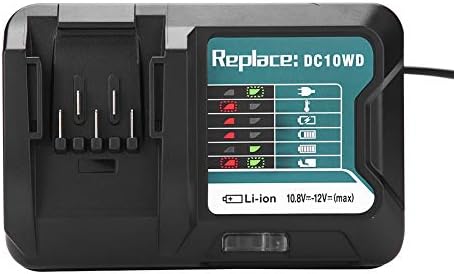
Image 3: The Zerone charger with its integrated power cord, ready for connection to an electrical outlet.
6. Instrukcja obsługi
Aby naładować baterię:
- Włóż baterię: Align the battery with the charger's slot and slide it in until it clicks securely into place.
- Ładowanie monitora: The LED indicator will show the charging status. Refer to the "LED Indicator Guide" section for detailed explanations of the light patterns.
- Ładowanie zakończone: Gdy akumulator będzie w pełni naładowany, dioda LED zacznie świecić ciągłym zielonym światłem.
- Wyjmij baterię: Press the release button on the battery (if applicable) and slide it out of the charger.
- Odłącz ładowarkę: Odłącz ładowarkę od gniazdka sieciowego, gdy nie jest używana.

Image 4: The Zerone charger with a compatible lithium-ion battery inserted, ready for charging.
7. Przewodnik po wskaźnikach LED
The charger features an LED display to communicate the battery's status:
| Kontrolka świetlna | Status |
|---|---|
| Miga na zielono | Ładowarka jest podłączona i gotowa. |
| Migające czerwone | Battery is in cooling mode. Charging will begin once the battery temperature is within the optimal range. |
| Red Sustained Light | Battery is currently charging (0-100%). |
| Green Sustained Light | Charging is completed. The battery is fully charged. |
| Red and Green Flashing | Indicates a defective battery pack or charger. |

Obraz 5: Zbliżenie view of the charger's LED indicator panel, detailing the meaning of each light pattern for battery status.
8. Konserwacja
Proper maintenance ensures the longevity and performance of your charger:
- Czyszczenie: Disconnect the charger from the power supply before cleaning. Use a dry, soft cloth to wipe the exterior of the charger. Do not use water or chemical cleaners.
- Składowanie: Przechowuj ładowarkę w suchym i chłodnym miejscu, z dala od bezpośredniego światła słonecznego i wilgoci.
- Regularnie sprawdzaj: Periodically inspect the charger and its cord for any signs of damage. If damage is found, discontinue use and seek professional repair.
9. Rozwiązywanie Problemów
Jeśli masz problemy z ładowarką, zapoznaj się z poniższymi typowymi problemami i ich rozwiązaniami:
- Ładowarka się nie włącza:
- Upewnij się, że przewód zasilający jest prawidłowo podłączony do ładowarki i do sprawnego gniazdka elektrycznego.
- Sprawdź gniazdko elektryczne za pomocą innego urządzenia, aby upewnić się, że działa prawidłowo.
- Battery not charging (Red Flashing LED):
- The battery may be too hot or too cold. Allow the battery to reach room temperature before attempting to charge again. Charging will automatically resume once the temperature is optimal.
- Battery not charging (Red and Green Flashing LED):
- This indicates a defective battery or charger. Try charging a different, known-good battery. If the issue persists, the charger may be faulty. If only the original battery causes this, the battery is likely defective.
- Powolne ładowanie:
- Sprawdź, czy akumulator jest całkowicie włożony do ładowarki.
- Verify that the battery is compatible with this charger.
Jeśli powyższe kroki nie rozwiążą problemu, skontaktuj się z obsługą klienta.
10. Specyfikacje
| Specyfikacja | Szczegół |
|---|---|
| Numer modelu | Zeronegfvetp6dn8-01 |
| Wejście Voltage | Prąd zmienny 100 V-260 V, 50-60 Hz |
| Objętość wyjściatage | 10.8 V-12 V (prąd stały) |
| Wymiary produktu | 4.72 x 1.97 x 5.91 cala |
| Waga przedmiotu | 11.6 uncji (0.33 kilograma) |
| Producent | Zerone |
| Kompatybilne typy baterii | 10.8V-12V Lithium-Ion (e.g., BL1015, BL1016, BL1021B, BL1041B) |
| Compatible Charger Models | DC10WD, DC10SB, DC10WC |

Image 6: The bottom view of the Zerone charger, showing its input/output specifications and model number.
11. Gwarancja i wsparcie
For warranty information or technical support, please refer to the documentation provided with your purchase or contact Zerone customer service through the retailer where the product was purchased. Keep your purchase receipt as proof of purchase.