
1. Wprowadzenie
Thank you for choosing the KAIDI KD-904 Bluetooth Earphones. These wireless in-ear headphones are designed for comfort and stability, making them ideal for sports and daily use. Featuring Bluetooth connectivity and a built-in microphone, they allow for hands-free calls and high-quality audio playback. This manual provides essential information for the proper setup, operation, and maintenance of your earphones.
2. Zawartość opakowania
- KAIDI KD-904 Bluetooth Earphones
- Kabel ładujący USB
- Instrukcja obsługi
3. Koniec produktuview
The KAIDI KD-904 earphones feature an ergonomic design with ear hooks for a secure fit, especially during physical activity. The earbuds are magnetic, allowing them to clip together for convenient storage around your neck when not in use. An inline control module provides easy access to power, volume, and call functions.

Obraz: Zbliżenie view of a single KAIDI KD-904 earphone, highlighting the in-ear bud and the flexible ear hook designed for stability.

Obraz: Szczegółowy view of the earbud housing with the 'KAIDI' brand logo, showing the design and finish of the earphone unit.
4. Konfiguracja
4.1 Ładowanie słuchawek
- Connect the micro USB end of the charging cable to the charging port on the inline control module of the earphones.
- Podłącz koniec USB-A kabla ładującego do źródła zasilania USB (np. portu USB komputera, zasilacza sieciowego).
- The LED indicator on the control module will illuminate, typically red, during charging.
- Once fully charged (approximately 1-2 hours), the LED indicator will change color (e.g., blue) or turn off.
Note: Ensure the earphones are fully charged before first use for optimal battery life.
4.2 parowanie Bluetooth
- Włączanie: Press and hold the multi-function button (usually the center button on the inline control) for approximately 3-5 seconds until the LED indicator flashes blue and red alternately. This indicates the earphones are in pairing mode.
- Aktywuj Bluetooth: Na smartfonie lub innym urządzeniu z włączoną funkcją Bluetooth przejdź do ustawień Bluetooth i upewnij się, że funkcja Bluetooth jest włączona.
- Szukaj Urządzenia: Your device will scan for available Bluetooth devices. Look for "KD-904" or a similar name in the list.
- Łączyć: Select "KD-904" from the list to initiate the connection. Once successfully paired, the LED indicator on the earphones will typically flash blue slowly or turn solid blue, and you may hear an audible confirmation.
- Na nowo połączyć: After initial pairing, the earphones will automatically attempt to connect to the last paired device when powered on, provided the device's Bluetooth is active and within range.
5. Instrukcja obsługi
5.1 Podstawowe funkcje
- Włączanie: Naciśnij i przytrzymaj przycisk wielofunkcyjny przez 3 sekundy.
- Wyłączone: Naciśnij i przytrzymaj przycisk wielofunkcyjny przez 5 sekundy.
- Odtwórz/Pauza: Krótko naciśnij przycisk wielofunkcyjny.
- Zwiększenie głośności: Naciśnij krótko przycisk „+”.
- Ściszanie: Naciśnij krótko przycisk '-'.
- Następny utwór: Naciśnij i przytrzymaj przycisk „+”.
- Poprzedni utwór: Naciśnij i przytrzymaj przycisk '-'.
5.2 Zarządzanie połączeniami
- Odbierz połączenie: Naciśnij krótko przycisk wielofunkcyjny, gdy usłyszysz połączenie przychodzące.
- Zakończ połączenie: Naciśnij krótko przycisk wielofunkcyjny podczas połączenia.
- Odrzuć połączenie: Long press the multi-function button when an incoming call rings.
- Ponowne wybieranie ostatniego numeru: Naciśnij dwukrotnie przycisk wielofunkcyjny.
6. Konserwacja
- Czyszczenie: Use a soft, dry cloth to clean the earphones. Do not use abrasive cleaners or immerse in water.
- Składowanie: Store the earphones in a cool, dry place away from direct sunlight and extreme temperatures. The magnetic earbuds help prevent tangling during storage.
- Pielęgnacja baterii: To prolong battery life, avoid completely discharging the earphones frequently. Charge them regularly, even if not in use for extended periods.
- Unikaj uszkodzeń: Do not drop, disassemble, or modify the earphones. Keep away from sharp objects.
7. Rozwiązywanie Problemów
| Problem | Możliwa przyczyna | Rozwiązanie |
|---|---|---|
| Słuchawki nie włączają się. | Niski poziom naładowania baterii. | Naładuj słuchawki do pełna. |
| Nie można sparować z urządzeniem. | Earphones not in pairing mode; Bluetooth off on device; device out of range. | Ensure earphones are in pairing mode (flashing red/blue). Turn on Bluetooth on your device. Move device closer to earphones (within 10 meters). Try re-pairing. |
| Brak dźwięku lub niski poziom głośności. | Głośność jest zbyt niska; nie podłączono; wybrano nieprawidłowe wyjście audio. | Increase volume on both earphones and connected device. Ensure earphones are successfully connected. Check audio output settings on your device. |
| Ładowanie nie działa. | Wadliwy kabel lub źródło zasilania. | Try a different USB charging cable and/or a different USB power source. |
8. Specyfikacje
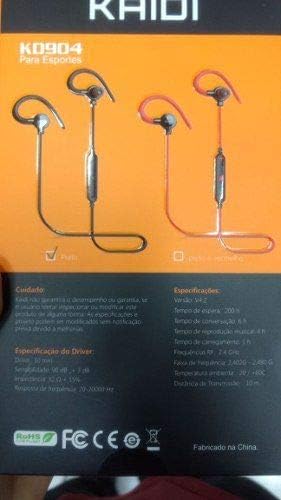
Image: Back of the KAIDI KD-904 product box, displaying detailed technical specifications and features in text.
- Model: KD-904
- Wersja Bluetooth: V4.2
- Zasięg działania: Do 10 metrów (33 stóp)
- Czas odtwarzania muzyki: Około 4 godzin
- Czas czuwania: Około 200 godzin
- Czas ładowania: Około 1-2 godzin
- Rozmiar sterownika: 10 mm
- Czułość kierowcy: 98dB
- Pasmo przenoszenia: 20Hz - 20kHz
- Łączność: Bezprzewodowy Bluetooth
- Umieszczenie ucha: In-ear (Intra-auricular)
- Konkretne zastosowania: Sports, Running
- Zgodne urządzenia: Android, Samsung, iPhone
9. Gwarancja i wsparcie
For warranty information or technical support, please refer to the purchase documentation or contact your retailer. Keep your proof of purchase for any warranty claims. KAIDI is committed to providing quality products and support.