
1. Wprowadzenie
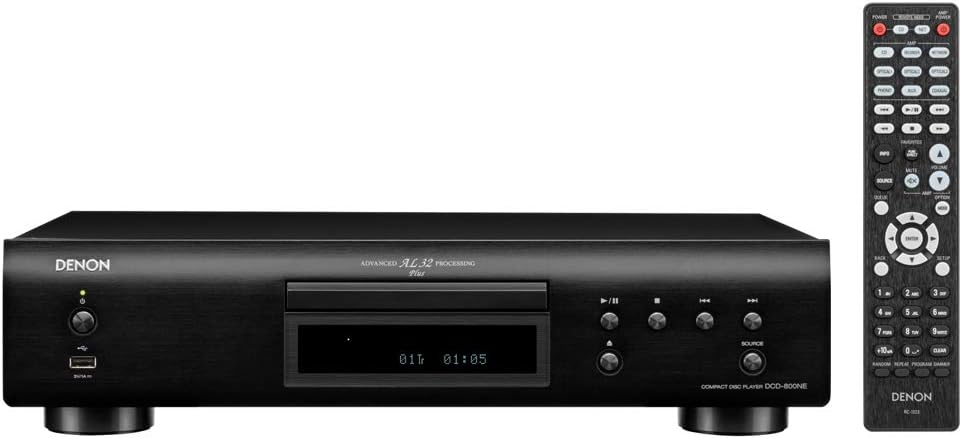
The Denon DCD-800NE is a single-disk CD player designed for high-resolution audio playback. It features an integrated USB port for playing various digital file formats. The player incorporates Advanced AL32 Processing Plus and an innovative circuitry structure to ensure accurate and interference-free sound reproduction, faithful to the original recording. It supports hi-res playback up to PCM192/24 and DSD 2.8 MHz/5.6 MHz via its USB port. The Pure Direct Mode allows for direct sound output to amplifiers, bypassing additional processing for clean and detailed audio. Its vibration-resistant design minimizes adverse audio effects, maintaining Denon's sound quality standards.

Rysunek 1: Przód view of the Denon DCD-800NE CD Player with its remote control. The display shows track information and playback status.
2. Konfiguracja
2.1 Rozpakowanie
Ostrożnie wyjmij wszystkie elementy z opakowania. Upewnij się, że znajdują się w nim następujące elementy:
- Denon DCD-800NE CD Player
- Pilot zdalnego sterowania (RC-1223)
- Two "AAA" batteries for the remote
- 47" Stereo RCA cable
- Owner's Manual on CD-ROM (for detailed instructions)
- Szybki przewodnik
- Informacje o gwarancji
- Instrukcje bezpieczeństwa
2.2 Umieszczenie
Ustaw urządzenie DCD-800NE na stabilnej, równej powierzchni, z dala od bezpośredniego światła słonecznego, źródeł ciepła i nadmiernych wibracji. Zapewnij odpowiednią wentylację wokół urządzenia.
2.3 Połączenia
Connect the DCD-800NE to your amplifier or receiver using the provided RCA cable or a digital audio cable (optical or coaxial, not included). For optimal sound quality, ensure all connections are secure.
Rysunek 2: Rear panel connections of the DCD-800NE, including analog audio out (RCA), digital audio out (optical and coaxial), and IR control ports.
- Analogowe wyjście audio: Connect the RCA cables from the "AUDIO OUT" jacks on the DCD-800NE to the corresponding analog input jacks on your amplifier (e.g., "CD IN").
- Cyfrowe wyjście audio: For digital connection, use an optical or coaxial digital cable (not supplied) to connect the "DIGITAL AUDIO OUT" (OPTICAL or COAXIAL) jack on the DCD-800NE to a digital input on your amplifier lub DAC.
- Podłączenie zasilania: Once all audio connections are made, connect the power cord to the DCD-800NE and then to an AC power outlet.
2.4 Instalacja baterii w pilocie zdalnego sterowania
Open the battery compartment on the back of the remote control and insert the two "AAA" batteries, ensuring correct polarity (+/-). Close the compartment.
3. Działanie
3.1 Włączanie/wyłączanie zasilania
Aby włączyć lub wyłączyć urządzenie, naciśnij przycisk zasilania na panelu przednim lub pilocie.
3.2 Odtwarzanie płyt CD
- Naciśnij OTWÓRZ/ZAMKNIJ przycisk, aby otworzyć tacę na płytę.
- Włóż płytę CD etykietą do góry do napędu.
- Naciśnij OTWÓRZ/ZAMKNIJ Naciśnij przycisk ponownie, aby zamknąć tackę. Odtwarzacz odczyta płytę.
- Naciśnij GRAĆ przycisk, aby rozpocząć odtwarzanie.
- Użyj POMINĄĆ buttons to navigate between tracks and the PAUZA or ZATRZYMYWAĆ SIĘ przyciski do sterowania odtwarzaniem.
3.3 Odtwarzanie USB
The DCD-800NE features a front USB-A port for playing audio files from USB storage devices (e.g., USB flash drives, external hard drives).
- Podłącz urządzenie pamięci masowej USB do portu USB na panelu przednim.
- Naciśnij USB button on the front panel or remote to select the USB input.
- Use the navigation buttons on the remote to browse folders and select desired audio files.
- Naciskać GRAĆ to begin playback. The player supports hi-res formats like PCM192/24 and DSD 2.8 MHz/5.6 MHz, as well as MP3, WMA, and FLAC.
3.4 Tryb czysto bezpośredni
Activate Pure Direct Mode to bypass digital processing circuits that can color the audio signal. This provides a cleaner, more direct sound path, ideal for critical listening. Refer to the full Owner's Manual for instructions on enabling this mode.
3.5 Integration with Denon 800NE Series
The DCD-800NE is designed to integrate seamlessly with other Denon 800NE series components, such as the PMA-800NE Integrated Amplifier and DNP-800NE Network Audio Player, for a complete high-fidelity system. A single remote control can operate the entire 800NE series.
Wideo 1: Ponadview of the Denon 800NE series, demonstrating the DCD-800NE CD player's features, including its integration with the PMA-800NE amplifier and DNP-800NE network player, advanced processing, and vibration-resistant design. It highlights CD and USB playback capabilities.
4. Konserwacja
4.1 Czyszczenie urządzenia
Wipe the exterior of the unit with a soft, dry cloth. Do not use abrasive cleaners, waxes, or solvents as they may damage the finish. Avoid spraying liquids directly onto the unit.
4.2 Dyski czyszczące
Handle CDs by their edges. If a disc is dirty, wipe it gently from the center outwards with a soft, lint-free cloth. Do not use harsh chemicals or abrasive materials, as these can scratch the disc surface and affect playback quality.
4.3 Wentylacja
Ensure that the ventilation openings on the unit are not blocked. Proper airflow is essential to prevent overheating and maintain optimal performance.
5. Rozwiązywanie Problemów
If you experience issues with your DCD-800NE, consult the following common troubleshooting steps before seeking professional service.
- Brak zasilania:
- Check if the power cord is securely plugged into the unit and the AC outlet.
- Sprawdź, czy gniazdko elektryczne jest sprawne.
- Brak dźwięku:
- Verify that the audio cables are correctly connected between the DCD-800NE and your amppodgrzewacz/odbiornik.
- Upewnij się, że na Twoim komputerze wybrano właściwe źródło sygnału wejściowego. amppodgrzewacz/odbiornik.
- Check the volume level on both the DCD-800NE and your amppodgrzewacz/odbiornik.
- Disc Does Not Play / Disc Error:
- Sprawdź, czy płyta jest czysta, bez zarysowań i smug.
- Make sure the disc is inserted correctly with the label side up.
- Spróbuj odtworzyć inną płytę, aby ustalić, czy problem dotyczy odtwarzacza czy płyty.
- Some discs may not be compatible (e.g., certain recordable CD-R/RW formats).
- USB Device Not Recognized / Files Nie odtwarzane:
- Ensure the USB device is formatted correctly (FAT16/FAT32).
- Sprawdź, czy dźwięk files are in a supported format (MP3, WMA, FLAC, WAV, DSD).
- The player supports up to 255 folders on a USB drive.
- Some USB devices may require external power or may not be compatible.
- Pilot nie działa:
- Check if the batteries are inserted correctly and are not depleted.
- Upewnij się, że między pilotem zdalnego sterowania a czujnikiem podczerwieni urządzenia nie ma żadnych przeszkód.
- Skieruj pilota bezpośrednio na urządzenie.
For more detailed troubleshooting, refer to the Owner's Manual on CD-ROM.
6. Specyfikacje
| Funkcja | Szczegół |
|---|---|
| Wymiary produktu | 10.5 x 17.12 x 4.5 cala |
| Waga przedmiotu | 9.48 funta |
| Numer modelu | DCD-800NE |
| Technologia łączności | USB |
| Zawarte komponenty | CD player, Remote control (RC-1223), Two "AAA" batteries, 47" Stereo RCA cable, Owner's Manual on CD-ROM, Quick Start Guide, Warranty Information, Safety Instructions |
| Data pierwszej dostępności | 13 września 2018 r. |
Uwaga: Specyfikacje mogą ulec zmianie bez powiadomienia.
7. Informacje o gwarancji
Denon products are manufactured to the highest quality standards. This product is covered by a limited warranty. Please refer to the "Warranty Information" document included in your product packaging or on the Owner's Manual CD-ROM for specific terms, conditions, and duration of the warranty applicable to your region. Keep your proof of purchase for warranty service.
8. Obsługa klienta
For technical assistance, product inquiries, or service requests, please contact Denon customer support. You can find contact information on the official Denon website or in the "Quick Start Guide" included with your product.
Zasoby internetowe: Visit the official Denon webwitryna z odpowiedziami na często zadawane pytania, aktualizacjami oprogramowania i dodatkowymi materiałami pomocniczymi.