Produkt ponadview
The UMLIFE XH-W3001 Digital LED Temperature Controller Module is a versatile thermostat switch designed for precise temperature control in various applications. It features a clear digital display and a waterproof NTC10K probe, making it suitable for both heating and cooling modes. Its robust ABS flame retardant housing ensures safety and durability.

Figure 1: UMLIFE XH-W3001 Digital LED Temperature Controller Module with probe and wiring.
Główne cechy
- Kontrolka LED: Displays the current output status for easy monitoring.
- Cyfrowa tuba wyświetlacza: Shows measuring temperature with high accuracy.
- Dwa tryby pracy: Supports both heating (start temperature < stop temperature) and cooling (start temperature > stop temperature) operations.
- Szeroki zakres temperatur: Operates from -50℃ to 110℃ with a control precision of 0.1℃.
- Trwała obudowa: Constructed with ABS flame retardant material for high safety, aging resistance, and durability.
- Wodoodporna sonda: Equipped with a 1-meter NTC10K stainless steel probe that is waterproof and rust-resistant.
Konfiguracja i okablowanie
Proper wiring is crucial for the safe and correct operation of the XH-W3001 module. Ensure all connections are secure before applying power.

Figure 2: Wiring diagram for the 12V XH-W3001 model. Connect the 12V input (red/black wires) to your power source. The output (yellow/black wires) connects to your load (e.g., a light bulb or fan). The sensor probe connects to the designated port.
Instrukcje okablowania:
- Pobór mocy: Connect the red wire to the positive (+) terminal of your 12V DC power supply and the black wire to the negative (-) terminal.
- Wyjście obciążenia: Connect the yellow wire to the positive (+) terminal of your heating or cooling device (load) and the black wire to the negative (-) terminal of the load. Ensure the load's voltage matches the controller's input voltage (12 V).
- Sonda temperatury: Insert the NTC10K waterproof probe into the designated two-pin connector on the module.
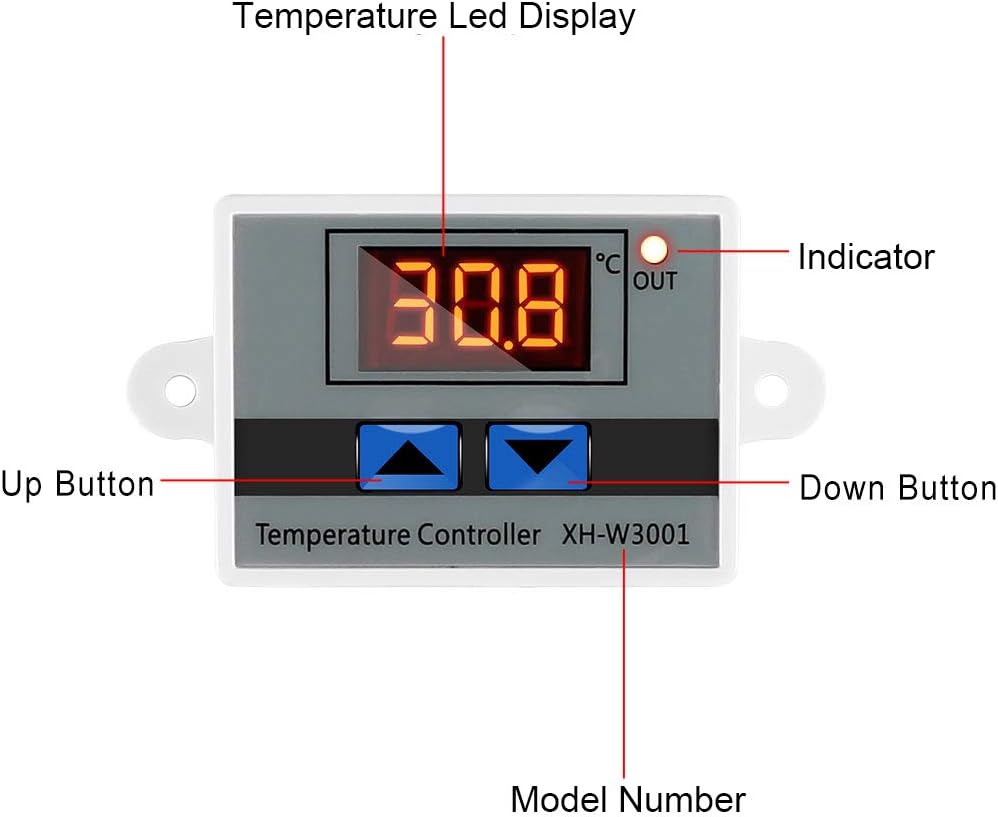
Figure 3: Labeled components of the XH-W3001 module, showing the temperature LED display, indicator light, up button, down button, and model number.
Instrukcja obsługi
The XH-W3001 has two main parameters to set: the start temperature and the stop temperature.
Setting Start Temperature:
- Naciśnij i przytrzymaj Przycisk w górę (left button) for approximately 3 seconds. The display will start flashing, indicating it's in setting mode.
- Użyj Up I Przyciski w dół to adjust the desired start temperature.
- Naciśnij Przycisk w górę again or wait for 3 seconds for the setting to be saved automatically.
Setting Stop Temperature:
- Naciśnij i przytrzymaj Przycisk w dół (right button) for approximately 3 seconds. The display will start flashing.
- Użyj Up I Przyciski w dół to adjust the desired stop temperature.
- Naciśnij Przycisk w dół again or wait for 3 seconds for the setting to be saved automatically.
Tryby pracy:
- Tryb ogrzewania: If the Start Temperature is set niżej than the Stop Temperature, the module will operate in heating mode. The output will turn ON when the temperature drops below the Start Temperature and turn OFF when it reaches the Stop Temperature.
- Tryb chłodzenia: If the Start Temperature is set wyższy than the Stop Temperature, the module will operate in cooling mode. The output will turn ON when the temperature rises above the Start Temperature and turn OFF when it drops to the Stop Temperature.
Note: The display shows temperature in Celsius only. There is no option to change to Fahrenheit.
Konserwacja
The XH-W3001 module is designed for low maintenance. Regular checks can ensure its longevity and accurate performance.
- Czyszczenie: Keep the module and probe clean. Use a soft, dry cloth to wipe the display and housing. For the probe, ensure it is free from debris that might affect temperature readings.
- Znajomości: Okresowo sprawdzaj wszystkie połączenia przewodów, aby upewnić się, że są solidne i nie mają śladów korozji. Luźne połączenia mogą prowadzić do zakłóceń w działaniu lub uszkodzeń.
- Stan sondy: Inspect the temperature probe for any signs of damage to the cable or the sensor tip. Replace if damaged to maintain accuracy.
- Środowisko: Ensure the module is installed in an environment within its specified operating temperature and humidity ranges to prevent premature failure.
Rozwiązywanie problemów
If you encounter issues with your XH-W3001 module, refer to the following common problems and solutions:
| Problem | Możliwa przyczyna | Rozwiązanie |
|---|---|---|
| Display not lighting up. | No power, incorrect wiring, or faulty unit. | Check power supply connections. Ensure correct polarity. Verify power source is active. |
| Odczyt temperatury jest niedokładny. | Damaged probe, probe not properly connected, or environmental interference. | Ensure probe is securely connected. Inspect probe for physical damage. Test with another known accurate thermometer if possible. |
| Output not switching ON/OFF as expected. | Incorrect start/stop temperature settings, load not connected, or faulty relay. | Review and re-set start/stop temperatures. Verify load connections. Ensure the load's power requirements are within the module's specifications (10A 120W for 12V model). |
| Display shows "LLL" or "HHH". | "LLL" indicates open circuit or probe not connected. "HHH" indicates short circuit or temperature exceeding range. | Check probe connection. Replace probe if damaged. Ensure temperature is within -50℃ to 110℃ range. |
Specyfikacje
| Funkcja | Specyfikacja |
|---|---|
| Numer modelu | XH-W3001 |
| Tomtage | 12 Volts (for this specific model) |
| Prąd wyjściowy | Maksymalnie 10A |
| Moc wyjściowa | Max 120W (for 12V model) |
| Zakres regulacji temperatury | -50℃ do 110℃ |
| Dokładność pomiaru temperatury | ±0.2℃ |
| Dokładność kontroli temperatury | ±0.1℃ |
| Typ sondy | NTC10K (Waterproof) |
| Typ wyświetlacza | Wyświetlacz cyfrowy LED |
| Materiał obudowy | Zmniejszający palność ABS |
| Wymiary produktu | 3.3 x 1.8 x 1.1 cala |
| Waga przedmiotu | 1.76 uncji (50 grama) |
Gwarancja i wsparcie
For warranty information or technical support regarding your UMLIFE XH-W3001 Digital LED Temperature Controller Module, please refer to the product packaging or contact UMLIFE customer service directly. Contact details are typically provided with your purchase or can be found on the manufacturer's official webstrona.