
1. Koniec produktuview
The Keenso E27 Motion Sensor LED Light Bulb is designed for automatic illumination in response to motion. It integrates a PIR (Passive Infrared) motion sensor to detect movement, providing light when needed and conserving energy when not. This bulb is suitable for various indoor and outdoor applications such as corridors, stairwells, garages, and security areas.

Obraz 1.1: Przód view of the Keenso E27 Motion Sensor LED Light Bulb, showing the E27 base and the bulb housing.

Obraz 1.2: Zbliżenie view of the integrated PIR motion sensor located at the tip of the bulb.
2. Specyfikacje
| Funkcja | Szczegół |
|---|---|
| Typ żarówki | E27 |
| Pobór mocy | 5W (also available in 7W, 9W variants) |
| Wykrywanie odległości | 4-6 metrów (13.12-19.68 stóp) |
| Kąt wykrywania | 120° |
| Temperatura barwowa | 6000-6500 K (białe światło) |
| Strumień świetlny | 300LM (for 5W), 400LM (for 7W), 550LM (for 9W) |
| Tworzywo | PCV |
| Wymiary | Approximately 3.54" W x 4.72" H |
| Zastosowanie wewnątrz/na zewnątrz | Wewnątrz, Na zewnątrz |
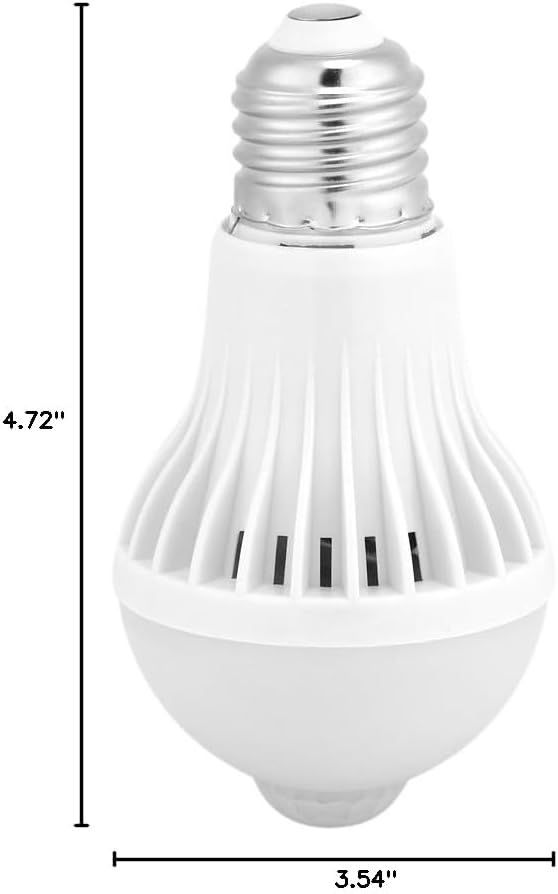
Image 2.1: Diagram showing the approximate dimensions of the bulb: 3.54 inches width and 4.72 inches height.
3. Instrukcje instalacji
The Keenso E27 Motion Sensor LED Light Bulb is designed for simple installation. No special wiring or additional motion detection fixtures are required.
- Wyłączone: Przed montażem należy upewnić się, że zasilanie oprawy oświetleniowej jest wyłączone głównym wyłącznikiem, aby zapobiec porażeniu prądem.
- Wkręcać: Carefully screw the Keenso E27 Motion Sensor LED Light Bulb into any standard E27 light socket or fixture. Ensure it is securely tightened but do not overtighten.
- Włączanie: Przywróć zasilanie oprawy oświetleniowej.
- Autotest: Upon initial power-up, the bulb will perform a self-test, flashing twice. Allow 15-20 seconds for the bulb to stabilize and begin normal operation.

Image 3.1: Detail of the E27 screw base, highlighting the standard fitting for easy installation.
4. Instrukcja obsługi
The bulb operates automatically based on its built-in PIR motion sensor and ambient light conditions.
- Aktywacja automatyczna: The bulb will automatically illuminate when it detects motion within its sensing range (4-6 meters / 13.12-19.68 feet) in dark conditions.
- Automatyczna dezaktywacja: The bulb will automatically turn off approximately 30-60 seconds after motion ceases or disappears from its detection area.
- Czułość na światło: The bulb is designed to operate primarily in low-light environments. It will not activate during daylight or in brightly lit areas to conserve energy.

Image 4.1: Diagram showing the intelligent motion detection capability, where the light bulb turns on automatically when people are within the 4 to 6 meter range.

Image 4.2: The Keenso motion sensor bulb emitting bright white light in a dark setting, demonstrating its operational state.
5. Konserwacja
The Keenso E27 Motion Sensor LED Light Bulb requires minimal maintenance.
- Czyszczenie: Ensure the power is off before cleaning. Gently wipe the bulb's surface with a soft, dry cloth. Avoid using liquid cleaners or abrasive materials, as these can damage the sensor or the bulb's finish.
- Przeszkoda czujnika: Periodically check that the motion sensor lens is clear of dust, dirt, or any obstructions that might interfere with its detection capabilities.
- Wymiana: When the bulb reaches the end of its lifespan, replace it with a new E27 LED bulb.
6. Rozwiązywanie Problemów
If you encounter issues with your Keenso E27 Motion Sensor LED Light Bulb, refer to the following common solutions:
| Problem | Możliwa przyczyna | Rozwiązanie |
|---|---|---|
| Żarówka się nie włącza. |
|
|
| Bulb stays on constantly. |
|
|
| Bulb flashes or flickers. |
|
|
| Motion detection is inconsistent. |
|
|
7. Gwarancja i wsparcie
For any issues or inquiries regarding your Keenso E27 Motion Sensor LED Light Bulb, please contact Keenso customer support. While specific warranty details are not provided in this manual, Keenso is committed to customer satisfaction.
Informacje kontaktowe:
- Szczegółowe warunki gwarancji znajdziesz w dokumentacji zakupu.
- For support, please contact the seller via the platform where the purchase was made, or visit the official Keenso store page for contact options.