
Wstęp
This manual provides essential instructions for the safe and effective use of your Andoer Portable 1080P Digital Camera D11773S. Please read this manual thoroughly before operating the device and retain it for future reference. This digital camera is designed for capturing high-resolution photos and videos, featuring a 48MP image sensor, 1080P video recording, 8X digital zoom, and a 2.7-inch LCD screen.
Informacje dotyczące bezpieczeństwa
- Nie narażaj aparatu na działanie wody lub wilgoci.
- Unikaj upuszczania aparatu i narażania go na silne uderzenia.
- Trzymaj aparat z dala od silnych pól magnetycznych.
- Do not attempt to disassemble or modify the camera. Repairs should only be performed by qualified personnel.
- Należy używać wyłącznie wskazanego typu baterii i kabla ładującego.
- Kiedy aparat nie jest używany, przechowuj go w chłodnym i suchym miejscu.
- Przechowywać w miejscu niedostępnym dla małych dzieci.
Zawartość opakowania
Sprawdź, czy w opakowaniu znajdują się wszystkie elementy:
- Andoer Portable Digital Camera (Model D11773S)
- Bateria litowa (3.7 V 550 mAh)
- Kabel ładujący typu C
- Pasek na nadgarstek
- Torba
- Instrukcja obsługi

Image: Contents of the camera package, showing the camera, battery, USB-C cable, wrist strap, carry bag, and user manual.
Koniec kameryview
Zapoznaj się z głównymi elementami swojego aparatu.
Przód View

Obraz: Przód view of the Andoer D11773S camera. Key features visible include the digital lens, built-in flash, and the 2.7" TFT display and 48 Mega pixels indicators.
- Obiektyw: Przechwytuje obrazy i filmy.
- Błysk: Zapewnia oświetlenie w warunkach słabego oświetlenia.
- Mikrofon: Nagrywa dźwięk podczas przechwytywania obrazu wideo.
Tył View

Obraz: Tył view of the Andoer D11773S camera, displaying the 2.7-inch LCD screen and various control buttons for navigation and settings.
- LCD Screen (2.7 Inch): Wyświetla na żywo view, menu i odtwarzanie.
- Przyciski sterujące: For menu navigation, mode selection, zoom, and playback.
- Głośnik: Do odtwarzania dźwięku.
Strona View i wymiary

Image: Diagram illustrating the dimensions of the Andoer D11773S camera: 9.2cm length, 6.1cm width, and 1.4cm thickness.
- Port USB (typ C): Do ładowania i przesyłania danych.
- Gniazdo karty pamięci: For inserting a Micro SD card.
- Komora baterii: Mieści akumulator litowo-jonowy.
Organizować coś
1. Ładowanie akumulatora
- Insert the provided lithium battery into the camera's battery compartment.
- Connect the camera to a power source (e.g., computer USB port or USB wall adapter) using the supplied Type-C charge cable.
- Zaświeci się kontrolka ładowania. Po pełnym naładowaniu kontrolka może zmienić kolor lub zgasnąć.
2. Wkładanie karty pamięci
The camera requires a Class-10 external Micro SD memory card (not included) with a maximum capacity of 128GB.
- Znajdź gniazdo karty pamięci z boku aparatu.
- Włóż kartę Micro SD metalowymi stykami skierowanymi w stronę przedniej części aparatu, aż do momentu, gdy zatrzaśnie się na miejscu.
- Aby wyjąć kartę, delikatnie naciśnij ją do środka, aż wysunie się.
Instrukcja obsługi
Włączanie/wyłączanie zasilania
- Aby włączyć urządzenie, naciśnij i przytrzymaj przycisk zasilania.
- Aby wyłączyć urządzenie, naciśnij i przytrzymaj przycisk zasilania ponownie.
Robienie zdjęć
The camera supports picture resolutions up to 48MP.
- Włącz kamerę.
- Skadruj ujęcie korzystając z 2.7-calowego ekranu LCD.
- Press the Shutter button halfway to focus (if applicable), then fully press to capture the photo.

Image: Visual representation of the camera's capabilities, showing a 48MP photo example and a 1080P video example.
Nagrywanie filmów
The camera supports video resolution up to 1920x1080 (1080P).
- Switch the camera to video recording mode (refer to on-screen icons or mode button).
- Naciśnij przycisk nagrywania, aby rozpocząć nagrywanie.
- Naciśnij ponownie przycisk nagrywania, aby zatrzymać nagrywanie.
Funkcja Zoom
Aparat wyposażony jest w 8-krotny zoom cyfrowy.
- Use the zoom buttons (often marked 'W' for Wide and 'T' for Telephoto) to adjust the zoom level.
Ustawienia lampy błyskowej
The built-in flash can be used in dark conditions.
- Access the flash settings through the camera's menu to select modes like Auto Flash, Fill-in Flash, Red-eye Reduction, or Flash Off.
Special Features: Anti-Shake, Face Detect, Smile Capture, Self-Timer
These features enhance your photography experience.
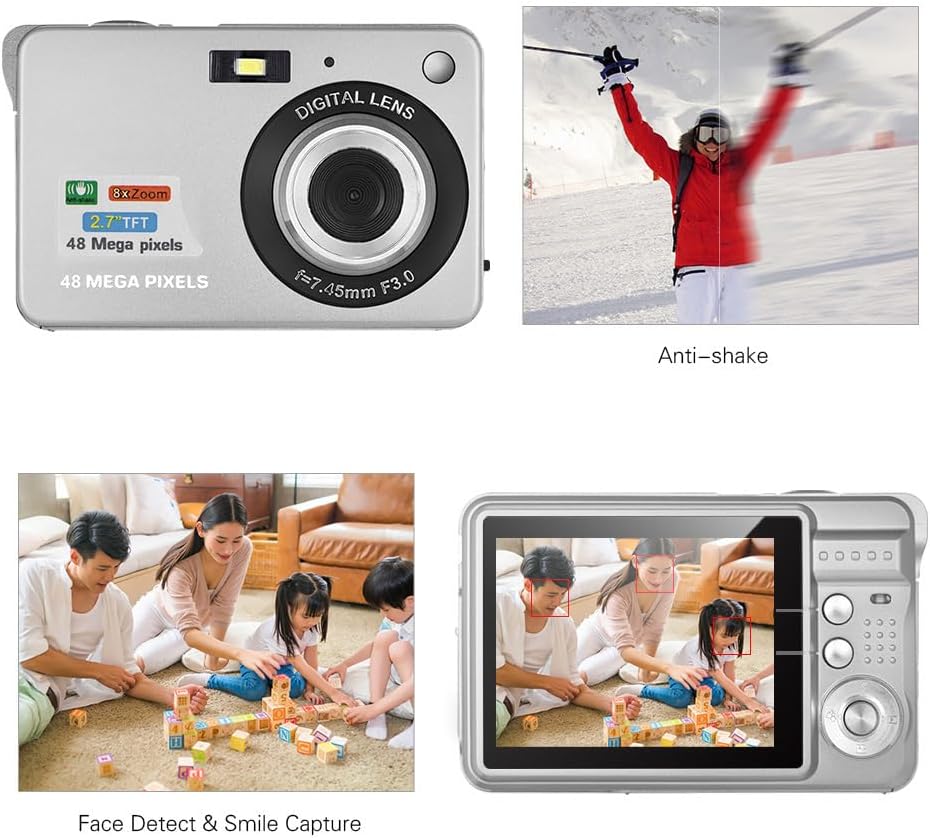
Image: Demonstrations of the camera's Anti-shake function (reducing blur from movement) and Face Detect & Smile Capture (identifying faces and automatically taking a photo when a smile is detected).
- Przeciwwstrząsowy: Helps reduce blur caused by camera movement. This feature is typically enabled by default or can be toggled in settings.
- Wykrywanie twarzy i rejestrowanie uśmiechu: The camera can detect faces and automatically capture a photo when a smile is detected. Enable these options in the camera's menu.
- Samowyzwalacz: Set a delay (2, 5, or 10 seconds) before the photo is taken, allowing you to be in the shot.
Tryb makro
For close-up photography of small objects.

Image: A close-up photograph of an ant, demonstrating the camera's Macro Mode capability for detailed shots of small subjects.
- Activate Macro Mode through the camera's menu or a dedicated button for close-up shots.
Tryb odtwarzania
- Naciśnij przycisk odtwarzania, aby ponownieview captured photos and videos on the LCD screen.
- Użyj przycisków nawigacyjnych, aby przewijać multimedia.
Łączenie się z komputerem
You can transfer photos and videos to a computer using the supplied Type-C USB cable.
- Upewnij się, że kamera jest włączona.
- Connect one end of the Type-C USB cable to the camera's USB port and the other end to an available USB port on your computer.
- The camera should appear as a removable disk or media device on your computer.
- Open the camera's folder to access and transfer your files.
- Przed odłączeniem kabla należy bezpiecznie odłączyć urządzenie od komputera.
Konserwacja
- Czyszczenie: Use a soft, dry cloth to clean the camera body. For the lens and LCD screen, use a specialized lens cleaning cloth and solution. Do not use abrasive cleaners.
- Składowanie: When not in use for extended periods, remove the battery and store the camera in a cool, dry place, preferably in its carry bag.
- Pielęgnacja baterii: Recharge the battery periodically even if not in use to maintain its lifespan.
Rozwiązywanie problemów
| Problem | Możliwe rozwiązanie |
|---|---|
| Kamera się nie włącza. | Sprawdź, czy akumulator jest całkowicie naładowany i prawidłowo włożony. |
| Nie można robić zdjęć/nagrywać filmów. | Check if a memory card is inserted and has sufficient free space. Ensure the camera is in the correct mode. |
| Obrazy są niewyraźne. | Ensure the lens is clean. Hold the camera steady during capture. Check lighting conditions and use flash if necessary. |
| Komputer nie rozpoznał kamery. | Ensure the USB cable is securely connected. Try a different USB port or restart the computer. |
| Bateria szybko się rozładowuje. | Reduce LCD brightness. Limit flash usage. Ensure the camera is powered off when not in use. |
Specyfikacje
| Funkcja | Szczegół |
|---|---|
| Czujnik obrazu | Czujnik CMOS |
| Wyświetlacz | 2.7-calowy wyświetlacz LCD |
| File Format | JPEG (Photo), AVI (Video) |
| Rozdzielczość obrazu | Do 48M (8000x6000) |
| Rozdzielczość wideo | 1920x1080 (1080P), 1280x720 |
| Zoom cyfrowy | 8X |
| Kompensacja ekspozycji | EV-3 do EV+3 |
| Samowyzwalacz | Wyłączony / 2 s / 5 s / 10 s |
| Cechy specjalne | Anti-Shake, Face Detect, Smile Capture |
| Zasilacz | 1 * Lithium battery (3.7V 550mAh) |
| Obsługiwana karta pamięci | Class-10 Micro SD, max. 128GB (not included) |
| Interfejs | USB Typ C |
| Wymiary (dł.*szer.*wys.) | 9.2 * 6.1 * 1.4 cm / 3.6 * 2.4 * 0.5 inch |
| Waga | 99g / 3.5 uncji |
| Obsługiwany system | Windows XP, VISTA, WIN7, MAC |
Gwarancja i wsparcie
This product comes with a standard manufacturer's warranty. Please refer to the warranty card included in your package for specific terms and conditions. For technical support, troubleshooting assistance, or further inquiries, please visit the official Andoer webOdwiedź witrynę lub skontaktuj się z działem obsługi klienta. Zachowaj paragon jako dowód zakupu na wypadek reklamacji.
Wsparcie online: Odwiedź sklep Andoer na Amazon